!!
#Windmill
The windmill projects show how to model isometric perspective with both Spine Essential and Spine Professional. The project illustrates how to perform isometric rotations, create a simple smoke effect, and how to add variation by duplicating elements and their animations.
## Video
[youtube:kUi7ODUmQes]
The download for this project contains seven `.spine` files, numbered in chronological order, allowing you to follow along with the video.
## Trees, bushes, and flowers
### Setup
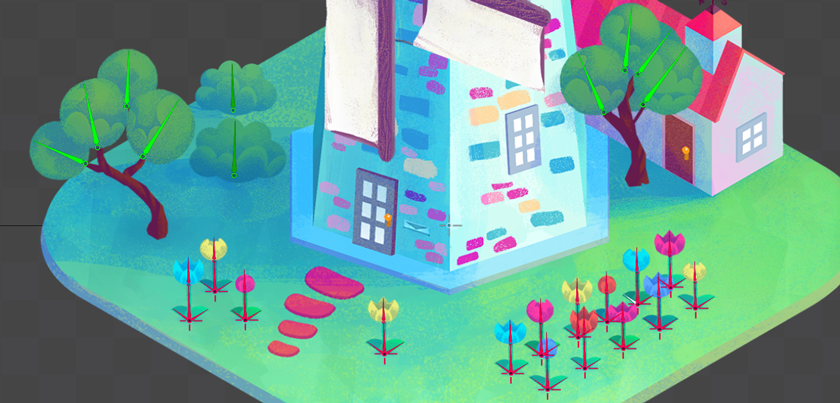
Each tree is composed of a [slot](/spine-basic-concepts#Slots) representing its trunk (`tree1-trunk` and `tree2-trunk`), and one bone for each bundle of leaves attached to a trunk's branches (`leaves` to `leaves8`). Since we do not animate the tree trunks, their slots are direct children of the root bone, saving us two bones.
The bushes each consist of a single bone (`bush1` and `bush2`), each with a single slot and attachment.
The flowers are a little more complex. They each consist of a hierarchy of bones and slots modeling the flower's shadow, front and back leaf at the bottom of the stem, the stem itself, and the flower petals at the top. The flower petals slot contains 3 different images from which we can select different petal shapes when customizing a duplicated flower. We also change slot colors to add additional variety.
### Animation
The trees are animated by keying only the [rotation](/spine-key-frames#Rotation) of each bundle of leaves. The setup position is keyed at the start and at the end of the animation, with variations in between, forming a seamlessly looping animation.
The bushes are animated by keying only their [shear](/spine-tools#Shear-tool) property. This deforms the bushes while keeping them attached to the ground. Like the tree leaves, the shear value is keyed at the start and end of the animation to create a seamless loop, with variations in between.
With all basic keys set, the curves between keys were changed by selecting all keys and applying a curve in the [Graph view](/spine-graph). To make the animation slightly less synchronized, the [Offset tool](/spine-dopesheet#Key-Offset) was used on groups of keys.
## Rooster
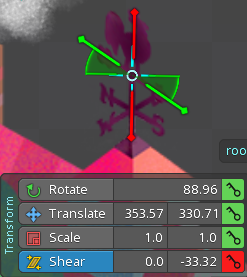
This rooster is a decoration on top of the house roof. It's made of metal, and can be shaken by the wind. The scene has an isometric view, so the rooster should rotate on the vertical axis adhering to the isometric perspective.
### Setup
The rooster consists of a single bone with zero length and a slot containing a front view of the rooster as a region attachment.
### Animation
The rooster is animated by keying the shear property on the Y axis. To create a seamless loop, the shear value is keyed in the first and last frame, with variations in between.
## Windmill Blades
The rotating blades are the main focus of the composition. They consist of the blade base image `windmill-blades` and two long wood parts forming the front of blades, `windmill-blades-wood-h` and `windmill-blades-wood-v`. All images are prepared in a frontal view, but rotate in adherence to the isometric perspective of the scene.
### Setup
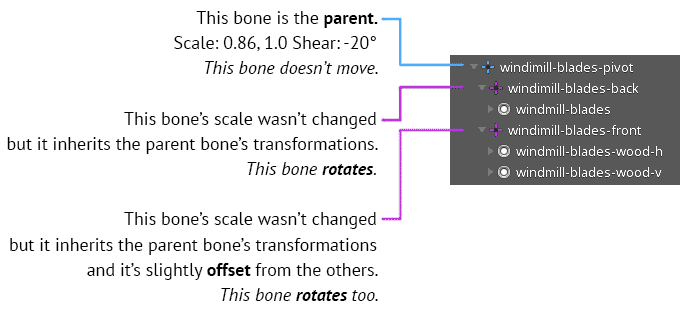
We need two bones to achieve a correct isometric rotation: a bone that deforms the blades to match the isometric perspective `windmill-blades-pivot` and a bone to actually perform the rotation, `windmill-blades-front` (and `windmill-blades-back`).
 !!
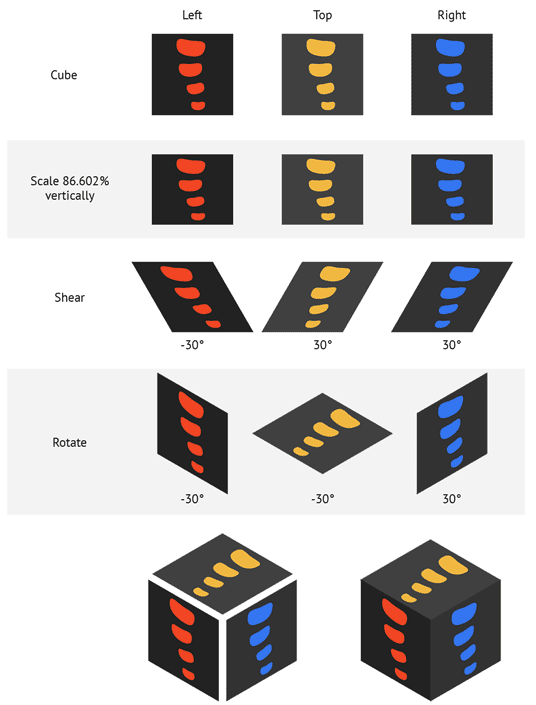
[Isometric perspective](https://design.tutsplus.com/tutorials/how-to-create-advanced-isometric-illustrations-using-the-ssr-method--vector-1058) can be obtained by scaling an image by `0.86` and then applying a shear of `30°`. This would be valid for a square, but since the blades are attached to a hexagon, we use a shear of `20°` instead.
!!
[Isometric perspective](https://design.tutsplus.com/tutorials/how-to-create-advanced-isometric-illustrations-using-the-ssr-method--vector-1058) can be obtained by scaling an image by `0.86` and then applying a shear of `30°`. This would be valid for a square, but since the blades are attached to a hexagon, we use a shear of `20°` instead.
 !!
In Spine the children inherit the parent bone's transformation (unless you disable inheritance in the bone's properties). Applying a scale of `0.86` and shear of `20°` to the parent bone will also apply that transformation to the children. We can therefore apply the isometric perspective transformation to the `windmill-blades-pivot` parent bone and it will affect the bone's children.
To give the blades more depth, we separated the front and back into two bones, `windmill-blades-back` and `windmill-blades-front`, and slightly offset them.
### Animation
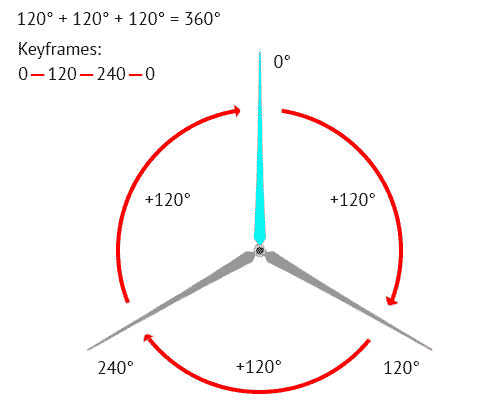
To achieve a [complete rotation](/spine-key-frames#Rotation) in Spine, we key the rotation of a bone at the beginning and end of the animation to `0°`. We then place two keyframes equally spaced in between, one at 1/3 and the other one at 2/3 of the animation duration. A complete spin takes `360°`, so the rotation is incremented by `120°` in each key frame.
!!
In Spine the children inherit the parent bone's transformation (unless you disable inheritance in the bone's properties). Applying a scale of `0.86` and shear of `20°` to the parent bone will also apply that transformation to the children. We can therefore apply the isometric perspective transformation to the `windmill-blades-pivot` parent bone and it will affect the bone's children.
To give the blades more depth, we separated the front and back into two bones, `windmill-blades-back` and `windmill-blades-front`, and slightly offset them.
### Animation
To achieve a [complete rotation](/spine-key-frames#Rotation) in Spine, we key the rotation of a bone at the beginning and end of the animation to `0°`. We then place two keyframes equally spaced in between, one at 1/3 and the other one at 2/3 of the animation duration. A complete spin takes `360°`, so the rotation is incremented by `120°` in each key frame.
 !!
The two bones `windmill-blades-back` and `windmill-blades-front` both rotate following this principle.
The depth effect of the blades was adjusted in `Setup` mode with the help of the `Preview` view.
## Smoke
The smoke comes out of the chimney and fades into the distance.
### Setup
We reuse the image of a cloud across 3 bones, `smoke` to `smoke3`, to create a little smoke trail.
###Animation###
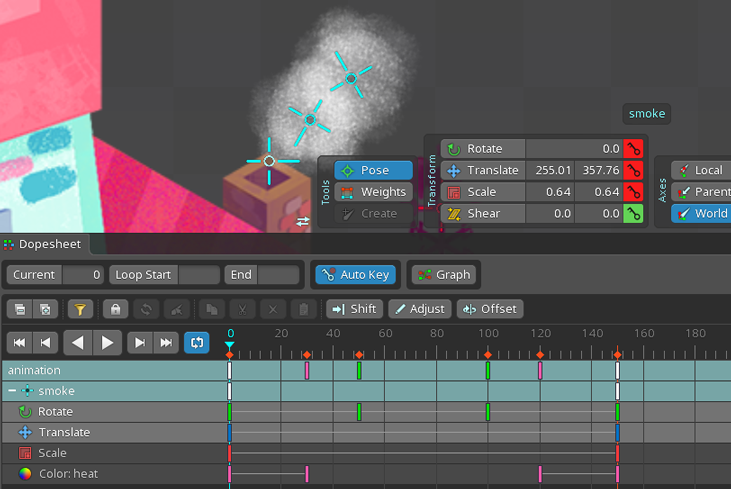
The smoke movement is a combination of translation, rotation, scale, and [color keys](/spine-key-frames#Color).
The smoke translates from the roof to the upper right, while rotating. It starts small and gets
bigger as it moves up and to the right. It also changes its transparency when it appears, moves, and eventually disappears in a soft fade.
The animation was first created for a single smoke bone, then copied and offset. To make offsetting possible, the first and last frame must match.
!!
The two bones `windmill-blades-back` and `windmill-blades-front` both rotate following this principle.
The depth effect of the blades was adjusted in `Setup` mode with the help of the `Preview` view.
## Smoke
The smoke comes out of the chimney and fades into the distance.
### Setup
We reuse the image of a cloud across 3 bones, `smoke` to `smoke3`, to create a little smoke trail.
###Animation###
The smoke movement is a combination of translation, rotation, scale, and [color keys](/spine-key-frames#Color).
The smoke translates from the roof to the upper right, while rotating. It starts small and gets
bigger as it moves up and to the right. It also changes its transparency when it appears, moves, and eventually disappears in a soft fade.
The animation was first created for a single smoke bone, then copied and offset. To make offsetting possible, the first and last frame must match.
