NOMARKDOWN<style>
dl dt, .m, #content #ref table, #content #ref td { font-size: 90%; font-weight: normal; font-family:Consolas, DejaVu Sans Mono, Bitstream Vera Sans Mono, Menlo, Monaco, Lucida Console, Liberation Mono, Courier New, monospace; }
dl { border: 0; border-collapse: separate; border-radius: 10px; overflow: hidden; margin-top:1.66em; }
dt, dd { background-color:#fbfdfe; }
dt:nth-of-type(even), dd:nth-of-type(odd) { background-color:#fbf9f9; }
dd, dt.empty { border-bottom: 1px solid #ddd; margin: 0; }
dt.empty { padding-bottom: 0.7em !important; }
.enum { border-bottom: 1px solid #ddd; margin: 0; padding-bottom: 0.7em !important; }
dd:first-child { background-color:#c2d6e8; font-weight:bold; padding: 0.75em 0.7em 0.65em 0.7em; border:0; }
dd:first-child a { color:black; margin-top:-0.75em; padding-top:0.75em; }
dt { padding: 0.7em 0.7em 0 0.7em; }
dd { padding: 0.5em 0.7em 0.76em 2.7em; }
dd.x { display:none; }
.n { color:#1c2022 !important; font-weight:bold; margin-top:-0.5em; padding-top:0.5em;}
#content-body u { color:#8400bf; text-decoration:none; }
.br { height:0.7em; }
.p { font-weight:bold; }
.c { border-bottom:1px solid #ddd; margin-top:2em; }
.c:first-of-type { margin-top:0; }
.desc { margin-top: 0.85em; margin-bottom:-0.41em; line-height:1.25em; }
#ref i, #ref i a { color:#976738; font-style: italic; }
#ref i a:hover { color:#f40; }
#ref li { margin: 0.7em 0 0 0 !important; }
#ref li code:first-child { padding:2px 3px; margin-bottom:-1px; background:#f0f0f0; border:1px solid #ddd; }
#ref dd code { background:none; border:0; padding:0; margin:0; }
#content #ref table, #content #ref tbody, #content #ref td { border:0; background:none; padding:0; margin:0; }
#content #ref td:first-child { white-space:nowrap; }
#content #ref td:last-child { width:100%; }
#content #ref table, #content #ref td { font-size:100%; }
h1, h2, h3, h4 { font-size:2.142em !important; display:inline !important; border:0 !important; margin-bottom:0 !important;padding-top: 0.75em; margin-top: -0.55em; }
</style>
<div id='ref'>

<div class='c'><h1>4.2 API Reference</h1></div>

<div class='desc'>The Spine Runtimes are available for many programming languages. To simplify documentation, the API reference below is programming language agnostic. There may be minor differences for some languages, such as start caps for spine-csharp and class name prefixes on methods for spine-c.<div class='br'></div>Parameters cannot be null unless explicitly mentioned. Returns values will not be null unless explicitly mentioned.<div class='br'></div>
This documentation is for the latest non-beta Spine Runtimes (<a href='https://github.com/EsotericSoftware/spine-runtimes/tree/4.2'>4.2</a>). Documentation for the <a href='/spine-api-reference-beta'>latest beta Spine Runtimes</a> is also available.
</div>

<div class='c'><h1>Class diagram</h1></div>
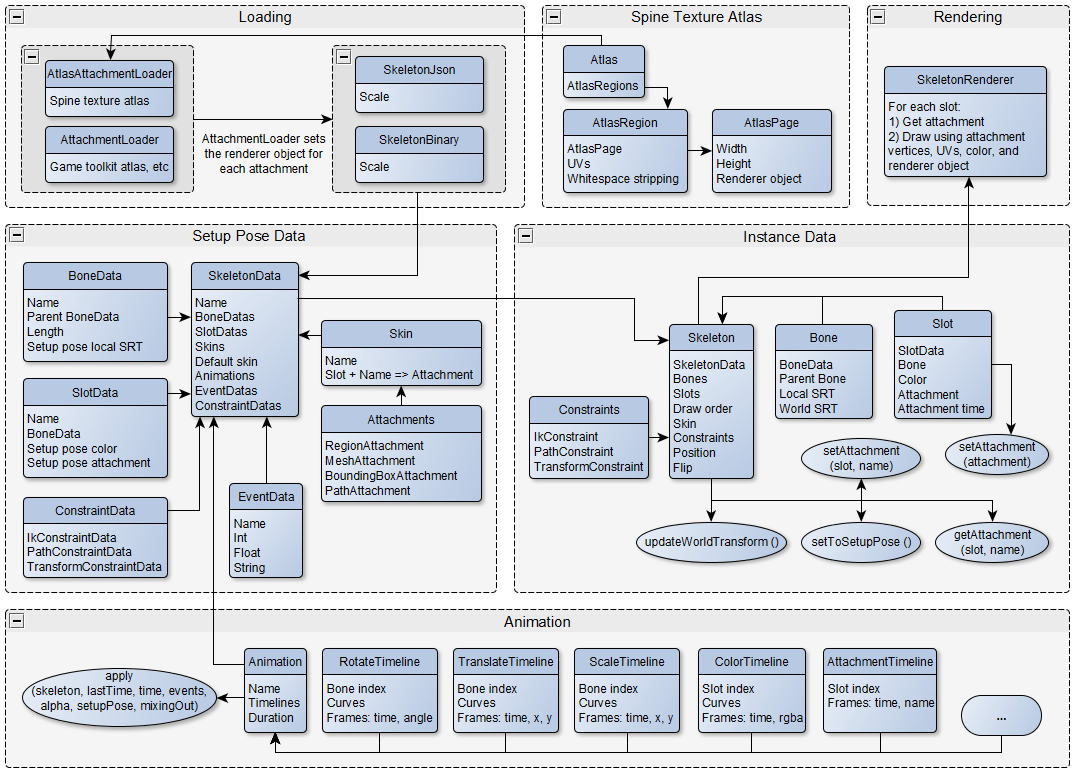
<div class='desc'>This diagram illustrates how the various pieces of the runtimes fit together. Click for full resolution.<div class='br'></div><a href='/img/runtimes-diagram.png'><img src='/img/runtimes-diagram.png' class='no-borders'></a>The instance data is created for each skeleton instance and stores the skeleton's pose and other state. The setup pose data is stateless and shared across skeleton instances. It contains the setup pose, attachments, and animations.</div>
<div class='c'><h1>Animation</h1>

</div><div class='desc'>Stores a list of timelines to animate a skeleton's pose over time.</div>

<dl><dd><a href='#Animation-Properties' id='Animation-Properties'>Animation Properties</a></dd>
<dt><a href='#Animation-duration' id='Animation-duration' class='n'>duration</a>: <u>float</u></dt><dd>The duration of the animation in seconds, which is usually the highest time of all frames in the timeline. The duration is used to know when it has completed and when it should loop back to the start.</dd><dt><a href='#Animation-name' id='Animation-name' class='n'>name</a>: <u>string</u><i> readonly</i></dt><dd>The animation's name, which is unique across all animations in the skeleton.</dd><dt><a href='#Animation-timelines' id='Animation-timelines' class='n'>timelines</a>: <u>list&lt;<a href='#Timeline'>Timeline</a>&gt;</u></dt><dd>If the returned array or the timelines it contains are modified, <a href='#Animation-timelines' class='m'>timelines</a> must be called.</dd></dl>

<dl><dd><a href='#Animation-Methods' id='Animation-Methods'>Animation Methods</a></dd>
<dt><table><tr><td><a href='#Animation-apply' id='Animation-apply' class='n'>apply</a> <span class='p'>(</span></td><td><u><a href='#Skeleton'>Skeleton</a></u>&nbsp;skeleton, <u>float</u>&nbsp;lastTime, <u>float</u>&nbsp;time, <u>bool</u>&nbsp;loop, <u>list&lt;<a href='#Event'>Event</a>&gt;</u>&nbsp;events, <u>float</u>&nbsp;alpha, <u><a href='#MixBlend'>MixBlend</a></u>&nbsp;blend, <u><a href='#MixDirection'>MixDirection</a></u>&nbsp;direction<span class='p'>)</span>: <u>void</u></td></tr></table></dt><dd>Applies the animation's timelines to the specified skeleton. <div class='br'></div> See Timeline <a href='#Timeline-apply' class='m'>apply</a>.<ul><li><code>skeleton</code> The skeleton the animation is being applied to. This provides access to the bones, slots, and other skeleton components the timelines may change.</li><li><code>lastTime</code> The last time in seconds this animation was applied. Some timelines trigger only at specific times rather than every frame. Pass -1 the first time an animation is applied to ensure frame 0 is triggered.</li><li><code>time</code> The time in seconds the skeleton is being posed for. Most timelines find the frame before and the frame after this time and interpolate between the frame values. If beyond the <a href='#Animation-duration' class='m'>duration</a> and <code>loop</code> is true then the animation will repeat, else the last frame will be applied.</li><li><code>loop</code> If true, the animation repeats after the <a href='#Animation-duration' class='m'>duration</a>.</li><li><code>events</code> If any events are fired, they are added to this list. Can be null to ignore fired events or if no timelines fire events.</li><li><code>alpha</code> 0 applies the current or setup values (depending on <code>blend</code>). 1 applies the timeline values. Between 0 and 1 applies values between the current or setup values and the timeline values. By adjusting <code>alpha</code> over time, an animation can be mixed in or out. <code>alpha</code> can also be useful to apply animations on top of each other (layering).</li><li><code>blend</code> Controls how mixing is applied when <code>alpha</code> &lt; 1.</li><li><code>direction</code> Indicates whether the timelines are mixing in or out. Used by timelines which perform instant transitions, such as <a href='#DrawOrderTimeline'>DrawOrderTimeline</a> or <a href='#AttachmentTimeline'>AttachmentTimeline</a>.</li></ul></dd>
<dt><table><tr><td><a href='#Animation-hasTimeline' id='Animation-hasTimeline' class='n'>hasTimeline</a> <span class='p'>(</span></td><td><u>string[]</u>&nbsp;propertyIds<span class='p'>)</span>: <u>bool</u></td></tr></table></dt><dd>Returns true if this animation contains a timeline with any of the specified property IDs.</dd>
</dl>

<div class='c'><h2>Timeline</h2>

</div><div class='desc'>The base class for all timelines.</div>

<dl><dd><a href='#Timeline-Properties' id='Timeline-Properties'>Timeline Properties</a></dd>
<dt class='empty'><a href='#Timeline-duration' id='Timeline-duration' class='n'>duration</a>: <u>float</u><i> readonly</i></dt><dd class='x'></dd><dt><a href='#Timeline-frameCount' id='Timeline-frameCount' class='n'>frameCount</a>: <u>int</u><i> readonly</i></dt><dd>The number of frames for this timeline.</dd><dt><a href='#Timeline-frameEntries' id='Timeline-frameEntries' class='n'>frameEntries</a>: <u>int</u><i> readonly</i></dt><dd>The number of entries stored per frame.</dd><dt><a href='#Timeline-frames' id='Timeline-frames' class='n'>frames</a>: <u>float[]</u><i> readonly</i></dt><dd>The time in seconds and any other values for each frame.</dd><dt><a href='#Timeline-propertyIds' id='Timeline-propertyIds' class='n'>propertyIds</a>: <u>string[]</u><i> readonly</i></dt><dd>Uniquely encodes both the type of this timeline and the skeleton properties that it affects.</dd></dl>

<dl><dd><a href='#Timeline-Methods' id='Timeline-Methods'>Timeline Methods</a></dd>
<dt><table><tr><td><a href='#Timeline-apply' id='Timeline-apply' class='n'>apply</a> <span class='p'>(</span></td><td><u><a href='#Skeleton'>Skeleton</a></u>&nbsp;skeleton, <u>float</u>&nbsp;lastTime, <u>float</u>&nbsp;time, <u>list&lt;<a href='#Event'>Event</a>&gt;</u>&nbsp;events, <u>float</u>&nbsp;alpha, <u><a href='#MixBlend'>MixBlend</a></u>&nbsp;blend, <u><a href='#MixDirection'>MixDirection</a></u>&nbsp;direction<span class='p'>)</span>: <u>void</u></td></tr></table></dt><dd>Applies this timeline to the skeleton.<ul><li><code>skeleton</code> The skeleton to which the timeline is being applied. This provides access to the bones, slots, and other skeleton components that the timeline may change.</li><li><code>lastTime</code> The last time in seconds this timeline was applied. Timelines such as <a href='#EventTimeline'>EventTimeline</a> trigger only at specific times rather than every frame. In that case, the timeline triggers everything between <code>lastTime</code> (exclusive) and <code>time</code> (inclusive). Pass -1 the first time an animation is applied to ensure frame 0 is triggered.</li><li><code>time</code> The time in seconds that the skeleton is being posed for. Most timelines find the frame before and the frame after this time and interpolate between the frame values. If beyond the last frame, the last frame will be applied.</li><li><code>events</code> If any events are fired, they are added to this list. Can be null to ignore fired events or if the timeline does not fire events.</li><li><code>alpha</code> 0 applies the current or setup value (depending on <code>blend</code>). 1 applies the timeline value. Between 0 and 1 applies a value between the current or setup value and the timeline value. By adjusting <code>alpha</code> over time, an animation can be mixed in or out. <code>alpha</code> can also be useful to apply animations on top of each other (layering).</li><li><code>blend</code> Controls how mixing is applied when <code>alpha</code> &lt; 1.</li><li><code>direction</code> Indicates whether the timeline is mixing in or out. Used by timelines which perform instant transitions, such as <a href='#DrawOrderTimeline'>DrawOrderTimeline</a> or <a href='#AttachmentTimeline'>AttachmentTimeline</a>, and others such as <a href='#ScaleTimeline'>ScaleTimeline</a>.</li></ul></dd>
</dl>

<div class='c'><h3>AlphaTimeline</h3>

<i> extends&nbsp;<u><a href='#CurveTimeline1'>CurveTimeline1</a></u> implements&nbsp;<u><a href='#SlotTimeline'>SlotTimeline</a></u></i></div><div class='desc'>Changes the alpha for a slot's <a href='#Slot-color' class='m'>color</a>.</div>

<dl><dd><a href='#AlphaTimeline-Properties' id='AlphaTimeline-Properties'>AlphaTimeline Properties</a></dd>
<dt class='empty'><a href='#AlphaTimeline-duration' id='AlphaTimeline-duration' class='n'>duration</a>: <u>float</u><i> readonly, from&nbsp;<a href='#Timeline-duration'>Timeline</a></i></dt><dd class='x'></dd><dt><a href='#AlphaTimeline-frameCount' id='AlphaTimeline-frameCount' class='n'>frameCount</a>: <u>int</u><i> readonly, from&nbsp;<a href='#Timeline-frameCount'>Timeline</a></i></dt><dd>The number of frames for this timeline.</dd><dt><a href='#AlphaTimeline-frameEntries' id='AlphaTimeline-frameEntries' class='n'>frameEntries</a>: <u>int</u><i> readonly, from&nbsp;<a href='#Timeline-frameEntries'>Timeline</a></i></dt><dd>The number of entries stored per frame.</dd><dt><a href='#AlphaTimeline-frames' id='AlphaTimeline-frames' class='n'>frames</a>: <u>float[]</u><i> readonly, from&nbsp;<a href='#Timeline-frames'>Timeline</a></i></dt><dd>The time in seconds and any other values for each frame.</dd><dt><a href='#AlphaTimeline-propertyIds' id='AlphaTimeline-propertyIds' class='n'>propertyIds</a>: <u>string[]</u><i> readonly, from&nbsp;<a href='#Timeline-propertyIds'>Timeline</a></i></dt><dd>Uniquely encodes both the type of this timeline and the skeleton properties that it affects.</dd><dt class='empty'><a href='#AlphaTimeline-slotIndex' id='AlphaTimeline-slotIndex' class='n'>slotIndex</a>: <u>int</u><i> readonly</i></dt><dd class='x'></dd></dl>

<dl><dd><a href='#AlphaTimeline-Methods' id='AlphaTimeline-Methods'>AlphaTimeline Methods</a></dd>
<dt><table><tr><td><a href='#AlphaTimeline-apply' id='AlphaTimeline-apply' class='n'>apply</a> <span class='p'>(</span></td><td><u><a href='#Skeleton'>Skeleton</a></u>&nbsp;skeleton, <u>float</u>&nbsp;lastTime, <u>float</u>&nbsp;time, <u>list&lt;<a href='#Event'>Event</a>&gt;</u>&nbsp;events, <u>float</u>&nbsp;alpha, <u><a href='#MixBlend'>MixBlend</a></u>&nbsp;blend, <u><a href='#MixDirection'>MixDirection</a></u>&nbsp;direction<span class='p'>)</span>: <u>void</u><i> from&nbsp;<a href='#Timeline-apply'>Timeline</a></i></td></tr></table></dt><dd>Applies this timeline to the skeleton.<div class='br'></div>See Timeline <a href='#Timeline-apply' class='m'>apply</a>.</dd>
<dt class='empty'><table><tr><td><a href='#AlphaTimeline-getAbsoluteValue' id='AlphaTimeline-getAbsoluteValue' class='n'>getAbsoluteValue</a> <span class='p'>(</span></td><td><u>float</u>&nbsp;time, <u>float</u>&nbsp;alpha, <u><a href='#MixBlend'>MixBlend</a></u>&nbsp;blend, <u>float</u>&nbsp;current, <u>float</u>&nbsp;setup, <u>float</u>&nbsp;value<span class='p'>)</span>: <u>float</u><i> from&nbsp;<a href='#CurveTimeline1-getAbsoluteValue'>CurveTimeline1</a></i></td></tr></table></dt><dd class='x'></dd><dt class='empty'><table><tr><td><a href='#AlphaTimeline-getAbsoluteValue2' id='AlphaTimeline-getAbsoluteValue2' class='n'>getAbsoluteValue</a> <span class='p'>(</span></td><td><u>float</u>&nbsp;time, <u>float</u>&nbsp;alpha, <u><a href='#MixBlend'>MixBlend</a></u>&nbsp;blend, <u>float</u>&nbsp;current, <u>float</u>&nbsp;setup<span class='p'>)</span>: <u>float</u><i> from&nbsp;<a href='#CurveTimeline1-getAbsoluteValue2'>CurveTimeline1</a></i></td></tr></table></dt><dd class='x'></dd><dt><table><tr><td><a href='#AlphaTimeline-getBezierValue' id='AlphaTimeline-getBezierValue' class='n'>getBezierValue</a> <span class='p'>(</span></td><td><u>float</u>&nbsp;time, <u>int</u>&nbsp;frameIndex, <u>int</u>&nbsp;valueOffset, <u>int</u>&nbsp;i<span class='p'>)</span>: <u>float</u><i> from&nbsp;<a href='#CurveTimeline-getBezierValue'>CurveTimeline</a></i></td></tr></table></dt><dd>Returns the Bezier interpolated value for the specified time.<ul><li><code>frameIndex</code> The index into <a href='#AlphaTimeline-frames' class='m'>frames</a> for the values of the frame before <code>time</code>.</li><li><code>valueOffset</code> The offset from <code>frameIndex</code> to the value this curve is used for.</li><li><code>i</code> The index of the Bezier segments. See <a href='#AlphaTimeline-getCurveType' class='m'>getCurveType</a>.</li></ul></dd>
<dt><table><tr><td><a href='#AlphaTimeline-getCurveType' id='AlphaTimeline-getCurveType' class='n'>getCurveType</a> <span class='p'>(</span></td><td><u>int</u>&nbsp;frame<span class='p'>)</span>: <u>int</u><i> from&nbsp;<a href='#CurveTimeline-getCurveType'>CurveTimeline</a></i></td></tr></table></dt><dd>Returns the interpolation type for the specified frame.<ul><li><code>frame</code> Between 0 and <code>frameCount - 1</code>, inclusive.</li><li><code>&lt;return&gt;</code> <a href='#CurveTimeline-LINEAR' class='m'>LINEAR</a>, <a href='#CurveTimeline-STEPPED' class='m'>STEPPED</a>, or <a href='#CurveTimeline-BEZIER' class='m'>BEZIER</a> + the index of the Bezier segments.</li></ul></dd>
<dt><table><tr><td><a href='#AlphaTimeline-getCurveValue' id='AlphaTimeline-getCurveValue' class='n'>getCurveValue</a> <span class='p'>(</span></td><td><u>float</u>&nbsp;time<span class='p'>)</span>: <u>float</u><i> from&nbsp;<a href='#CurveTimeline1-getCurveValue'>CurveTimeline1</a></i></td></tr></table></dt><dd>Returns the interpolated value for the specified time.</dd>
<dt class='empty'><table><tr><td><a href='#AlphaTimeline-getRelativeValue' id='AlphaTimeline-getRelativeValue' class='n'>getRelativeValue</a> <span class='p'>(</span></td><td><u>float</u>&nbsp;time, <u>float</u>&nbsp;alpha, <u><a href='#MixBlend'>MixBlend</a></u>&nbsp;blend, <u>float</u>&nbsp;current, <u>float</u>&nbsp;setup<span class='p'>)</span>: <u>float</u><i> from&nbsp;<a href='#CurveTimeline1-getRelativeValue'>CurveTimeline1</a></i></td></tr></table></dt><dd class='x'></dd><dt class='empty'><table><tr><td><a href='#AlphaTimeline-getScaleValue' id='AlphaTimeline-getScaleValue' class='n'>getScaleValue</a> <span class='p'>(</span></td><td><u>float</u>&nbsp;time, <u>float</u>&nbsp;alpha, <u><a href='#MixBlend'>MixBlend</a></u>&nbsp;blend, <u><a href='#MixDirection'>MixDirection</a></u>&nbsp;direction, <u>float</u>&nbsp;current, <u>float</u>&nbsp;setup<span class='p'>)</span>: <u>float</u><i> from&nbsp;<a href='#CurveTimeline1-getScaleValue'>CurveTimeline1</a></i></td></tr></table></dt><dd class='x'></dd><dt><table><tr><td><a href='#AlphaTimeline-setBezier' id='AlphaTimeline-setBezier' class='n'>setBezier</a> <span class='p'>(</span></td><td><u>int</u>&nbsp;bezier, <u>int</u>&nbsp;frame, <u>int</u>&nbsp;value, <u>float</u>&nbsp;time1, <u>float</u>&nbsp;value1, <u>float</u>&nbsp;cx1, <u>float</u>&nbsp;cy1, <u>float</u>&nbsp;cx2, <u>float</u>&nbsp;cy2, <u>float</u>&nbsp;time2, <u>float</u>&nbsp;value2<span class='p'>)</span>: <u>void</u><i> from&nbsp;<a href='#CurveTimeline-setBezier'>CurveTimeline</a></i></td></tr></table></dt><dd>Stores the segments for the specified Bezier curve. For timelines that modify multiple values, there may be more than one curve per frame.<div class='br'></div>See CurveTimeline <a href='#CurveTimeline-setBezier' class='m'>setBezier</a>.</dd>
<dt><table><tr><td><a href='#AlphaTimeline-setFrame' id='AlphaTimeline-setFrame' class='n'>setFrame</a> <span class='p'>(</span></td><td><u>int</u>&nbsp;frame, <u>float</u>&nbsp;time, <u>float</u>&nbsp;value<span class='p'>)</span>: <u>void</u><i> from&nbsp;<a href='#CurveTimeline1-setFrame'>CurveTimeline1</a></i></td></tr></table></dt><dd>Sets the time and value for the specified frame.<ul><li><code>frame</code> Between 0 and <code>frameCount</code>, inclusive.</li><li><code>time</code> The frame time in seconds.</li></ul></dd>
<dt><table><tr><td><a href='#AlphaTimeline-setLinear' id='AlphaTimeline-setLinear' class='n'>setLinear</a> <span class='p'>(</span></td><td><u>int</u>&nbsp;frame<span class='p'>)</span>: <u>void</u><i> from&nbsp;<a href='#CurveTimeline-setLinear'>CurveTimeline</a></i></td></tr></table></dt><dd>Sets the specified frame to linear interpolation.<ul><li><code>frame</code> Between 0 and <code>frameCount - 1</code>, inclusive.</li></ul></dd>
<dt><table><tr><td><a href='#AlphaTimeline-setStepped' id='AlphaTimeline-setStepped' class='n'>setStepped</a> <span class='p'>(</span></td><td><u>int</u>&nbsp;frame<span class='p'>)</span>: <u>void</u><i> from&nbsp;<a href='#CurveTimeline-setStepped'>CurveTimeline</a></i></td></tr></table></dt><dd>Sets the specified frame to stepped interpolation.<ul><li><code>frame</code> Between 0 and <code>frameCount - 1</code>, inclusive.</li></ul></dd>
<dt><table><tr><td><a href='#AlphaTimeline-shrink' id='AlphaTimeline-shrink' class='n'>shrink</a> <span class='p'>(</span></td><td><u>int</u>&nbsp;bezierCount<span class='p'>)</span>: <u>void</u><i> from&nbsp;<a href='#CurveTimeline-shrink'>CurveTimeline</a></i></td></tr></table></dt><dd>Shrinks the storage for Bezier curves, for use when <code>bezierCount</code> (specified in the constructor) was larger than the actual number of Bezier curves.</dd>
</dl>

<div class='c'><h3>AttachmentTimeline</h3>

<i> extends&nbsp;<u><a href='#Timeline'>Timeline</a></u> implements&nbsp;<u><a href='#SlotTimeline'>SlotTimeline</a></u></i></div><div class='desc'>Changes a slot's <a href='#Slot-attachment' class='m'>attachment</a>.</div>

<dl><dd><a href='#AttachmentTimeline-Properties' id='AttachmentTimeline-Properties'>AttachmentTimeline Properties</a></dd>
<dt><a href='#AttachmentTimeline-attachmentNames' id='AttachmentTimeline-attachmentNames' class='n'>attachmentNames</a>: <u>string[]</u><i> readonly</i></dt><dd>The attachment name for each frame. May contain null values to clear the attachment.</dd><dt class='empty'><a href='#AttachmentTimeline-duration' id='AttachmentTimeline-duration' class='n'>duration</a>: <u>float</u><i> readonly, from&nbsp;<a href='#Timeline-duration'>Timeline</a></i></dt><dd class='x'></dd><dt><a href='#AttachmentTimeline-frameCount' id='AttachmentTimeline-frameCount' class='n'>frameCount</a>: <u>int</u><i> readonly, from&nbsp;<a href='#Timeline-frameCount'>Timeline</a></i></dt><dd>The number of frames for this timeline.</dd><dt><a href='#AttachmentTimeline-frameEntries' id='AttachmentTimeline-frameEntries' class='n'>frameEntries</a>: <u>int</u><i> readonly, from&nbsp;<a href='#Timeline-frameEntries'>Timeline</a></i></dt><dd>The number of entries stored per frame.</dd><dt><a href='#AttachmentTimeline-frames' id='AttachmentTimeline-frames' class='n'>frames</a>: <u>float[]</u><i> readonly, from&nbsp;<a href='#Timeline-frames'>Timeline</a></i></dt><dd>The time in seconds and any other values for each frame.</dd><dt><a href='#AttachmentTimeline-propertyIds' id='AttachmentTimeline-propertyIds' class='n'>propertyIds</a>: <u>string[]</u><i> readonly, from&nbsp;<a href='#Timeline-propertyIds'>Timeline</a></i></dt><dd>Uniquely encodes both the type of this timeline and the skeleton properties that it affects.</dd><dt class='empty'><a href='#AttachmentTimeline-slotIndex' id='AttachmentTimeline-slotIndex' class='n'>slotIndex</a>: <u>int</u><i> readonly</i></dt><dd class='x'></dd></dl>

<dl><dd><a href='#AttachmentTimeline-Methods' id='AttachmentTimeline-Methods'>AttachmentTimeline Methods</a></dd>
<dt><table><tr><td><a href='#AttachmentTimeline-apply' id='AttachmentTimeline-apply' class='n'>apply</a> <span class='p'>(</span></td><td><u><a href='#Skeleton'>Skeleton</a></u>&nbsp;skeleton, <u>float</u>&nbsp;lastTime, <u>float</u>&nbsp;time, <u>list&lt;<a href='#Event'>Event</a>&gt;</u>&nbsp;events, <u>float</u>&nbsp;alpha, <u><a href='#MixBlend'>MixBlend</a></u>&nbsp;blend, <u><a href='#MixDirection'>MixDirection</a></u>&nbsp;direction<span class='p'>)</span>: <u>void</u><i> from&nbsp;<a href='#Timeline-apply'>Timeline</a></i></td></tr></table></dt><dd>Applies this timeline to the skeleton.<div class='br'></div>See Timeline <a href='#Timeline-apply' class='m'>apply</a>.</dd>
<dt><table><tr><td><a href='#AttachmentTimeline-setFrame' id='AttachmentTimeline-setFrame' class='n'>setFrame</a> <span class='p'>(</span></td><td><u>int</u>&nbsp;frame, <u>float</u>&nbsp;time, <u>string</u>&nbsp;attachmentName<span class='p'>)</span>: <u>void</u></td></tr></table></dt><dd>Sets the time and attachment name for the specified frame.<ul><li><code>frame</code> Between 0 and <code>frameCount</code>, inclusive.</li><li><code>time</code> The frame time in seconds.</li></ul></dd>
</dl>

<div class='c'><h3>BoneTimeline</h3>

</div><div class='desc'>An interface for timelines which change the property of a bone.</div>

<dl><dd><a href='#BoneTimeline-Properties' id='BoneTimeline-Properties'>BoneTimeline Properties</a></dd>
<dt><a href='#BoneTimeline-boneIndex' id='BoneTimeline-boneIndex' class='n'>boneIndex</a>: <u>int</u><i> readonly</i></dt><dd>The index of the bone in <a href='#Skeleton-bones' class='m'>bones</a> that will be changed when this timeline is applied.</dd></dl>

<div class='c'><h3>CurveTimeline</h3>

<i> extends&nbsp;<u><a href='#Timeline'>Timeline</a></u></i></div><div class='desc'>The base class for timelines that interpolate between frame values using stepped, linear, or a Bezier curve.</div>

<dl><dd><a href='#CurveTimeline-Properties' id='CurveTimeline-Properties'>CurveTimeline Properties</a></dd>
<dt class='empty'><a href='#CurveTimeline-LINEAR' id='CurveTimeline-LINEAR' class='n'>LINEAR</a> = 0: <u>int</u><i> static, readonly</i></dt><dd class='x'></dd><dt class='empty'><a href='#CurveTimeline-STEPPED' id='CurveTimeline-STEPPED' class='n'>STEPPED</a> = 1: <u>int</u><i> static, readonly</i></dt><dd class='x'></dd><dt class='empty'><a href='#CurveTimeline-BEZIER' id='CurveTimeline-BEZIER' class='n'>BEZIER</a> = 2: <u>int</u><i> static, readonly</i></dt><dd class='x'></dd><dt class='empty'><a href='#CurveTimeline-BEZIER_SIZE' id='CurveTimeline-BEZIER_SIZE' class='n'>BEZIER_SIZE</a> = 18: <u>int</u><i> static, readonly</i></dt><dd class='x'></dd><dt class='empty'><a href='#CurveTimeline-duration' id='CurveTimeline-duration' class='n'>duration</a>: <u>float</u><i> readonly, from&nbsp;<a href='#Timeline-duration'>Timeline</a></i></dt><dd class='x'></dd><dt><a href='#CurveTimeline-frameCount' id='CurveTimeline-frameCount' class='n'>frameCount</a>: <u>int</u><i> readonly, from&nbsp;<a href='#Timeline-frameCount'>Timeline</a></i></dt><dd>The number of frames for this timeline.</dd><dt><a href='#CurveTimeline-frameEntries' id='CurveTimeline-frameEntries' class='n'>frameEntries</a>: <u>int</u><i> readonly, from&nbsp;<a href='#Timeline-frameEntries'>Timeline</a></i></dt><dd>The number of entries stored per frame.</dd><dt><a href='#CurveTimeline-frames' id='CurveTimeline-frames' class='n'>frames</a>: <u>float[]</u><i> readonly, from&nbsp;<a href='#Timeline-frames'>Timeline</a></i></dt><dd>The time in seconds and any other values for each frame.</dd><dt><a href='#CurveTimeline-propertyIds' id='CurveTimeline-propertyIds' class='n'>propertyIds</a>: <u>string[]</u><i> readonly, from&nbsp;<a href='#Timeline-propertyIds'>Timeline</a></i></dt><dd>Uniquely encodes both the type of this timeline and the skeleton properties that it affects.</dd></dl>

<dl><dd><a href='#CurveTimeline-Methods' id='CurveTimeline-Methods'>CurveTimeline Methods</a></dd>
<dt><table><tr><td><a href='#CurveTimeline-apply' id='CurveTimeline-apply' class='n'>apply</a> <span class='p'>(</span></td><td><u><a href='#Skeleton'>Skeleton</a></u>&nbsp;skeleton, <u>float</u>&nbsp;lastTime, <u>float</u>&nbsp;time, <u>list&lt;<a href='#Event'>Event</a>&gt;</u>&nbsp;events, <u>float</u>&nbsp;alpha, <u><a href='#MixBlend'>MixBlend</a></u>&nbsp;blend, <u><a href='#MixDirection'>MixDirection</a></u>&nbsp;direction<span class='p'>)</span>: <u>void</u><i> from&nbsp;<a href='#Timeline-apply'>Timeline</a></i></td></tr></table></dt><dd>Applies this timeline to the skeleton.<div class='br'></div>See Timeline <a href='#Timeline-apply' class='m'>apply</a>.</dd>
<dt><table><tr><td><a href='#CurveTimeline-getBezierValue' id='CurveTimeline-getBezierValue' class='n'>getBezierValue</a> <span class='p'>(</span></td><td><u>float</u>&nbsp;time, <u>int</u>&nbsp;frameIndex, <u>int</u>&nbsp;valueOffset, <u>int</u>&nbsp;i<span class='p'>)</span>: <u>float</u></td></tr></table></dt><dd>Returns the Bezier interpolated value for the specified time.<ul><li><code>frameIndex</code> The index into <a href='#CurveTimeline-frames' class='m'>frames</a> for the values of the frame before <code>time</code>.</li><li><code>valueOffset</code> The offset from <code>frameIndex</code> to the value this curve is used for.</li><li><code>i</code> The index of the Bezier segments. See <a href='#CurveTimeline-getCurveType' class='m'>getCurveType</a>.</li></ul></dd>
<dt><table><tr><td><a href='#CurveTimeline-getCurveType' id='CurveTimeline-getCurveType' class='n'>getCurveType</a> <span class='p'>(</span></td><td><u>int</u>&nbsp;frame<span class='p'>)</span>: <u>int</u></td></tr></table></dt><dd>Returns the interpolation type for the specified frame.<ul><li><code>frame</code> Between 0 and <code>frameCount - 1</code>, inclusive.</li><li><code>&lt;return&gt;</code> <a href='#CurveTimeline-LINEAR' class='m'>LINEAR</a>, <a href='#CurveTimeline-STEPPED' class='m'>STEPPED</a>, or <a href='#CurveTimeline-BEZIER' class='m'>BEZIER</a> + the index of the Bezier segments.</li></ul></dd>
<dt><table><tr><td><a href='#CurveTimeline-setBezier' id='CurveTimeline-setBezier' class='n'>setBezier</a> <span class='p'>(</span></td><td><u>int</u>&nbsp;bezier, <u>int</u>&nbsp;frame, <u>int</u>&nbsp;value, <u>float</u>&nbsp;time1, <u>float</u>&nbsp;value1, <u>float</u>&nbsp;cx1, <u>float</u>&nbsp;cy1, <u>float</u>&nbsp;cx2, <u>float</u>&nbsp;cy2, <u>float</u>&nbsp;time2, <u>float</u>&nbsp;value2<span class='p'>)</span>: <u>void</u></td></tr></table></dt><dd>Stores the segments for the specified Bezier curve. For timelines that modify multiple values, there may be more than one curve per frame.<ul><li><code>bezier</code> The ordinal of this Bezier curve for this timeline, between 0 and <code>bezierCount - 1</code> (specified in the constructor), inclusive.</li><li><code>frame</code> Between 0 and <code>frameCount - 1</code>, inclusive.</li><li><code>value</code> The index of the value for the frame this curve is used for.</li><li><code>time1</code> The time for the first key.</li><li><code>value1</code> The value for the first key.</li><li><code>cx1</code> The time for the first Bezier handle.</li><li><code>cy1</code> The value for the first Bezier handle.</li><li><code>cx2</code> The time of the second Bezier handle.</li><li><code>cy2</code> The value for the second Bezier handle.</li><li><code>time2</code> The time for the second key.</li><li><code>value2</code> The value for the second key.</li></ul></dd>
<dt><table><tr><td><a href='#CurveTimeline-setLinear' id='CurveTimeline-setLinear' class='n'>setLinear</a> <span class='p'>(</span></td><td><u>int</u>&nbsp;frame<span class='p'>)</span>: <u>void</u></td></tr></table></dt><dd>Sets the specified frame to linear interpolation.<ul><li><code>frame</code> Between 0 and <code>frameCount - 1</code>, inclusive.</li></ul></dd>
<dt><table><tr><td><a href='#CurveTimeline-setStepped' id='CurveTimeline-setStepped' class='n'>setStepped</a> <span class='p'>(</span></td><td><u>int</u>&nbsp;frame<span class='p'>)</span>: <u>void</u></td></tr></table></dt><dd>Sets the specified frame to stepped interpolation.<ul><li><code>frame</code> Between 0 and <code>frameCount - 1</code>, inclusive.</li></ul></dd>
<dt><table><tr><td><a href='#CurveTimeline-shrink' id='CurveTimeline-shrink' class='n'>shrink</a> <span class='p'>(</span></td><td><u>int</u>&nbsp;bezierCount<span class='p'>)</span>: <u>void</u></td></tr></table></dt><dd>Shrinks the storage for Bezier curves, for use when <code>bezierCount</code> (specified in the constructor) was larger than the actual number of Bezier curves.</dd>
</dl>

<div class='c'><h3>CurveTimeline1</h3>

<i> extends&nbsp;<u><a href='#CurveTimeline'>CurveTimeline</a></u></i></div><div class='desc'>The base class for a <a href='#CurveTimeline'>CurveTimeline</a> that sets one property.</div>

<dl><dd><a href='#CurveTimeline1-Properties' id='CurveTimeline1-Properties'>CurveTimeline1 Properties</a></dd>
<dt class='empty'><a href='#CurveTimeline1-ENTRIES' id='CurveTimeline1-ENTRIES' class='n'>ENTRIES</a> = 2: <u>int</u><i> static, readonly</i></dt><dd class='x'></dd><dt class='empty'><a href='#CurveTimeline1-duration' id='CurveTimeline1-duration' class='n'>duration</a>: <u>float</u><i> readonly, from&nbsp;<a href='#Timeline-duration'>Timeline</a></i></dt><dd class='x'></dd><dt><a href='#CurveTimeline1-frameCount' id='CurveTimeline1-frameCount' class='n'>frameCount</a>: <u>int</u><i> readonly, from&nbsp;<a href='#Timeline-frameCount'>Timeline</a></i></dt><dd>The number of frames for this timeline.</dd><dt><a href='#CurveTimeline1-frameEntries' id='CurveTimeline1-frameEntries' class='n'>frameEntries</a>: <u>int</u><i> readonly, from&nbsp;<a href='#Timeline-frameEntries'>Timeline</a></i></dt><dd>The number of entries stored per frame.</dd><dt><a href='#CurveTimeline1-frames' id='CurveTimeline1-frames' class='n'>frames</a>: <u>float[]</u><i> readonly, from&nbsp;<a href='#Timeline-frames'>Timeline</a></i></dt><dd>The time in seconds and any other values for each frame.</dd><dt><a href='#CurveTimeline1-propertyIds' id='CurveTimeline1-propertyIds' class='n'>propertyIds</a>: <u>string[]</u><i> readonly, from&nbsp;<a href='#Timeline-propertyIds'>Timeline</a></i></dt><dd>Uniquely encodes both the type of this timeline and the skeleton properties that it affects.</dd></dl>

<dl><dd><a href='#CurveTimeline1-Methods' id='CurveTimeline1-Methods'>CurveTimeline1 Methods</a></dd>
<dt><table><tr><td><a href='#CurveTimeline1-apply' id='CurveTimeline1-apply' class='n'>apply</a> <span class='p'>(</span></td><td><u><a href='#Skeleton'>Skeleton</a></u>&nbsp;skeleton, <u>float</u>&nbsp;lastTime, <u>float</u>&nbsp;time, <u>list&lt;<a href='#Event'>Event</a>&gt;</u>&nbsp;events, <u>float</u>&nbsp;alpha, <u><a href='#MixBlend'>MixBlend</a></u>&nbsp;blend, <u><a href='#MixDirection'>MixDirection</a></u>&nbsp;direction<span class='p'>)</span>: <u>void</u><i> from&nbsp;<a href='#Timeline-apply'>Timeline</a></i></td></tr></table></dt><dd>Applies this timeline to the skeleton.<div class='br'></div>See Timeline <a href='#Timeline-apply' class='m'>apply</a>.</dd>
<dt class='empty'><table><tr><td><a href='#CurveTimeline1-getAbsoluteValue' id='CurveTimeline1-getAbsoluteValue' class='n'>getAbsoluteValue</a> <span class='p'>(</span></td><td><u>float</u>&nbsp;time, <u>float</u>&nbsp;alpha, <u><a href='#MixBlend'>MixBlend</a></u>&nbsp;blend, <u>float</u>&nbsp;current, <u>float</u>&nbsp;setup, <u>float</u>&nbsp;value<span class='p'>)</span>: <u>float</u></td></tr></table></dt><dd class='x'></dd><dt class='empty'><table><tr><td><a href='#CurveTimeline1-getAbsoluteValue2' id='CurveTimeline1-getAbsoluteValue2' class='n'>getAbsoluteValue</a> <span class='p'>(</span></td><td><u>float</u>&nbsp;time, <u>float</u>&nbsp;alpha, <u><a href='#MixBlend'>MixBlend</a></u>&nbsp;blend, <u>float</u>&nbsp;current, <u>float</u>&nbsp;setup<span class='p'>)</span>: <u>float</u></td></tr></table></dt><dd class='x'></dd><dt><table><tr><td><a href='#CurveTimeline1-getBezierValue' id='CurveTimeline1-getBezierValue' class='n'>getBezierValue</a> <span class='p'>(</span></td><td><u>float</u>&nbsp;time, <u>int</u>&nbsp;frameIndex, <u>int</u>&nbsp;valueOffset, <u>int</u>&nbsp;i<span class='p'>)</span>: <u>float</u><i> from&nbsp;<a href='#CurveTimeline-getBezierValue'>CurveTimeline</a></i></td></tr></table></dt><dd>Returns the Bezier interpolated value for the specified time.<ul><li><code>frameIndex</code> The index into <a href='#CurveTimeline1-frames' class='m'>frames</a> for the values of the frame before <code>time</code>.</li><li><code>valueOffset</code> The offset from <code>frameIndex</code> to the value this curve is used for.</li><li><code>i</code> The index of the Bezier segments. See <a href='#CurveTimeline1-getCurveType' class='m'>getCurveType</a>.</li></ul></dd>
<dt><table><tr><td><a href='#CurveTimeline1-getCurveType' id='CurveTimeline1-getCurveType' class='n'>getCurveType</a> <span class='p'>(</span></td><td><u>int</u>&nbsp;frame<span class='p'>)</span>: <u>int</u><i> from&nbsp;<a href='#CurveTimeline-getCurveType'>CurveTimeline</a></i></td></tr></table></dt><dd>Returns the interpolation type for the specified frame.<ul><li><code>frame</code> Between 0 and <code>frameCount - 1</code>, inclusive.</li><li><code>&lt;return&gt;</code> <a href='#CurveTimeline-LINEAR' class='m'>LINEAR</a>, <a href='#CurveTimeline-STEPPED' class='m'>STEPPED</a>, or <a href='#CurveTimeline-BEZIER' class='m'>BEZIER</a> + the index of the Bezier segments.</li></ul></dd>
<dt><table><tr><td><a href='#CurveTimeline1-getCurveValue' id='CurveTimeline1-getCurveValue' class='n'>getCurveValue</a> <span class='p'>(</span></td><td><u>float</u>&nbsp;time<span class='p'>)</span>: <u>float</u></td></tr></table></dt><dd>Returns the interpolated value for the specified time.</dd>
<dt class='empty'><table><tr><td><a href='#CurveTimeline1-getRelativeValue' id='CurveTimeline1-getRelativeValue' class='n'>getRelativeValue</a> <span class='p'>(</span></td><td><u>float</u>&nbsp;time, <u>float</u>&nbsp;alpha, <u><a href='#MixBlend'>MixBlend</a></u>&nbsp;blend, <u>float</u>&nbsp;current, <u>float</u>&nbsp;setup<span class='p'>)</span>: <u>float</u></td></tr></table></dt><dd class='x'></dd><dt class='empty'><table><tr><td><a href='#CurveTimeline1-getScaleValue' id='CurveTimeline1-getScaleValue' class='n'>getScaleValue</a> <span class='p'>(</span></td><td><u>float</u>&nbsp;time, <u>float</u>&nbsp;alpha, <u><a href='#MixBlend'>MixBlend</a></u>&nbsp;blend, <u><a href='#MixDirection'>MixDirection</a></u>&nbsp;direction, <u>float</u>&nbsp;current, <u>float</u>&nbsp;setup<span class='p'>)</span>: <u>float</u></td></tr></table></dt><dd class='x'></dd><dt><table><tr><td><a href='#CurveTimeline1-setBezier' id='CurveTimeline1-setBezier' class='n'>setBezier</a> <span class='p'>(</span></td><td><u>int</u>&nbsp;bezier, <u>int</u>&nbsp;frame, <u>int</u>&nbsp;value, <u>float</u>&nbsp;time1, <u>float</u>&nbsp;value1, <u>float</u>&nbsp;cx1, <u>float</u>&nbsp;cy1, <u>float</u>&nbsp;cx2, <u>float</u>&nbsp;cy2, <u>float</u>&nbsp;time2, <u>float</u>&nbsp;value2<span class='p'>)</span>: <u>void</u><i> from&nbsp;<a href='#CurveTimeline-setBezier'>CurveTimeline</a></i></td></tr></table></dt><dd>Stores the segments for the specified Bezier curve. For timelines that modify multiple values, there may be more than one curve per frame.<div class='br'></div>See CurveTimeline <a href='#CurveTimeline-setBezier' class='m'>setBezier</a>.</dd>
<dt><table><tr><td><a href='#CurveTimeline1-setFrame' id='CurveTimeline1-setFrame' class='n'>setFrame</a> <span class='p'>(</span></td><td><u>int</u>&nbsp;frame, <u>float</u>&nbsp;time, <u>float</u>&nbsp;value<span class='p'>)</span>: <u>void</u></td></tr></table></dt><dd>Sets the time and value for the specified frame.<ul><li><code>frame</code> Between 0 and <code>frameCount</code>, inclusive.</li><li><code>time</code> The frame time in seconds.</li></ul></dd>
<dt><table><tr><td><a href='#CurveTimeline1-setLinear' id='CurveTimeline1-setLinear' class='n'>setLinear</a> <span class='p'>(</span></td><td><u>int</u>&nbsp;frame<span class='p'>)</span>: <u>void</u><i> from&nbsp;<a href='#CurveTimeline-setLinear'>CurveTimeline</a></i></td></tr></table></dt><dd>Sets the specified frame to linear interpolation.<ul><li><code>frame</code> Between 0 and <code>frameCount - 1</code>, inclusive.</li></ul></dd>
<dt><table><tr><td><a href='#CurveTimeline1-setStepped' id='CurveTimeline1-setStepped' class='n'>setStepped</a> <span class='p'>(</span></td><td><u>int</u>&nbsp;frame<span class='p'>)</span>: <u>void</u><i> from&nbsp;<a href='#CurveTimeline-setStepped'>CurveTimeline</a></i></td></tr></table></dt><dd>Sets the specified frame to stepped interpolation.<ul><li><code>frame</code> Between 0 and <code>frameCount - 1</code>, inclusive.</li></ul></dd>
<dt><table><tr><td><a href='#CurveTimeline1-shrink' id='CurveTimeline1-shrink' class='n'>shrink</a> <span class='p'>(</span></td><td><u>int</u>&nbsp;bezierCount<span class='p'>)</span>: <u>void</u><i> from&nbsp;<a href='#CurveTimeline-shrink'>CurveTimeline</a></i></td></tr></table></dt><dd>Shrinks the storage for Bezier curves, for use when <code>bezierCount</code> (specified in the constructor) was larger than the actual number of Bezier curves.</dd>
</dl>

<div class='c'><h3>CurveTimeline2</h3>

<i> extends&nbsp;<u><a href='#CurveTimeline'>CurveTimeline</a></u></i></div><div class='desc'>The base class for a <a href='#CurveTimeline'>CurveTimeline</a> which sets two properties.</div>

<dl><dd><a href='#CurveTimeline2-Properties' id='CurveTimeline2-Properties'>CurveTimeline2 Properties</a></dd>
<dt class='empty'><a href='#CurveTimeline2-ENTRIES' id='CurveTimeline2-ENTRIES' class='n'>ENTRIES</a> = 3: <u>int</u><i> static, readonly</i></dt><dd class='x'></dd><dt class='empty'><a href='#CurveTimeline2-duration' id='CurveTimeline2-duration' class='n'>duration</a>: <u>float</u><i> readonly, from&nbsp;<a href='#Timeline-duration'>Timeline</a></i></dt><dd class='x'></dd><dt><a href='#CurveTimeline2-frameCount' id='CurveTimeline2-frameCount' class='n'>frameCount</a>: <u>int</u><i> readonly, from&nbsp;<a href='#Timeline-frameCount'>Timeline</a></i></dt><dd>The number of frames for this timeline.</dd><dt><a href='#CurveTimeline2-frameEntries' id='CurveTimeline2-frameEntries' class='n'>frameEntries</a>: <u>int</u><i> readonly, from&nbsp;<a href='#Timeline-frameEntries'>Timeline</a></i></dt><dd>The number of entries stored per frame.</dd><dt><a href='#CurveTimeline2-frames' id='CurveTimeline2-frames' class='n'>frames</a>: <u>float[]</u><i> readonly, from&nbsp;<a href='#Timeline-frames'>Timeline</a></i></dt><dd>The time in seconds and any other values for each frame.</dd><dt><a href='#CurveTimeline2-propertyIds' id='CurveTimeline2-propertyIds' class='n'>propertyIds</a>: <u>string[]</u><i> readonly, from&nbsp;<a href='#Timeline-propertyIds'>Timeline</a></i></dt><dd>Uniquely encodes both the type of this timeline and the skeleton properties that it affects.</dd></dl>

<dl><dd><a href='#CurveTimeline2-Methods' id='CurveTimeline2-Methods'>CurveTimeline2 Methods</a></dd>
<dt><table><tr><td><a href='#CurveTimeline2-apply' id='CurveTimeline2-apply' class='n'>apply</a> <span class='p'>(</span></td><td><u><a href='#Skeleton'>Skeleton</a></u>&nbsp;skeleton, <u>float</u>&nbsp;lastTime, <u>float</u>&nbsp;time, <u>list&lt;<a href='#Event'>Event</a>&gt;</u>&nbsp;events, <u>float</u>&nbsp;alpha, <u><a href='#MixBlend'>MixBlend</a></u>&nbsp;blend, <u><a href='#MixDirection'>MixDirection</a></u>&nbsp;direction<span class='p'>)</span>: <u>void</u><i> from&nbsp;<a href='#Timeline-apply'>Timeline</a></i></td></tr></table></dt><dd>Applies this timeline to the skeleton.<div class='br'></div>See Timeline <a href='#Timeline-apply' class='m'>apply</a>.</dd>
<dt><table><tr><td><a href='#CurveTimeline2-getBezierValue' id='CurveTimeline2-getBezierValue' class='n'>getBezierValue</a> <span class='p'>(</span></td><td><u>float</u>&nbsp;time, <u>int</u>&nbsp;frameIndex, <u>int</u>&nbsp;valueOffset, <u>int</u>&nbsp;i<span class='p'>)</span>: <u>float</u><i> from&nbsp;<a href='#CurveTimeline-getBezierValue'>CurveTimeline</a></i></td></tr></table></dt><dd>Returns the Bezier interpolated value for the specified time.<ul><li><code>frameIndex</code> The index into <a href='#CurveTimeline2-frames' class='m'>frames</a> for the values of the frame before <code>time</code>.</li><li><code>valueOffset</code> The offset from <code>frameIndex</code> to the value this curve is used for.</li><li><code>i</code> The index of the Bezier segments. See <a href='#CurveTimeline2-getCurveType' class='m'>getCurveType</a>.</li></ul></dd>
<dt><table><tr><td><a href='#CurveTimeline2-getCurveType' id='CurveTimeline2-getCurveType' class='n'>getCurveType</a> <span class='p'>(</span></td><td><u>int</u>&nbsp;frame<span class='p'>)</span>: <u>int</u><i> from&nbsp;<a href='#CurveTimeline-getCurveType'>CurveTimeline</a></i></td></tr></table></dt><dd>Returns the interpolation type for the specified frame.<ul><li><code>frame</code> Between 0 and <code>frameCount - 1</code>, inclusive.</li><li><code>&lt;return&gt;</code> <a href='#CurveTimeline-LINEAR' class='m'>LINEAR</a>, <a href='#CurveTimeline-STEPPED' class='m'>STEPPED</a>, or <a href='#CurveTimeline-BEZIER' class='m'>BEZIER</a> + the index of the Bezier segments.</li></ul></dd>
<dt><table><tr><td><a href='#CurveTimeline2-setBezier' id='CurveTimeline2-setBezier' class='n'>setBezier</a> <span class='p'>(</span></td><td><u>int</u>&nbsp;bezier, <u>int</u>&nbsp;frame, <u>int</u>&nbsp;value, <u>float</u>&nbsp;time1, <u>float</u>&nbsp;value1, <u>float</u>&nbsp;cx1, <u>float</u>&nbsp;cy1, <u>float</u>&nbsp;cx2, <u>float</u>&nbsp;cy2, <u>float</u>&nbsp;time2, <u>float</u>&nbsp;value2<span class='p'>)</span>: <u>void</u><i> from&nbsp;<a href='#CurveTimeline-setBezier'>CurveTimeline</a></i></td></tr></table></dt><dd>Stores the segments for the specified Bezier curve. For timelines that modify multiple values, there may be more than one curve per frame.<div class='br'></div>See CurveTimeline <a href='#CurveTimeline-setBezier' class='m'>setBezier</a>.</dd>
<dt><table><tr><td><a href='#CurveTimeline2-setFrame' id='CurveTimeline2-setFrame' class='n'>setFrame</a> <span class='p'>(</span></td><td><u>int</u>&nbsp;frame, <u>float</u>&nbsp;time, <u>float</u>&nbsp;value1, <u>float</u>&nbsp;value2<span class='p'>)</span>: <u>void</u></td></tr></table></dt><dd>Sets the time and values for the specified frame.<ul><li><code>frame</code> Between 0 and <code>frameCount</code>, inclusive.</li><li><code>time</code> The frame time in seconds.</li></ul></dd>
<dt><table><tr><td><a href='#CurveTimeline2-setLinear' id='CurveTimeline2-setLinear' class='n'>setLinear</a> <span class='p'>(</span></td><td><u>int</u>&nbsp;frame<span class='p'>)</span>: <u>void</u><i> from&nbsp;<a href='#CurveTimeline-setLinear'>CurveTimeline</a></i></td></tr></table></dt><dd>Sets the specified frame to linear interpolation.<ul><li><code>frame</code> Between 0 and <code>frameCount - 1</code>, inclusive.</li></ul></dd>
<dt><table><tr><td><a href='#CurveTimeline2-setStepped' id='CurveTimeline2-setStepped' class='n'>setStepped</a> <span class='p'>(</span></td><td><u>int</u>&nbsp;frame<span class='p'>)</span>: <u>void</u><i> from&nbsp;<a href='#CurveTimeline-setStepped'>CurveTimeline</a></i></td></tr></table></dt><dd>Sets the specified frame to stepped interpolation.<ul><li><code>frame</code> Between 0 and <code>frameCount - 1</code>, inclusive.</li></ul></dd>
<dt><table><tr><td><a href='#CurveTimeline2-shrink' id='CurveTimeline2-shrink' class='n'>shrink</a> <span class='p'>(</span></td><td><u>int</u>&nbsp;bezierCount<span class='p'>)</span>: <u>void</u><i> from&nbsp;<a href='#CurveTimeline-shrink'>CurveTimeline</a></i></td></tr></table></dt><dd>Shrinks the storage for Bezier curves, for use when <code>bezierCount</code> (specified in the constructor) was larger than the actual number of Bezier curves.</dd>
</dl>

<div class='c'><h3>DeformTimeline</h3>

<i> extends&nbsp;<u><a href='#CurveTimeline'>CurveTimeline</a></u> implements&nbsp;<u><a href='#SlotTimeline'>SlotTimeline</a></u></i></div><div class='desc'>Changes a slot's <a href='#Slot-deform' class='m'>deform</a> to deform a <a href='#VertexAttachment'>VertexAttachment</a>.</div>

<dl><dd><a href='#DeformTimeline-Properties' id='DeformTimeline-Properties'>DeformTimeline Properties</a></dd>
<dt><a href='#DeformTimeline-attachment' id='DeformTimeline-attachment' class='n'>attachment</a>: <u><a href='#VertexAttachment'>VertexAttachment</a></u><i> readonly</i></dt><dd>The attachment that will be deformed. <div class='br'></div> See <a href='#VertexAttachment-timelineAttachment' class='m'>timelineAttachment</a>.</dd><dt class='empty'><a href='#DeformTimeline-duration' id='DeformTimeline-duration' class='n'>duration</a>: <u>float</u><i> readonly, from&nbsp;<a href='#Timeline-duration'>Timeline</a></i></dt><dd class='x'></dd><dt><a href='#DeformTimeline-frameCount' id='DeformTimeline-frameCount' class='n'>frameCount</a>: <u>int</u><i> readonly, from&nbsp;<a href='#Timeline-frameCount'>Timeline</a></i></dt><dd>The number of frames for this timeline.</dd><dt><a href='#DeformTimeline-frameEntries' id='DeformTimeline-frameEntries' class='n'>frameEntries</a>: <u>int</u><i> readonly, from&nbsp;<a href='#Timeline-frameEntries'>Timeline</a></i></dt><dd>The number of entries stored per frame.</dd><dt><a href='#DeformTimeline-frames' id='DeformTimeline-frames' class='n'>frames</a>: <u>float[]</u><i> readonly, from&nbsp;<a href='#Timeline-frames'>Timeline</a></i></dt><dd>The time in seconds and any other values for each frame.</dd><dt><a href='#DeformTimeline-propertyIds' id='DeformTimeline-propertyIds' class='n'>propertyIds</a>: <u>string[]</u><i> readonly, from&nbsp;<a href='#Timeline-propertyIds'>Timeline</a></i></dt><dd>Uniquely encodes both the type of this timeline and the skeleton properties that it affects.</dd><dt class='empty'><a href='#DeformTimeline-slotIndex' id='DeformTimeline-slotIndex' class='n'>slotIndex</a>: <u>int</u><i> readonly</i></dt><dd class='x'></dd><dt><a href='#DeformTimeline-vertices' id='DeformTimeline-vertices' class='n'>vertices</a>: <u>float[][]</u><i> readonly</i></dt><dd>The vertices for each frame.</dd></dl>

<dl><dd><a href='#DeformTimeline-Methods' id='DeformTimeline-Methods'>DeformTimeline Methods</a></dd>
<dt><table><tr><td><a href='#DeformTimeline-apply' id='DeformTimeline-apply' class='n'>apply</a> <span class='p'>(</span></td><td><u><a href='#Skeleton'>Skeleton</a></u>&nbsp;skeleton, <u>float</u>&nbsp;lastTime, <u>float</u>&nbsp;time, <u>list&lt;<a href='#Event'>Event</a>&gt;</u>&nbsp;events, <u>float</u>&nbsp;alpha, <u><a href='#MixBlend'>MixBlend</a></u>&nbsp;blend, <u><a href='#MixDirection'>MixDirection</a></u>&nbsp;direction<span class='p'>)</span>: <u>void</u><i> from&nbsp;<a href='#Timeline-apply'>Timeline</a></i></td></tr></table></dt><dd>Applies this timeline to the skeleton.<div class='br'></div>See Timeline <a href='#Timeline-apply' class='m'>apply</a>.</dd>
<dt><table><tr><td><a href='#DeformTimeline-getBezierValue' id='DeformTimeline-getBezierValue' class='n'>getBezierValue</a> <span class='p'>(</span></td><td><u>float</u>&nbsp;time, <u>int</u>&nbsp;frameIndex, <u>int</u>&nbsp;valueOffset, <u>int</u>&nbsp;i<span class='p'>)</span>: <u>float</u><i> from&nbsp;<a href='#CurveTimeline-getBezierValue'>CurveTimeline</a></i></td></tr></table></dt><dd>Returns the Bezier interpolated value for the specified time.<ul><li><code>frameIndex</code> The index into <a href='#DeformTimeline-frames' class='m'>frames</a> for the values of the frame before <code>time</code>.</li><li><code>valueOffset</code> The offset from <code>frameIndex</code> to the value this curve is used for.</li><li><code>i</code> The index of the Bezier segments. See <a href='#DeformTimeline-getCurveType' class='m'>getCurveType</a>.</li></ul></dd>
<dt><table><tr><td><a href='#DeformTimeline-getCurveType' id='DeformTimeline-getCurveType' class='n'>getCurveType</a> <span class='p'>(</span></td><td><u>int</u>&nbsp;frame<span class='p'>)</span>: <u>int</u><i> from&nbsp;<a href='#CurveTimeline-getCurveType'>CurveTimeline</a></i></td></tr></table></dt><dd>Returns the interpolation type for the specified frame.<ul><li><code>frame</code> Between 0 and <code>frameCount - 1</code>, inclusive.</li><li><code>&lt;return&gt;</code> <a href='#CurveTimeline-LINEAR' class='m'>LINEAR</a>, <a href='#CurveTimeline-STEPPED' class='m'>STEPPED</a>, or <a href='#CurveTimeline-BEZIER' class='m'>BEZIER</a> + the index of the Bezier segments.</li></ul></dd>
<dt><table><tr><td><a href='#DeformTimeline-setBezier' id='DeformTimeline-setBezier' class='n'>setBezier</a> <span class='p'>(</span></td><td><u>int</u>&nbsp;bezier, <u>int</u>&nbsp;frame, <u>int</u>&nbsp;value, <u>float</u>&nbsp;time1, <u>float</u>&nbsp;value1, <u>float</u>&nbsp;cx1, <u>float</u>&nbsp;cy1, <u>float</u>&nbsp;cx2, <u>float</u>&nbsp;cy2, <u>float</u>&nbsp;time2, <u>float</u>&nbsp;value2<span class='p'>)</span>: <u>void</u><i> from&nbsp;<a href='#CurveTimeline-setBezier'>CurveTimeline</a></i></td></tr></table></dt><dd>Stores the segments for the specified Bezier curve. For timelines that modify multiple values, there may be more than one curve per frame.<div class='br'></div>See CurveTimeline <a href='#CurveTimeline-setBezier' class='m'>setBezier</a>.</dd>
<dt><table><tr><td><a href='#DeformTimeline-setFrame' id='DeformTimeline-setFrame' class='n'>setFrame</a> <span class='p'>(</span></td><td><u>int</u>&nbsp;frame, <u>float</u>&nbsp;time, <u>float[]</u>&nbsp;vertices<span class='p'>)</span>: <u>void</u></td></tr></table></dt><dd>Sets the time and vertices for the specified frame.<ul><li><code>frame</code> Between 0 and <code>frameCount</code>, inclusive.</li><li><code>time</code> The frame time in seconds.</li><li><code>vertices</code> Vertex positions for an unweighted VertexAttachment, or deform offsets if it has weights.</li></ul></dd>
<dt><table><tr><td><a href='#DeformTimeline-setLinear' id='DeformTimeline-setLinear' class='n'>setLinear</a> <span class='p'>(</span></td><td><u>int</u>&nbsp;frame<span class='p'>)</span>: <u>void</u><i> from&nbsp;<a href='#CurveTimeline-setLinear'>CurveTimeline</a></i></td></tr></table></dt><dd>Sets the specified frame to linear interpolation.<ul><li><code>frame</code> Between 0 and <code>frameCount - 1</code>, inclusive.</li></ul></dd>
<dt><table><tr><td><a href='#DeformTimeline-setStepped' id='DeformTimeline-setStepped' class='n'>setStepped</a> <span class='p'>(</span></td><td><u>int</u>&nbsp;frame<span class='p'>)</span>: <u>void</u><i> from&nbsp;<a href='#CurveTimeline-setStepped'>CurveTimeline</a></i></td></tr></table></dt><dd>Sets the specified frame to stepped interpolation.<ul><li><code>frame</code> Between 0 and <code>frameCount - 1</code>, inclusive.</li></ul></dd>
<dt><table><tr><td><a href='#DeformTimeline-shrink' id='DeformTimeline-shrink' class='n'>shrink</a> <span class='p'>(</span></td><td><u>int</u>&nbsp;bezierCount<span class='p'>)</span>: <u>void</u><i> from&nbsp;<a href='#CurveTimeline-shrink'>CurveTimeline</a></i></td></tr></table></dt><dd>Shrinks the storage for Bezier curves, for use when <code>bezierCount</code> (specified in the constructor) was larger than the actual number of Bezier curves.</dd>
</dl>

<div class='c'><h3>DrawOrderTimeline</h3>

<i> extends&nbsp;<u><a href='#Timeline'>Timeline</a></u></i></div><div class='desc'>Changes a skeleton's <a href='#Skeleton-drawOrder' class='m'>drawOrder</a>.</div>

<dl><dd><a href='#DrawOrderTimeline-Properties' id='DrawOrderTimeline-Properties'>DrawOrderTimeline Properties</a></dd>
<dt><a href='#DrawOrderTimeline-drawOrders' id='DrawOrderTimeline-drawOrders' class='n'>drawOrders</a>: <u>int[][]</u><i> readonly</i></dt><dd>The draw order for each frame. See <a href='#DrawOrderTimeline-setFrame' class='m'>setFrame</a>.</dd><dt class='empty'><a href='#DrawOrderTimeline-duration' id='DrawOrderTimeline-duration' class='n'>duration</a>: <u>float</u><i> readonly, from&nbsp;<a href='#Timeline-duration'>Timeline</a></i></dt><dd class='x'></dd><dt><a href='#DrawOrderTimeline-frameCount' id='DrawOrderTimeline-frameCount' class='n'>frameCount</a>: <u>int</u><i> readonly, from&nbsp;<a href='#Timeline-frameCount'>Timeline</a></i></dt><dd>The number of frames for this timeline.</dd><dt><a href='#DrawOrderTimeline-frameEntries' id='DrawOrderTimeline-frameEntries' class='n'>frameEntries</a>: <u>int</u><i> readonly, from&nbsp;<a href='#Timeline-frameEntries'>Timeline</a></i></dt><dd>The number of entries stored per frame.</dd><dt><a href='#DrawOrderTimeline-frames' id='DrawOrderTimeline-frames' class='n'>frames</a>: <u>float[]</u><i> readonly, from&nbsp;<a href='#Timeline-frames'>Timeline</a></i></dt><dd>The time in seconds and any other values for each frame.</dd><dt><a href='#DrawOrderTimeline-propertyIds' id='DrawOrderTimeline-propertyIds' class='n'>propertyIds</a>: <u>string[]</u><i> readonly, from&nbsp;<a href='#Timeline-propertyIds'>Timeline</a></i></dt><dd>Uniquely encodes both the type of this timeline and the skeleton properties that it affects.</dd></dl>

<dl><dd><a href='#DrawOrderTimeline-Methods' id='DrawOrderTimeline-Methods'>DrawOrderTimeline Methods</a></dd>
<dt><table><tr><td><a href='#DrawOrderTimeline-apply' id='DrawOrderTimeline-apply' class='n'>apply</a> <span class='p'>(</span></td><td><u><a href='#Skeleton'>Skeleton</a></u>&nbsp;skeleton, <u>float</u>&nbsp;lastTime, <u>float</u>&nbsp;time, <u>list&lt;<a href='#Event'>Event</a>&gt;</u>&nbsp;events, <u>float</u>&nbsp;alpha, <u><a href='#MixBlend'>MixBlend</a></u>&nbsp;blend, <u><a href='#MixDirection'>MixDirection</a></u>&nbsp;direction<span class='p'>)</span>: <u>void</u><i> from&nbsp;<a href='#Timeline-apply'>Timeline</a></i></td></tr></table></dt><dd>Applies this timeline to the skeleton.<div class='br'></div>See Timeline <a href='#Timeline-apply' class='m'>apply</a>.</dd>
<dt><table><tr><td><a href='#DrawOrderTimeline-setFrame' id='DrawOrderTimeline-setFrame' class='n'>setFrame</a> <span class='p'>(</span></td><td><u>int</u>&nbsp;frame, <u>float</u>&nbsp;time, <u>int[]</u>&nbsp;drawOrder<span class='p'>)</span>: <u>void</u></td></tr></table></dt><dd>Sets the time and draw order for the specified frame.<ul><li><code>frame</code> Between 0 and <code>frameCount</code>, inclusive.</li><li><code>time</code> The frame time in seconds.</li><li><code>drawOrder</code> For each slot in <a href='#Skeleton-slots' class='m'>slots</a>, the index of the slot in the new draw order. May be null to use setup pose draw order.</li></ul></dd>
</dl>

<div class='c'><h3>EventTimeline</h3>

<i> extends&nbsp;<u><a href='#Timeline'>Timeline</a></u></i></div><div class='desc'>Fires an <a href='#Event'>Event</a> when specific animation times are reached.</div>

<dl><dd><a href='#EventTimeline-Properties' id='EventTimeline-Properties'>EventTimeline Properties</a></dd>
<dt class='empty'><a href='#EventTimeline-duration' id='EventTimeline-duration' class='n'>duration</a>: <u>float</u><i> readonly, from&nbsp;<a href='#Timeline-duration'>Timeline</a></i></dt><dd class='x'></dd><dt><a href='#EventTimeline-events' id='EventTimeline-events' class='n'>events</a>: <u><a href='#Event'>Event</a>[]</u><i> readonly</i></dt><dd>The event for each frame.</dd><dt><a href='#EventTimeline-frameCount' id='EventTimeline-frameCount' class='n'>frameCount</a>: <u>int</u><i> readonly, from&nbsp;<a href='#Timeline-frameCount'>Timeline</a></i></dt><dd>The number of frames for this timeline.</dd><dt><a href='#EventTimeline-frameEntries' id='EventTimeline-frameEntries' class='n'>frameEntries</a>: <u>int</u><i> readonly, from&nbsp;<a href='#Timeline-frameEntries'>Timeline</a></i></dt><dd>The number of entries stored per frame.</dd><dt><a href='#EventTimeline-frames' id='EventTimeline-frames' class='n'>frames</a>: <u>float[]</u><i> readonly, from&nbsp;<a href='#Timeline-frames'>Timeline</a></i></dt><dd>The time in seconds and any other values for each frame.</dd><dt><a href='#EventTimeline-propertyIds' id='EventTimeline-propertyIds' class='n'>propertyIds</a>: <u>string[]</u><i> readonly, from&nbsp;<a href='#Timeline-propertyIds'>Timeline</a></i></dt><dd>Uniquely encodes both the type of this timeline and the skeleton properties that it affects.</dd></dl>

<dl><dd><a href='#EventTimeline-Methods' id='EventTimeline-Methods'>EventTimeline Methods</a></dd>
<dt><table><tr><td><a href='#EventTimeline-apply' id='EventTimeline-apply' class='n'>apply</a> <span class='p'>(</span></td><td><u><a href='#Skeleton'>Skeleton</a></u>&nbsp;skeleton, <u>float</u>&nbsp;lastTime, <u>float</u>&nbsp;time, <u>list&lt;<a href='#Event'>Event</a>&gt;</u>&nbsp;events, <u>float</u>&nbsp;alpha, <u><a href='#MixBlend'>MixBlend</a></u>&nbsp;blend, <u><a href='#MixDirection'>MixDirection</a></u>&nbsp;direction<span class='p'>)</span>: <u>void</u><i> from&nbsp;<a href='#Timeline-apply'>Timeline</a></i></td></tr></table></dt><dd>Fires events for frames &gt; <code>lastTime</code> and &lt;= <code>time</code>.<div class='br'></div>See Timeline <a href='#Timeline-apply' class='m'>apply</a>.</dd>
<dt><table><tr><td><a href='#EventTimeline-setFrame' id='EventTimeline-setFrame' class='n'>setFrame</a> <span class='p'>(</span></td><td><u>int</u>&nbsp;frame, <u><a href='#Event'>Event</a></u>&nbsp;event<span class='p'>)</span>: <u>void</u></td></tr></table></dt><dd>Sets the time and event for the specified frame.<ul><li><code>frame</code> Between 0 and <code>frameCount</code>, inclusive.</li></ul></dd>
</dl>

<div class='c'><h3>InheritTimeline</h3>

<i> extends&nbsp;<u><a href='#Timeline'>Timeline</a></u> implements&nbsp;<u><a href='#BoneTimeline'>BoneTimeline</a></u></i></div><div class='desc'>Changes a bone's <a href='#Bone-inherit' class='m'>inherit</a>.</div>

<dl><dd><a href='#InheritTimeline-Properties' id='InheritTimeline-Properties'>InheritTimeline Properties</a></dd>
<dt class='empty'><a href='#InheritTimeline-ENTRIES' id='InheritTimeline-ENTRIES' class='n'>ENTRIES</a> = 2: <u>int</u><i> static, readonly</i></dt><dd class='x'></dd><dt class='empty'><a href='#InheritTimeline-boneIndex' id='InheritTimeline-boneIndex' class='n'>boneIndex</a>: <u>int</u><i> readonly</i></dt><dd class='x'></dd><dt class='empty'><a href='#InheritTimeline-duration' id='InheritTimeline-duration' class='n'>duration</a>: <u>float</u><i> readonly, from&nbsp;<a href='#Timeline-duration'>Timeline</a></i></dt><dd class='x'></dd><dt><a href='#InheritTimeline-frameCount' id='InheritTimeline-frameCount' class='n'>frameCount</a>: <u>int</u><i> readonly, from&nbsp;<a href='#Timeline-frameCount'>Timeline</a></i></dt><dd>The number of frames for this timeline.</dd><dt><a href='#InheritTimeline-frameEntries' id='InheritTimeline-frameEntries' class='n'>frameEntries</a>: <u>int</u><i> readonly, from&nbsp;<a href='#Timeline-frameEntries'>Timeline</a></i></dt><dd>The number of entries stored per frame.</dd><dt><a href='#InheritTimeline-frames' id='InheritTimeline-frames' class='n'>frames</a>: <u>float[]</u><i> readonly, from&nbsp;<a href='#Timeline-frames'>Timeline</a></i></dt><dd>The time in seconds and any other values for each frame.</dd><dt><a href='#InheritTimeline-propertyIds' id='InheritTimeline-propertyIds' class='n'>propertyIds</a>: <u>string[]</u><i> readonly, from&nbsp;<a href='#Timeline-propertyIds'>Timeline</a></i></dt><dd>Uniquely encodes both the type of this timeline and the skeleton properties that it affects.</dd></dl>

<dl><dd><a href='#InheritTimeline-Methods' id='InheritTimeline-Methods'>InheritTimeline Methods</a></dd>
<dt><table><tr><td><a href='#InheritTimeline-apply' id='InheritTimeline-apply' class='n'>apply</a> <span class='p'>(</span></td><td><u><a href='#Skeleton'>Skeleton</a></u>&nbsp;skeleton, <u>float</u>&nbsp;lastTime, <u>float</u>&nbsp;time, <u>list&lt;<a href='#Event'>Event</a>&gt;</u>&nbsp;events, <u>float</u>&nbsp;alpha, <u><a href='#MixBlend'>MixBlend</a></u>&nbsp;blend, <u><a href='#MixDirection'>MixDirection</a></u>&nbsp;direction<span class='p'>)</span>: <u>void</u><i> from&nbsp;<a href='#Timeline-apply'>Timeline</a></i></td></tr></table></dt><dd>Applies this timeline to the skeleton.<div class='br'></div>See Timeline <a href='#Timeline-apply' class='m'>apply</a>.</dd>
<dt><table><tr><td><a href='#InheritTimeline-setFrame' id='InheritTimeline-setFrame' class='n'>setFrame</a> <span class='p'>(</span></td><td><u>int</u>&nbsp;frame, <u>float</u>&nbsp;time, <u><a href='#Inherit'>Inherit</a></u>&nbsp;inherit<span class='p'>)</span>: <u>void</u></td></tr></table></dt><dd>Sets the transform mode for the specified frame.<ul><li><code>frame</code> Between 0 and <code>frameCount</code>, inclusive.</li><li><code>time</code> The frame time in seconds.</li></ul></dd>
</dl>

<div class='c'><h3>IkConstraintTimeline</h3>

<i> extends&nbsp;<u><a href='#CurveTimeline'>CurveTimeline</a></u></i></div><div class='desc'>Changes an IK constraint's <a href='#IkConstraint-mix' class='m'>mix</a>, <a href='#IkConstraint-softness' class='m'>softness</a>, <a href='#IkConstraint-bendDirection' class='m'>bendDirection</a>, <a href='#IkConstraint-stretch' class='m'>stretch</a>, and <a href='#IkConstraint-compress' class='m'>compress</a>.</div>

<dl><dd><a href='#IkConstraintTimeline-Properties' id='IkConstraintTimeline-Properties'>IkConstraintTimeline Properties</a></dd>
<dt class='empty'><a href='#IkConstraintTimeline-ENTRIES' id='IkConstraintTimeline-ENTRIES' class='n'>ENTRIES</a> = 6: <u>int</u><i> static, readonly</i></dt><dd class='x'></dd><dt class='empty'><a href='#IkConstraintTimeline-duration' id='IkConstraintTimeline-duration' class='n'>duration</a>: <u>float</u><i> readonly, from&nbsp;<a href='#Timeline-duration'>Timeline</a></i></dt><dd class='x'></dd><dt><a href='#IkConstraintTimeline-frameCount' id='IkConstraintTimeline-frameCount' class='n'>frameCount</a>: <u>int</u><i> readonly, from&nbsp;<a href='#Timeline-frameCount'>Timeline</a></i></dt><dd>The number of frames for this timeline.</dd><dt><a href='#IkConstraintTimeline-frameEntries' id='IkConstraintTimeline-frameEntries' class='n'>frameEntries</a>: <u>int</u><i> readonly, from&nbsp;<a href='#Timeline-frameEntries'>Timeline</a></i></dt><dd>The number of entries stored per frame.</dd><dt><a href='#IkConstraintTimeline-frames' id='IkConstraintTimeline-frames' class='n'>frames</a>: <u>float[]</u><i> readonly, from&nbsp;<a href='#Timeline-frames'>Timeline</a></i></dt><dd>The time in seconds and any other values for each frame.</dd><dt><a href='#IkConstraintTimeline-ikConstraintIndex' id='IkConstraintTimeline-ikConstraintIndex' class='n'>ikConstraintIndex</a>: <u>int</u><i> readonly</i></dt><dd>The index of the IK constraint in <a href='#Skeleton-ikConstraints' class='m'>ikConstraints</a> that will be changed when this timeline is applied.</dd><dt><a href='#IkConstraintTimeline-propertyIds' id='IkConstraintTimeline-propertyIds' class='n'>propertyIds</a>: <u>string[]</u><i> readonly, from&nbsp;<a href='#Timeline-propertyIds'>Timeline</a></i></dt><dd>Uniquely encodes both the type of this timeline and the skeleton properties that it affects.</dd></dl>

<dl><dd><a href='#IkConstraintTimeline-Methods' id='IkConstraintTimeline-Methods'>IkConstraintTimeline Methods</a></dd>
<dt><table><tr><td><a href='#IkConstraintTimeline-apply' id='IkConstraintTimeline-apply' class='n'>apply</a> <span class='p'>(</span></td><td><u><a href='#Skeleton'>Skeleton</a></u>&nbsp;skeleton, <u>float</u>&nbsp;lastTime, <u>float</u>&nbsp;time, <u>list&lt;<a href='#Event'>Event</a>&gt;</u>&nbsp;events, <u>float</u>&nbsp;alpha, <u><a href='#MixBlend'>MixBlend</a></u>&nbsp;blend, <u><a href='#MixDirection'>MixDirection</a></u>&nbsp;direction<span class='p'>)</span>: <u>void</u><i> from&nbsp;<a href='#Timeline-apply'>Timeline</a></i></td></tr></table></dt><dd>Applies this timeline to the skeleton.<div class='br'></div>See Timeline <a href='#Timeline-apply' class='m'>apply</a>.</dd>
<dt><table><tr><td><a href='#IkConstraintTimeline-getBezierValue' id='IkConstraintTimeline-getBezierValue' class='n'>getBezierValue</a> <span class='p'>(</span></td><td><u>float</u>&nbsp;time, <u>int</u>&nbsp;frameIndex, <u>int</u>&nbsp;valueOffset, <u>int</u>&nbsp;i<span class='p'>)</span>: <u>float</u><i> from&nbsp;<a href='#CurveTimeline-getBezierValue'>CurveTimeline</a></i></td></tr></table></dt><dd>Returns the Bezier interpolated value for the specified time.<ul><li><code>frameIndex</code> The index into <a href='#IkConstraintTimeline-frames' class='m'>frames</a> for the values of the frame before <code>time</code>.</li><li><code>valueOffset</code> The offset from <code>frameIndex</code> to the value this curve is used for.</li><li><code>i</code> The index of the Bezier segments. See <a href='#IkConstraintTimeline-getCurveType' class='m'>getCurveType</a>.</li></ul></dd>
<dt><table><tr><td><a href='#IkConstraintTimeline-getCurveType' id='IkConstraintTimeline-getCurveType' class='n'>getCurveType</a> <span class='p'>(</span></td><td><u>int</u>&nbsp;frame<span class='p'>)</span>: <u>int</u><i> from&nbsp;<a href='#CurveTimeline-getCurveType'>CurveTimeline</a></i></td></tr></table></dt><dd>Returns the interpolation type for the specified frame.<ul><li><code>frame</code> Between 0 and <code>frameCount - 1</code>, inclusive.</li><li><code>&lt;return&gt;</code> <a href='#CurveTimeline-LINEAR' class='m'>LINEAR</a>, <a href='#CurveTimeline-STEPPED' class='m'>STEPPED</a>, or <a href='#CurveTimeline-BEZIER' class='m'>BEZIER</a> + the index of the Bezier segments.</li></ul></dd>
<dt><table><tr><td><a href='#IkConstraintTimeline-setBezier' id='IkConstraintTimeline-setBezier' class='n'>setBezier</a> <span class='p'>(</span></td><td><u>int</u>&nbsp;bezier, <u>int</u>&nbsp;frame, <u>int</u>&nbsp;value, <u>float</u>&nbsp;time1, <u>float</u>&nbsp;value1, <u>float</u>&nbsp;cx1, <u>float</u>&nbsp;cy1, <u>float</u>&nbsp;cx2, <u>float</u>&nbsp;cy2, <u>float</u>&nbsp;time2, <u>float</u>&nbsp;value2<span class='p'>)</span>: <u>void</u><i> from&nbsp;<a href='#CurveTimeline-setBezier'>CurveTimeline</a></i></td></tr></table></dt><dd>Stores the segments for the specified Bezier curve. For timelines that modify multiple values, there may be more than one curve per frame.<div class='br'></div>See CurveTimeline <a href='#CurveTimeline-setBezier' class='m'>setBezier</a>.</dd>
<dt><table><tr><td><a href='#IkConstraintTimeline-setFrame' id='IkConstraintTimeline-setFrame' class='n'>setFrame</a> <span class='p'>(</span></td><td><u>int</u>&nbsp;frame, <u>float</u>&nbsp;time, <u>float</u>&nbsp;mix, <u>float</u>&nbsp;softness, <u>int</u>&nbsp;bendDirection, <u>bool</u>&nbsp;compress, <u>bool</u>&nbsp;stretch<span class='p'>)</span>: <u>void</u></td></tr></table></dt><dd>Sets the time, mix, softness, bend direction, compress, and stretch for the specified frame.<ul><li><code>frame</code> Between 0 and <code>frameCount</code>, inclusive.</li><li><code>time</code> The frame time in seconds.</li><li><code>bendDirection</code> 1 or -1.</li></ul></dd>
<dt><table><tr><td><a href='#IkConstraintTimeline-setLinear' id='IkConstraintTimeline-setLinear' class='n'>setLinear</a> <span class='p'>(</span></td><td><u>int</u>&nbsp;frame<span class='p'>)</span>: <u>void</u><i> from&nbsp;<a href='#CurveTimeline-setLinear'>CurveTimeline</a></i></td></tr></table></dt><dd>Sets the specified frame to linear interpolation.<ul><li><code>frame</code> Between 0 and <code>frameCount - 1</code>, inclusive.</li></ul></dd>
<dt><table><tr><td><a href='#IkConstraintTimeline-setStepped' id='IkConstraintTimeline-setStepped' class='n'>setStepped</a> <span class='p'>(</span></td><td><u>int</u>&nbsp;frame<span class='p'>)</span>: <u>void</u><i> from&nbsp;<a href='#CurveTimeline-setStepped'>CurveTimeline</a></i></td></tr></table></dt><dd>Sets the specified frame to stepped interpolation.<ul><li><code>frame</code> Between 0 and <code>frameCount - 1</code>, inclusive.</li></ul></dd>
<dt><table><tr><td><a href='#IkConstraintTimeline-shrink' id='IkConstraintTimeline-shrink' class='n'>shrink</a> <span class='p'>(</span></td><td><u>int</u>&nbsp;bezierCount<span class='p'>)</span>: <u>void</u><i> from&nbsp;<a href='#CurveTimeline-shrink'>CurveTimeline</a></i></td></tr></table></dt><dd>Shrinks the storage for Bezier curves, for use when <code>bezierCount</code> (specified in the constructor) was larger than the actual number of Bezier curves.</dd>
</dl>

<div class='c'><h3>PathConstraintMixTimeline</h3>

<i> extends&nbsp;<u><a href='#CurveTimeline'>CurveTimeline</a></u></i></div><div class='desc'>Changes a path constraint's <a href='#PathConstraint-mixRotate' class='m'>mixRotate</a>, <a href='#PathConstraint-mixX' class='m'>mixX</a>, and <a href='#PathConstraint-mixY' class='m'>mixY</a>.</div>

<dl><dd><a href='#PathConstraintMixTimeline-Properties' id='PathConstraintMixTimeline-Properties'>PathConstraintMixTimeline Properties</a></dd>
<dt class='empty'><a href='#PathConstraintMixTimeline-ENTRIES' id='PathConstraintMixTimeline-ENTRIES' class='n'>ENTRIES</a> = 4: <u>int</u><i> static, readonly</i></dt><dd class='x'></dd><dt class='empty'><a href='#PathConstraintMixTimeline-duration' id='PathConstraintMixTimeline-duration' class='n'>duration</a>: <u>float</u><i> readonly, from&nbsp;<a href='#Timeline-duration'>Timeline</a></i></dt><dd class='x'></dd><dt><a href='#PathConstraintMixTimeline-frameCount' id='PathConstraintMixTimeline-frameCount' class='n'>frameCount</a>: <u>int</u><i> readonly, from&nbsp;<a href='#Timeline-frameCount'>Timeline</a></i></dt><dd>The number of frames for this timeline.</dd><dt><a href='#PathConstraintMixTimeline-frameEntries' id='PathConstraintMixTimeline-frameEntries' class='n'>frameEntries</a>: <u>int</u><i> readonly, from&nbsp;<a href='#Timeline-frameEntries'>Timeline</a></i></dt><dd>The number of entries stored per frame.</dd><dt><a href='#PathConstraintMixTimeline-frames' id='PathConstraintMixTimeline-frames' class='n'>frames</a>: <u>float[]</u><i> readonly, from&nbsp;<a href='#Timeline-frames'>Timeline</a></i></dt><dd>The time in seconds and any other values for each frame.</dd><dt><a href='#PathConstraintMixTimeline-pathConstraintIndex' id='PathConstraintMixTimeline-pathConstraintIndex' class='n'>pathConstraintIndex</a>: <u>int</u><i> readonly</i></dt><dd>The index of the path constraint in <a href='#Skeleton-pathConstraints' class='m'>pathConstraints</a> that will be changed when this timeline is applied.</dd><dt><a href='#PathConstraintMixTimeline-propertyIds' id='PathConstraintMixTimeline-propertyIds' class='n'>propertyIds</a>: <u>string[]</u><i> readonly, from&nbsp;<a href='#Timeline-propertyIds'>Timeline</a></i></dt><dd>Uniquely encodes both the type of this timeline and the skeleton properties that it affects.</dd></dl>

<dl><dd><a href='#PathConstraintMixTimeline-Methods' id='PathConstraintMixTimeline-Methods'>PathConstraintMixTimeline Methods</a></dd>
<dt><table><tr><td><a href='#PathConstraintMixTimeline-apply' id='PathConstraintMixTimeline-apply' class='n'>apply</a> <span class='p'>(</span></td><td><u><a href='#Skeleton'>Skeleton</a></u>&nbsp;skeleton, <u>float</u>&nbsp;lastTime, <u>float</u>&nbsp;time, <u>list&lt;<a href='#Event'>Event</a>&gt;</u>&nbsp;events, <u>float</u>&nbsp;alpha, <u><a href='#MixBlend'>MixBlend</a></u>&nbsp;blend, <u><a href='#MixDirection'>MixDirection</a></u>&nbsp;direction<span class='p'>)</span>: <u>void</u><i> from&nbsp;<a href='#Timeline-apply'>Timeline</a></i></td></tr></table></dt><dd>Applies this timeline to the skeleton.<div class='br'></div>See Timeline <a href='#Timeline-apply' class='m'>apply</a>.</dd>
<dt><table><tr><td><a href='#PathConstraintMixTimeline-getBezierValue' id='PathConstraintMixTimeline-getBezierValue' class='n'>getBezierValue</a> <span class='p'>(</span></td><td><u>float</u>&nbsp;time, <u>int</u>&nbsp;frameIndex, <u>int</u>&nbsp;valueOffset, <u>int</u>&nbsp;i<span class='p'>)</span>: <u>float</u><i> from&nbsp;<a href='#CurveTimeline-getBezierValue'>CurveTimeline</a></i></td></tr></table></dt><dd>Returns the Bezier interpolated value for the specified time.<ul><li><code>frameIndex</code> The index into <a href='#PathConstraintMixTimeline-frames' class='m'>frames</a> for the values of the frame before <code>time</code>.</li><li><code>valueOffset</code> The offset from <code>frameIndex</code> to the value this curve is used for.</li><li><code>i</code> The index of the Bezier segments. See <a href='#PathConstraintMixTimeline-getCurveType' class='m'>getCurveType</a>.</li></ul></dd>
<dt><table><tr><td><a href='#PathConstraintMixTimeline-getCurveType' id='PathConstraintMixTimeline-getCurveType' class='n'>getCurveType</a> <span class='p'>(</span></td><td><u>int</u>&nbsp;frame<span class='p'>)</span>: <u>int</u><i> from&nbsp;<a href='#CurveTimeline-getCurveType'>CurveTimeline</a></i></td></tr></table></dt><dd>Returns the interpolation type for the specified frame.<ul><li><code>frame</code> Between 0 and <code>frameCount - 1</code>, inclusive.</li><li><code>&lt;return&gt;</code> <a href='#CurveTimeline-LINEAR' class='m'>LINEAR</a>, <a href='#CurveTimeline-STEPPED' class='m'>STEPPED</a>, or <a href='#CurveTimeline-BEZIER' class='m'>BEZIER</a> + the index of the Bezier segments.</li></ul></dd>
<dt><table><tr><td><a href='#PathConstraintMixTimeline-setBezier' id='PathConstraintMixTimeline-setBezier' class='n'>setBezier</a> <span class='p'>(</span></td><td><u>int</u>&nbsp;bezier, <u>int</u>&nbsp;frame, <u>int</u>&nbsp;value, <u>float</u>&nbsp;time1, <u>float</u>&nbsp;value1, <u>float</u>&nbsp;cx1, <u>float</u>&nbsp;cy1, <u>float</u>&nbsp;cx2, <u>float</u>&nbsp;cy2, <u>float</u>&nbsp;time2, <u>float</u>&nbsp;value2<span class='p'>)</span>: <u>void</u><i> from&nbsp;<a href='#CurveTimeline-setBezier'>CurveTimeline</a></i></td></tr></table></dt><dd>Stores the segments for the specified Bezier curve. For timelines that modify multiple values, there may be more than one curve per frame.<div class='br'></div>See CurveTimeline <a href='#CurveTimeline-setBezier' class='m'>setBezier</a>.</dd>
<dt><table><tr><td><a href='#PathConstraintMixTimeline-setFrame' id='PathConstraintMixTimeline-setFrame' class='n'>setFrame</a> <span class='p'>(</span></td><td><u>int</u>&nbsp;frame, <u>float</u>&nbsp;time, <u>float</u>&nbsp;mixRotate, <u>float</u>&nbsp;mixX, <u>float</u>&nbsp;mixY<span class='p'>)</span>: <u>void</u></td></tr></table></dt><dd>Sets the time and color for the specified frame.<ul><li><code>frame</code> Between 0 and <code>frameCount</code>, inclusive.</li><li><code>time</code> The frame time in seconds.</li></ul></dd>
<dt><table><tr><td><a href='#PathConstraintMixTimeline-setLinear' id='PathConstraintMixTimeline-setLinear' class='n'>setLinear</a> <span class='p'>(</span></td><td><u>int</u>&nbsp;frame<span class='p'>)</span>: <u>void</u><i> from&nbsp;<a href='#CurveTimeline-setLinear'>CurveTimeline</a></i></td></tr></table></dt><dd>Sets the specified frame to linear interpolation.<ul><li><code>frame</code> Between 0 and <code>frameCount - 1</code>, inclusive.</li></ul></dd>
<dt><table><tr><td><a href='#PathConstraintMixTimeline-setStepped' id='PathConstraintMixTimeline-setStepped' class='n'>setStepped</a> <span class='p'>(</span></td><td><u>int</u>&nbsp;frame<span class='p'>)</span>: <u>void</u><i> from&nbsp;<a href='#CurveTimeline-setStepped'>CurveTimeline</a></i></td></tr></table></dt><dd>Sets the specified frame to stepped interpolation.<ul><li><code>frame</code> Between 0 and <code>frameCount - 1</code>, inclusive.</li></ul></dd>
<dt><table><tr><td><a href='#PathConstraintMixTimeline-shrink' id='PathConstraintMixTimeline-shrink' class='n'>shrink</a> <span class='p'>(</span></td><td><u>int</u>&nbsp;bezierCount<span class='p'>)</span>: <u>void</u><i> from&nbsp;<a href='#CurveTimeline-shrink'>CurveTimeline</a></i></td></tr></table></dt><dd>Shrinks the storage for Bezier curves, for use when <code>bezierCount</code> (specified in the constructor) was larger than the actual number of Bezier curves.</dd>
</dl>

<div class='c'><h3>PathConstraintPositionTimeline</h3>

<i> extends&nbsp;<u><a href='#CurveTimeline1'>CurveTimeline1</a></u></i></div><div class='desc'>Changes a path constraint's <a href='#PathConstraint-position' class='m'>position</a>.</div>

<dl><dd><a href='#PathConstraintPositionTimeline-Properties' id='PathConstraintPositionTimeline-Properties'>PathConstraintPositionTimeline Properties</a></dd>
<dt class='empty'><a href='#PathConstraintPositionTimeline-duration' id='PathConstraintPositionTimeline-duration' class='n'>duration</a>: <u>float</u><i> readonly, from&nbsp;<a href='#Timeline-duration'>Timeline</a></i></dt><dd class='x'></dd><dt><a href='#PathConstraintPositionTimeline-frameCount' id='PathConstraintPositionTimeline-frameCount' class='n'>frameCount</a>: <u>int</u><i> readonly, from&nbsp;<a href='#Timeline-frameCount'>Timeline</a></i></dt><dd>The number of frames for this timeline.</dd><dt><a href='#PathConstraintPositionTimeline-frameEntries' id='PathConstraintPositionTimeline-frameEntries' class='n'>frameEntries</a>: <u>int</u><i> readonly, from&nbsp;<a href='#Timeline-frameEntries'>Timeline</a></i></dt><dd>The number of entries stored per frame.</dd><dt><a href='#PathConstraintPositionTimeline-frames' id='PathConstraintPositionTimeline-frames' class='n'>frames</a>: <u>float[]</u><i> readonly, from&nbsp;<a href='#Timeline-frames'>Timeline</a></i></dt><dd>The time in seconds and any other values for each frame.</dd><dt><a href='#PathConstraintPositionTimeline-pathConstraintIndex' id='PathConstraintPositionTimeline-pathConstraintIndex' class='n'>pathConstraintIndex</a>: <u>int</u><i> readonly</i></dt><dd>The index of the path constraint in <a href='#Skeleton-pathConstraints' class='m'>pathConstraints</a> that will be changed when this timeline is applied.</dd><dt><a href='#PathConstraintPositionTimeline-propertyIds' id='PathConstraintPositionTimeline-propertyIds' class='n'>propertyIds</a>: <u>string[]</u><i> readonly, from&nbsp;<a href='#Timeline-propertyIds'>Timeline</a></i></dt><dd>Uniquely encodes both the type of this timeline and the skeleton properties that it affects.</dd></dl>

<dl><dd><a href='#PathConstraintPositionTimeline-Methods' id='PathConstraintPositionTimeline-Methods'>PathConstraintPositionTimeline Methods</a></dd>
<dt><table><tr><td><a href='#PathConstraintPositionTimeline-apply' id='PathConstraintPositionTimeline-apply' class='n'>apply</a> <span class='p'>(</span></td><td><u><a href='#Skeleton'>Skeleton</a></u>&nbsp;skeleton, <u>float</u>&nbsp;lastTime, <u>float</u>&nbsp;time, <u>list&lt;<a href='#Event'>Event</a>&gt;</u>&nbsp;events, <u>float</u>&nbsp;alpha, <u><a href='#MixBlend'>MixBlend</a></u>&nbsp;blend, <u><a href='#MixDirection'>MixDirection</a></u>&nbsp;direction<span class='p'>)</span>: <u>void</u><i> from&nbsp;<a href='#Timeline-apply'>Timeline</a></i></td></tr></table></dt><dd>Applies this timeline to the skeleton.<div class='br'></div>See Timeline <a href='#Timeline-apply' class='m'>apply</a>.</dd>
<dt class='empty'><table><tr><td><a href='#PathConstraintPositionTimeline-getAbsoluteValue' id='PathConstraintPositionTimeline-getAbsoluteValue' class='n'>getAbsoluteValue</a> <span class='p'>(</span></td><td><u>float</u>&nbsp;time, <u>float</u>&nbsp;alpha, <u><a href='#MixBlend'>MixBlend</a></u>&nbsp;blend, <u>float</u>&nbsp;current, <u>float</u>&nbsp;setup, <u>float</u>&nbsp;value<span class='p'>)</span>: <u>float</u><i> from&nbsp;<a href='#CurveTimeline1-getAbsoluteValue'>CurveTimeline1</a></i></td></tr></table></dt><dd class='x'></dd><dt class='empty'><table><tr><td><a href='#PathConstraintPositionTimeline-getAbsoluteValue2' id='PathConstraintPositionTimeline-getAbsoluteValue2' class='n'>getAbsoluteValue</a> <span class='p'>(</span></td><td><u>float</u>&nbsp;time, <u>float</u>&nbsp;alpha, <u><a href='#MixBlend'>MixBlend</a></u>&nbsp;blend, <u>float</u>&nbsp;current, <u>float</u>&nbsp;setup<span class='p'>)</span>: <u>float</u><i> from&nbsp;<a href='#CurveTimeline1-getAbsoluteValue2'>CurveTimeline1</a></i></td></tr></table></dt><dd class='x'></dd><dt><table><tr><td><a href='#PathConstraintPositionTimeline-getBezierValue' id='PathConstraintPositionTimeline-getBezierValue' class='n'>getBezierValue</a> <span class='p'>(</span></td><td><u>float</u>&nbsp;time, <u>int</u>&nbsp;frameIndex, <u>int</u>&nbsp;valueOffset, <u>int</u>&nbsp;i<span class='p'>)</span>: <u>float</u><i> from&nbsp;<a href='#CurveTimeline-getBezierValue'>CurveTimeline</a></i></td></tr></table></dt><dd>Returns the Bezier interpolated value for the specified time.<ul><li><code>frameIndex</code> The index into <a href='#PathConstraintPositionTimeline-frames' class='m'>frames</a> for the values of the frame before <code>time</code>.</li><li><code>valueOffset</code> The offset from <code>frameIndex</code> to the value this curve is used for.</li><li><code>i</code> The index of the Bezier segments. See <a href='#PathConstraintPositionTimeline-getCurveType' class='m'>getCurveType</a>.</li></ul></dd>
<dt><table><tr><td><a href='#PathConstraintPositionTimeline-getCurveType' id='PathConstraintPositionTimeline-getCurveType' class='n'>getCurveType</a> <span class='p'>(</span></td><td><u>int</u>&nbsp;frame<span class='p'>)</span>: <u>int</u><i> from&nbsp;<a href='#CurveTimeline-getCurveType'>CurveTimeline</a></i></td></tr></table></dt><dd>Returns the interpolation type for the specified frame.<ul><li><code>frame</code> Between 0 and <code>frameCount - 1</code>, inclusive.</li><li><code>&lt;return&gt;</code> <a href='#CurveTimeline-LINEAR' class='m'>LINEAR</a>, <a href='#CurveTimeline-STEPPED' class='m'>STEPPED</a>, or <a href='#CurveTimeline-BEZIER' class='m'>BEZIER</a> + the index of the Bezier segments.</li></ul></dd>
<dt><table><tr><td><a href='#PathConstraintPositionTimeline-getCurveValue' id='PathConstraintPositionTimeline-getCurveValue' class='n'>getCurveValue</a> <span class='p'>(</span></td><td><u>float</u>&nbsp;time<span class='p'>)</span>: <u>float</u><i> from&nbsp;<a href='#CurveTimeline1-getCurveValue'>CurveTimeline1</a></i></td></tr></table></dt><dd>Returns the interpolated value for the specified time.</dd>
<dt class='empty'><table><tr><td><a href='#PathConstraintPositionTimeline-getRelativeValue' id='PathConstraintPositionTimeline-getRelativeValue' class='n'>getRelativeValue</a> <span class='p'>(</span></td><td><u>float</u>&nbsp;time, <u>float</u>&nbsp;alpha, <u><a href='#MixBlend'>MixBlend</a></u>&nbsp;blend, <u>float</u>&nbsp;current, <u>float</u>&nbsp;setup<span class='p'>)</span>: <u>float</u><i> from&nbsp;<a href='#CurveTimeline1-getRelativeValue'>CurveTimeline1</a></i></td></tr></table></dt><dd class='x'></dd><dt class='empty'><table><tr><td><a href='#PathConstraintPositionTimeline-getScaleValue' id='PathConstraintPositionTimeline-getScaleValue' class='n'>getScaleValue</a> <span class='p'>(</span></td><td><u>float</u>&nbsp;time, <u>float</u>&nbsp;alpha, <u><a href='#MixBlend'>MixBlend</a></u>&nbsp;blend, <u><a href='#MixDirection'>MixDirection</a></u>&nbsp;direction, <u>float</u>&nbsp;current, <u>float</u>&nbsp;setup<span class='p'>)</span>: <u>float</u><i> from&nbsp;<a href='#CurveTimeline1-getScaleValue'>CurveTimeline1</a></i></td></tr></table></dt><dd class='x'></dd><dt><table><tr><td><a href='#PathConstraintPositionTimeline-setBezier' id='PathConstraintPositionTimeline-setBezier' class='n'>setBezier</a> <span class='p'>(</span></td><td><u>int</u>&nbsp;bezier, <u>int</u>&nbsp;frame, <u>int</u>&nbsp;value, <u>float</u>&nbsp;time1, <u>float</u>&nbsp;value1, <u>float</u>&nbsp;cx1, <u>float</u>&nbsp;cy1, <u>float</u>&nbsp;cx2, <u>float</u>&nbsp;cy2, <u>float</u>&nbsp;time2, <u>float</u>&nbsp;value2<span class='p'>)</span>: <u>void</u><i> from&nbsp;<a href='#CurveTimeline-setBezier'>CurveTimeline</a></i></td></tr></table></dt><dd>Stores the segments for the specified Bezier curve. For timelines that modify multiple values, there may be more than one curve per frame.<div class='br'></div>See CurveTimeline <a href='#CurveTimeline-setBezier' class='m'>setBezier</a>.</dd>
<dt><table><tr><td><a href='#PathConstraintPositionTimeline-setFrame' id='PathConstraintPositionTimeline-setFrame' class='n'>setFrame</a> <span class='p'>(</span></td><td><u>int</u>&nbsp;frame, <u>float</u>&nbsp;time, <u>float</u>&nbsp;value<span class='p'>)</span>: <u>void</u><i> from&nbsp;<a href='#CurveTimeline1-setFrame'>CurveTimeline1</a></i></td></tr></table></dt><dd>Sets the time and value for the specified frame.<ul><li><code>frame</code> Between 0 and <code>frameCount</code>, inclusive.</li><li><code>time</code> The frame time in seconds.</li></ul></dd>
<dt><table><tr><td><a href='#PathConstraintPositionTimeline-setLinear' id='PathConstraintPositionTimeline-setLinear' class='n'>setLinear</a> <span class='p'>(</span></td><td><u>int</u>&nbsp;frame<span class='p'>)</span>: <u>void</u><i> from&nbsp;<a href='#CurveTimeline-setLinear'>CurveTimeline</a></i></td></tr></table></dt><dd>Sets the specified frame to linear interpolation.<ul><li><code>frame</code> Between 0 and <code>frameCount - 1</code>, inclusive.</li></ul></dd>
<dt><table><tr><td><a href='#PathConstraintPositionTimeline-setStepped' id='PathConstraintPositionTimeline-setStepped' class='n'>setStepped</a> <span class='p'>(</span></td><td><u>int</u>&nbsp;frame<span class='p'>)</span>: <u>void</u><i> from&nbsp;<a href='#CurveTimeline-setStepped'>CurveTimeline</a></i></td></tr></table></dt><dd>Sets the specified frame to stepped interpolation.<ul><li><code>frame</code> Between 0 and <code>frameCount - 1</code>, inclusive.</li></ul></dd>
<dt><table><tr><td><a href='#PathConstraintPositionTimeline-shrink' id='PathConstraintPositionTimeline-shrink' class='n'>shrink</a> <span class='p'>(</span></td><td><u>int</u>&nbsp;bezierCount<span class='p'>)</span>: <u>void</u><i> from&nbsp;<a href='#CurveTimeline-shrink'>CurveTimeline</a></i></td></tr></table></dt><dd>Shrinks the storage for Bezier curves, for use when <code>bezierCount</code> (specified in the constructor) was larger than the actual number of Bezier curves.</dd>
</dl>

<div class='c'><h3>PathConstraintSpacingTimeline</h3>

<i> extends&nbsp;<u><a href='#CurveTimeline1'>CurveTimeline1</a></u></i></div><div class='desc'>Changes a path constraint's <a href='#PathConstraint-spacing' class='m'>spacing</a>.</div>

<dl><dd><a href='#PathConstraintSpacingTimeline-Properties' id='PathConstraintSpacingTimeline-Properties'>PathConstraintSpacingTimeline Properties</a></dd>
<dt class='empty'><a href='#PathConstraintSpacingTimeline-duration' id='PathConstraintSpacingTimeline-duration' class='n'>duration</a>: <u>float</u><i> readonly, from&nbsp;<a href='#Timeline-duration'>Timeline</a></i></dt><dd class='x'></dd><dt><a href='#PathConstraintSpacingTimeline-frameCount' id='PathConstraintSpacingTimeline-frameCount' class='n'>frameCount</a>: <u>int</u><i> readonly, from&nbsp;<a href='#Timeline-frameCount'>Timeline</a></i></dt><dd>The number of frames for this timeline.</dd><dt><a href='#PathConstraintSpacingTimeline-frameEntries' id='PathConstraintSpacingTimeline-frameEntries' class='n'>frameEntries</a>: <u>int</u><i> readonly, from&nbsp;<a href='#Timeline-frameEntries'>Timeline</a></i></dt><dd>The number of entries stored per frame.</dd><dt><a href='#PathConstraintSpacingTimeline-frames' id='PathConstraintSpacingTimeline-frames' class='n'>frames</a>: <u>float[]</u><i> readonly, from&nbsp;<a href='#Timeline-frames'>Timeline</a></i></dt><dd>The time in seconds and any other values for each frame.</dd><dt><a href='#PathConstraintSpacingTimeline-pathConstraintIndex' id='PathConstraintSpacingTimeline-pathConstraintIndex' class='n'>pathConstraintIndex</a>: <u>int</u><i> readonly</i></dt><dd>The index of the path constraint in <a href='#Skeleton-pathConstraints' class='m'>pathConstraints</a> that will be changed when this timeline is applied.</dd><dt><a href='#PathConstraintSpacingTimeline-propertyIds' id='PathConstraintSpacingTimeline-propertyIds' class='n'>propertyIds</a>: <u>string[]</u><i> readonly, from&nbsp;<a href='#Timeline-propertyIds'>Timeline</a></i></dt><dd>Uniquely encodes both the type of this timeline and the skeleton properties that it affects.</dd></dl>

<dl><dd><a href='#PathConstraintSpacingTimeline-Methods' id='PathConstraintSpacingTimeline-Methods'>PathConstraintSpacingTimeline Methods</a></dd>
<dt><table><tr><td><a href='#PathConstraintSpacingTimeline-apply' id='PathConstraintSpacingTimeline-apply' class='n'>apply</a> <span class='p'>(</span></td><td><u><a href='#Skeleton'>Skeleton</a></u>&nbsp;skeleton, <u>float</u>&nbsp;lastTime, <u>float</u>&nbsp;time, <u>list&lt;<a href='#Event'>Event</a>&gt;</u>&nbsp;events, <u>float</u>&nbsp;alpha, <u><a href='#MixBlend'>MixBlend</a></u>&nbsp;blend, <u><a href='#MixDirection'>MixDirection</a></u>&nbsp;direction<span class='p'>)</span>: <u>void</u><i> from&nbsp;<a href='#Timeline-apply'>Timeline</a></i></td></tr></table></dt><dd>Applies this timeline to the skeleton.<div class='br'></div>See Timeline <a href='#Timeline-apply' class='m'>apply</a>.</dd>
<dt class='empty'><table><tr><td><a href='#PathConstraintSpacingTimeline-getAbsoluteValue' id='PathConstraintSpacingTimeline-getAbsoluteValue' class='n'>getAbsoluteValue</a> <span class='p'>(</span></td><td><u>float</u>&nbsp;time, <u>float</u>&nbsp;alpha, <u><a href='#MixBlend'>MixBlend</a></u>&nbsp;blend, <u>float</u>&nbsp;current, <u>float</u>&nbsp;setup, <u>float</u>&nbsp;value<span class='p'>)</span>: <u>float</u><i> from&nbsp;<a href='#CurveTimeline1-getAbsoluteValue'>CurveTimeline1</a></i></td></tr></table></dt><dd class='x'></dd><dt class='empty'><table><tr><td><a href='#PathConstraintSpacingTimeline-getAbsoluteValue2' id='PathConstraintSpacingTimeline-getAbsoluteValue2' class='n'>getAbsoluteValue</a> <span class='p'>(</span></td><td><u>float</u>&nbsp;time, <u>float</u>&nbsp;alpha, <u><a href='#MixBlend'>MixBlend</a></u>&nbsp;blend, <u>float</u>&nbsp;current, <u>float</u>&nbsp;setup<span class='p'>)</span>: <u>float</u><i> from&nbsp;<a href='#CurveTimeline1-getAbsoluteValue2'>CurveTimeline1</a></i></td></tr></table></dt><dd class='x'></dd><dt><table><tr><td><a href='#PathConstraintSpacingTimeline-getBezierValue' id='PathConstraintSpacingTimeline-getBezierValue' class='n'>getBezierValue</a> <span class='p'>(</span></td><td><u>float</u>&nbsp;time, <u>int</u>&nbsp;frameIndex, <u>int</u>&nbsp;valueOffset, <u>int</u>&nbsp;i<span class='p'>)</span>: <u>float</u><i> from&nbsp;<a href='#CurveTimeline-getBezierValue'>CurveTimeline</a></i></td></tr></table></dt><dd>Returns the Bezier interpolated value for the specified time.<ul><li><code>frameIndex</code> The index into <a href='#PathConstraintSpacingTimeline-frames' class='m'>frames</a> for the values of the frame before <code>time</code>.</li><li><code>valueOffset</code> The offset from <code>frameIndex</code> to the value this curve is used for.</li><li><code>i</code> The index of the Bezier segments. See <a href='#PathConstraintSpacingTimeline-getCurveType' class='m'>getCurveType</a>.</li></ul></dd>
<dt><table><tr><td><a href='#PathConstraintSpacingTimeline-getCurveType' id='PathConstraintSpacingTimeline-getCurveType' class='n'>getCurveType</a> <span class='p'>(</span></td><td><u>int</u>&nbsp;frame<span class='p'>)</span>: <u>int</u><i> from&nbsp;<a href='#CurveTimeline-getCurveType'>CurveTimeline</a></i></td></tr></table></dt><dd>Returns the interpolation type for the specified frame.<ul><li><code>frame</code> Between 0 and <code>frameCount - 1</code>, inclusive.</li><li><code>&lt;return&gt;</code> <a href='#CurveTimeline-LINEAR' class='m'>LINEAR</a>, <a href='#CurveTimeline-STEPPED' class='m'>STEPPED</a>, or <a href='#CurveTimeline-BEZIER' class='m'>BEZIER</a> + the index of the Bezier segments.</li></ul></dd>
<dt><table><tr><td><a href='#PathConstraintSpacingTimeline-getCurveValue' id='PathConstraintSpacingTimeline-getCurveValue' class='n'>getCurveValue</a> <span class='p'>(</span></td><td><u>float</u>&nbsp;time<span class='p'>)</span>: <u>float</u><i> from&nbsp;<a href='#CurveTimeline1-getCurveValue'>CurveTimeline1</a></i></td></tr></table></dt><dd>Returns the interpolated value for the specified time.</dd>
<dt class='empty'><table><tr><td><a href='#PathConstraintSpacingTimeline-getRelativeValue' id='PathConstraintSpacingTimeline-getRelativeValue' class='n'>getRelativeValue</a> <span class='p'>(</span></td><td><u>float</u>&nbsp;time, <u>float</u>&nbsp;alpha, <u><a href='#MixBlend'>MixBlend</a></u>&nbsp;blend, <u>float</u>&nbsp;current, <u>float</u>&nbsp;setup<span class='p'>)</span>: <u>float</u><i> from&nbsp;<a href='#CurveTimeline1-getRelativeValue'>CurveTimeline1</a></i></td></tr></table></dt><dd class='x'></dd><dt class='empty'><table><tr><td><a href='#PathConstraintSpacingTimeline-getScaleValue' id='PathConstraintSpacingTimeline-getScaleValue' class='n'>getScaleValue</a> <span class='p'>(</span></td><td><u>float</u>&nbsp;time, <u>float</u>&nbsp;alpha, <u><a href='#MixBlend'>MixBlend</a></u>&nbsp;blend, <u><a href='#MixDirection'>MixDirection</a></u>&nbsp;direction, <u>float</u>&nbsp;current, <u>float</u>&nbsp;setup<span class='p'>)</span>: <u>float</u><i> from&nbsp;<a href='#CurveTimeline1-getScaleValue'>CurveTimeline1</a></i></td></tr></table></dt><dd class='x'></dd><dt><table><tr><td><a href='#PathConstraintSpacingTimeline-setBezier' id='PathConstraintSpacingTimeline-setBezier' class='n'>setBezier</a> <span class='p'>(</span></td><td><u>int</u>&nbsp;bezier, <u>int</u>&nbsp;frame, <u>int</u>&nbsp;value, <u>float</u>&nbsp;time1, <u>float</u>&nbsp;value1, <u>float</u>&nbsp;cx1, <u>float</u>&nbsp;cy1, <u>float</u>&nbsp;cx2, <u>float</u>&nbsp;cy2, <u>float</u>&nbsp;time2, <u>float</u>&nbsp;value2<span class='p'>)</span>: <u>void</u><i> from&nbsp;<a href='#CurveTimeline-setBezier'>CurveTimeline</a></i></td></tr></table></dt><dd>Stores the segments for the specified Bezier curve. For timelines that modify multiple values, there may be more than one curve per frame.<div class='br'></div>See CurveTimeline <a href='#CurveTimeline-setBezier' class='m'>setBezier</a>.</dd>
<dt><table><tr><td><a href='#PathConstraintSpacingTimeline-setFrame' id='PathConstraintSpacingTimeline-setFrame' class='n'>setFrame</a> <span class='p'>(</span></td><td><u>int</u>&nbsp;frame, <u>float</u>&nbsp;time, <u>float</u>&nbsp;value<span class='p'>)</span>: <u>void</u><i> from&nbsp;<a href='#CurveTimeline1-setFrame'>CurveTimeline1</a></i></td></tr></table></dt><dd>Sets the time and value for the specified frame.<ul><li><code>frame</code> Between 0 and <code>frameCount</code>, inclusive.</li><li><code>time</code> The frame time in seconds.</li></ul></dd>
<dt><table><tr><td><a href='#PathConstraintSpacingTimeline-setLinear' id='PathConstraintSpacingTimeline-setLinear' class='n'>setLinear</a> <span class='p'>(</span></td><td><u>int</u>&nbsp;frame<span class='p'>)</span>: <u>void</u><i> from&nbsp;<a href='#CurveTimeline-setLinear'>CurveTimeline</a></i></td></tr></table></dt><dd>Sets the specified frame to linear interpolation.<ul><li><code>frame</code> Between 0 and <code>frameCount - 1</code>, inclusive.</li></ul></dd>
<dt><table><tr><td><a href='#PathConstraintSpacingTimeline-setStepped' id='PathConstraintSpacingTimeline-setStepped' class='n'>setStepped</a> <span class='p'>(</span></td><td><u>int</u>&nbsp;frame<span class='p'>)</span>: <u>void</u><i> from&nbsp;<a href='#CurveTimeline-setStepped'>CurveTimeline</a></i></td></tr></table></dt><dd>Sets the specified frame to stepped interpolation.<ul><li><code>frame</code> Between 0 and <code>frameCount - 1</code>, inclusive.</li></ul></dd>
<dt><table><tr><td><a href='#PathConstraintSpacingTimeline-shrink' id='PathConstraintSpacingTimeline-shrink' class='n'>shrink</a> <span class='p'>(</span></td><td><u>int</u>&nbsp;bezierCount<span class='p'>)</span>: <u>void</u><i> from&nbsp;<a href='#CurveTimeline-shrink'>CurveTimeline</a></i></td></tr></table></dt><dd>Shrinks the storage for Bezier curves, for use when <code>bezierCount</code> (specified in the constructor) was larger than the actual number of Bezier curves.</dd>
</dl>

<div class='c'><h3>PhysicsConstraintDampingTimeline</h3>

<i> extends&nbsp;<u><a href='#PhysicsConstraintTimeline'>PhysicsConstraintTimeline</a></u></i></div><div class='desc'>Changes a physics constraint's <a href='#PhysicsConstraint-damping' class='m'>damping</a>.</div>

<dl><dd><a href='#PhysicsConstraintDampingTimeline-Properties' id='PhysicsConstraintDampingTimeline-Properties'>PhysicsConstraintDampingTimeline Properties</a></dd>
<dt class='empty'><a href='#PhysicsConstraintDampingTimeline-duration' id='PhysicsConstraintDampingTimeline-duration' class='n'>duration</a>: <u>float</u><i> readonly, from&nbsp;<a href='#Timeline-duration'>Timeline</a></i></dt><dd class='x'></dd><dt><a href='#PhysicsConstraintDampingTimeline-frameCount' id='PhysicsConstraintDampingTimeline-frameCount' class='n'>frameCount</a>: <u>int</u><i> readonly, from&nbsp;<a href='#Timeline-frameCount'>Timeline</a></i></dt><dd>The number of frames for this timeline.</dd><dt><a href='#PhysicsConstraintDampingTimeline-frameEntries' id='PhysicsConstraintDampingTimeline-frameEntries' class='n'>frameEntries</a>: <u>int</u><i> readonly, from&nbsp;<a href='#Timeline-frameEntries'>Timeline</a></i></dt><dd>The number of entries stored per frame.</dd><dt><a href='#PhysicsConstraintDampingTimeline-frames' id='PhysicsConstraintDampingTimeline-frames' class='n'>frames</a>: <u>float[]</u><i> readonly, from&nbsp;<a href='#Timeline-frames'>Timeline</a></i></dt><dd>The time in seconds and any other values for each frame.</dd><dt><a href='#PhysicsConstraintDampingTimeline-physicsConstraintIndex' id='PhysicsConstraintDampingTimeline-physicsConstraintIndex' class='n'>physicsConstraintIndex</a>: <u>int</u><i> readonly, from&nbsp;<a href='#PhysicsConstraintTimeline-physicsConstraintIndex'>PhysicsConstraintTimeline</a></i></dt><dd>The index of the physics constraint in <a href='#Skeleton-physicsConstraints' class='m'>physicsConstraints</a> that will be changed when this timeline is applied, or -1 if all physics constraints in the skeleton will be changed.</dd><dt><a href='#PhysicsConstraintDampingTimeline-propertyIds' id='PhysicsConstraintDampingTimeline-propertyIds' class='n'>propertyIds</a>: <u>string[]</u><i> readonly, from&nbsp;<a href='#Timeline-propertyIds'>Timeline</a></i></dt><dd>Uniquely encodes both the type of this timeline and the skeleton properties that it affects.</dd></dl>

<dl><dd><a href='#PhysicsConstraintDampingTimeline-Methods' id='PhysicsConstraintDampingTimeline-Methods'>PhysicsConstraintDampingTimeline Methods</a></dd>
<dt><table><tr><td><a href='#PhysicsConstraintDampingTimeline-apply' id='PhysicsConstraintDampingTimeline-apply' class='n'>apply</a> <span class='p'>(</span></td><td><u><a href='#Skeleton'>Skeleton</a></u>&nbsp;skeleton, <u>float</u>&nbsp;lastTime, <u>float</u>&nbsp;time, <u>list&lt;<a href='#Event'>Event</a>&gt;</u>&nbsp;events, <u>float</u>&nbsp;alpha, <u><a href='#MixBlend'>MixBlend</a></u>&nbsp;blend, <u><a href='#MixDirection'>MixDirection</a></u>&nbsp;direction<span class='p'>)</span>: <u>void</u><i> from&nbsp;<a href='#Timeline-apply'>Timeline</a></i></td></tr></table></dt><dd>Applies this timeline to the skeleton.<div class='br'></div>See Timeline <a href='#Timeline-apply' class='m'>apply</a>.</dd>
<dt class='empty'><table><tr><td><a href='#PhysicsConstraintDampingTimeline-getAbsoluteValue' id='PhysicsConstraintDampingTimeline-getAbsoluteValue' class='n'>getAbsoluteValue</a> <span class='p'>(</span></td><td><u>float</u>&nbsp;time, <u>float</u>&nbsp;alpha, <u><a href='#MixBlend'>MixBlend</a></u>&nbsp;blend, <u>float</u>&nbsp;current, <u>float</u>&nbsp;setup, <u>float</u>&nbsp;value<span class='p'>)</span>: <u>float</u><i> from&nbsp;<a href='#CurveTimeline1-getAbsoluteValue'>CurveTimeline1</a></i></td></tr></table></dt><dd class='x'></dd><dt class='empty'><table><tr><td><a href='#PhysicsConstraintDampingTimeline-getAbsoluteValue2' id='PhysicsConstraintDampingTimeline-getAbsoluteValue2' class='n'>getAbsoluteValue</a> <span class='p'>(</span></td><td><u>float</u>&nbsp;time, <u>float</u>&nbsp;alpha, <u><a href='#MixBlend'>MixBlend</a></u>&nbsp;blend, <u>float</u>&nbsp;current, <u>float</u>&nbsp;setup<span class='p'>)</span>: <u>float</u><i> from&nbsp;<a href='#CurveTimeline1-getAbsoluteValue2'>CurveTimeline1</a></i></td></tr></table></dt><dd class='x'></dd><dt><table><tr><td><a href='#PhysicsConstraintDampingTimeline-getBezierValue' id='PhysicsConstraintDampingTimeline-getBezierValue' class='n'>getBezierValue</a> <span class='p'>(</span></td><td><u>float</u>&nbsp;time, <u>int</u>&nbsp;frameIndex, <u>int</u>&nbsp;valueOffset, <u>int</u>&nbsp;i<span class='p'>)</span>: <u>float</u><i> from&nbsp;<a href='#CurveTimeline-getBezierValue'>CurveTimeline</a></i></td></tr></table></dt><dd>Returns the Bezier interpolated value for the specified time.<ul><li><code>frameIndex</code> The index into <a href='#PhysicsConstraintDampingTimeline-frames' class='m'>frames</a> for the values of the frame before <code>time</code>.</li><li><code>valueOffset</code> The offset from <code>frameIndex</code> to the value this curve is used for.</li><li><code>i</code> The index of the Bezier segments. See <a href='#PhysicsConstraintDampingTimeline-getCurveType' class='m'>getCurveType</a>.</li></ul></dd>
<dt><table><tr><td><a href='#PhysicsConstraintDampingTimeline-getCurveType' id='PhysicsConstraintDampingTimeline-getCurveType' class='n'>getCurveType</a> <span class='p'>(</span></td><td><u>int</u>&nbsp;frame<span class='p'>)</span>: <u>int</u><i> from&nbsp;<a href='#CurveTimeline-getCurveType'>CurveTimeline</a></i></td></tr></table></dt><dd>Returns the interpolation type for the specified frame.<ul><li><code>frame</code> Between 0 and <code>frameCount - 1</code>, inclusive.</li><li><code>&lt;return&gt;</code> <a href='#CurveTimeline-LINEAR' class='m'>LINEAR</a>, <a href='#CurveTimeline-STEPPED' class='m'>STEPPED</a>, or <a href='#CurveTimeline-BEZIER' class='m'>BEZIER</a> + the index of the Bezier segments.</li></ul></dd>
<dt><table><tr><td><a href='#PhysicsConstraintDampingTimeline-getCurveValue' id='PhysicsConstraintDampingTimeline-getCurveValue' class='n'>getCurveValue</a> <span class='p'>(</span></td><td><u>float</u>&nbsp;time<span class='p'>)</span>: <u>float</u><i> from&nbsp;<a href='#CurveTimeline1-getCurveValue'>CurveTimeline1</a></i></td></tr></table></dt><dd>Returns the interpolated value for the specified time.</dd>
<dt class='empty'><table><tr><td><a href='#PhysicsConstraintDampingTimeline-getRelativeValue' id='PhysicsConstraintDampingTimeline-getRelativeValue' class='n'>getRelativeValue</a> <span class='p'>(</span></td><td><u>float</u>&nbsp;time, <u>float</u>&nbsp;alpha, <u><a href='#MixBlend'>MixBlend</a></u>&nbsp;blend, <u>float</u>&nbsp;current, <u>float</u>&nbsp;setup<span class='p'>)</span>: <u>float</u><i> from&nbsp;<a href='#CurveTimeline1-getRelativeValue'>CurveTimeline1</a></i></td></tr></table></dt><dd class='x'></dd><dt class='empty'><table><tr><td><a href='#PhysicsConstraintDampingTimeline-getScaleValue' id='PhysicsConstraintDampingTimeline-getScaleValue' class='n'>getScaleValue</a> <span class='p'>(</span></td><td><u>float</u>&nbsp;time, <u>float</u>&nbsp;alpha, <u><a href='#MixBlend'>MixBlend</a></u>&nbsp;blend, <u><a href='#MixDirection'>MixDirection</a></u>&nbsp;direction, <u>float</u>&nbsp;current, <u>float</u>&nbsp;setup<span class='p'>)</span>: <u>float</u><i> from&nbsp;<a href='#CurveTimeline1-getScaleValue'>CurveTimeline1</a></i></td></tr></table></dt><dd class='x'></dd><dt><table><tr><td><a href='#PhysicsConstraintDampingTimeline-setBezier' id='PhysicsConstraintDampingTimeline-setBezier' class='n'>setBezier</a> <span class='p'>(</span></td><td><u>int</u>&nbsp;bezier, <u>int</u>&nbsp;frame, <u>int</u>&nbsp;value, <u>float</u>&nbsp;time1, <u>float</u>&nbsp;value1, <u>float</u>&nbsp;cx1, <u>float</u>&nbsp;cy1, <u>float</u>&nbsp;cx2, <u>float</u>&nbsp;cy2, <u>float</u>&nbsp;time2, <u>float</u>&nbsp;value2<span class='p'>)</span>: <u>void</u><i> from&nbsp;<a href='#CurveTimeline-setBezier'>CurveTimeline</a></i></td></tr></table></dt><dd>Stores the segments for the specified Bezier curve. For timelines that modify multiple values, there may be more than one curve per frame.<div class='br'></div>See CurveTimeline <a href='#CurveTimeline-setBezier' class='m'>setBezier</a>.</dd>
<dt><table><tr><td><a href='#PhysicsConstraintDampingTimeline-setFrame' id='PhysicsConstraintDampingTimeline-setFrame' class='n'>setFrame</a> <span class='p'>(</span></td><td><u>int</u>&nbsp;frame, <u>float</u>&nbsp;time, <u>float</u>&nbsp;value<span class='p'>)</span>: <u>void</u><i> from&nbsp;<a href='#CurveTimeline1-setFrame'>CurveTimeline1</a></i></td></tr></table></dt><dd>Sets the time and value for the specified frame.<ul><li><code>frame</code> Between 0 and <code>frameCount</code>, inclusive.</li><li><code>time</code> The frame time in seconds.</li></ul></dd>
<dt><table><tr><td><a href='#PhysicsConstraintDampingTimeline-setLinear' id='PhysicsConstraintDampingTimeline-setLinear' class='n'>setLinear</a> <span class='p'>(</span></td><td><u>int</u>&nbsp;frame<span class='p'>)</span>: <u>void</u><i> from&nbsp;<a href='#CurveTimeline-setLinear'>CurveTimeline</a></i></td></tr></table></dt><dd>Sets the specified frame to linear interpolation.<ul><li><code>frame</code> Between 0 and <code>frameCount - 1</code>, inclusive.</li></ul></dd>
<dt><table><tr><td><a href='#PhysicsConstraintDampingTimeline-setStepped' id='PhysicsConstraintDampingTimeline-setStepped' class='n'>setStepped</a> <span class='p'>(</span></td><td><u>int</u>&nbsp;frame<span class='p'>)</span>: <u>void</u><i> from&nbsp;<a href='#CurveTimeline-setStepped'>CurveTimeline</a></i></td></tr></table></dt><dd>Sets the specified frame to stepped interpolation.<ul><li><code>frame</code> Between 0 and <code>frameCount - 1</code>, inclusive.</li></ul></dd>
<dt><table><tr><td><a href='#PhysicsConstraintDampingTimeline-shrink' id='PhysicsConstraintDampingTimeline-shrink' class='n'>shrink</a> <span class='p'>(</span></td><td><u>int</u>&nbsp;bezierCount<span class='p'>)</span>: <u>void</u><i> from&nbsp;<a href='#CurveTimeline-shrink'>CurveTimeline</a></i></td></tr></table></dt><dd>Shrinks the storage for Bezier curves, for use when <code>bezierCount</code> (specified in the constructor) was larger than the actual number of Bezier curves.</dd>
</dl>

<div class='c'><h3>PhysicsConstraintGravityTimeline</h3>

<i> extends&nbsp;<u><a href='#PhysicsConstraintTimeline'>PhysicsConstraintTimeline</a></u></i></div><div class='desc'>Changes a physics constraint's <a href='#PhysicsConstraint-gravity' class='m'>gravity</a>.</div>

<dl><dd><a href='#PhysicsConstraintGravityTimeline-Properties' id='PhysicsConstraintGravityTimeline-Properties'>PhysicsConstraintGravityTimeline Properties</a></dd>
<dt class='empty'><a href='#PhysicsConstraintGravityTimeline-duration' id='PhysicsConstraintGravityTimeline-duration' class='n'>duration</a>: <u>float</u><i> readonly, from&nbsp;<a href='#Timeline-duration'>Timeline</a></i></dt><dd class='x'></dd><dt><a href='#PhysicsConstraintGravityTimeline-frameCount' id='PhysicsConstraintGravityTimeline-frameCount' class='n'>frameCount</a>: <u>int</u><i> readonly, from&nbsp;<a href='#Timeline-frameCount'>Timeline</a></i></dt><dd>The number of frames for this timeline.</dd><dt><a href='#PhysicsConstraintGravityTimeline-frameEntries' id='PhysicsConstraintGravityTimeline-frameEntries' class='n'>frameEntries</a>: <u>int</u><i> readonly, from&nbsp;<a href='#Timeline-frameEntries'>Timeline</a></i></dt><dd>The number of entries stored per frame.</dd><dt><a href='#PhysicsConstraintGravityTimeline-frames' id='PhysicsConstraintGravityTimeline-frames' class='n'>frames</a>: <u>float[]</u><i> readonly, from&nbsp;<a href='#Timeline-frames'>Timeline</a></i></dt><dd>The time in seconds and any other values for each frame.</dd><dt><a href='#PhysicsConstraintGravityTimeline-physicsConstraintIndex' id='PhysicsConstraintGravityTimeline-physicsConstraintIndex' class='n'>physicsConstraintIndex</a>: <u>int</u><i> readonly, from&nbsp;<a href='#PhysicsConstraintTimeline-physicsConstraintIndex'>PhysicsConstraintTimeline</a></i></dt><dd>The index of the physics constraint in <a href='#Skeleton-physicsConstraints' class='m'>physicsConstraints</a> that will be changed when this timeline is applied, or -1 if all physics constraints in the skeleton will be changed.</dd><dt><a href='#PhysicsConstraintGravityTimeline-propertyIds' id='PhysicsConstraintGravityTimeline-propertyIds' class='n'>propertyIds</a>: <u>string[]</u><i> readonly, from&nbsp;<a href='#Timeline-propertyIds'>Timeline</a></i></dt><dd>Uniquely encodes both the type of this timeline and the skeleton properties that it affects.</dd></dl>

<dl><dd><a href='#PhysicsConstraintGravityTimeline-Methods' id='PhysicsConstraintGravityTimeline-Methods'>PhysicsConstraintGravityTimeline Methods</a></dd>
<dt><table><tr><td><a href='#PhysicsConstraintGravityTimeline-apply' id='PhysicsConstraintGravityTimeline-apply' class='n'>apply</a> <span class='p'>(</span></td><td><u><a href='#Skeleton'>Skeleton</a></u>&nbsp;skeleton, <u>float</u>&nbsp;lastTime, <u>float</u>&nbsp;time, <u>list&lt;<a href='#Event'>Event</a>&gt;</u>&nbsp;events, <u>float</u>&nbsp;alpha, <u><a href='#MixBlend'>MixBlend</a></u>&nbsp;blend, <u><a href='#MixDirection'>MixDirection</a></u>&nbsp;direction<span class='p'>)</span>: <u>void</u><i> from&nbsp;<a href='#Timeline-apply'>Timeline</a></i></td></tr></table></dt><dd>Applies this timeline to the skeleton.<div class='br'></div>See Timeline <a href='#Timeline-apply' class='m'>apply</a>.</dd>
<dt class='empty'><table><tr><td><a href='#PhysicsConstraintGravityTimeline-getAbsoluteValue' id='PhysicsConstraintGravityTimeline-getAbsoluteValue' class='n'>getAbsoluteValue</a> <span class='p'>(</span></td><td><u>float</u>&nbsp;time, <u>float</u>&nbsp;alpha, <u><a href='#MixBlend'>MixBlend</a></u>&nbsp;blend, <u>float</u>&nbsp;current, <u>float</u>&nbsp;setup, <u>float</u>&nbsp;value<span class='p'>)</span>: <u>float</u><i> from&nbsp;<a href='#CurveTimeline1-getAbsoluteValue'>CurveTimeline1</a></i></td></tr></table></dt><dd class='x'></dd><dt class='empty'><table><tr><td><a href='#PhysicsConstraintGravityTimeline-getAbsoluteValue2' id='PhysicsConstraintGravityTimeline-getAbsoluteValue2' class='n'>getAbsoluteValue</a> <span class='p'>(</span></td><td><u>float</u>&nbsp;time, <u>float</u>&nbsp;alpha, <u><a href='#MixBlend'>MixBlend</a></u>&nbsp;blend, <u>float</u>&nbsp;current, <u>float</u>&nbsp;setup<span class='p'>)</span>: <u>float</u><i> from&nbsp;<a href='#CurveTimeline1-getAbsoluteValue2'>CurveTimeline1</a></i></td></tr></table></dt><dd class='x'></dd><dt><table><tr><td><a href='#PhysicsConstraintGravityTimeline-getBezierValue' id='PhysicsConstraintGravityTimeline-getBezierValue' class='n'>getBezierValue</a> <span class='p'>(</span></td><td><u>float</u>&nbsp;time, <u>int</u>&nbsp;frameIndex, <u>int</u>&nbsp;valueOffset, <u>int</u>&nbsp;i<span class='p'>)</span>: <u>float</u><i> from&nbsp;<a href='#CurveTimeline-getBezierValue'>CurveTimeline</a></i></td></tr></table></dt><dd>Returns the Bezier interpolated value for the specified time.<ul><li><code>frameIndex</code> The index into <a href='#PhysicsConstraintGravityTimeline-frames' class='m'>frames</a> for the values of the frame before <code>time</code>.</li><li><code>valueOffset</code> The offset from <code>frameIndex</code> to the value this curve is used for.</li><li><code>i</code> The index of the Bezier segments. See <a href='#PhysicsConstraintGravityTimeline-getCurveType' class='m'>getCurveType</a>.</li></ul></dd>
<dt><table><tr><td><a href='#PhysicsConstraintGravityTimeline-getCurveType' id='PhysicsConstraintGravityTimeline-getCurveType' class='n'>getCurveType</a> <span class='p'>(</span></td><td><u>int</u>&nbsp;frame<span class='p'>)</span>: <u>int</u><i> from&nbsp;<a href='#CurveTimeline-getCurveType'>CurveTimeline</a></i></td></tr></table></dt><dd>Returns the interpolation type for the specified frame.<ul><li><code>frame</code> Between 0 and <code>frameCount - 1</code>, inclusive.</li><li><code>&lt;return&gt;</code> <a href='#CurveTimeline-LINEAR' class='m'>LINEAR</a>, <a href='#CurveTimeline-STEPPED' class='m'>STEPPED</a>, or <a href='#CurveTimeline-BEZIER' class='m'>BEZIER</a> + the index of the Bezier segments.</li></ul></dd>
<dt><table><tr><td><a href='#PhysicsConstraintGravityTimeline-getCurveValue' id='PhysicsConstraintGravityTimeline-getCurveValue' class='n'>getCurveValue</a> <span class='p'>(</span></td><td><u>float</u>&nbsp;time<span class='p'>)</span>: <u>float</u><i> from&nbsp;<a href='#CurveTimeline1-getCurveValue'>CurveTimeline1</a></i></td></tr></table></dt><dd>Returns the interpolated value for the specified time.</dd>
<dt class='empty'><table><tr><td><a href='#PhysicsConstraintGravityTimeline-getRelativeValue' id='PhysicsConstraintGravityTimeline-getRelativeValue' class='n'>getRelativeValue</a> <span class='p'>(</span></td><td><u>float</u>&nbsp;time, <u>float</u>&nbsp;alpha, <u><a href='#MixBlend'>MixBlend</a></u>&nbsp;blend, <u>float</u>&nbsp;current, <u>float</u>&nbsp;setup<span class='p'>)</span>: <u>float</u><i> from&nbsp;<a href='#CurveTimeline1-getRelativeValue'>CurveTimeline1</a></i></td></tr></table></dt><dd class='x'></dd><dt class='empty'><table><tr><td><a href='#PhysicsConstraintGravityTimeline-getScaleValue' id='PhysicsConstraintGravityTimeline-getScaleValue' class='n'>getScaleValue</a> <span class='p'>(</span></td><td><u>float</u>&nbsp;time, <u>float</u>&nbsp;alpha, <u><a href='#MixBlend'>MixBlend</a></u>&nbsp;blend, <u><a href='#MixDirection'>MixDirection</a></u>&nbsp;direction, <u>float</u>&nbsp;current, <u>float</u>&nbsp;setup<span class='p'>)</span>: <u>float</u><i> from&nbsp;<a href='#CurveTimeline1-getScaleValue'>CurveTimeline1</a></i></td></tr></table></dt><dd class='x'></dd><dt><table><tr><td><a href='#PhysicsConstraintGravityTimeline-setBezier' id='PhysicsConstraintGravityTimeline-setBezier' class='n'>setBezier</a> <span class='p'>(</span></td><td><u>int</u>&nbsp;bezier, <u>int</u>&nbsp;frame, <u>int</u>&nbsp;value, <u>float</u>&nbsp;time1, <u>float</u>&nbsp;value1, <u>float</u>&nbsp;cx1, <u>float</u>&nbsp;cy1, <u>float</u>&nbsp;cx2, <u>float</u>&nbsp;cy2, <u>float</u>&nbsp;time2, <u>float</u>&nbsp;value2<span class='p'>)</span>: <u>void</u><i> from&nbsp;<a href='#CurveTimeline-setBezier'>CurveTimeline</a></i></td></tr></table></dt><dd>Stores the segments for the specified Bezier curve. For timelines that modify multiple values, there may be more than one curve per frame.<div class='br'></div>See CurveTimeline <a href='#CurveTimeline-setBezier' class='m'>setBezier</a>.</dd>
<dt><table><tr><td><a href='#PhysicsConstraintGravityTimeline-setFrame' id='PhysicsConstraintGravityTimeline-setFrame' class='n'>setFrame</a> <span class='p'>(</span></td><td><u>int</u>&nbsp;frame, <u>float</u>&nbsp;time, <u>float</u>&nbsp;value<span class='p'>)</span>: <u>void</u><i> from&nbsp;<a href='#CurveTimeline1-setFrame'>CurveTimeline1</a></i></td></tr></table></dt><dd>Sets the time and value for the specified frame.<ul><li><code>frame</code> Between 0 and <code>frameCount</code>, inclusive.</li><li><code>time</code> The frame time in seconds.</li></ul></dd>
<dt><table><tr><td><a href='#PhysicsConstraintGravityTimeline-setLinear' id='PhysicsConstraintGravityTimeline-setLinear' class='n'>setLinear</a> <span class='p'>(</span></td><td><u>int</u>&nbsp;frame<span class='p'>)</span>: <u>void</u><i> from&nbsp;<a href='#CurveTimeline-setLinear'>CurveTimeline</a></i></td></tr></table></dt><dd>Sets the specified frame to linear interpolation.<ul><li><code>frame</code> Between 0 and <code>frameCount - 1</code>, inclusive.</li></ul></dd>
<dt><table><tr><td><a href='#PhysicsConstraintGravityTimeline-setStepped' id='PhysicsConstraintGravityTimeline-setStepped' class='n'>setStepped</a> <span class='p'>(</span></td><td><u>int</u>&nbsp;frame<span class='p'>)</span>: <u>void</u><i> from&nbsp;<a href='#CurveTimeline-setStepped'>CurveTimeline</a></i></td></tr></table></dt><dd>Sets the specified frame to stepped interpolation.<ul><li><code>frame</code> Between 0 and <code>frameCount - 1</code>, inclusive.</li></ul></dd>
<dt><table><tr><td><a href='#PhysicsConstraintGravityTimeline-shrink' id='PhysicsConstraintGravityTimeline-shrink' class='n'>shrink</a> <span class='p'>(</span></td><td><u>int</u>&nbsp;bezierCount<span class='p'>)</span>: <u>void</u><i> from&nbsp;<a href='#CurveTimeline-shrink'>CurveTimeline</a></i></td></tr></table></dt><dd>Shrinks the storage for Bezier curves, for use when <code>bezierCount</code> (specified in the constructor) was larger than the actual number of Bezier curves.</dd>
</dl>

<div class='c'><h3>PhysicsConstraintInertiaTimeline</h3>

<i> extends&nbsp;<u><a href='#PhysicsConstraintTimeline'>PhysicsConstraintTimeline</a></u></i></div><div class='desc'>Changes a physics constraint's <a href='#PhysicsConstraint-inertia' class='m'>inertia</a>.</div>

<dl><dd><a href='#PhysicsConstraintInertiaTimeline-Properties' id='PhysicsConstraintInertiaTimeline-Properties'>PhysicsConstraintInertiaTimeline Properties</a></dd>
<dt class='empty'><a href='#PhysicsConstraintInertiaTimeline-duration' id='PhysicsConstraintInertiaTimeline-duration' class='n'>duration</a>: <u>float</u><i> readonly, from&nbsp;<a href='#Timeline-duration'>Timeline</a></i></dt><dd class='x'></dd><dt><a href='#PhysicsConstraintInertiaTimeline-frameCount' id='PhysicsConstraintInertiaTimeline-frameCount' class='n'>frameCount</a>: <u>int</u><i> readonly, from&nbsp;<a href='#Timeline-frameCount'>Timeline</a></i></dt><dd>The number of frames for this timeline.</dd><dt><a href='#PhysicsConstraintInertiaTimeline-frameEntries' id='PhysicsConstraintInertiaTimeline-frameEntries' class='n'>frameEntries</a>: <u>int</u><i> readonly, from&nbsp;<a href='#Timeline-frameEntries'>Timeline</a></i></dt><dd>The number of entries stored per frame.</dd><dt><a href='#PhysicsConstraintInertiaTimeline-frames' id='PhysicsConstraintInertiaTimeline-frames' class='n'>frames</a>: <u>float[]</u><i> readonly, from&nbsp;<a href='#Timeline-frames'>Timeline</a></i></dt><dd>The time in seconds and any other values for each frame.</dd><dt><a href='#PhysicsConstraintInertiaTimeline-physicsConstraintIndex' id='PhysicsConstraintInertiaTimeline-physicsConstraintIndex' class='n'>physicsConstraintIndex</a>: <u>int</u><i> readonly, from&nbsp;<a href='#PhysicsConstraintTimeline-physicsConstraintIndex'>PhysicsConstraintTimeline</a></i></dt><dd>The index of the physics constraint in <a href='#Skeleton-physicsConstraints' class='m'>physicsConstraints</a> that will be changed when this timeline is applied, or -1 if all physics constraints in the skeleton will be changed.</dd><dt><a href='#PhysicsConstraintInertiaTimeline-propertyIds' id='PhysicsConstraintInertiaTimeline-propertyIds' class='n'>propertyIds</a>: <u>string[]</u><i> readonly, from&nbsp;<a href='#Timeline-propertyIds'>Timeline</a></i></dt><dd>Uniquely encodes both the type of this timeline and the skeleton properties that it affects.</dd></dl>

<dl><dd><a href='#PhysicsConstraintInertiaTimeline-Methods' id='PhysicsConstraintInertiaTimeline-Methods'>PhysicsConstraintInertiaTimeline Methods</a></dd>
<dt><table><tr><td><a href='#PhysicsConstraintInertiaTimeline-apply' id='PhysicsConstraintInertiaTimeline-apply' class='n'>apply</a> <span class='p'>(</span></td><td><u><a href='#Skeleton'>Skeleton</a></u>&nbsp;skeleton, <u>float</u>&nbsp;lastTime, <u>float</u>&nbsp;time, <u>list&lt;<a href='#Event'>Event</a>&gt;</u>&nbsp;events, <u>float</u>&nbsp;alpha, <u><a href='#MixBlend'>MixBlend</a></u>&nbsp;blend, <u><a href='#MixDirection'>MixDirection</a></u>&nbsp;direction<span class='p'>)</span>: <u>void</u><i> from&nbsp;<a href='#Timeline-apply'>Timeline</a></i></td></tr></table></dt><dd>Applies this timeline to the skeleton.<div class='br'></div>See Timeline <a href='#Timeline-apply' class='m'>apply</a>.</dd>
<dt class='empty'><table><tr><td><a href='#PhysicsConstraintInertiaTimeline-getAbsoluteValue' id='PhysicsConstraintInertiaTimeline-getAbsoluteValue' class='n'>getAbsoluteValue</a> <span class='p'>(</span></td><td><u>float</u>&nbsp;time, <u>float</u>&nbsp;alpha, <u><a href='#MixBlend'>MixBlend</a></u>&nbsp;blend, <u>float</u>&nbsp;current, <u>float</u>&nbsp;setup, <u>float</u>&nbsp;value<span class='p'>)</span>: <u>float</u><i> from&nbsp;<a href='#CurveTimeline1-getAbsoluteValue'>CurveTimeline1</a></i></td></tr></table></dt><dd class='x'></dd><dt class='empty'><table><tr><td><a href='#PhysicsConstraintInertiaTimeline-getAbsoluteValue2' id='PhysicsConstraintInertiaTimeline-getAbsoluteValue2' class='n'>getAbsoluteValue</a> <span class='p'>(</span></td><td><u>float</u>&nbsp;time, <u>float</u>&nbsp;alpha, <u><a href='#MixBlend'>MixBlend</a></u>&nbsp;blend, <u>float</u>&nbsp;current, <u>float</u>&nbsp;setup<span class='p'>)</span>: <u>float</u><i> from&nbsp;<a href='#CurveTimeline1-getAbsoluteValue2'>CurveTimeline1</a></i></td></tr></table></dt><dd class='x'></dd><dt><table><tr><td><a href='#PhysicsConstraintInertiaTimeline-getBezierValue' id='PhysicsConstraintInertiaTimeline-getBezierValue' class='n'>getBezierValue</a> <span class='p'>(</span></td><td><u>float</u>&nbsp;time, <u>int</u>&nbsp;frameIndex, <u>int</u>&nbsp;valueOffset, <u>int</u>&nbsp;i<span class='p'>)</span>: <u>float</u><i> from&nbsp;<a href='#CurveTimeline-getBezierValue'>CurveTimeline</a></i></td></tr></table></dt><dd>Returns the Bezier interpolated value for the specified time.<ul><li><code>frameIndex</code> The index into <a href='#PhysicsConstraintInertiaTimeline-frames' class='m'>frames</a> for the values of the frame before <code>time</code>.</li><li><code>valueOffset</code> The offset from <code>frameIndex</code> to the value this curve is used for.</li><li><code>i</code> The index of the Bezier segments. See <a href='#PhysicsConstraintInertiaTimeline-getCurveType' class='m'>getCurveType</a>.</li></ul></dd>
<dt><table><tr><td><a href='#PhysicsConstraintInertiaTimeline-getCurveType' id='PhysicsConstraintInertiaTimeline-getCurveType' class='n'>getCurveType</a> <span class='p'>(</span></td><td><u>int</u>&nbsp;frame<span class='p'>)</span>: <u>int</u><i> from&nbsp;<a href='#CurveTimeline-getCurveType'>CurveTimeline</a></i></td></tr></table></dt><dd>Returns the interpolation type for the specified frame.<ul><li><code>frame</code> Between 0 and <code>frameCount - 1</code>, inclusive.</li><li><code>&lt;return&gt;</code> <a href='#CurveTimeline-LINEAR' class='m'>LINEAR</a>, <a href='#CurveTimeline-STEPPED' class='m'>STEPPED</a>, or <a href='#CurveTimeline-BEZIER' class='m'>BEZIER</a> + the index of the Bezier segments.</li></ul></dd>
<dt><table><tr><td><a href='#PhysicsConstraintInertiaTimeline-getCurveValue' id='PhysicsConstraintInertiaTimeline-getCurveValue' class='n'>getCurveValue</a> <span class='p'>(</span></td><td><u>float</u>&nbsp;time<span class='p'>)</span>: <u>float</u><i> from&nbsp;<a href='#CurveTimeline1-getCurveValue'>CurveTimeline1</a></i></td></tr></table></dt><dd>Returns the interpolated value for the specified time.</dd>
<dt class='empty'><table><tr><td><a href='#PhysicsConstraintInertiaTimeline-getRelativeValue' id='PhysicsConstraintInertiaTimeline-getRelativeValue' class='n'>getRelativeValue</a> <span class='p'>(</span></td><td><u>float</u>&nbsp;time, <u>float</u>&nbsp;alpha, <u><a href='#MixBlend'>MixBlend</a></u>&nbsp;blend, <u>float</u>&nbsp;current, <u>float</u>&nbsp;setup<span class='p'>)</span>: <u>float</u><i> from&nbsp;<a href='#CurveTimeline1-getRelativeValue'>CurveTimeline1</a></i></td></tr></table></dt><dd class='x'></dd><dt class='empty'><table><tr><td><a href='#PhysicsConstraintInertiaTimeline-getScaleValue' id='PhysicsConstraintInertiaTimeline-getScaleValue' class='n'>getScaleValue</a> <span class='p'>(</span></td><td><u>float</u>&nbsp;time, <u>float</u>&nbsp;alpha, <u><a href='#MixBlend'>MixBlend</a></u>&nbsp;blend, <u><a href='#MixDirection'>MixDirection</a></u>&nbsp;direction, <u>float</u>&nbsp;current, <u>float</u>&nbsp;setup<span class='p'>)</span>: <u>float</u><i> from&nbsp;<a href='#CurveTimeline1-getScaleValue'>CurveTimeline1</a></i></td></tr></table></dt><dd class='x'></dd><dt><table><tr><td><a href='#PhysicsConstraintInertiaTimeline-setBezier' id='PhysicsConstraintInertiaTimeline-setBezier' class='n'>setBezier</a> <span class='p'>(</span></td><td><u>int</u>&nbsp;bezier, <u>int</u>&nbsp;frame, <u>int</u>&nbsp;value, <u>float</u>&nbsp;time1, <u>float</u>&nbsp;value1, <u>float</u>&nbsp;cx1, <u>float</u>&nbsp;cy1, <u>float</u>&nbsp;cx2, <u>float</u>&nbsp;cy2, <u>float</u>&nbsp;time2, <u>float</u>&nbsp;value2<span class='p'>)</span>: <u>void</u><i> from&nbsp;<a href='#CurveTimeline-setBezier'>CurveTimeline</a></i></td></tr></table></dt><dd>Stores the segments for the specified Bezier curve. For timelines that modify multiple values, there may be more than one curve per frame.<div class='br'></div>See CurveTimeline <a href='#CurveTimeline-setBezier' class='m'>setBezier</a>.</dd>
<dt><table><tr><td><a href='#PhysicsConstraintInertiaTimeline-setFrame' id='PhysicsConstraintInertiaTimeline-setFrame' class='n'>setFrame</a> <span class='p'>(</span></td><td><u>int</u>&nbsp;frame, <u>float</u>&nbsp;time, <u>float</u>&nbsp;value<span class='p'>)</span>: <u>void</u><i> from&nbsp;<a href='#CurveTimeline1-setFrame'>CurveTimeline1</a></i></td></tr></table></dt><dd>Sets the time and value for the specified frame.<ul><li><code>frame</code> Between 0 and <code>frameCount</code>, inclusive.</li><li><code>time</code> The frame time in seconds.</li></ul></dd>
<dt><table><tr><td><a href='#PhysicsConstraintInertiaTimeline-setLinear' id='PhysicsConstraintInertiaTimeline-setLinear' class='n'>setLinear</a> <span class='p'>(</span></td><td><u>int</u>&nbsp;frame<span class='p'>)</span>: <u>void</u><i> from&nbsp;<a href='#CurveTimeline-setLinear'>CurveTimeline</a></i></td></tr></table></dt><dd>Sets the specified frame to linear interpolation.<ul><li><code>frame</code> Between 0 and <code>frameCount - 1</code>, inclusive.</li></ul></dd>
<dt><table><tr><td><a href='#PhysicsConstraintInertiaTimeline-setStepped' id='PhysicsConstraintInertiaTimeline-setStepped' class='n'>setStepped</a> <span class='p'>(</span></td><td><u>int</u>&nbsp;frame<span class='p'>)</span>: <u>void</u><i> from&nbsp;<a href='#CurveTimeline-setStepped'>CurveTimeline</a></i></td></tr></table></dt><dd>Sets the specified frame to stepped interpolation.<ul><li><code>frame</code> Between 0 and <code>frameCount - 1</code>, inclusive.</li></ul></dd>
<dt><table><tr><td><a href='#PhysicsConstraintInertiaTimeline-shrink' id='PhysicsConstraintInertiaTimeline-shrink' class='n'>shrink</a> <span class='p'>(</span></td><td><u>int</u>&nbsp;bezierCount<span class='p'>)</span>: <u>void</u><i> from&nbsp;<a href='#CurveTimeline-shrink'>CurveTimeline</a></i></td></tr></table></dt><dd>Shrinks the storage for Bezier curves, for use when <code>bezierCount</code> (specified in the constructor) was larger than the actual number of Bezier curves.</dd>
</dl>

<div class='c'><h3>PhysicsConstraintMassTimeline</h3>

<i> extends&nbsp;<u><a href='#PhysicsConstraintTimeline'>PhysicsConstraintTimeline</a></u></i></div><div class='desc'>Changes a physics constraint's <a href='#PhysicsConstraint-massInverse' class='m'>massInverse</a>. The timeline values are not inverted.</div>

<dl><dd><a href='#PhysicsConstraintMassTimeline-Properties' id='PhysicsConstraintMassTimeline-Properties'>PhysicsConstraintMassTimeline Properties</a></dd>
<dt class='empty'><a href='#PhysicsConstraintMassTimeline-duration' id='PhysicsConstraintMassTimeline-duration' class='n'>duration</a>: <u>float</u><i> readonly, from&nbsp;<a href='#Timeline-duration'>Timeline</a></i></dt><dd class='x'></dd><dt><a href='#PhysicsConstraintMassTimeline-frameCount' id='PhysicsConstraintMassTimeline-frameCount' class='n'>frameCount</a>: <u>int</u><i> readonly, from&nbsp;<a href='#Timeline-frameCount'>Timeline</a></i></dt><dd>The number of frames for this timeline.</dd><dt><a href='#PhysicsConstraintMassTimeline-frameEntries' id='PhysicsConstraintMassTimeline-frameEntries' class='n'>frameEntries</a>: <u>int</u><i> readonly, from&nbsp;<a href='#Timeline-frameEntries'>Timeline</a></i></dt><dd>The number of entries stored per frame.</dd><dt><a href='#PhysicsConstraintMassTimeline-frames' id='PhysicsConstraintMassTimeline-frames' class='n'>frames</a>: <u>float[]</u><i> readonly, from&nbsp;<a href='#Timeline-frames'>Timeline</a></i></dt><dd>The time in seconds and any other values for each frame.</dd><dt><a href='#PhysicsConstraintMassTimeline-physicsConstraintIndex' id='PhysicsConstraintMassTimeline-physicsConstraintIndex' class='n'>physicsConstraintIndex</a>: <u>int</u><i> readonly, from&nbsp;<a href='#PhysicsConstraintTimeline-physicsConstraintIndex'>PhysicsConstraintTimeline</a></i></dt><dd>The index of the physics constraint in <a href='#Skeleton-physicsConstraints' class='m'>physicsConstraints</a> that will be changed when this timeline is applied, or -1 if all physics constraints in the skeleton will be changed.</dd><dt><a href='#PhysicsConstraintMassTimeline-propertyIds' id='PhysicsConstraintMassTimeline-propertyIds' class='n'>propertyIds</a>: <u>string[]</u><i> readonly, from&nbsp;<a href='#Timeline-propertyIds'>Timeline</a></i></dt><dd>Uniquely encodes both the type of this timeline and the skeleton properties that it affects.</dd></dl>

<dl><dd><a href='#PhysicsConstraintMassTimeline-Methods' id='PhysicsConstraintMassTimeline-Methods'>PhysicsConstraintMassTimeline Methods</a></dd>
<dt><table><tr><td><a href='#PhysicsConstraintMassTimeline-apply' id='PhysicsConstraintMassTimeline-apply' class='n'>apply</a> <span class='p'>(</span></td><td><u><a href='#Skeleton'>Skeleton</a></u>&nbsp;skeleton, <u>float</u>&nbsp;lastTime, <u>float</u>&nbsp;time, <u>list&lt;<a href='#Event'>Event</a>&gt;</u>&nbsp;events, <u>float</u>&nbsp;alpha, <u><a href='#MixBlend'>MixBlend</a></u>&nbsp;blend, <u><a href='#MixDirection'>MixDirection</a></u>&nbsp;direction<span class='p'>)</span>: <u>void</u><i> from&nbsp;<a href='#Timeline-apply'>Timeline</a></i></td></tr></table></dt><dd>Applies this timeline to the skeleton.<div class='br'></div>See Timeline <a href='#Timeline-apply' class='m'>apply</a>.</dd>
<dt class='empty'><table><tr><td><a href='#PhysicsConstraintMassTimeline-getAbsoluteValue' id='PhysicsConstraintMassTimeline-getAbsoluteValue' class='n'>getAbsoluteValue</a> <span class='p'>(</span></td><td><u>float</u>&nbsp;time, <u>float</u>&nbsp;alpha, <u><a href='#MixBlend'>MixBlend</a></u>&nbsp;blend, <u>float</u>&nbsp;current, <u>float</u>&nbsp;setup, <u>float</u>&nbsp;value<span class='p'>)</span>: <u>float</u><i> from&nbsp;<a href='#CurveTimeline1-getAbsoluteValue'>CurveTimeline1</a></i></td></tr></table></dt><dd class='x'></dd><dt class='empty'><table><tr><td><a href='#PhysicsConstraintMassTimeline-getAbsoluteValue2' id='PhysicsConstraintMassTimeline-getAbsoluteValue2' class='n'>getAbsoluteValue</a> <span class='p'>(</span></td><td><u>float</u>&nbsp;time, <u>float</u>&nbsp;alpha, <u><a href='#MixBlend'>MixBlend</a></u>&nbsp;blend, <u>float</u>&nbsp;current, <u>float</u>&nbsp;setup<span class='p'>)</span>: <u>float</u><i> from&nbsp;<a href='#CurveTimeline1-getAbsoluteValue2'>CurveTimeline1</a></i></td></tr></table></dt><dd class='x'></dd><dt><table><tr><td><a href='#PhysicsConstraintMassTimeline-getBezierValue' id='PhysicsConstraintMassTimeline-getBezierValue' class='n'>getBezierValue</a> <span class='p'>(</span></td><td><u>float</u>&nbsp;time, <u>int</u>&nbsp;frameIndex, <u>int</u>&nbsp;valueOffset, <u>int</u>&nbsp;i<span class='p'>)</span>: <u>float</u><i> from&nbsp;<a href='#CurveTimeline-getBezierValue'>CurveTimeline</a></i></td></tr></table></dt><dd>Returns the Bezier interpolated value for the specified time.<ul><li><code>frameIndex</code> The index into <a href='#PhysicsConstraintMassTimeline-frames' class='m'>frames</a> for the values of the frame before <code>time</code>.</li><li><code>valueOffset</code> The offset from <code>frameIndex</code> to the value this curve is used for.</li><li><code>i</code> The index of the Bezier segments. See <a href='#PhysicsConstraintMassTimeline-getCurveType' class='m'>getCurveType</a>.</li></ul></dd>
<dt><table><tr><td><a href='#PhysicsConstraintMassTimeline-getCurveType' id='PhysicsConstraintMassTimeline-getCurveType' class='n'>getCurveType</a> <span class='p'>(</span></td><td><u>int</u>&nbsp;frame<span class='p'>)</span>: <u>int</u><i> from&nbsp;<a href='#CurveTimeline-getCurveType'>CurveTimeline</a></i></td></tr></table></dt><dd>Returns the interpolation type for the specified frame.<ul><li><code>frame</code> Between 0 and <code>frameCount - 1</code>, inclusive.</li><li><code>&lt;return&gt;</code> <a href='#CurveTimeline-LINEAR' class='m'>LINEAR</a>, <a href='#CurveTimeline-STEPPED' class='m'>STEPPED</a>, or <a href='#CurveTimeline-BEZIER' class='m'>BEZIER</a> + the index of the Bezier segments.</li></ul></dd>
<dt><table><tr><td><a href='#PhysicsConstraintMassTimeline-getCurveValue' id='PhysicsConstraintMassTimeline-getCurveValue' class='n'>getCurveValue</a> <span class='p'>(</span></td><td><u>float</u>&nbsp;time<span class='p'>)</span>: <u>float</u><i> from&nbsp;<a href='#CurveTimeline1-getCurveValue'>CurveTimeline1</a></i></td></tr></table></dt><dd>Returns the interpolated value for the specified time.</dd>
<dt class='empty'><table><tr><td><a href='#PhysicsConstraintMassTimeline-getRelativeValue' id='PhysicsConstraintMassTimeline-getRelativeValue' class='n'>getRelativeValue</a> <span class='p'>(</span></td><td><u>float</u>&nbsp;time, <u>float</u>&nbsp;alpha, <u><a href='#MixBlend'>MixBlend</a></u>&nbsp;blend, <u>float</u>&nbsp;current, <u>float</u>&nbsp;setup<span class='p'>)</span>: <u>float</u><i> from&nbsp;<a href='#CurveTimeline1-getRelativeValue'>CurveTimeline1</a></i></td></tr></table></dt><dd class='x'></dd><dt class='empty'><table><tr><td><a href='#PhysicsConstraintMassTimeline-getScaleValue' id='PhysicsConstraintMassTimeline-getScaleValue' class='n'>getScaleValue</a> <span class='p'>(</span></td><td><u>float</u>&nbsp;time, <u>float</u>&nbsp;alpha, <u><a href='#MixBlend'>MixBlend</a></u>&nbsp;blend, <u><a href='#MixDirection'>MixDirection</a></u>&nbsp;direction, <u>float</u>&nbsp;current, <u>float</u>&nbsp;setup<span class='p'>)</span>: <u>float</u><i> from&nbsp;<a href='#CurveTimeline1-getScaleValue'>CurveTimeline1</a></i></td></tr></table></dt><dd class='x'></dd><dt><table><tr><td><a href='#PhysicsConstraintMassTimeline-setBezier' id='PhysicsConstraintMassTimeline-setBezier' class='n'>setBezier</a> <span class='p'>(</span></td><td><u>int</u>&nbsp;bezier, <u>int</u>&nbsp;frame, <u>int</u>&nbsp;value, <u>float</u>&nbsp;time1, <u>float</u>&nbsp;value1, <u>float</u>&nbsp;cx1, <u>float</u>&nbsp;cy1, <u>float</u>&nbsp;cx2, <u>float</u>&nbsp;cy2, <u>float</u>&nbsp;time2, <u>float</u>&nbsp;value2<span class='p'>)</span>: <u>void</u><i> from&nbsp;<a href='#CurveTimeline-setBezier'>CurveTimeline</a></i></td></tr></table></dt><dd>Stores the segments for the specified Bezier curve. For timelines that modify multiple values, there may be more than one curve per frame.<div class='br'></div>See CurveTimeline <a href='#CurveTimeline-setBezier' class='m'>setBezier</a>.</dd>
<dt><table><tr><td><a href='#PhysicsConstraintMassTimeline-setFrame' id='PhysicsConstraintMassTimeline-setFrame' class='n'>setFrame</a> <span class='p'>(</span></td><td><u>int</u>&nbsp;frame, <u>float</u>&nbsp;time, <u>float</u>&nbsp;value<span class='p'>)</span>: <u>void</u><i> from&nbsp;<a href='#CurveTimeline1-setFrame'>CurveTimeline1</a></i></td></tr></table></dt><dd>Sets the time and value for the specified frame.<ul><li><code>frame</code> Between 0 and <code>frameCount</code>, inclusive.</li><li><code>time</code> The frame time in seconds.</li></ul></dd>
<dt><table><tr><td><a href='#PhysicsConstraintMassTimeline-setLinear' id='PhysicsConstraintMassTimeline-setLinear' class='n'>setLinear</a> <span class='p'>(</span></td><td><u>int</u>&nbsp;frame<span class='p'>)</span>: <u>void</u><i> from&nbsp;<a href='#CurveTimeline-setLinear'>CurveTimeline</a></i></td></tr></table></dt><dd>Sets the specified frame to linear interpolation.<ul><li><code>frame</code> Between 0 and <code>frameCount - 1</code>, inclusive.</li></ul></dd>
<dt><table><tr><td><a href='#PhysicsConstraintMassTimeline-setStepped' id='PhysicsConstraintMassTimeline-setStepped' class='n'>setStepped</a> <span class='p'>(</span></td><td><u>int</u>&nbsp;frame<span class='p'>)</span>: <u>void</u><i> from&nbsp;<a href='#CurveTimeline-setStepped'>CurveTimeline</a></i></td></tr></table></dt><dd>Sets the specified frame to stepped interpolation.<ul><li><code>frame</code> Between 0 and <code>frameCount - 1</code>, inclusive.</li></ul></dd>
<dt><table><tr><td><a href='#PhysicsConstraintMassTimeline-shrink' id='PhysicsConstraintMassTimeline-shrink' class='n'>shrink</a> <span class='p'>(</span></td><td><u>int</u>&nbsp;bezierCount<span class='p'>)</span>: <u>void</u><i> from&nbsp;<a href='#CurveTimeline-shrink'>CurveTimeline</a></i></td></tr></table></dt><dd>Shrinks the storage for Bezier curves, for use when <code>bezierCount</code> (specified in the constructor) was larger than the actual number of Bezier curves.</dd>
</dl>

<div class='c'><h3>PhysicsConstraintMixTimeline</h3>

<i> extends&nbsp;<u><a href='#PhysicsConstraintTimeline'>PhysicsConstraintTimeline</a></u></i></div><div class='desc'>Changes a physics constraint's <a href='#PhysicsConstraint-mix' class='m'>mix</a>.</div>

<dl><dd><a href='#PhysicsConstraintMixTimeline-Properties' id='PhysicsConstraintMixTimeline-Properties'>PhysicsConstraintMixTimeline Properties</a></dd>
<dt class='empty'><a href='#PhysicsConstraintMixTimeline-duration' id='PhysicsConstraintMixTimeline-duration' class='n'>duration</a>: <u>float</u><i> readonly, from&nbsp;<a href='#Timeline-duration'>Timeline</a></i></dt><dd class='x'></dd><dt><a href='#PhysicsConstraintMixTimeline-frameCount' id='PhysicsConstraintMixTimeline-frameCount' class='n'>frameCount</a>: <u>int</u><i> readonly, from&nbsp;<a href='#Timeline-frameCount'>Timeline</a></i></dt><dd>The number of frames for this timeline.</dd><dt><a href='#PhysicsConstraintMixTimeline-frameEntries' id='PhysicsConstraintMixTimeline-frameEntries' class='n'>frameEntries</a>: <u>int</u><i> readonly, from&nbsp;<a href='#Timeline-frameEntries'>Timeline</a></i></dt><dd>The number of entries stored per frame.</dd><dt><a href='#PhysicsConstraintMixTimeline-frames' id='PhysicsConstraintMixTimeline-frames' class='n'>frames</a>: <u>float[]</u><i> readonly, from&nbsp;<a href='#Timeline-frames'>Timeline</a></i></dt><dd>The time in seconds and any other values for each frame.</dd><dt><a href='#PhysicsConstraintMixTimeline-physicsConstraintIndex' id='PhysicsConstraintMixTimeline-physicsConstraintIndex' class='n'>physicsConstraintIndex</a>: <u>int</u><i> readonly, from&nbsp;<a href='#PhysicsConstraintTimeline-physicsConstraintIndex'>PhysicsConstraintTimeline</a></i></dt><dd>The index of the physics constraint in <a href='#Skeleton-physicsConstraints' class='m'>physicsConstraints</a> that will be changed when this timeline is applied, or -1 if all physics constraints in the skeleton will be changed.</dd><dt><a href='#PhysicsConstraintMixTimeline-propertyIds' id='PhysicsConstraintMixTimeline-propertyIds' class='n'>propertyIds</a>: <u>string[]</u><i> readonly, from&nbsp;<a href='#Timeline-propertyIds'>Timeline</a></i></dt><dd>Uniquely encodes both the type of this timeline and the skeleton properties that it affects.</dd></dl>

<dl><dd><a href='#PhysicsConstraintMixTimeline-Methods' id='PhysicsConstraintMixTimeline-Methods'>PhysicsConstraintMixTimeline Methods</a></dd>
<dt><table><tr><td><a href='#PhysicsConstraintMixTimeline-apply' id='PhysicsConstraintMixTimeline-apply' class='n'>apply</a> <span class='p'>(</span></td><td><u><a href='#Skeleton'>Skeleton</a></u>&nbsp;skeleton, <u>float</u>&nbsp;lastTime, <u>float</u>&nbsp;time, <u>list&lt;<a href='#Event'>Event</a>&gt;</u>&nbsp;events, <u>float</u>&nbsp;alpha, <u><a href='#MixBlend'>MixBlend</a></u>&nbsp;blend, <u><a href='#MixDirection'>MixDirection</a></u>&nbsp;direction<span class='p'>)</span>: <u>void</u><i> from&nbsp;<a href='#Timeline-apply'>Timeline</a></i></td></tr></table></dt><dd>Applies this timeline to the skeleton.<div class='br'></div>See Timeline <a href='#Timeline-apply' class='m'>apply</a>.</dd>
<dt class='empty'><table><tr><td><a href='#PhysicsConstraintMixTimeline-getAbsoluteValue' id='PhysicsConstraintMixTimeline-getAbsoluteValue' class='n'>getAbsoluteValue</a> <span class='p'>(</span></td><td><u>float</u>&nbsp;time, <u>float</u>&nbsp;alpha, <u><a href='#MixBlend'>MixBlend</a></u>&nbsp;blend, <u>float</u>&nbsp;current, <u>float</u>&nbsp;setup, <u>float</u>&nbsp;value<span class='p'>)</span>: <u>float</u><i> from&nbsp;<a href='#CurveTimeline1-getAbsoluteValue'>CurveTimeline1</a></i></td></tr></table></dt><dd class='x'></dd><dt class='empty'><table><tr><td><a href='#PhysicsConstraintMixTimeline-getAbsoluteValue2' id='PhysicsConstraintMixTimeline-getAbsoluteValue2' class='n'>getAbsoluteValue</a> <span class='p'>(</span></td><td><u>float</u>&nbsp;time, <u>float</u>&nbsp;alpha, <u><a href='#MixBlend'>MixBlend</a></u>&nbsp;blend, <u>float</u>&nbsp;current, <u>float</u>&nbsp;setup<span class='p'>)</span>: <u>float</u><i> from&nbsp;<a href='#CurveTimeline1-getAbsoluteValue2'>CurveTimeline1</a></i></td></tr></table></dt><dd class='x'></dd><dt><table><tr><td><a href='#PhysicsConstraintMixTimeline-getBezierValue' id='PhysicsConstraintMixTimeline-getBezierValue' class='n'>getBezierValue</a> <span class='p'>(</span></td><td><u>float</u>&nbsp;time, <u>int</u>&nbsp;frameIndex, <u>int</u>&nbsp;valueOffset, <u>int</u>&nbsp;i<span class='p'>)</span>: <u>float</u><i> from&nbsp;<a href='#CurveTimeline-getBezierValue'>CurveTimeline</a></i></td></tr></table></dt><dd>Returns the Bezier interpolated value for the specified time.<ul><li><code>frameIndex</code> The index into <a href='#PhysicsConstraintMixTimeline-frames' class='m'>frames</a> for the values of the frame before <code>time</code>.</li><li><code>valueOffset</code> The offset from <code>frameIndex</code> to the value this curve is used for.</li><li><code>i</code> The index of the Bezier segments. See <a href='#PhysicsConstraintMixTimeline-getCurveType' class='m'>getCurveType</a>.</li></ul></dd>
<dt><table><tr><td><a href='#PhysicsConstraintMixTimeline-getCurveType' id='PhysicsConstraintMixTimeline-getCurveType' class='n'>getCurveType</a> <span class='p'>(</span></td><td><u>int</u>&nbsp;frame<span class='p'>)</span>: <u>int</u><i> from&nbsp;<a href='#CurveTimeline-getCurveType'>CurveTimeline</a></i></td></tr></table></dt><dd>Returns the interpolation type for the specified frame.<ul><li><code>frame</code> Between 0 and <code>frameCount - 1</code>, inclusive.</li><li><code>&lt;return&gt;</code> <a href='#CurveTimeline-LINEAR' class='m'>LINEAR</a>, <a href='#CurveTimeline-STEPPED' class='m'>STEPPED</a>, or <a href='#CurveTimeline-BEZIER' class='m'>BEZIER</a> + the index of the Bezier segments.</li></ul></dd>
<dt><table><tr><td><a href='#PhysicsConstraintMixTimeline-getCurveValue' id='PhysicsConstraintMixTimeline-getCurveValue' class='n'>getCurveValue</a> <span class='p'>(</span></td><td><u>float</u>&nbsp;time<span class='p'>)</span>: <u>float</u><i> from&nbsp;<a href='#CurveTimeline1-getCurveValue'>CurveTimeline1</a></i></td></tr></table></dt><dd>Returns the interpolated value for the specified time.</dd>
<dt class='empty'><table><tr><td><a href='#PhysicsConstraintMixTimeline-getRelativeValue' id='PhysicsConstraintMixTimeline-getRelativeValue' class='n'>getRelativeValue</a> <span class='p'>(</span></td><td><u>float</u>&nbsp;time, <u>float</u>&nbsp;alpha, <u><a href='#MixBlend'>MixBlend</a></u>&nbsp;blend, <u>float</u>&nbsp;current, <u>float</u>&nbsp;setup<span class='p'>)</span>: <u>float</u><i> from&nbsp;<a href='#CurveTimeline1-getRelativeValue'>CurveTimeline1</a></i></td></tr></table></dt><dd class='x'></dd><dt class='empty'><table><tr><td><a href='#PhysicsConstraintMixTimeline-getScaleValue' id='PhysicsConstraintMixTimeline-getScaleValue' class='n'>getScaleValue</a> <span class='p'>(</span></td><td><u>float</u>&nbsp;time, <u>float</u>&nbsp;alpha, <u><a href='#MixBlend'>MixBlend</a></u>&nbsp;blend, <u><a href='#MixDirection'>MixDirection</a></u>&nbsp;direction, <u>float</u>&nbsp;current, <u>float</u>&nbsp;setup<span class='p'>)</span>: <u>float</u><i> from&nbsp;<a href='#CurveTimeline1-getScaleValue'>CurveTimeline1</a></i></td></tr></table></dt><dd class='x'></dd><dt><table><tr><td><a href='#PhysicsConstraintMixTimeline-setBezier' id='PhysicsConstraintMixTimeline-setBezier' class='n'>setBezier</a> <span class='p'>(</span></td><td><u>int</u>&nbsp;bezier, <u>int</u>&nbsp;frame, <u>int</u>&nbsp;value, <u>float</u>&nbsp;time1, <u>float</u>&nbsp;value1, <u>float</u>&nbsp;cx1, <u>float</u>&nbsp;cy1, <u>float</u>&nbsp;cx2, <u>float</u>&nbsp;cy2, <u>float</u>&nbsp;time2, <u>float</u>&nbsp;value2<span class='p'>)</span>: <u>void</u><i> from&nbsp;<a href='#CurveTimeline-setBezier'>CurveTimeline</a></i></td></tr></table></dt><dd>Stores the segments for the specified Bezier curve. For timelines that modify multiple values, there may be more than one curve per frame.<div class='br'></div>See CurveTimeline <a href='#CurveTimeline-setBezier' class='m'>setBezier</a>.</dd>
<dt><table><tr><td><a href='#PhysicsConstraintMixTimeline-setFrame' id='PhysicsConstraintMixTimeline-setFrame' class='n'>setFrame</a> <span class='p'>(</span></td><td><u>int</u>&nbsp;frame, <u>float</u>&nbsp;time, <u>float</u>&nbsp;value<span class='p'>)</span>: <u>void</u><i> from&nbsp;<a href='#CurveTimeline1-setFrame'>CurveTimeline1</a></i></td></tr></table></dt><dd>Sets the time and value for the specified frame.<ul><li><code>frame</code> Between 0 and <code>frameCount</code>, inclusive.</li><li><code>time</code> The frame time in seconds.</li></ul></dd>
<dt><table><tr><td><a href='#PhysicsConstraintMixTimeline-setLinear' id='PhysicsConstraintMixTimeline-setLinear' class='n'>setLinear</a> <span class='p'>(</span></td><td><u>int</u>&nbsp;frame<span class='p'>)</span>: <u>void</u><i> from&nbsp;<a href='#CurveTimeline-setLinear'>CurveTimeline</a></i></td></tr></table></dt><dd>Sets the specified frame to linear interpolation.<ul><li><code>frame</code> Between 0 and <code>frameCount - 1</code>, inclusive.</li></ul></dd>
<dt><table><tr><td><a href='#PhysicsConstraintMixTimeline-setStepped' id='PhysicsConstraintMixTimeline-setStepped' class='n'>setStepped</a> <span class='p'>(</span></td><td><u>int</u>&nbsp;frame<span class='p'>)</span>: <u>void</u><i> from&nbsp;<a href='#CurveTimeline-setStepped'>CurveTimeline</a></i></td></tr></table></dt><dd>Sets the specified frame to stepped interpolation.<ul><li><code>frame</code> Between 0 and <code>frameCount - 1</code>, inclusive.</li></ul></dd>
<dt><table><tr><td><a href='#PhysicsConstraintMixTimeline-shrink' id='PhysicsConstraintMixTimeline-shrink' class='n'>shrink</a> <span class='p'>(</span></td><td><u>int</u>&nbsp;bezierCount<span class='p'>)</span>: <u>void</u><i> from&nbsp;<a href='#CurveTimeline-shrink'>CurveTimeline</a></i></td></tr></table></dt><dd>Shrinks the storage for Bezier curves, for use when <code>bezierCount</code> (specified in the constructor) was larger than the actual number of Bezier curves.</dd>
</dl>

<div class='c'><h3>PhysicsConstraintResetTimeline</h3>

<i> extends&nbsp;<u><a href='#Timeline'>Timeline</a></u></i></div><div class='desc'>Resets a physics constraint when specific animation times are reached.</div>

<dl><dd><a href='#PhysicsConstraintResetTimeline-Properties' id='PhysicsConstraintResetTimeline-Properties'>PhysicsConstraintResetTimeline Properties</a></dd>
<dt class='empty'><a href='#PhysicsConstraintResetTimeline-duration' id='PhysicsConstraintResetTimeline-duration' class='n'>duration</a>: <u>float</u><i> readonly, from&nbsp;<a href='#Timeline-duration'>Timeline</a></i></dt><dd class='x'></dd><dt><a href='#PhysicsConstraintResetTimeline-frameCount' id='PhysicsConstraintResetTimeline-frameCount' class='n'>frameCount</a>: <u>int</u><i> readonly, from&nbsp;<a href='#Timeline-frameCount'>Timeline</a></i></dt><dd>The number of frames for this timeline.</dd><dt><a href='#PhysicsConstraintResetTimeline-frameEntries' id='PhysicsConstraintResetTimeline-frameEntries' class='n'>frameEntries</a>: <u>int</u><i> readonly, from&nbsp;<a href='#Timeline-frameEntries'>Timeline</a></i></dt><dd>The number of entries stored per frame.</dd><dt><a href='#PhysicsConstraintResetTimeline-frames' id='PhysicsConstraintResetTimeline-frames' class='n'>frames</a>: <u>float[]</u><i> readonly, from&nbsp;<a href='#Timeline-frames'>Timeline</a></i></dt><dd>The time in seconds and any other values for each frame.</dd><dt><a href='#PhysicsConstraintResetTimeline-physicsConstraintIndex' id='PhysicsConstraintResetTimeline-physicsConstraintIndex' class='n'>physicsConstraintIndex</a>: <u>int</u><i> readonly</i></dt><dd>The index of the physics constraint in <a href='#Skeleton-physicsConstraints' class='m'>physicsConstraints</a> that will be reset when this timeline is applied, or -1 if all physics constraints in the skeleton will be reset.</dd><dt><a href='#PhysicsConstraintResetTimeline-propertyIds' id='PhysicsConstraintResetTimeline-propertyIds' class='n'>propertyIds</a>: <u>string[]</u><i> readonly, from&nbsp;<a href='#Timeline-propertyIds'>Timeline</a></i></dt><dd>Uniquely encodes both the type of this timeline and the skeleton properties that it affects.</dd></dl>

<dl><dd><a href='#PhysicsConstraintResetTimeline-Methods' id='PhysicsConstraintResetTimeline-Methods'>PhysicsConstraintResetTimeline Methods</a></dd>
<dt><table><tr><td><a href='#PhysicsConstraintResetTimeline-apply' id='PhysicsConstraintResetTimeline-apply' class='n'>apply</a> <span class='p'>(</span></td><td><u><a href='#Skeleton'>Skeleton</a></u>&nbsp;skeleton, <u>float</u>&nbsp;lastTime, <u>float</u>&nbsp;time, <u>list&lt;<a href='#Event'>Event</a>&gt;</u>&nbsp;events, <u>float</u>&nbsp;alpha, <u><a href='#MixBlend'>MixBlend</a></u>&nbsp;blend, <u><a href='#MixDirection'>MixDirection</a></u>&nbsp;direction<span class='p'>)</span>: <u>void</u><i> from&nbsp;<a href='#Timeline-apply'>Timeline</a></i></td></tr></table></dt><dd>Resets the physics constraint when frames &gt; <code>lastTime</code> and &lt;= <code>time</code>.<div class='br'></div>See Timeline <a href='#Timeline-apply' class='m'>apply</a>.</dd>
<dt><table><tr><td><a href='#PhysicsConstraintResetTimeline-setFrame' id='PhysicsConstraintResetTimeline-setFrame' class='n'>setFrame</a> <span class='p'>(</span></td><td><u>int</u>&nbsp;frame, <u>float</u>&nbsp;time<span class='p'>)</span>: <u>void</u></td></tr></table></dt><dd>Sets the time for the specified frame.<ul><li><code>frame</code> Between 0 and <code>frameCount</code>, inclusive.</li></ul></dd>
</dl>

<div class='c'><h3>PhysicsConstraintStrengthTimeline</h3>

<i> extends&nbsp;<u><a href='#PhysicsConstraintTimeline'>PhysicsConstraintTimeline</a></u></i></div><div class='desc'>Changes a physics constraint's <a href='#PhysicsConstraint-strength' class='m'>strength</a>.</div>

<dl><dd><a href='#PhysicsConstraintStrengthTimeline-Properties' id='PhysicsConstraintStrengthTimeline-Properties'>PhysicsConstraintStrengthTimeline Properties</a></dd>
<dt class='empty'><a href='#PhysicsConstraintStrengthTimeline-duration' id='PhysicsConstraintStrengthTimeline-duration' class='n'>duration</a>: <u>float</u><i> readonly, from&nbsp;<a href='#Timeline-duration'>Timeline</a></i></dt><dd class='x'></dd><dt><a href='#PhysicsConstraintStrengthTimeline-frameCount' id='PhysicsConstraintStrengthTimeline-frameCount' class='n'>frameCount</a>: <u>int</u><i> readonly, from&nbsp;<a href='#Timeline-frameCount'>Timeline</a></i></dt><dd>The number of frames for this timeline.</dd><dt><a href='#PhysicsConstraintStrengthTimeline-frameEntries' id='PhysicsConstraintStrengthTimeline-frameEntries' class='n'>frameEntries</a>: <u>int</u><i> readonly, from&nbsp;<a href='#Timeline-frameEntries'>Timeline</a></i></dt><dd>The number of entries stored per frame.</dd><dt><a href='#PhysicsConstraintStrengthTimeline-frames' id='PhysicsConstraintStrengthTimeline-frames' class='n'>frames</a>: <u>float[]</u><i> readonly, from&nbsp;<a href='#Timeline-frames'>Timeline</a></i></dt><dd>The time in seconds and any other values for each frame.</dd><dt><a href='#PhysicsConstraintStrengthTimeline-physicsConstraintIndex' id='PhysicsConstraintStrengthTimeline-physicsConstraintIndex' class='n'>physicsConstraintIndex</a>: <u>int</u><i> readonly, from&nbsp;<a href='#PhysicsConstraintTimeline-physicsConstraintIndex'>PhysicsConstraintTimeline</a></i></dt><dd>The index of the physics constraint in <a href='#Skeleton-physicsConstraints' class='m'>physicsConstraints</a> that will be changed when this timeline is applied, or -1 if all physics constraints in the skeleton will be changed.</dd><dt><a href='#PhysicsConstraintStrengthTimeline-propertyIds' id='PhysicsConstraintStrengthTimeline-propertyIds' class='n'>propertyIds</a>: <u>string[]</u><i> readonly, from&nbsp;<a href='#Timeline-propertyIds'>Timeline</a></i></dt><dd>Uniquely encodes both the type of this timeline and the skeleton properties that it affects.</dd></dl>

<dl><dd><a href='#PhysicsConstraintStrengthTimeline-Methods' id='PhysicsConstraintStrengthTimeline-Methods'>PhysicsConstraintStrengthTimeline Methods</a></dd>
<dt><table><tr><td><a href='#PhysicsConstraintStrengthTimeline-apply' id='PhysicsConstraintStrengthTimeline-apply' class='n'>apply</a> <span class='p'>(</span></td><td><u><a href='#Skeleton'>Skeleton</a></u>&nbsp;skeleton, <u>float</u>&nbsp;lastTime, <u>float</u>&nbsp;time, <u>list&lt;<a href='#Event'>Event</a>&gt;</u>&nbsp;events, <u>float</u>&nbsp;alpha, <u><a href='#MixBlend'>MixBlend</a></u>&nbsp;blend, <u><a href='#MixDirection'>MixDirection</a></u>&nbsp;direction<span class='p'>)</span>: <u>void</u><i> from&nbsp;<a href='#Timeline-apply'>Timeline</a></i></td></tr></table></dt><dd>Applies this timeline to the skeleton.<div class='br'></div>See Timeline <a href='#Timeline-apply' class='m'>apply</a>.</dd>
<dt class='empty'><table><tr><td><a href='#PhysicsConstraintStrengthTimeline-getAbsoluteValue' id='PhysicsConstraintStrengthTimeline-getAbsoluteValue' class='n'>getAbsoluteValue</a> <span class='p'>(</span></td><td><u>float</u>&nbsp;time, <u>float</u>&nbsp;alpha, <u><a href='#MixBlend'>MixBlend</a></u>&nbsp;blend, <u>float</u>&nbsp;current, <u>float</u>&nbsp;setup, <u>float</u>&nbsp;value<span class='p'>)</span>: <u>float</u><i> from&nbsp;<a href='#CurveTimeline1-getAbsoluteValue'>CurveTimeline1</a></i></td></tr></table></dt><dd class='x'></dd><dt class='empty'><table><tr><td><a href='#PhysicsConstraintStrengthTimeline-getAbsoluteValue2' id='PhysicsConstraintStrengthTimeline-getAbsoluteValue2' class='n'>getAbsoluteValue</a> <span class='p'>(</span></td><td><u>float</u>&nbsp;time, <u>float</u>&nbsp;alpha, <u><a href='#MixBlend'>MixBlend</a></u>&nbsp;blend, <u>float</u>&nbsp;current, <u>float</u>&nbsp;setup<span class='p'>)</span>: <u>float</u><i> from&nbsp;<a href='#CurveTimeline1-getAbsoluteValue2'>CurveTimeline1</a></i></td></tr></table></dt><dd class='x'></dd><dt><table><tr><td><a href='#PhysicsConstraintStrengthTimeline-getBezierValue' id='PhysicsConstraintStrengthTimeline-getBezierValue' class='n'>getBezierValue</a> <span class='p'>(</span></td><td><u>float</u>&nbsp;time, <u>int</u>&nbsp;frameIndex, <u>int</u>&nbsp;valueOffset, <u>int</u>&nbsp;i<span class='p'>)</span>: <u>float</u><i> from&nbsp;<a href='#CurveTimeline-getBezierValue'>CurveTimeline</a></i></td></tr></table></dt><dd>Returns the Bezier interpolated value for the specified time.<ul><li><code>frameIndex</code> The index into <a href='#PhysicsConstraintStrengthTimeline-frames' class='m'>frames</a> for the values of the frame before <code>time</code>.</li><li><code>valueOffset</code> The offset from <code>frameIndex</code> to the value this curve is used for.</li><li><code>i</code> The index of the Bezier segments. See <a href='#PhysicsConstraintStrengthTimeline-getCurveType' class='m'>getCurveType</a>.</li></ul></dd>
<dt><table><tr><td><a href='#PhysicsConstraintStrengthTimeline-getCurveType' id='PhysicsConstraintStrengthTimeline-getCurveType' class='n'>getCurveType</a> <span class='p'>(</span></td><td><u>int</u>&nbsp;frame<span class='p'>)</span>: <u>int</u><i> from&nbsp;<a href='#CurveTimeline-getCurveType'>CurveTimeline</a></i></td></tr></table></dt><dd>Returns the interpolation type for the specified frame.<ul><li><code>frame</code> Between 0 and <code>frameCount - 1</code>, inclusive.</li><li><code>&lt;return&gt;</code> <a href='#CurveTimeline-LINEAR' class='m'>LINEAR</a>, <a href='#CurveTimeline-STEPPED' class='m'>STEPPED</a>, or <a href='#CurveTimeline-BEZIER' class='m'>BEZIER</a> + the index of the Bezier segments.</li></ul></dd>
<dt><table><tr><td><a href='#PhysicsConstraintStrengthTimeline-getCurveValue' id='PhysicsConstraintStrengthTimeline-getCurveValue' class='n'>getCurveValue</a> <span class='p'>(</span></td><td><u>float</u>&nbsp;time<span class='p'>)</span>: <u>float</u><i> from&nbsp;<a href='#CurveTimeline1-getCurveValue'>CurveTimeline1</a></i></td></tr></table></dt><dd>Returns the interpolated value for the specified time.</dd>
<dt class='empty'><table><tr><td><a href='#PhysicsConstraintStrengthTimeline-getRelativeValue' id='PhysicsConstraintStrengthTimeline-getRelativeValue' class='n'>getRelativeValue</a> <span class='p'>(</span></td><td><u>float</u>&nbsp;time, <u>float</u>&nbsp;alpha, <u><a href='#MixBlend'>MixBlend</a></u>&nbsp;blend, <u>float</u>&nbsp;current, <u>float</u>&nbsp;setup<span class='p'>)</span>: <u>float</u><i> from&nbsp;<a href='#CurveTimeline1-getRelativeValue'>CurveTimeline1</a></i></td></tr></table></dt><dd class='x'></dd><dt class='empty'><table><tr><td><a href='#PhysicsConstraintStrengthTimeline-getScaleValue' id='PhysicsConstraintStrengthTimeline-getScaleValue' class='n'>getScaleValue</a> <span class='p'>(</span></td><td><u>float</u>&nbsp;time, <u>float</u>&nbsp;alpha, <u><a href='#MixBlend'>MixBlend</a></u>&nbsp;blend, <u><a href='#MixDirection'>MixDirection</a></u>&nbsp;direction, <u>float</u>&nbsp;current, <u>float</u>&nbsp;setup<span class='p'>)</span>: <u>float</u><i> from&nbsp;<a href='#CurveTimeline1-getScaleValue'>CurveTimeline1</a></i></td></tr></table></dt><dd class='x'></dd><dt><table><tr><td><a href='#PhysicsConstraintStrengthTimeline-setBezier' id='PhysicsConstraintStrengthTimeline-setBezier' class='n'>setBezier</a> <span class='p'>(</span></td><td><u>int</u>&nbsp;bezier, <u>int</u>&nbsp;frame, <u>int</u>&nbsp;value, <u>float</u>&nbsp;time1, <u>float</u>&nbsp;value1, <u>float</u>&nbsp;cx1, <u>float</u>&nbsp;cy1, <u>float</u>&nbsp;cx2, <u>float</u>&nbsp;cy2, <u>float</u>&nbsp;time2, <u>float</u>&nbsp;value2<span class='p'>)</span>: <u>void</u><i> from&nbsp;<a href='#CurveTimeline-setBezier'>CurveTimeline</a></i></td></tr></table></dt><dd>Stores the segments for the specified Bezier curve. For timelines that modify multiple values, there may be more than one curve per frame.<div class='br'></div>See CurveTimeline <a href='#CurveTimeline-setBezier' class='m'>setBezier</a>.</dd>
<dt><table><tr><td><a href='#PhysicsConstraintStrengthTimeline-setFrame' id='PhysicsConstraintStrengthTimeline-setFrame' class='n'>setFrame</a> <span class='p'>(</span></td><td><u>int</u>&nbsp;frame, <u>float</u>&nbsp;time, <u>float</u>&nbsp;value<span class='p'>)</span>: <u>void</u><i> from&nbsp;<a href='#CurveTimeline1-setFrame'>CurveTimeline1</a></i></td></tr></table></dt><dd>Sets the time and value for the specified frame.<ul><li><code>frame</code> Between 0 and <code>frameCount</code>, inclusive.</li><li><code>time</code> The frame time in seconds.</li></ul></dd>
<dt><table><tr><td><a href='#PhysicsConstraintStrengthTimeline-setLinear' id='PhysicsConstraintStrengthTimeline-setLinear' class='n'>setLinear</a> <span class='p'>(</span></td><td><u>int</u>&nbsp;frame<span class='p'>)</span>: <u>void</u><i> from&nbsp;<a href='#CurveTimeline-setLinear'>CurveTimeline</a></i></td></tr></table></dt><dd>Sets the specified frame to linear interpolation.<ul><li><code>frame</code> Between 0 and <code>frameCount - 1</code>, inclusive.</li></ul></dd>
<dt><table><tr><td><a href='#PhysicsConstraintStrengthTimeline-setStepped' id='PhysicsConstraintStrengthTimeline-setStepped' class='n'>setStepped</a> <span class='p'>(</span></td><td><u>int</u>&nbsp;frame<span class='p'>)</span>: <u>void</u><i> from&nbsp;<a href='#CurveTimeline-setStepped'>CurveTimeline</a></i></td></tr></table></dt><dd>Sets the specified frame to stepped interpolation.<ul><li><code>frame</code> Between 0 and <code>frameCount - 1</code>, inclusive.</li></ul></dd>
<dt><table><tr><td><a href='#PhysicsConstraintStrengthTimeline-shrink' id='PhysicsConstraintStrengthTimeline-shrink' class='n'>shrink</a> <span class='p'>(</span></td><td><u>int</u>&nbsp;bezierCount<span class='p'>)</span>: <u>void</u><i> from&nbsp;<a href='#CurveTimeline-shrink'>CurveTimeline</a></i></td></tr></table></dt><dd>Shrinks the storage for Bezier curves, for use when <code>bezierCount</code> (specified in the constructor) was larger than the actual number of Bezier curves.</dd>
</dl>

<div class='c'><h3>PhysicsConstraintTimeline</h3>

<i> extends&nbsp;<u><a href='#CurveTimeline1'>CurveTimeline1</a></u></i></div><div class='desc'>The base class for most <a href='#PhysicsConstraint'>PhysicsConstraint</a> timelines.</div>

<dl><dd><a href='#PhysicsConstraintTimeline-Properties' id='PhysicsConstraintTimeline-Properties'>PhysicsConstraintTimeline Properties</a></dd>
<dt class='empty'><a href='#PhysicsConstraintTimeline-duration' id='PhysicsConstraintTimeline-duration' class='n'>duration</a>: <u>float</u><i> readonly, from&nbsp;<a href='#Timeline-duration'>Timeline</a></i></dt><dd class='x'></dd><dt><a href='#PhysicsConstraintTimeline-frameCount' id='PhysicsConstraintTimeline-frameCount' class='n'>frameCount</a>: <u>int</u><i> readonly, from&nbsp;<a href='#Timeline-frameCount'>Timeline</a></i></dt><dd>The number of frames for this timeline.</dd><dt><a href='#PhysicsConstraintTimeline-frameEntries' id='PhysicsConstraintTimeline-frameEntries' class='n'>frameEntries</a>: <u>int</u><i> readonly, from&nbsp;<a href='#Timeline-frameEntries'>Timeline</a></i></dt><dd>The number of entries stored per frame.</dd><dt><a href='#PhysicsConstraintTimeline-frames' id='PhysicsConstraintTimeline-frames' class='n'>frames</a>: <u>float[]</u><i> readonly, from&nbsp;<a href='#Timeline-frames'>Timeline</a></i></dt><dd>The time in seconds and any other values for each frame.</dd><dt><a href='#PhysicsConstraintTimeline-physicsConstraintIndex' id='PhysicsConstraintTimeline-physicsConstraintIndex' class='n'>physicsConstraintIndex</a>: <u>int</u><i> readonly</i></dt><dd>The index of the physics constraint in <a href='#Skeleton-physicsConstraints' class='m'>physicsConstraints</a> that will be changed when this timeline is applied, or -1 if all physics constraints in the skeleton will be changed.</dd><dt><a href='#PhysicsConstraintTimeline-propertyIds' id='PhysicsConstraintTimeline-propertyIds' class='n'>propertyIds</a>: <u>string[]</u><i> readonly, from&nbsp;<a href='#Timeline-propertyIds'>Timeline</a></i></dt><dd>Uniquely encodes both the type of this timeline and the skeleton properties that it affects.</dd></dl>

<dl><dd><a href='#PhysicsConstraintTimeline-Methods' id='PhysicsConstraintTimeline-Methods'>PhysicsConstraintTimeline Methods</a></dd>
<dt><table><tr><td><a href='#PhysicsConstraintTimeline-apply' id='PhysicsConstraintTimeline-apply' class='n'>apply</a> <span class='p'>(</span></td><td><u><a href='#Skeleton'>Skeleton</a></u>&nbsp;skeleton, <u>float</u>&nbsp;lastTime, <u>float</u>&nbsp;time, <u>list&lt;<a href='#Event'>Event</a>&gt;</u>&nbsp;events, <u>float</u>&nbsp;alpha, <u><a href='#MixBlend'>MixBlend</a></u>&nbsp;blend, <u><a href='#MixDirection'>MixDirection</a></u>&nbsp;direction<span class='p'>)</span>: <u>void</u><i> from&nbsp;<a href='#Timeline-apply'>Timeline</a></i></td></tr></table></dt><dd>Applies this timeline to the skeleton.<div class='br'></div>See Timeline <a href='#Timeline-apply' class='m'>apply</a>.</dd>
<dt class='empty'><table><tr><td><a href='#PhysicsConstraintTimeline-getAbsoluteValue' id='PhysicsConstraintTimeline-getAbsoluteValue' class='n'>getAbsoluteValue</a> <span class='p'>(</span></td><td><u>float</u>&nbsp;time, <u>float</u>&nbsp;alpha, <u><a href='#MixBlend'>MixBlend</a></u>&nbsp;blend, <u>float</u>&nbsp;current, <u>float</u>&nbsp;setup, <u>float</u>&nbsp;value<span class='p'>)</span>: <u>float</u><i> from&nbsp;<a href='#CurveTimeline1-getAbsoluteValue'>CurveTimeline1</a></i></td></tr></table></dt><dd class='x'></dd><dt class='empty'><table><tr><td><a href='#PhysicsConstraintTimeline-getAbsoluteValue2' id='PhysicsConstraintTimeline-getAbsoluteValue2' class='n'>getAbsoluteValue</a> <span class='p'>(</span></td><td><u>float</u>&nbsp;time, <u>float</u>&nbsp;alpha, <u><a href='#MixBlend'>MixBlend</a></u>&nbsp;blend, <u>float</u>&nbsp;current, <u>float</u>&nbsp;setup<span class='p'>)</span>: <u>float</u><i> from&nbsp;<a href='#CurveTimeline1-getAbsoluteValue2'>CurveTimeline1</a></i></td></tr></table></dt><dd class='x'></dd><dt><table><tr><td><a href='#PhysicsConstraintTimeline-getBezierValue' id='PhysicsConstraintTimeline-getBezierValue' class='n'>getBezierValue</a> <span class='p'>(</span></td><td><u>float</u>&nbsp;time, <u>int</u>&nbsp;frameIndex, <u>int</u>&nbsp;valueOffset, <u>int</u>&nbsp;i<span class='p'>)</span>: <u>float</u><i> from&nbsp;<a href='#CurveTimeline-getBezierValue'>CurveTimeline</a></i></td></tr></table></dt><dd>Returns the Bezier interpolated value for the specified time.<ul><li><code>frameIndex</code> The index into <a href='#PhysicsConstraintTimeline-frames' class='m'>frames</a> for the values of the frame before <code>time</code>.</li><li><code>valueOffset</code> The offset from <code>frameIndex</code> to the value this curve is used for.</li><li><code>i</code> The index of the Bezier segments. See <a href='#PhysicsConstraintTimeline-getCurveType' class='m'>getCurveType</a>.</li></ul></dd>
<dt><table><tr><td><a href='#PhysicsConstraintTimeline-getCurveType' id='PhysicsConstraintTimeline-getCurveType' class='n'>getCurveType</a> <span class='p'>(</span></td><td><u>int</u>&nbsp;frame<span class='p'>)</span>: <u>int</u><i> from&nbsp;<a href='#CurveTimeline-getCurveType'>CurveTimeline</a></i></td></tr></table></dt><dd>Returns the interpolation type for the specified frame.<ul><li><code>frame</code> Between 0 and <code>frameCount - 1</code>, inclusive.</li><li><code>&lt;return&gt;</code> <a href='#CurveTimeline-LINEAR' class='m'>LINEAR</a>, <a href='#CurveTimeline-STEPPED' class='m'>STEPPED</a>, or <a href='#CurveTimeline-BEZIER' class='m'>BEZIER</a> + the index of the Bezier segments.</li></ul></dd>
<dt><table><tr><td><a href='#PhysicsConstraintTimeline-getCurveValue' id='PhysicsConstraintTimeline-getCurveValue' class='n'>getCurveValue</a> <span class='p'>(</span></td><td><u>float</u>&nbsp;time<span class='p'>)</span>: <u>float</u><i> from&nbsp;<a href='#CurveTimeline1-getCurveValue'>CurveTimeline1</a></i></td></tr></table></dt><dd>Returns the interpolated value for the specified time.</dd>
<dt class='empty'><table><tr><td><a href='#PhysicsConstraintTimeline-getRelativeValue' id='PhysicsConstraintTimeline-getRelativeValue' class='n'>getRelativeValue</a> <span class='p'>(</span></td><td><u>float</u>&nbsp;time, <u>float</u>&nbsp;alpha, <u><a href='#MixBlend'>MixBlend</a></u>&nbsp;blend, <u>float</u>&nbsp;current, <u>float</u>&nbsp;setup<span class='p'>)</span>: <u>float</u><i> from&nbsp;<a href='#CurveTimeline1-getRelativeValue'>CurveTimeline1</a></i></td></tr></table></dt><dd class='x'></dd><dt class='empty'><table><tr><td><a href='#PhysicsConstraintTimeline-getScaleValue' id='PhysicsConstraintTimeline-getScaleValue' class='n'>getScaleValue</a> <span class='p'>(</span></td><td><u>float</u>&nbsp;time, <u>float</u>&nbsp;alpha, <u><a href='#MixBlend'>MixBlend</a></u>&nbsp;blend, <u><a href='#MixDirection'>MixDirection</a></u>&nbsp;direction, <u>float</u>&nbsp;current, <u>float</u>&nbsp;setup<span class='p'>)</span>: <u>float</u><i> from&nbsp;<a href='#CurveTimeline1-getScaleValue'>CurveTimeline1</a></i></td></tr></table></dt><dd class='x'></dd><dt><table><tr><td><a href='#PhysicsConstraintTimeline-setBezier' id='PhysicsConstraintTimeline-setBezier' class='n'>setBezier</a> <span class='p'>(</span></td><td><u>int</u>&nbsp;bezier, <u>int</u>&nbsp;frame, <u>int</u>&nbsp;value, <u>float</u>&nbsp;time1, <u>float</u>&nbsp;value1, <u>float</u>&nbsp;cx1, <u>float</u>&nbsp;cy1, <u>float</u>&nbsp;cx2, <u>float</u>&nbsp;cy2, <u>float</u>&nbsp;time2, <u>float</u>&nbsp;value2<span class='p'>)</span>: <u>void</u><i> from&nbsp;<a href='#CurveTimeline-setBezier'>CurveTimeline</a></i></td></tr></table></dt><dd>Stores the segments for the specified Bezier curve. For timelines that modify multiple values, there may be more than one curve per frame.<div class='br'></div>See CurveTimeline <a href='#CurveTimeline-setBezier' class='m'>setBezier</a>.</dd>
<dt><table><tr><td><a href='#PhysicsConstraintTimeline-setFrame' id='PhysicsConstraintTimeline-setFrame' class='n'>setFrame</a> <span class='p'>(</span></td><td><u>int</u>&nbsp;frame, <u>float</u>&nbsp;time, <u>float</u>&nbsp;value<span class='p'>)</span>: <u>void</u><i> from&nbsp;<a href='#CurveTimeline1-setFrame'>CurveTimeline1</a></i></td></tr></table></dt><dd>Sets the time and value for the specified frame.<ul><li><code>frame</code> Between 0 and <code>frameCount</code>, inclusive.</li><li><code>time</code> The frame time in seconds.</li></ul></dd>
<dt><table><tr><td><a href='#PhysicsConstraintTimeline-setLinear' id='PhysicsConstraintTimeline-setLinear' class='n'>setLinear</a> <span class='p'>(</span></td><td><u>int</u>&nbsp;frame<span class='p'>)</span>: <u>void</u><i> from&nbsp;<a href='#CurveTimeline-setLinear'>CurveTimeline</a></i></td></tr></table></dt><dd>Sets the specified frame to linear interpolation.<ul><li><code>frame</code> Between 0 and <code>frameCount - 1</code>, inclusive.</li></ul></dd>
<dt><table><tr><td><a href='#PhysicsConstraintTimeline-setStepped' id='PhysicsConstraintTimeline-setStepped' class='n'>setStepped</a> <span class='p'>(</span></td><td><u>int</u>&nbsp;frame<span class='p'>)</span>: <u>void</u><i> from&nbsp;<a href='#CurveTimeline-setStepped'>CurveTimeline</a></i></td></tr></table></dt><dd>Sets the specified frame to stepped interpolation.<ul><li><code>frame</code> Between 0 and <code>frameCount - 1</code>, inclusive.</li></ul></dd>
<dt><table><tr><td><a href='#PhysicsConstraintTimeline-shrink' id='PhysicsConstraintTimeline-shrink' class='n'>shrink</a> <span class='p'>(</span></td><td><u>int</u>&nbsp;bezierCount<span class='p'>)</span>: <u>void</u><i> from&nbsp;<a href='#CurveTimeline-shrink'>CurveTimeline</a></i></td></tr></table></dt><dd>Shrinks the storage for Bezier curves, for use when <code>bezierCount</code> (specified in the constructor) was larger than the actual number of Bezier curves.</dd>
</dl>

<div class='c'><h3>PhysicsConstraintWindTimeline</h3>

<i> extends&nbsp;<u><a href='#PhysicsConstraintTimeline'>PhysicsConstraintTimeline</a></u></i></div><div class='desc'>Changes a physics constraint's <a href='#PhysicsConstraint-wind' class='m'>wind</a>.</div>

<dl><dd><a href='#PhysicsConstraintWindTimeline-Properties' id='PhysicsConstraintWindTimeline-Properties'>PhysicsConstraintWindTimeline Properties</a></dd>
<dt class='empty'><a href='#PhysicsConstraintWindTimeline-duration' id='PhysicsConstraintWindTimeline-duration' class='n'>duration</a>: <u>float</u><i> readonly, from&nbsp;<a href='#Timeline-duration'>Timeline</a></i></dt><dd class='x'></dd><dt><a href='#PhysicsConstraintWindTimeline-frameCount' id='PhysicsConstraintWindTimeline-frameCount' class='n'>frameCount</a>: <u>int</u><i> readonly, from&nbsp;<a href='#Timeline-frameCount'>Timeline</a></i></dt><dd>The number of frames for this timeline.</dd><dt><a href='#PhysicsConstraintWindTimeline-frameEntries' id='PhysicsConstraintWindTimeline-frameEntries' class='n'>frameEntries</a>: <u>int</u><i> readonly, from&nbsp;<a href='#Timeline-frameEntries'>Timeline</a></i></dt><dd>The number of entries stored per frame.</dd><dt><a href='#PhysicsConstraintWindTimeline-frames' id='PhysicsConstraintWindTimeline-frames' class='n'>frames</a>: <u>float[]</u><i> readonly, from&nbsp;<a href='#Timeline-frames'>Timeline</a></i></dt><dd>The time in seconds and any other values for each frame.</dd><dt><a href='#PhysicsConstraintWindTimeline-physicsConstraintIndex' id='PhysicsConstraintWindTimeline-physicsConstraintIndex' class='n'>physicsConstraintIndex</a>: <u>int</u><i> readonly, from&nbsp;<a href='#PhysicsConstraintTimeline-physicsConstraintIndex'>PhysicsConstraintTimeline</a></i></dt><dd>The index of the physics constraint in <a href='#Skeleton-physicsConstraints' class='m'>physicsConstraints</a> that will be changed when this timeline is applied, or -1 if all physics constraints in the skeleton will be changed.</dd><dt><a href='#PhysicsConstraintWindTimeline-propertyIds' id='PhysicsConstraintWindTimeline-propertyIds' class='n'>propertyIds</a>: <u>string[]</u><i> readonly, from&nbsp;<a href='#Timeline-propertyIds'>Timeline</a></i></dt><dd>Uniquely encodes both the type of this timeline and the skeleton properties that it affects.</dd></dl>

<dl><dd><a href='#PhysicsConstraintWindTimeline-Methods' id='PhysicsConstraintWindTimeline-Methods'>PhysicsConstraintWindTimeline Methods</a></dd>
<dt><table><tr><td><a href='#PhysicsConstraintWindTimeline-apply' id='PhysicsConstraintWindTimeline-apply' class='n'>apply</a> <span class='p'>(</span></td><td><u><a href='#Skeleton'>Skeleton</a></u>&nbsp;skeleton, <u>float</u>&nbsp;lastTime, <u>float</u>&nbsp;time, <u>list&lt;<a href='#Event'>Event</a>&gt;</u>&nbsp;events, <u>float</u>&nbsp;alpha, <u><a href='#MixBlend'>MixBlend</a></u>&nbsp;blend, <u><a href='#MixDirection'>MixDirection</a></u>&nbsp;direction<span class='p'>)</span>: <u>void</u><i> from&nbsp;<a href='#Timeline-apply'>Timeline</a></i></td></tr></table></dt><dd>Applies this timeline to the skeleton.<div class='br'></div>See Timeline <a href='#Timeline-apply' class='m'>apply</a>.</dd>
<dt class='empty'><table><tr><td><a href='#PhysicsConstraintWindTimeline-getAbsoluteValue' id='PhysicsConstraintWindTimeline-getAbsoluteValue' class='n'>getAbsoluteValue</a> <span class='p'>(</span></td><td><u>float</u>&nbsp;time, <u>float</u>&nbsp;alpha, <u><a href='#MixBlend'>MixBlend</a></u>&nbsp;blend, <u>float</u>&nbsp;current, <u>float</u>&nbsp;setup, <u>float</u>&nbsp;value<span class='p'>)</span>: <u>float</u><i> from&nbsp;<a href='#CurveTimeline1-getAbsoluteValue'>CurveTimeline1</a></i></td></tr></table></dt><dd class='x'></dd><dt class='empty'><table><tr><td><a href='#PhysicsConstraintWindTimeline-getAbsoluteValue2' id='PhysicsConstraintWindTimeline-getAbsoluteValue2' class='n'>getAbsoluteValue</a> <span class='p'>(</span></td><td><u>float</u>&nbsp;time, <u>float</u>&nbsp;alpha, <u><a href='#MixBlend'>MixBlend</a></u>&nbsp;blend, <u>float</u>&nbsp;current, <u>float</u>&nbsp;setup<span class='p'>)</span>: <u>float</u><i> from&nbsp;<a href='#CurveTimeline1-getAbsoluteValue2'>CurveTimeline1</a></i></td></tr></table></dt><dd class='x'></dd><dt><table><tr><td><a href='#PhysicsConstraintWindTimeline-getBezierValue' id='PhysicsConstraintWindTimeline-getBezierValue' class='n'>getBezierValue</a> <span class='p'>(</span></td><td><u>float</u>&nbsp;time, <u>int</u>&nbsp;frameIndex, <u>int</u>&nbsp;valueOffset, <u>int</u>&nbsp;i<span class='p'>)</span>: <u>float</u><i> from&nbsp;<a href='#CurveTimeline-getBezierValue'>CurveTimeline</a></i></td></tr></table></dt><dd>Returns the Bezier interpolated value for the specified time.<ul><li><code>frameIndex</code> The index into <a href='#PhysicsConstraintWindTimeline-frames' class='m'>frames</a> for the values of the frame before <code>time</code>.</li><li><code>valueOffset</code> The offset from <code>frameIndex</code> to the value this curve is used for.</li><li><code>i</code> The index of the Bezier segments. See <a href='#PhysicsConstraintWindTimeline-getCurveType' class='m'>getCurveType</a>.</li></ul></dd>
<dt><table><tr><td><a href='#PhysicsConstraintWindTimeline-getCurveType' id='PhysicsConstraintWindTimeline-getCurveType' class='n'>getCurveType</a> <span class='p'>(</span></td><td><u>int</u>&nbsp;frame<span class='p'>)</span>: <u>int</u><i> from&nbsp;<a href='#CurveTimeline-getCurveType'>CurveTimeline</a></i></td></tr></table></dt><dd>Returns the interpolation type for the specified frame.<ul><li><code>frame</code> Between 0 and <code>frameCount - 1</code>, inclusive.</li><li><code>&lt;return&gt;</code> <a href='#CurveTimeline-LINEAR' class='m'>LINEAR</a>, <a href='#CurveTimeline-STEPPED' class='m'>STEPPED</a>, or <a href='#CurveTimeline-BEZIER' class='m'>BEZIER</a> + the index of the Bezier segments.</li></ul></dd>
<dt><table><tr><td><a href='#PhysicsConstraintWindTimeline-getCurveValue' id='PhysicsConstraintWindTimeline-getCurveValue' class='n'>getCurveValue</a> <span class='p'>(</span></td><td><u>float</u>&nbsp;time<span class='p'>)</span>: <u>float</u><i> from&nbsp;<a href='#CurveTimeline1-getCurveValue'>CurveTimeline1</a></i></td></tr></table></dt><dd>Returns the interpolated value for the specified time.</dd>
<dt class='empty'><table><tr><td><a href='#PhysicsConstraintWindTimeline-getRelativeValue' id='PhysicsConstraintWindTimeline-getRelativeValue' class='n'>getRelativeValue</a> <span class='p'>(</span></td><td><u>float</u>&nbsp;time, <u>float</u>&nbsp;alpha, <u><a href='#MixBlend'>MixBlend</a></u>&nbsp;blend, <u>float</u>&nbsp;current, <u>float</u>&nbsp;setup<span class='p'>)</span>: <u>float</u><i> from&nbsp;<a href='#CurveTimeline1-getRelativeValue'>CurveTimeline1</a></i></td></tr></table></dt><dd class='x'></dd><dt class='empty'><table><tr><td><a href='#PhysicsConstraintWindTimeline-getScaleValue' id='PhysicsConstraintWindTimeline-getScaleValue' class='n'>getScaleValue</a> <span class='p'>(</span></td><td><u>float</u>&nbsp;time, <u>float</u>&nbsp;alpha, <u><a href='#MixBlend'>MixBlend</a></u>&nbsp;blend, <u><a href='#MixDirection'>MixDirection</a></u>&nbsp;direction, <u>float</u>&nbsp;current, <u>float</u>&nbsp;setup<span class='p'>)</span>: <u>float</u><i> from&nbsp;<a href='#CurveTimeline1-getScaleValue'>CurveTimeline1</a></i></td></tr></table></dt><dd class='x'></dd><dt><table><tr><td><a href='#PhysicsConstraintWindTimeline-setBezier' id='PhysicsConstraintWindTimeline-setBezier' class='n'>setBezier</a> <span class='p'>(</span></td><td><u>int</u>&nbsp;bezier, <u>int</u>&nbsp;frame, <u>int</u>&nbsp;value, <u>float</u>&nbsp;time1, <u>float</u>&nbsp;value1, <u>float</u>&nbsp;cx1, <u>float</u>&nbsp;cy1, <u>float</u>&nbsp;cx2, <u>float</u>&nbsp;cy2, <u>float</u>&nbsp;time2, <u>float</u>&nbsp;value2<span class='p'>)</span>: <u>void</u><i> from&nbsp;<a href='#CurveTimeline-setBezier'>CurveTimeline</a></i></td></tr></table></dt><dd>Stores the segments for the specified Bezier curve. For timelines that modify multiple values, there may be more than one curve per frame.<div class='br'></div>See CurveTimeline <a href='#CurveTimeline-setBezier' class='m'>setBezier</a>.</dd>
<dt><table><tr><td><a href='#PhysicsConstraintWindTimeline-setFrame' id='PhysicsConstraintWindTimeline-setFrame' class='n'>setFrame</a> <span class='p'>(</span></td><td><u>int</u>&nbsp;frame, <u>float</u>&nbsp;time, <u>float</u>&nbsp;value<span class='p'>)</span>: <u>void</u><i> from&nbsp;<a href='#CurveTimeline1-setFrame'>CurveTimeline1</a></i></td></tr></table></dt><dd>Sets the time and value for the specified frame.<ul><li><code>frame</code> Between 0 and <code>frameCount</code>, inclusive.</li><li><code>time</code> The frame time in seconds.</li></ul></dd>
<dt><table><tr><td><a href='#PhysicsConstraintWindTimeline-setLinear' id='PhysicsConstraintWindTimeline-setLinear' class='n'>setLinear</a> <span class='p'>(</span></td><td><u>int</u>&nbsp;frame<span class='p'>)</span>: <u>void</u><i> from&nbsp;<a href='#CurveTimeline-setLinear'>CurveTimeline</a></i></td></tr></table></dt><dd>Sets the specified frame to linear interpolation.<ul><li><code>frame</code> Between 0 and <code>frameCount - 1</code>, inclusive.</li></ul></dd>
<dt><table><tr><td><a href='#PhysicsConstraintWindTimeline-setStepped' id='PhysicsConstraintWindTimeline-setStepped' class='n'>setStepped</a> <span class='p'>(</span></td><td><u>int</u>&nbsp;frame<span class='p'>)</span>: <u>void</u><i> from&nbsp;<a href='#CurveTimeline-setStepped'>CurveTimeline</a></i></td></tr></table></dt><dd>Sets the specified frame to stepped interpolation.<ul><li><code>frame</code> Between 0 and <code>frameCount - 1</code>, inclusive.</li></ul></dd>
<dt><table><tr><td><a href='#PhysicsConstraintWindTimeline-shrink' id='PhysicsConstraintWindTimeline-shrink' class='n'>shrink</a> <span class='p'>(</span></td><td><u>int</u>&nbsp;bezierCount<span class='p'>)</span>: <u>void</u><i> from&nbsp;<a href='#CurveTimeline-shrink'>CurveTimeline</a></i></td></tr></table></dt><dd>Shrinks the storage for Bezier curves, for use when <code>bezierCount</code> (specified in the constructor) was larger than the actual number of Bezier curves.</dd>
</dl>

<div class='c'><h3>RGBATimeline</h3>

<i> extends&nbsp;<u><a href='#CurveTimeline'>CurveTimeline</a></u> implements&nbsp;<u><a href='#SlotTimeline'>SlotTimeline</a></u></i></div><div class='desc'>Changes a slot's <a href='#Slot-color' class='m'>color</a>.</div>

<dl><dd><a href='#RGBATimeline-Properties' id='RGBATimeline-Properties'>RGBATimeline Properties</a></dd>
<dt class='empty'><a href='#RGBATimeline-ENTRIES' id='RGBATimeline-ENTRIES' class='n'>ENTRIES</a> = 5: <u>int</u><i> static, readonly</i></dt><dd class='x'></dd><dt class='empty'><a href='#RGBATimeline-duration' id='RGBATimeline-duration' class='n'>duration</a>: <u>float</u><i> readonly, from&nbsp;<a href='#Timeline-duration'>Timeline</a></i></dt><dd class='x'></dd><dt><a href='#RGBATimeline-frameCount' id='RGBATimeline-frameCount' class='n'>frameCount</a>: <u>int</u><i> readonly, from&nbsp;<a href='#Timeline-frameCount'>Timeline</a></i></dt><dd>The number of frames for this timeline.</dd><dt><a href='#RGBATimeline-frameEntries' id='RGBATimeline-frameEntries' class='n'>frameEntries</a>: <u>int</u><i> readonly, from&nbsp;<a href='#Timeline-frameEntries'>Timeline</a></i></dt><dd>The number of entries stored per frame.</dd><dt><a href='#RGBATimeline-frames' id='RGBATimeline-frames' class='n'>frames</a>: <u>float[]</u><i> readonly, from&nbsp;<a href='#Timeline-frames'>Timeline</a></i></dt><dd>The time in seconds and any other values for each frame.</dd><dt><a href='#RGBATimeline-propertyIds' id='RGBATimeline-propertyIds' class='n'>propertyIds</a>: <u>string[]</u><i> readonly, from&nbsp;<a href='#Timeline-propertyIds'>Timeline</a></i></dt><dd>Uniquely encodes both the type of this timeline and the skeleton properties that it affects.</dd><dt class='empty'><a href='#RGBATimeline-slotIndex' id='RGBATimeline-slotIndex' class='n'>slotIndex</a>: <u>int</u><i> readonly</i></dt><dd class='x'></dd></dl>

<dl><dd><a href='#RGBATimeline-Methods' id='RGBATimeline-Methods'>RGBATimeline Methods</a></dd>
<dt><table><tr><td><a href='#RGBATimeline-apply' id='RGBATimeline-apply' class='n'>apply</a> <span class='p'>(</span></td><td><u><a href='#Skeleton'>Skeleton</a></u>&nbsp;skeleton, <u>float</u>&nbsp;lastTime, <u>float</u>&nbsp;time, <u>list&lt;<a href='#Event'>Event</a>&gt;</u>&nbsp;events, <u>float</u>&nbsp;alpha, <u><a href='#MixBlend'>MixBlend</a></u>&nbsp;blend, <u><a href='#MixDirection'>MixDirection</a></u>&nbsp;direction<span class='p'>)</span>: <u>void</u><i> from&nbsp;<a href='#Timeline-apply'>Timeline</a></i></td></tr></table></dt><dd>Applies this timeline to the skeleton.<div class='br'></div>See Timeline <a href='#Timeline-apply' class='m'>apply</a>.</dd>
<dt><table><tr><td><a href='#RGBATimeline-getBezierValue' id='RGBATimeline-getBezierValue' class='n'>getBezierValue</a> <span class='p'>(</span></td><td><u>float</u>&nbsp;time, <u>int</u>&nbsp;frameIndex, <u>int</u>&nbsp;valueOffset, <u>int</u>&nbsp;i<span class='p'>)</span>: <u>float</u><i> from&nbsp;<a href='#CurveTimeline-getBezierValue'>CurveTimeline</a></i></td></tr></table></dt><dd>Returns the Bezier interpolated value for the specified time.<ul><li><code>frameIndex</code> The index into <a href='#RGBATimeline-frames' class='m'>frames</a> for the values of the frame before <code>time</code>.</li><li><code>valueOffset</code> The offset from <code>frameIndex</code> to the value this curve is used for.</li><li><code>i</code> The index of the Bezier segments. See <a href='#RGBATimeline-getCurveType' class='m'>getCurveType</a>.</li></ul></dd>
<dt><table><tr><td><a href='#RGBATimeline-getCurveType' id='RGBATimeline-getCurveType' class='n'>getCurveType</a> <span class='p'>(</span></td><td><u>int</u>&nbsp;frame<span class='p'>)</span>: <u>int</u><i> from&nbsp;<a href='#CurveTimeline-getCurveType'>CurveTimeline</a></i></td></tr></table></dt><dd>Returns the interpolation type for the specified frame.<ul><li><code>frame</code> Between 0 and <code>frameCount - 1</code>, inclusive.</li><li><code>&lt;return&gt;</code> <a href='#CurveTimeline-LINEAR' class='m'>LINEAR</a>, <a href='#CurveTimeline-STEPPED' class='m'>STEPPED</a>, or <a href='#CurveTimeline-BEZIER' class='m'>BEZIER</a> + the index of the Bezier segments.</li></ul></dd>
<dt><table><tr><td><a href='#RGBATimeline-setBezier' id='RGBATimeline-setBezier' class='n'>setBezier</a> <span class='p'>(</span></td><td><u>int</u>&nbsp;bezier, <u>int</u>&nbsp;frame, <u>int</u>&nbsp;value, <u>float</u>&nbsp;time1, <u>float</u>&nbsp;value1, <u>float</u>&nbsp;cx1, <u>float</u>&nbsp;cy1, <u>float</u>&nbsp;cx2, <u>float</u>&nbsp;cy2, <u>float</u>&nbsp;time2, <u>float</u>&nbsp;value2<span class='p'>)</span>: <u>void</u><i> from&nbsp;<a href='#CurveTimeline-setBezier'>CurveTimeline</a></i></td></tr></table></dt><dd>Stores the segments for the specified Bezier curve. For timelines that modify multiple values, there may be more than one curve per frame.<div class='br'></div>See CurveTimeline <a href='#CurveTimeline-setBezier' class='m'>setBezier</a>.</dd>
<dt><table><tr><td><a href='#RGBATimeline-setFrame' id='RGBATimeline-setFrame' class='n'>setFrame</a> <span class='p'>(</span></td><td><u>int</u>&nbsp;frame, <u>float</u>&nbsp;time, <u>float</u>&nbsp;r, <u>float</u>&nbsp;g, <u>float</u>&nbsp;b, <u>float</u>&nbsp;a<span class='p'>)</span>: <u>void</u></td></tr></table></dt><dd>Sets the time and color for the specified frame.<ul><li><code>frame</code> Between 0 and <code>frameCount</code>, inclusive.</li><li><code>time</code> The frame time in seconds.</li></ul></dd>
<dt><table><tr><td><a href='#RGBATimeline-setLinear' id='RGBATimeline-setLinear' class='n'>setLinear</a> <span class='p'>(</span></td><td><u>int</u>&nbsp;frame<span class='p'>)</span>: <u>void</u><i> from&nbsp;<a href='#CurveTimeline-setLinear'>CurveTimeline</a></i></td></tr></table></dt><dd>Sets the specified frame to linear interpolation.<ul><li><code>frame</code> Between 0 and <code>frameCount - 1</code>, inclusive.</li></ul></dd>
<dt><table><tr><td><a href='#RGBATimeline-setStepped' id='RGBATimeline-setStepped' class='n'>setStepped</a> <span class='p'>(</span></td><td><u>int</u>&nbsp;frame<span class='p'>)</span>: <u>void</u><i> from&nbsp;<a href='#CurveTimeline-setStepped'>CurveTimeline</a></i></td></tr></table></dt><dd>Sets the specified frame to stepped interpolation.<ul><li><code>frame</code> Between 0 and <code>frameCount - 1</code>, inclusive.</li></ul></dd>
<dt><table><tr><td><a href='#RGBATimeline-shrink' id='RGBATimeline-shrink' class='n'>shrink</a> <span class='p'>(</span></td><td><u>int</u>&nbsp;bezierCount<span class='p'>)</span>: <u>void</u><i> from&nbsp;<a href='#CurveTimeline-shrink'>CurveTimeline</a></i></td></tr></table></dt><dd>Shrinks the storage for Bezier curves, for use when <code>bezierCount</code> (specified in the constructor) was larger than the actual number of Bezier curves.</dd>
</dl>

<div class='c'><h3>RGBA2Timeline</h3>

<i> extends&nbsp;<u><a href='#CurveTimeline'>CurveTimeline</a></u> implements&nbsp;<u><a href='#SlotTimeline'>SlotTimeline</a></u></i></div><div class='desc'>Changes a slot's <a href='#Slot-color' class='m'>color</a> and <a href='#Slot-darkColor' class='m'>darkColor</a> for two color tinting.</div>

<dl><dd><a href='#RGBA2Timeline-Properties' id='RGBA2Timeline-Properties'>RGBA2Timeline Properties</a></dd>
<dt class='empty'><a href='#RGBA2Timeline-ENTRIES' id='RGBA2Timeline-ENTRIES' class='n'>ENTRIES</a> = 8: <u>int</u><i> static, readonly</i></dt><dd class='x'></dd><dt class='empty'><a href='#RGBA2Timeline-duration' id='RGBA2Timeline-duration' class='n'>duration</a>: <u>float</u><i> readonly, from&nbsp;<a href='#Timeline-duration'>Timeline</a></i></dt><dd class='x'></dd><dt><a href='#RGBA2Timeline-frameCount' id='RGBA2Timeline-frameCount' class='n'>frameCount</a>: <u>int</u><i> readonly, from&nbsp;<a href='#Timeline-frameCount'>Timeline</a></i></dt><dd>The number of frames for this timeline.</dd><dt><a href='#RGBA2Timeline-frameEntries' id='RGBA2Timeline-frameEntries' class='n'>frameEntries</a>: <u>int</u><i> readonly, from&nbsp;<a href='#Timeline-frameEntries'>Timeline</a></i></dt><dd>The number of entries stored per frame.</dd><dt><a href='#RGBA2Timeline-frames' id='RGBA2Timeline-frames' class='n'>frames</a>: <u>float[]</u><i> readonly, from&nbsp;<a href='#Timeline-frames'>Timeline</a></i></dt><dd>The time in seconds and any other values for each frame.</dd><dt><a href='#RGBA2Timeline-propertyIds' id='RGBA2Timeline-propertyIds' class='n'>propertyIds</a>: <u>string[]</u><i> readonly, from&nbsp;<a href='#Timeline-propertyIds'>Timeline</a></i></dt><dd>Uniquely encodes both the type of this timeline and the skeleton properties that it affects.</dd><dt><a href='#RGBA2Timeline-slotIndex' id='RGBA2Timeline-slotIndex' class='n'>slotIndex</a>: <u>int</u><i> readonly</i></dt><dd>The index of the slot in <a href='#Skeleton-slots' class='m'>slots</a> that will be changed when this timeline is applied. The <a href='#Slot-darkColor' class='m'>darkColor</a> must not be null.</dd></dl>

<dl><dd><a href='#RGBA2Timeline-Methods' id='RGBA2Timeline-Methods'>RGBA2Timeline Methods</a></dd>
<dt><table><tr><td><a href='#RGBA2Timeline-apply' id='RGBA2Timeline-apply' class='n'>apply</a> <span class='p'>(</span></td><td><u><a href='#Skeleton'>Skeleton</a></u>&nbsp;skeleton, <u>float</u>&nbsp;lastTime, <u>float</u>&nbsp;time, <u>list&lt;<a href='#Event'>Event</a>&gt;</u>&nbsp;events, <u>float</u>&nbsp;alpha, <u><a href='#MixBlend'>MixBlend</a></u>&nbsp;blend, <u><a href='#MixDirection'>MixDirection</a></u>&nbsp;direction<span class='p'>)</span>: <u>void</u><i> from&nbsp;<a href='#Timeline-apply'>Timeline</a></i></td></tr></table></dt><dd>Applies this timeline to the skeleton.<div class='br'></div>See Timeline <a href='#Timeline-apply' class='m'>apply</a>.</dd>
<dt><table><tr><td><a href='#RGBA2Timeline-getBezierValue' id='RGBA2Timeline-getBezierValue' class='n'>getBezierValue</a> <span class='p'>(</span></td><td><u>float</u>&nbsp;time, <u>int</u>&nbsp;frameIndex, <u>int</u>&nbsp;valueOffset, <u>int</u>&nbsp;i<span class='p'>)</span>: <u>float</u><i> from&nbsp;<a href='#CurveTimeline-getBezierValue'>CurveTimeline</a></i></td></tr></table></dt><dd>Returns the Bezier interpolated value for the specified time.<ul><li><code>frameIndex</code> The index into <a href='#RGBA2Timeline-frames' class='m'>frames</a> for the values of the frame before <code>time</code>.</li><li><code>valueOffset</code> The offset from <code>frameIndex</code> to the value this curve is used for.</li><li><code>i</code> The index of the Bezier segments. See <a href='#RGBA2Timeline-getCurveType' class='m'>getCurveType</a>.</li></ul></dd>
<dt><table><tr><td><a href='#RGBA2Timeline-getCurveType' id='RGBA2Timeline-getCurveType' class='n'>getCurveType</a> <span class='p'>(</span></td><td><u>int</u>&nbsp;frame<span class='p'>)</span>: <u>int</u><i> from&nbsp;<a href='#CurveTimeline-getCurveType'>CurveTimeline</a></i></td></tr></table></dt><dd>Returns the interpolation type for the specified frame.<ul><li><code>frame</code> Between 0 and <code>frameCount - 1</code>, inclusive.</li><li><code>&lt;return&gt;</code> <a href='#CurveTimeline-LINEAR' class='m'>LINEAR</a>, <a href='#CurveTimeline-STEPPED' class='m'>STEPPED</a>, or <a href='#CurveTimeline-BEZIER' class='m'>BEZIER</a> + the index of the Bezier segments.</li></ul></dd>
<dt><table><tr><td><a href='#RGBA2Timeline-setBezier' id='RGBA2Timeline-setBezier' class='n'>setBezier</a> <span class='p'>(</span></td><td><u>int</u>&nbsp;bezier, <u>int</u>&nbsp;frame, <u>int</u>&nbsp;value, <u>float</u>&nbsp;time1, <u>float</u>&nbsp;value1, <u>float</u>&nbsp;cx1, <u>float</u>&nbsp;cy1, <u>float</u>&nbsp;cx2, <u>float</u>&nbsp;cy2, <u>float</u>&nbsp;time2, <u>float</u>&nbsp;value2<span class='p'>)</span>: <u>void</u><i> from&nbsp;<a href='#CurveTimeline-setBezier'>CurveTimeline</a></i></td></tr></table></dt><dd>Stores the segments for the specified Bezier curve. For timelines that modify multiple values, there may be more than one curve per frame.<div class='br'></div>See CurveTimeline <a href='#CurveTimeline-setBezier' class='m'>setBezier</a>.</dd>
<dt><table><tr><td><a href='#RGBA2Timeline-setFrame' id='RGBA2Timeline-setFrame' class='n'>setFrame</a> <span class='p'>(</span></td><td><u>int</u>&nbsp;frame, <u>float</u>&nbsp;time, <u>float</u>&nbsp;r, <u>float</u>&nbsp;g, <u>float</u>&nbsp;b, <u>float</u>&nbsp;a, <u>float</u>&nbsp;r2, <u>float</u>&nbsp;g2, <u>float</u>&nbsp;b2<span class='p'>)</span>: <u>void</u></td></tr></table></dt><dd>Sets the time, light color, and dark color for the specified frame.<ul><li><code>frame</code> Between 0 and <code>frameCount</code>, inclusive.</li><li><code>time</code> The frame time in seconds.</li></ul></dd>
<dt><table><tr><td><a href='#RGBA2Timeline-setLinear' id='RGBA2Timeline-setLinear' class='n'>setLinear</a> <span class='p'>(</span></td><td><u>int</u>&nbsp;frame<span class='p'>)</span>: <u>void</u><i> from&nbsp;<a href='#CurveTimeline-setLinear'>CurveTimeline</a></i></td></tr></table></dt><dd>Sets the specified frame to linear interpolation.<ul><li><code>frame</code> Between 0 and <code>frameCount - 1</code>, inclusive.</li></ul></dd>
<dt><table><tr><td><a href='#RGBA2Timeline-setStepped' id='RGBA2Timeline-setStepped' class='n'>setStepped</a> <span class='p'>(</span></td><td><u>int</u>&nbsp;frame<span class='p'>)</span>: <u>void</u><i> from&nbsp;<a href='#CurveTimeline-setStepped'>CurveTimeline</a></i></td></tr></table></dt><dd>Sets the specified frame to stepped interpolation.<ul><li><code>frame</code> Between 0 and <code>frameCount - 1</code>, inclusive.</li></ul></dd>
<dt><table><tr><td><a href='#RGBA2Timeline-shrink' id='RGBA2Timeline-shrink' class='n'>shrink</a> <span class='p'>(</span></td><td><u>int</u>&nbsp;bezierCount<span class='p'>)</span>: <u>void</u><i> from&nbsp;<a href='#CurveTimeline-shrink'>CurveTimeline</a></i></td></tr></table></dt><dd>Shrinks the storage for Bezier curves, for use when <code>bezierCount</code> (specified in the constructor) was larger than the actual number of Bezier curves.</dd>
</dl>

<div class='c'><h3>RGBTimeline</h3>

<i> extends&nbsp;<u><a href='#CurveTimeline'>CurveTimeline</a></u> implements&nbsp;<u><a href='#SlotTimeline'>SlotTimeline</a></u></i></div><div class='desc'>Changes the RGB for a slot's <a href='#Slot-color' class='m'>color</a>.</div>

<dl><dd><a href='#RGBTimeline-Properties' id='RGBTimeline-Properties'>RGBTimeline Properties</a></dd>
<dt class='empty'><a href='#RGBTimeline-ENTRIES' id='RGBTimeline-ENTRIES' class='n'>ENTRIES</a> = 4: <u>int</u><i> static, readonly</i></dt><dd class='x'></dd><dt class='empty'><a href='#RGBTimeline-duration' id='RGBTimeline-duration' class='n'>duration</a>: <u>float</u><i> readonly, from&nbsp;<a href='#Timeline-duration'>Timeline</a></i></dt><dd class='x'></dd><dt><a href='#RGBTimeline-frameCount' id='RGBTimeline-frameCount' class='n'>frameCount</a>: <u>int</u><i> readonly, from&nbsp;<a href='#Timeline-frameCount'>Timeline</a></i></dt><dd>The number of frames for this timeline.</dd><dt><a href='#RGBTimeline-frameEntries' id='RGBTimeline-frameEntries' class='n'>frameEntries</a>: <u>int</u><i> readonly, from&nbsp;<a href='#Timeline-frameEntries'>Timeline</a></i></dt><dd>The number of entries stored per frame.</dd><dt><a href='#RGBTimeline-frames' id='RGBTimeline-frames' class='n'>frames</a>: <u>float[]</u><i> readonly, from&nbsp;<a href='#Timeline-frames'>Timeline</a></i></dt><dd>The time in seconds and any other values for each frame.</dd><dt><a href='#RGBTimeline-propertyIds' id='RGBTimeline-propertyIds' class='n'>propertyIds</a>: <u>string[]</u><i> readonly, from&nbsp;<a href='#Timeline-propertyIds'>Timeline</a></i></dt><dd>Uniquely encodes both the type of this timeline and the skeleton properties that it affects.</dd><dt class='empty'><a href='#RGBTimeline-slotIndex' id='RGBTimeline-slotIndex' class='n'>slotIndex</a>: <u>int</u><i> readonly</i></dt><dd class='x'></dd></dl>

<dl><dd><a href='#RGBTimeline-Methods' id='RGBTimeline-Methods'>RGBTimeline Methods</a></dd>
<dt><table><tr><td><a href='#RGBTimeline-apply' id='RGBTimeline-apply' class='n'>apply</a> <span class='p'>(</span></td><td><u><a href='#Skeleton'>Skeleton</a></u>&nbsp;skeleton, <u>float</u>&nbsp;lastTime, <u>float</u>&nbsp;time, <u>list&lt;<a href='#Event'>Event</a>&gt;</u>&nbsp;events, <u>float</u>&nbsp;alpha, <u><a href='#MixBlend'>MixBlend</a></u>&nbsp;blend, <u><a href='#MixDirection'>MixDirection</a></u>&nbsp;direction<span class='p'>)</span>: <u>void</u><i> from&nbsp;<a href='#Timeline-apply'>Timeline</a></i></td></tr></table></dt><dd>Applies this timeline to the skeleton.<div class='br'></div>See Timeline <a href='#Timeline-apply' class='m'>apply</a>.</dd>
<dt><table><tr><td><a href='#RGBTimeline-getBezierValue' id='RGBTimeline-getBezierValue' class='n'>getBezierValue</a> <span class='p'>(</span></td><td><u>float</u>&nbsp;time, <u>int</u>&nbsp;frameIndex, <u>int</u>&nbsp;valueOffset, <u>int</u>&nbsp;i<span class='p'>)</span>: <u>float</u><i> from&nbsp;<a href='#CurveTimeline-getBezierValue'>CurveTimeline</a></i></td></tr></table></dt><dd>Returns the Bezier interpolated value for the specified time.<ul><li><code>frameIndex</code> The index into <a href='#RGBTimeline-frames' class='m'>frames</a> for the values of the frame before <code>time</code>.</li><li><code>valueOffset</code> The offset from <code>frameIndex</code> to the value this curve is used for.</li><li><code>i</code> The index of the Bezier segments. See <a href='#RGBTimeline-getCurveType' class='m'>getCurveType</a>.</li></ul></dd>
<dt><table><tr><td><a href='#RGBTimeline-getCurveType' id='RGBTimeline-getCurveType' class='n'>getCurveType</a> <span class='p'>(</span></td><td><u>int</u>&nbsp;frame<span class='p'>)</span>: <u>int</u><i> from&nbsp;<a href='#CurveTimeline-getCurveType'>CurveTimeline</a></i></td></tr></table></dt><dd>Returns the interpolation type for the specified frame.<ul><li><code>frame</code> Between 0 and <code>frameCount - 1</code>, inclusive.</li><li><code>&lt;return&gt;</code> <a href='#CurveTimeline-LINEAR' class='m'>LINEAR</a>, <a href='#CurveTimeline-STEPPED' class='m'>STEPPED</a>, or <a href='#CurveTimeline-BEZIER' class='m'>BEZIER</a> + the index of the Bezier segments.</li></ul></dd>
<dt><table><tr><td><a href='#RGBTimeline-setBezier' id='RGBTimeline-setBezier' class='n'>setBezier</a> <span class='p'>(</span></td><td><u>int</u>&nbsp;bezier, <u>int</u>&nbsp;frame, <u>int</u>&nbsp;value, <u>float</u>&nbsp;time1, <u>float</u>&nbsp;value1, <u>float</u>&nbsp;cx1, <u>float</u>&nbsp;cy1, <u>float</u>&nbsp;cx2, <u>float</u>&nbsp;cy2, <u>float</u>&nbsp;time2, <u>float</u>&nbsp;value2<span class='p'>)</span>: <u>void</u><i> from&nbsp;<a href='#CurveTimeline-setBezier'>CurveTimeline</a></i></td></tr></table></dt><dd>Stores the segments for the specified Bezier curve. For timelines that modify multiple values, there may be more than one curve per frame.<div class='br'></div>See CurveTimeline <a href='#CurveTimeline-setBezier' class='m'>setBezier</a>.</dd>
<dt><table><tr><td><a href='#RGBTimeline-setFrame' id='RGBTimeline-setFrame' class='n'>setFrame</a> <span class='p'>(</span></td><td><u>int</u>&nbsp;frame, <u>float</u>&nbsp;time, <u>float</u>&nbsp;r, <u>float</u>&nbsp;g, <u>float</u>&nbsp;b<span class='p'>)</span>: <u>void</u></td></tr></table></dt><dd>Sets the time and color for the specified frame.<ul><li><code>frame</code> Between 0 and <code>frameCount</code>, inclusive.</li><li><code>time</code> The frame time in seconds.</li></ul></dd>
<dt><table><tr><td><a href='#RGBTimeline-setLinear' id='RGBTimeline-setLinear' class='n'>setLinear</a> <span class='p'>(</span></td><td><u>int</u>&nbsp;frame<span class='p'>)</span>: <u>void</u><i> from&nbsp;<a href='#CurveTimeline-setLinear'>CurveTimeline</a></i></td></tr></table></dt><dd>Sets the specified frame to linear interpolation.<ul><li><code>frame</code> Between 0 and <code>frameCount - 1</code>, inclusive.</li></ul></dd>
<dt><table><tr><td><a href='#RGBTimeline-setStepped' id='RGBTimeline-setStepped' class='n'>setStepped</a> <span class='p'>(</span></td><td><u>int</u>&nbsp;frame<span class='p'>)</span>: <u>void</u><i> from&nbsp;<a href='#CurveTimeline-setStepped'>CurveTimeline</a></i></td></tr></table></dt><dd>Sets the specified frame to stepped interpolation.<ul><li><code>frame</code> Between 0 and <code>frameCount - 1</code>, inclusive.</li></ul></dd>
<dt><table><tr><td><a href='#RGBTimeline-shrink' id='RGBTimeline-shrink' class='n'>shrink</a> <span class='p'>(</span></td><td><u>int</u>&nbsp;bezierCount<span class='p'>)</span>: <u>void</u><i> from&nbsp;<a href='#CurveTimeline-shrink'>CurveTimeline</a></i></td></tr></table></dt><dd>Shrinks the storage for Bezier curves, for use when <code>bezierCount</code> (specified in the constructor) was larger than the actual number of Bezier curves.</dd>
</dl>

<div class='c'><h3>RGB2Timeline</h3>

<i> extends&nbsp;<u><a href='#CurveTimeline'>CurveTimeline</a></u> implements&nbsp;<u><a href='#SlotTimeline'>SlotTimeline</a></u></i></div><div class='desc'>Changes the RGB for a slot's <a href='#Slot-color' class='m'>color</a> and <a href='#Slot-darkColor' class='m'>darkColor</a> for two color tinting.</div>

<dl><dd><a href='#RGB2Timeline-Properties' id='RGB2Timeline-Properties'>RGB2Timeline Properties</a></dd>
<dt class='empty'><a href='#RGB2Timeline-ENTRIES' id='RGB2Timeline-ENTRIES' class='n'>ENTRIES</a> = 7: <u>int</u><i> static, readonly</i></dt><dd class='x'></dd><dt class='empty'><a href='#RGB2Timeline-duration' id='RGB2Timeline-duration' class='n'>duration</a>: <u>float</u><i> readonly, from&nbsp;<a href='#Timeline-duration'>Timeline</a></i></dt><dd class='x'></dd><dt><a href='#RGB2Timeline-frameCount' id='RGB2Timeline-frameCount' class='n'>frameCount</a>: <u>int</u><i> readonly, from&nbsp;<a href='#Timeline-frameCount'>Timeline</a></i></dt><dd>The number of frames for this timeline.</dd><dt><a href='#RGB2Timeline-frameEntries' id='RGB2Timeline-frameEntries' class='n'>frameEntries</a>: <u>int</u><i> readonly, from&nbsp;<a href='#Timeline-frameEntries'>Timeline</a></i></dt><dd>The number of entries stored per frame.</dd><dt><a href='#RGB2Timeline-frames' id='RGB2Timeline-frames' class='n'>frames</a>: <u>float[]</u><i> readonly, from&nbsp;<a href='#Timeline-frames'>Timeline</a></i></dt><dd>The time in seconds and any other values for each frame.</dd><dt><a href='#RGB2Timeline-propertyIds' id='RGB2Timeline-propertyIds' class='n'>propertyIds</a>: <u>string[]</u><i> readonly, from&nbsp;<a href='#Timeline-propertyIds'>Timeline</a></i></dt><dd>Uniquely encodes both the type of this timeline and the skeleton properties that it affects.</dd><dt><a href='#RGB2Timeline-slotIndex' id='RGB2Timeline-slotIndex' class='n'>slotIndex</a>: <u>int</u><i> readonly</i></dt><dd>The index of the slot in <a href='#Skeleton-slots' class='m'>slots</a> that will be changed when this timeline is applied. The <a href='#Slot-darkColor' class='m'>darkColor</a> must not be null.</dd></dl>

<dl><dd><a href='#RGB2Timeline-Methods' id='RGB2Timeline-Methods'>RGB2Timeline Methods</a></dd>
<dt><table><tr><td><a href='#RGB2Timeline-apply' id='RGB2Timeline-apply' class='n'>apply</a> <span class='p'>(</span></td><td><u><a href='#Skeleton'>Skeleton</a></u>&nbsp;skeleton, <u>float</u>&nbsp;lastTime, <u>float</u>&nbsp;time, <u>list&lt;<a href='#Event'>Event</a>&gt;</u>&nbsp;events, <u>float</u>&nbsp;alpha, <u><a href='#MixBlend'>MixBlend</a></u>&nbsp;blend, <u><a href='#MixDirection'>MixDirection</a></u>&nbsp;direction<span class='p'>)</span>: <u>void</u><i> from&nbsp;<a href='#Timeline-apply'>Timeline</a></i></td></tr></table></dt><dd>Applies this timeline to the skeleton.<div class='br'></div>See Timeline <a href='#Timeline-apply' class='m'>apply</a>.</dd>
<dt><table><tr><td><a href='#RGB2Timeline-getBezierValue' id='RGB2Timeline-getBezierValue' class='n'>getBezierValue</a> <span class='p'>(</span></td><td><u>float</u>&nbsp;time, <u>int</u>&nbsp;frameIndex, <u>int</u>&nbsp;valueOffset, <u>int</u>&nbsp;i<span class='p'>)</span>: <u>float</u><i> from&nbsp;<a href='#CurveTimeline-getBezierValue'>CurveTimeline</a></i></td></tr></table></dt><dd>Returns the Bezier interpolated value for the specified time.<ul><li><code>frameIndex</code> The index into <a href='#RGB2Timeline-frames' class='m'>frames</a> for the values of the frame before <code>time</code>.</li><li><code>valueOffset</code> The offset from <code>frameIndex</code> to the value this curve is used for.</li><li><code>i</code> The index of the Bezier segments. See <a href='#RGB2Timeline-getCurveType' class='m'>getCurveType</a>.</li></ul></dd>
<dt><table><tr><td><a href='#RGB2Timeline-getCurveType' id='RGB2Timeline-getCurveType' class='n'>getCurveType</a> <span class='p'>(</span></td><td><u>int</u>&nbsp;frame<span class='p'>)</span>: <u>int</u><i> from&nbsp;<a href='#CurveTimeline-getCurveType'>CurveTimeline</a></i></td></tr></table></dt><dd>Returns the interpolation type for the specified frame.<ul><li><code>frame</code> Between 0 and <code>frameCount - 1</code>, inclusive.</li><li><code>&lt;return&gt;</code> <a href='#CurveTimeline-LINEAR' class='m'>LINEAR</a>, <a href='#CurveTimeline-STEPPED' class='m'>STEPPED</a>, or <a href='#CurveTimeline-BEZIER' class='m'>BEZIER</a> + the index of the Bezier segments.</li></ul></dd>
<dt><table><tr><td><a href='#RGB2Timeline-setBezier' id='RGB2Timeline-setBezier' class='n'>setBezier</a> <span class='p'>(</span></td><td><u>int</u>&nbsp;bezier, <u>int</u>&nbsp;frame, <u>int</u>&nbsp;value, <u>float</u>&nbsp;time1, <u>float</u>&nbsp;value1, <u>float</u>&nbsp;cx1, <u>float</u>&nbsp;cy1, <u>float</u>&nbsp;cx2, <u>float</u>&nbsp;cy2, <u>float</u>&nbsp;time2, <u>float</u>&nbsp;value2<span class='p'>)</span>: <u>void</u><i> from&nbsp;<a href='#CurveTimeline-setBezier'>CurveTimeline</a></i></td></tr></table></dt><dd>Stores the segments for the specified Bezier curve. For timelines that modify multiple values, there may be more than one curve per frame.<div class='br'></div>See CurveTimeline <a href='#CurveTimeline-setBezier' class='m'>setBezier</a>.</dd>
<dt><table><tr><td><a href='#RGB2Timeline-setFrame' id='RGB2Timeline-setFrame' class='n'>setFrame</a> <span class='p'>(</span></td><td><u>int</u>&nbsp;frame, <u>float</u>&nbsp;time, <u>float</u>&nbsp;r, <u>float</u>&nbsp;g, <u>float</u>&nbsp;b, <u>float</u>&nbsp;r2, <u>float</u>&nbsp;g2, <u>float</u>&nbsp;b2<span class='p'>)</span>: <u>void</u></td></tr></table></dt><dd>Sets the time, light color, and dark color for the specified frame.<ul><li><code>frame</code> Between 0 and <code>frameCount</code>, inclusive.</li><li><code>time</code> The frame time in seconds.</li></ul></dd>
<dt><table><tr><td><a href='#RGB2Timeline-setLinear' id='RGB2Timeline-setLinear' class='n'>setLinear</a> <span class='p'>(</span></td><td><u>int</u>&nbsp;frame<span class='p'>)</span>: <u>void</u><i> from&nbsp;<a href='#CurveTimeline-setLinear'>CurveTimeline</a></i></td></tr></table></dt><dd>Sets the specified frame to linear interpolation.<ul><li><code>frame</code> Between 0 and <code>frameCount - 1</code>, inclusive.</li></ul></dd>
<dt><table><tr><td><a href='#RGB2Timeline-setStepped' id='RGB2Timeline-setStepped' class='n'>setStepped</a> <span class='p'>(</span></td><td><u>int</u>&nbsp;frame<span class='p'>)</span>: <u>void</u><i> from&nbsp;<a href='#CurveTimeline-setStepped'>CurveTimeline</a></i></td></tr></table></dt><dd>Sets the specified frame to stepped interpolation.<ul><li><code>frame</code> Between 0 and <code>frameCount - 1</code>, inclusive.</li></ul></dd>
<dt><table><tr><td><a href='#RGB2Timeline-shrink' id='RGB2Timeline-shrink' class='n'>shrink</a> <span class='p'>(</span></td><td><u>int</u>&nbsp;bezierCount<span class='p'>)</span>: <u>void</u><i> from&nbsp;<a href='#CurveTimeline-shrink'>CurveTimeline</a></i></td></tr></table></dt><dd>Shrinks the storage for Bezier curves, for use when <code>bezierCount</code> (specified in the constructor) was larger than the actual number of Bezier curves.</dd>
</dl>

<div class='c'><h3>RotateTimeline</h3>

<i> extends&nbsp;<u><a href='#CurveTimeline1'>CurveTimeline1</a></u> implements&nbsp;<u><a href='#BoneTimeline'>BoneTimeline</a></u></i></div><div class='desc'>Changes a bone's local <a href='#Bone-rotation' class='m'>rotation</a>.</div>

<dl><dd><a href='#RotateTimeline-Properties' id='RotateTimeline-Properties'>RotateTimeline Properties</a></dd>
<dt class='empty'><a href='#RotateTimeline-boneIndex' id='RotateTimeline-boneIndex' class='n'>boneIndex</a>: <u>int</u><i> readonly</i></dt><dd class='x'></dd><dt class='empty'><a href='#RotateTimeline-duration' id='RotateTimeline-duration' class='n'>duration</a>: <u>float</u><i> readonly, from&nbsp;<a href='#Timeline-duration'>Timeline</a></i></dt><dd class='x'></dd><dt><a href='#RotateTimeline-frameCount' id='RotateTimeline-frameCount' class='n'>frameCount</a>: <u>int</u><i> readonly, from&nbsp;<a href='#Timeline-frameCount'>Timeline</a></i></dt><dd>The number of frames for this timeline.</dd><dt><a href='#RotateTimeline-frameEntries' id='RotateTimeline-frameEntries' class='n'>frameEntries</a>: <u>int</u><i> readonly, from&nbsp;<a href='#Timeline-frameEntries'>Timeline</a></i></dt><dd>The number of entries stored per frame.</dd><dt><a href='#RotateTimeline-frames' id='RotateTimeline-frames' class='n'>frames</a>: <u>float[]</u><i> readonly, from&nbsp;<a href='#Timeline-frames'>Timeline</a></i></dt><dd>The time in seconds and any other values for each frame.</dd><dt><a href='#RotateTimeline-propertyIds' id='RotateTimeline-propertyIds' class='n'>propertyIds</a>: <u>string[]</u><i> readonly, from&nbsp;<a href='#Timeline-propertyIds'>Timeline</a></i></dt><dd>Uniquely encodes both the type of this timeline and the skeleton properties that it affects.</dd></dl>

<dl><dd><a href='#RotateTimeline-Methods' id='RotateTimeline-Methods'>RotateTimeline Methods</a></dd>
<dt><table><tr><td><a href='#RotateTimeline-apply' id='RotateTimeline-apply' class='n'>apply</a> <span class='p'>(</span></td><td><u><a href='#Skeleton'>Skeleton</a></u>&nbsp;skeleton, <u>float</u>&nbsp;lastTime, <u>float</u>&nbsp;time, <u>list&lt;<a href='#Event'>Event</a>&gt;</u>&nbsp;events, <u>float</u>&nbsp;alpha, <u><a href='#MixBlend'>MixBlend</a></u>&nbsp;blend, <u><a href='#MixDirection'>MixDirection</a></u>&nbsp;direction<span class='p'>)</span>: <u>void</u><i> from&nbsp;<a href='#Timeline-apply'>Timeline</a></i></td></tr></table></dt><dd>Applies this timeline to the skeleton.<div class='br'></div>See Timeline <a href='#Timeline-apply' class='m'>apply</a>.</dd>
<dt class='empty'><table><tr><td><a href='#RotateTimeline-getAbsoluteValue' id='RotateTimeline-getAbsoluteValue' class='n'>getAbsoluteValue</a> <span class='p'>(</span></td><td><u>float</u>&nbsp;time, <u>float</u>&nbsp;alpha, <u><a href='#MixBlend'>MixBlend</a></u>&nbsp;blend, <u>float</u>&nbsp;current, <u>float</u>&nbsp;setup, <u>float</u>&nbsp;value<span class='p'>)</span>: <u>float</u><i> from&nbsp;<a href='#CurveTimeline1-getAbsoluteValue'>CurveTimeline1</a></i></td></tr></table></dt><dd class='x'></dd><dt class='empty'><table><tr><td><a href='#RotateTimeline-getAbsoluteValue2' id='RotateTimeline-getAbsoluteValue2' class='n'>getAbsoluteValue</a> <span class='p'>(</span></td><td><u>float</u>&nbsp;time, <u>float</u>&nbsp;alpha, <u><a href='#MixBlend'>MixBlend</a></u>&nbsp;blend, <u>float</u>&nbsp;current, <u>float</u>&nbsp;setup<span class='p'>)</span>: <u>float</u><i> from&nbsp;<a href='#CurveTimeline1-getAbsoluteValue2'>CurveTimeline1</a></i></td></tr></table></dt><dd class='x'></dd><dt><table><tr><td><a href='#RotateTimeline-getBezierValue' id='RotateTimeline-getBezierValue' class='n'>getBezierValue</a> <span class='p'>(</span></td><td><u>float</u>&nbsp;time, <u>int</u>&nbsp;frameIndex, <u>int</u>&nbsp;valueOffset, <u>int</u>&nbsp;i<span class='p'>)</span>: <u>float</u><i> from&nbsp;<a href='#CurveTimeline-getBezierValue'>CurveTimeline</a></i></td></tr></table></dt><dd>Returns the Bezier interpolated value for the specified time.<ul><li><code>frameIndex</code> The index into <a href='#RotateTimeline-frames' class='m'>frames</a> for the values of the frame before <code>time</code>.</li><li><code>valueOffset</code> The offset from <code>frameIndex</code> to the value this curve is used for.</li><li><code>i</code> The index of the Bezier segments. See <a href='#RotateTimeline-getCurveType' class='m'>getCurveType</a>.</li></ul></dd>
<dt><table><tr><td><a href='#RotateTimeline-getCurveType' id='RotateTimeline-getCurveType' class='n'>getCurveType</a> <span class='p'>(</span></td><td><u>int</u>&nbsp;frame<span class='p'>)</span>: <u>int</u><i> from&nbsp;<a href='#CurveTimeline-getCurveType'>CurveTimeline</a></i></td></tr></table></dt><dd>Returns the interpolation type for the specified frame.<ul><li><code>frame</code> Between 0 and <code>frameCount - 1</code>, inclusive.</li><li><code>&lt;return&gt;</code> <a href='#CurveTimeline-LINEAR' class='m'>LINEAR</a>, <a href='#CurveTimeline-STEPPED' class='m'>STEPPED</a>, or <a href='#CurveTimeline-BEZIER' class='m'>BEZIER</a> + the index of the Bezier segments.</li></ul></dd>
<dt><table><tr><td><a href='#RotateTimeline-getCurveValue' id='RotateTimeline-getCurveValue' class='n'>getCurveValue</a> <span class='p'>(</span></td><td><u>float</u>&nbsp;time<span class='p'>)</span>: <u>float</u><i> from&nbsp;<a href='#CurveTimeline1-getCurveValue'>CurveTimeline1</a></i></td></tr></table></dt><dd>Returns the interpolated value for the specified time.</dd>
<dt class='empty'><table><tr><td><a href='#RotateTimeline-getRelativeValue' id='RotateTimeline-getRelativeValue' class='n'>getRelativeValue</a> <span class='p'>(</span></td><td><u>float</u>&nbsp;time, <u>float</u>&nbsp;alpha, <u><a href='#MixBlend'>MixBlend</a></u>&nbsp;blend, <u>float</u>&nbsp;current, <u>float</u>&nbsp;setup<span class='p'>)</span>: <u>float</u><i> from&nbsp;<a href='#CurveTimeline1-getRelativeValue'>CurveTimeline1</a></i></td></tr></table></dt><dd class='x'></dd><dt class='empty'><table><tr><td><a href='#RotateTimeline-getScaleValue' id='RotateTimeline-getScaleValue' class='n'>getScaleValue</a> <span class='p'>(</span></td><td><u>float</u>&nbsp;time, <u>float</u>&nbsp;alpha, <u><a href='#MixBlend'>MixBlend</a></u>&nbsp;blend, <u><a href='#MixDirection'>MixDirection</a></u>&nbsp;direction, <u>float</u>&nbsp;current, <u>float</u>&nbsp;setup<span class='p'>)</span>: <u>float</u><i> from&nbsp;<a href='#CurveTimeline1-getScaleValue'>CurveTimeline1</a></i></td></tr></table></dt><dd class='x'></dd><dt><table><tr><td><a href='#RotateTimeline-setBezier' id='RotateTimeline-setBezier' class='n'>setBezier</a> <span class='p'>(</span></td><td><u>int</u>&nbsp;bezier, <u>int</u>&nbsp;frame, <u>int</u>&nbsp;value, <u>float</u>&nbsp;time1, <u>float</u>&nbsp;value1, <u>float</u>&nbsp;cx1, <u>float</u>&nbsp;cy1, <u>float</u>&nbsp;cx2, <u>float</u>&nbsp;cy2, <u>float</u>&nbsp;time2, <u>float</u>&nbsp;value2<span class='p'>)</span>: <u>void</u><i> from&nbsp;<a href='#CurveTimeline-setBezier'>CurveTimeline</a></i></td></tr></table></dt><dd>Stores the segments for the specified Bezier curve. For timelines that modify multiple values, there may be more than one curve per frame.<div class='br'></div>See CurveTimeline <a href='#CurveTimeline-setBezier' class='m'>setBezier</a>.</dd>
<dt><table><tr><td><a href='#RotateTimeline-setFrame' id='RotateTimeline-setFrame' class='n'>setFrame</a> <span class='p'>(</span></td><td><u>int</u>&nbsp;frame, <u>float</u>&nbsp;time, <u>float</u>&nbsp;value<span class='p'>)</span>: <u>void</u><i> from&nbsp;<a href='#CurveTimeline1-setFrame'>CurveTimeline1</a></i></td></tr></table></dt><dd>Sets the time and value for the specified frame.<ul><li><code>frame</code> Between 0 and <code>frameCount</code>, inclusive.</li><li><code>time</code> The frame time in seconds.</li></ul></dd>
<dt><table><tr><td><a href='#RotateTimeline-setLinear' id='RotateTimeline-setLinear' class='n'>setLinear</a> <span class='p'>(</span></td><td><u>int</u>&nbsp;frame<span class='p'>)</span>: <u>void</u><i> from&nbsp;<a href='#CurveTimeline-setLinear'>CurveTimeline</a></i></td></tr></table></dt><dd>Sets the specified frame to linear interpolation.<ul><li><code>frame</code> Between 0 and <code>frameCount - 1</code>, inclusive.</li></ul></dd>
<dt><table><tr><td><a href='#RotateTimeline-setStepped' id='RotateTimeline-setStepped' class='n'>setStepped</a> <span class='p'>(</span></td><td><u>int</u>&nbsp;frame<span class='p'>)</span>: <u>void</u><i> from&nbsp;<a href='#CurveTimeline-setStepped'>CurveTimeline</a></i></td></tr></table></dt><dd>Sets the specified frame to stepped interpolation.<ul><li><code>frame</code> Between 0 and <code>frameCount - 1</code>, inclusive.</li></ul></dd>
<dt><table><tr><td><a href='#RotateTimeline-shrink' id='RotateTimeline-shrink' class='n'>shrink</a> <span class='p'>(</span></td><td><u>int</u>&nbsp;bezierCount<span class='p'>)</span>: <u>void</u><i> from&nbsp;<a href='#CurveTimeline-shrink'>CurveTimeline</a></i></td></tr></table></dt><dd>Shrinks the storage for Bezier curves, for use when <code>bezierCount</code> (specified in the constructor) was larger than the actual number of Bezier curves.</dd>
</dl>

<div class='c'><h3>ScaleTimeline</h3>

<i> extends&nbsp;<u><a href='#CurveTimeline2'>CurveTimeline2</a></u> implements&nbsp;<u><a href='#BoneTimeline'>BoneTimeline</a></u></i></div><div class='desc'>Changes a bone's local <a href='#Bone-scaleX' class='m'>scaleX</a> and <a href='#Bone-scaleY' class='m'>scaleY</a>.</div>

<dl><dd><a href='#ScaleTimeline-Properties' id='ScaleTimeline-Properties'>ScaleTimeline Properties</a></dd>
<dt class='empty'><a href='#ScaleTimeline-boneIndex' id='ScaleTimeline-boneIndex' class='n'>boneIndex</a>: <u>int</u><i> readonly</i></dt><dd class='x'></dd><dt class='empty'><a href='#ScaleTimeline-duration' id='ScaleTimeline-duration' class='n'>duration</a>: <u>float</u><i> readonly, from&nbsp;<a href='#Timeline-duration'>Timeline</a></i></dt><dd class='x'></dd><dt><a href='#ScaleTimeline-frameCount' id='ScaleTimeline-frameCount' class='n'>frameCount</a>: <u>int</u><i> readonly, from&nbsp;<a href='#Timeline-frameCount'>Timeline</a></i></dt><dd>The number of frames for this timeline.</dd><dt><a href='#ScaleTimeline-frameEntries' id='ScaleTimeline-frameEntries' class='n'>frameEntries</a>: <u>int</u><i> readonly, from&nbsp;<a href='#Timeline-frameEntries'>Timeline</a></i></dt><dd>The number of entries stored per frame.</dd><dt><a href='#ScaleTimeline-frames' id='ScaleTimeline-frames' class='n'>frames</a>: <u>float[]</u><i> readonly, from&nbsp;<a href='#Timeline-frames'>Timeline</a></i></dt><dd>The time in seconds and any other values for each frame.</dd><dt><a href='#ScaleTimeline-propertyIds' id='ScaleTimeline-propertyIds' class='n'>propertyIds</a>: <u>string[]</u><i> readonly, from&nbsp;<a href='#Timeline-propertyIds'>Timeline</a></i></dt><dd>Uniquely encodes both the type of this timeline and the skeleton properties that it affects.</dd></dl>

<dl><dd><a href='#ScaleTimeline-Methods' id='ScaleTimeline-Methods'>ScaleTimeline Methods</a></dd>
<dt><table><tr><td><a href='#ScaleTimeline-apply' id='ScaleTimeline-apply' class='n'>apply</a> <span class='p'>(</span></td><td><u><a href='#Skeleton'>Skeleton</a></u>&nbsp;skeleton, <u>float</u>&nbsp;lastTime, <u>float</u>&nbsp;time, <u>list&lt;<a href='#Event'>Event</a>&gt;</u>&nbsp;events, <u>float</u>&nbsp;alpha, <u><a href='#MixBlend'>MixBlend</a></u>&nbsp;blend, <u><a href='#MixDirection'>MixDirection</a></u>&nbsp;direction<span class='p'>)</span>: <u>void</u><i> from&nbsp;<a href='#Timeline-apply'>Timeline</a></i></td></tr></table></dt><dd>Applies this timeline to the skeleton.<div class='br'></div>See Timeline <a href='#Timeline-apply' class='m'>apply</a>.</dd>
<dt><table><tr><td><a href='#ScaleTimeline-getBezierValue' id='ScaleTimeline-getBezierValue' class='n'>getBezierValue</a> <span class='p'>(</span></td><td><u>float</u>&nbsp;time, <u>int</u>&nbsp;frameIndex, <u>int</u>&nbsp;valueOffset, <u>int</u>&nbsp;i<span class='p'>)</span>: <u>float</u><i> from&nbsp;<a href='#CurveTimeline-getBezierValue'>CurveTimeline</a></i></td></tr></table></dt><dd>Returns the Bezier interpolated value for the specified time.<ul><li><code>frameIndex</code> The index into <a href='#ScaleTimeline-frames' class='m'>frames</a> for the values of the frame before <code>time</code>.</li><li><code>valueOffset</code> The offset from <code>frameIndex</code> to the value this curve is used for.</li><li><code>i</code> The index of the Bezier segments. See <a href='#ScaleTimeline-getCurveType' class='m'>getCurveType</a>.</li></ul></dd>
<dt><table><tr><td><a href='#ScaleTimeline-getCurveType' id='ScaleTimeline-getCurveType' class='n'>getCurveType</a> <span class='p'>(</span></td><td><u>int</u>&nbsp;frame<span class='p'>)</span>: <u>int</u><i> from&nbsp;<a href='#CurveTimeline-getCurveType'>CurveTimeline</a></i></td></tr></table></dt><dd>Returns the interpolation type for the specified frame.<ul><li><code>frame</code> Between 0 and <code>frameCount - 1</code>, inclusive.</li><li><code>&lt;return&gt;</code> <a href='#CurveTimeline-LINEAR' class='m'>LINEAR</a>, <a href='#CurveTimeline-STEPPED' class='m'>STEPPED</a>, or <a href='#CurveTimeline-BEZIER' class='m'>BEZIER</a> + the index of the Bezier segments.</li></ul></dd>
<dt><table><tr><td><a href='#ScaleTimeline-setBezier' id='ScaleTimeline-setBezier' class='n'>setBezier</a> <span class='p'>(</span></td><td><u>int</u>&nbsp;bezier, <u>int</u>&nbsp;frame, <u>int</u>&nbsp;value, <u>float</u>&nbsp;time1, <u>float</u>&nbsp;value1, <u>float</u>&nbsp;cx1, <u>float</u>&nbsp;cy1, <u>float</u>&nbsp;cx2, <u>float</u>&nbsp;cy2, <u>float</u>&nbsp;time2, <u>float</u>&nbsp;value2<span class='p'>)</span>: <u>void</u><i> from&nbsp;<a href='#CurveTimeline-setBezier'>CurveTimeline</a></i></td></tr></table></dt><dd>Stores the segments for the specified Bezier curve. For timelines that modify multiple values, there may be more than one curve per frame.<div class='br'></div>See CurveTimeline <a href='#CurveTimeline-setBezier' class='m'>setBezier</a>.</dd>
<dt><table><tr><td><a href='#ScaleTimeline-setFrame' id='ScaleTimeline-setFrame' class='n'>setFrame</a> <span class='p'>(</span></td><td><u>int</u>&nbsp;frame, <u>float</u>&nbsp;time, <u>float</u>&nbsp;value1, <u>float</u>&nbsp;value2<span class='p'>)</span>: <u>void</u><i> from&nbsp;<a href='#CurveTimeline2-setFrame'>CurveTimeline2</a></i></td></tr></table></dt><dd>Sets the time and values for the specified frame.<ul><li><code>frame</code> Between 0 and <code>frameCount</code>, inclusive.</li><li><code>time</code> The frame time in seconds.</li></ul></dd>
<dt><table><tr><td><a href='#ScaleTimeline-setLinear' id='ScaleTimeline-setLinear' class='n'>setLinear</a> <span class='p'>(</span></td><td><u>int</u>&nbsp;frame<span class='p'>)</span>: <u>void</u><i> from&nbsp;<a href='#CurveTimeline-setLinear'>CurveTimeline</a></i></td></tr></table></dt><dd>Sets the specified frame to linear interpolation.<ul><li><code>frame</code> Between 0 and <code>frameCount - 1</code>, inclusive.</li></ul></dd>
<dt><table><tr><td><a href='#ScaleTimeline-setStepped' id='ScaleTimeline-setStepped' class='n'>setStepped</a> <span class='p'>(</span></td><td><u>int</u>&nbsp;frame<span class='p'>)</span>: <u>void</u><i> from&nbsp;<a href='#CurveTimeline-setStepped'>CurveTimeline</a></i></td></tr></table></dt><dd>Sets the specified frame to stepped interpolation.<ul><li><code>frame</code> Between 0 and <code>frameCount - 1</code>, inclusive.</li></ul></dd>
<dt><table><tr><td><a href='#ScaleTimeline-shrink' id='ScaleTimeline-shrink' class='n'>shrink</a> <span class='p'>(</span></td><td><u>int</u>&nbsp;bezierCount<span class='p'>)</span>: <u>void</u><i> from&nbsp;<a href='#CurveTimeline-shrink'>CurveTimeline</a></i></td></tr></table></dt><dd>Shrinks the storage for Bezier curves, for use when <code>bezierCount</code> (specified in the constructor) was larger than the actual number of Bezier curves.</dd>
</dl>

<div class='c'><h3>ScaleXTimeline</h3>

<i> extends&nbsp;<u><a href='#CurveTimeline1'>CurveTimeline1</a></u> implements&nbsp;<u><a href='#BoneTimeline'>BoneTimeline</a></u></i></div><div class='desc'>Changes a bone's local <a href='#Bone-scaleX' class='m'>scaleX</a>.</div>

<dl><dd><a href='#ScaleXTimeline-Properties' id='ScaleXTimeline-Properties'>ScaleXTimeline Properties</a></dd>
<dt class='empty'><a href='#ScaleXTimeline-boneIndex' id='ScaleXTimeline-boneIndex' class='n'>boneIndex</a>: <u>int</u><i> readonly</i></dt><dd class='x'></dd><dt class='empty'><a href='#ScaleXTimeline-duration' id='ScaleXTimeline-duration' class='n'>duration</a>: <u>float</u><i> readonly, from&nbsp;<a href='#Timeline-duration'>Timeline</a></i></dt><dd class='x'></dd><dt><a href='#ScaleXTimeline-frameCount' id='ScaleXTimeline-frameCount' class='n'>frameCount</a>: <u>int</u><i> readonly, from&nbsp;<a href='#Timeline-frameCount'>Timeline</a></i></dt><dd>The number of frames for this timeline.</dd><dt><a href='#ScaleXTimeline-frameEntries' id='ScaleXTimeline-frameEntries' class='n'>frameEntries</a>: <u>int</u><i> readonly, from&nbsp;<a href='#Timeline-frameEntries'>Timeline</a></i></dt><dd>The number of entries stored per frame.</dd><dt><a href='#ScaleXTimeline-frames' id='ScaleXTimeline-frames' class='n'>frames</a>: <u>float[]</u><i> readonly, from&nbsp;<a href='#Timeline-frames'>Timeline</a></i></dt><dd>The time in seconds and any other values for each frame.</dd><dt><a href='#ScaleXTimeline-propertyIds' id='ScaleXTimeline-propertyIds' class='n'>propertyIds</a>: <u>string[]</u><i> readonly, from&nbsp;<a href='#Timeline-propertyIds'>Timeline</a></i></dt><dd>Uniquely encodes both the type of this timeline and the skeleton properties that it affects.</dd></dl>

<dl><dd><a href='#ScaleXTimeline-Methods' id='ScaleXTimeline-Methods'>ScaleXTimeline Methods</a></dd>
<dt><table><tr><td><a href='#ScaleXTimeline-apply' id='ScaleXTimeline-apply' class='n'>apply</a> <span class='p'>(</span></td><td><u><a href='#Skeleton'>Skeleton</a></u>&nbsp;skeleton, <u>float</u>&nbsp;lastTime, <u>float</u>&nbsp;time, <u>list&lt;<a href='#Event'>Event</a>&gt;</u>&nbsp;events, <u>float</u>&nbsp;alpha, <u><a href='#MixBlend'>MixBlend</a></u>&nbsp;blend, <u><a href='#MixDirection'>MixDirection</a></u>&nbsp;direction<span class='p'>)</span>: <u>void</u><i> from&nbsp;<a href='#Timeline-apply'>Timeline</a></i></td></tr></table></dt><dd>Applies this timeline to the skeleton.<div class='br'></div>See Timeline <a href='#Timeline-apply' class='m'>apply</a>.</dd>
<dt class='empty'><table><tr><td><a href='#ScaleXTimeline-getAbsoluteValue' id='ScaleXTimeline-getAbsoluteValue' class='n'>getAbsoluteValue</a> <span class='p'>(</span></td><td><u>float</u>&nbsp;time, <u>float</u>&nbsp;alpha, <u><a href='#MixBlend'>MixBlend</a></u>&nbsp;blend, <u>float</u>&nbsp;current, <u>float</u>&nbsp;setup, <u>float</u>&nbsp;value<span class='p'>)</span>: <u>float</u><i> from&nbsp;<a href='#CurveTimeline1-getAbsoluteValue'>CurveTimeline1</a></i></td></tr></table></dt><dd class='x'></dd><dt class='empty'><table><tr><td><a href='#ScaleXTimeline-getAbsoluteValue2' id='ScaleXTimeline-getAbsoluteValue2' class='n'>getAbsoluteValue</a> <span class='p'>(</span></td><td><u>float</u>&nbsp;time, <u>float</u>&nbsp;alpha, <u><a href='#MixBlend'>MixBlend</a></u>&nbsp;blend, <u>float</u>&nbsp;current, <u>float</u>&nbsp;setup<span class='p'>)</span>: <u>float</u><i> from&nbsp;<a href='#CurveTimeline1-getAbsoluteValue2'>CurveTimeline1</a></i></td></tr></table></dt><dd class='x'></dd><dt><table><tr><td><a href='#ScaleXTimeline-getBezierValue' id='ScaleXTimeline-getBezierValue' class='n'>getBezierValue</a> <span class='p'>(</span></td><td><u>float</u>&nbsp;time, <u>int</u>&nbsp;frameIndex, <u>int</u>&nbsp;valueOffset, <u>int</u>&nbsp;i<span class='p'>)</span>: <u>float</u><i> from&nbsp;<a href='#CurveTimeline-getBezierValue'>CurveTimeline</a></i></td></tr></table></dt><dd>Returns the Bezier interpolated value for the specified time.<ul><li><code>frameIndex</code> The index into <a href='#ScaleXTimeline-frames' class='m'>frames</a> for the values of the frame before <code>time</code>.</li><li><code>valueOffset</code> The offset from <code>frameIndex</code> to the value this curve is used for.</li><li><code>i</code> The index of the Bezier segments. See <a href='#ScaleXTimeline-getCurveType' class='m'>getCurveType</a>.</li></ul></dd>
<dt><table><tr><td><a href='#ScaleXTimeline-getCurveType' id='ScaleXTimeline-getCurveType' class='n'>getCurveType</a> <span class='p'>(</span></td><td><u>int</u>&nbsp;frame<span class='p'>)</span>: <u>int</u><i> from&nbsp;<a href='#CurveTimeline-getCurveType'>CurveTimeline</a></i></td></tr></table></dt><dd>Returns the interpolation type for the specified frame.<ul><li><code>frame</code> Between 0 and <code>frameCount - 1</code>, inclusive.</li><li><code>&lt;return&gt;</code> <a href='#CurveTimeline-LINEAR' class='m'>LINEAR</a>, <a href='#CurveTimeline-STEPPED' class='m'>STEPPED</a>, or <a href='#CurveTimeline-BEZIER' class='m'>BEZIER</a> + the index of the Bezier segments.</li></ul></dd>
<dt><table><tr><td><a href='#ScaleXTimeline-getCurveValue' id='ScaleXTimeline-getCurveValue' class='n'>getCurveValue</a> <span class='p'>(</span></td><td><u>float</u>&nbsp;time<span class='p'>)</span>: <u>float</u><i> from&nbsp;<a href='#CurveTimeline1-getCurveValue'>CurveTimeline1</a></i></td></tr></table></dt><dd>Returns the interpolated value for the specified time.</dd>
<dt class='empty'><table><tr><td><a href='#ScaleXTimeline-getRelativeValue' id='ScaleXTimeline-getRelativeValue' class='n'>getRelativeValue</a> <span class='p'>(</span></td><td><u>float</u>&nbsp;time, <u>float</u>&nbsp;alpha, <u><a href='#MixBlend'>MixBlend</a></u>&nbsp;blend, <u>float</u>&nbsp;current, <u>float</u>&nbsp;setup<span class='p'>)</span>: <u>float</u><i> from&nbsp;<a href='#CurveTimeline1-getRelativeValue'>CurveTimeline1</a></i></td></tr></table></dt><dd class='x'></dd><dt class='empty'><table><tr><td><a href='#ScaleXTimeline-getScaleValue' id='ScaleXTimeline-getScaleValue' class='n'>getScaleValue</a> <span class='p'>(</span></td><td><u>float</u>&nbsp;time, <u>float</u>&nbsp;alpha, <u><a href='#MixBlend'>MixBlend</a></u>&nbsp;blend, <u><a href='#MixDirection'>MixDirection</a></u>&nbsp;direction, <u>float</u>&nbsp;current, <u>float</u>&nbsp;setup<span class='p'>)</span>: <u>float</u><i> from&nbsp;<a href='#CurveTimeline1-getScaleValue'>CurveTimeline1</a></i></td></tr></table></dt><dd class='x'></dd><dt><table><tr><td><a href='#ScaleXTimeline-setBezier' id='ScaleXTimeline-setBezier' class='n'>setBezier</a> <span class='p'>(</span></td><td><u>int</u>&nbsp;bezier, <u>int</u>&nbsp;frame, <u>int</u>&nbsp;value, <u>float</u>&nbsp;time1, <u>float</u>&nbsp;value1, <u>float</u>&nbsp;cx1, <u>float</u>&nbsp;cy1, <u>float</u>&nbsp;cx2, <u>float</u>&nbsp;cy2, <u>float</u>&nbsp;time2, <u>float</u>&nbsp;value2<span class='p'>)</span>: <u>void</u><i> from&nbsp;<a href='#CurveTimeline-setBezier'>CurveTimeline</a></i></td></tr></table></dt><dd>Stores the segments for the specified Bezier curve. For timelines that modify multiple values, there may be more than one curve per frame.<div class='br'></div>See CurveTimeline <a href='#CurveTimeline-setBezier' class='m'>setBezier</a>.</dd>
<dt><table><tr><td><a href='#ScaleXTimeline-setFrame' id='ScaleXTimeline-setFrame' class='n'>setFrame</a> <span class='p'>(</span></td><td><u>int</u>&nbsp;frame, <u>float</u>&nbsp;time, <u>float</u>&nbsp;value<span class='p'>)</span>: <u>void</u><i> from&nbsp;<a href='#CurveTimeline1-setFrame'>CurveTimeline1</a></i></td></tr></table></dt><dd>Sets the time and value for the specified frame.<ul><li><code>frame</code> Between 0 and <code>frameCount</code>, inclusive.</li><li><code>time</code> The frame time in seconds.</li></ul></dd>
<dt><table><tr><td><a href='#ScaleXTimeline-setLinear' id='ScaleXTimeline-setLinear' class='n'>setLinear</a> <span class='p'>(</span></td><td><u>int</u>&nbsp;frame<span class='p'>)</span>: <u>void</u><i> from&nbsp;<a href='#CurveTimeline-setLinear'>CurveTimeline</a></i></td></tr></table></dt><dd>Sets the specified frame to linear interpolation.<ul><li><code>frame</code> Between 0 and <code>frameCount - 1</code>, inclusive.</li></ul></dd>
<dt><table><tr><td><a href='#ScaleXTimeline-setStepped' id='ScaleXTimeline-setStepped' class='n'>setStepped</a> <span class='p'>(</span></td><td><u>int</u>&nbsp;frame<span class='p'>)</span>: <u>void</u><i> from&nbsp;<a href='#CurveTimeline-setStepped'>CurveTimeline</a></i></td></tr></table></dt><dd>Sets the specified frame to stepped interpolation.<ul><li><code>frame</code> Between 0 and <code>frameCount - 1</code>, inclusive.</li></ul></dd>
<dt><table><tr><td><a href='#ScaleXTimeline-shrink' id='ScaleXTimeline-shrink' class='n'>shrink</a> <span class='p'>(</span></td><td><u>int</u>&nbsp;bezierCount<span class='p'>)</span>: <u>void</u><i> from&nbsp;<a href='#CurveTimeline-shrink'>CurveTimeline</a></i></td></tr></table></dt><dd>Shrinks the storage for Bezier curves, for use when <code>bezierCount</code> (specified in the constructor) was larger than the actual number of Bezier curves.</dd>
</dl>

<div class='c'><h3>ScaleYTimeline</h3>

<i> extends&nbsp;<u><a href='#CurveTimeline1'>CurveTimeline1</a></u> implements&nbsp;<u><a href='#BoneTimeline'>BoneTimeline</a></u></i></div><div class='desc'>Changes a bone's local <a href='#Bone-scaleY' class='m'>scaleY</a>.</div>

<dl><dd><a href='#ScaleYTimeline-Properties' id='ScaleYTimeline-Properties'>ScaleYTimeline Properties</a></dd>
<dt class='empty'><a href='#ScaleYTimeline-boneIndex' id='ScaleYTimeline-boneIndex' class='n'>boneIndex</a>: <u>int</u><i> readonly</i></dt><dd class='x'></dd><dt class='empty'><a href='#ScaleYTimeline-duration' id='ScaleYTimeline-duration' class='n'>duration</a>: <u>float</u><i> readonly, from&nbsp;<a href='#Timeline-duration'>Timeline</a></i></dt><dd class='x'></dd><dt><a href='#ScaleYTimeline-frameCount' id='ScaleYTimeline-frameCount' class='n'>frameCount</a>: <u>int</u><i> readonly, from&nbsp;<a href='#Timeline-frameCount'>Timeline</a></i></dt><dd>The number of frames for this timeline.</dd><dt><a href='#ScaleYTimeline-frameEntries' id='ScaleYTimeline-frameEntries' class='n'>frameEntries</a>: <u>int</u><i> readonly, from&nbsp;<a href='#Timeline-frameEntries'>Timeline</a></i></dt><dd>The number of entries stored per frame.</dd><dt><a href='#ScaleYTimeline-frames' id='ScaleYTimeline-frames' class='n'>frames</a>: <u>float[]</u><i> readonly, from&nbsp;<a href='#Timeline-frames'>Timeline</a></i></dt><dd>The time in seconds and any other values for each frame.</dd><dt><a href='#ScaleYTimeline-propertyIds' id='ScaleYTimeline-propertyIds' class='n'>propertyIds</a>: <u>string[]</u><i> readonly, from&nbsp;<a href='#Timeline-propertyIds'>Timeline</a></i></dt><dd>Uniquely encodes both the type of this timeline and the skeleton properties that it affects.</dd></dl>

<dl><dd><a href='#ScaleYTimeline-Methods' id='ScaleYTimeline-Methods'>ScaleYTimeline Methods</a></dd>
<dt><table><tr><td><a href='#ScaleYTimeline-apply' id='ScaleYTimeline-apply' class='n'>apply</a> <span class='p'>(</span></td><td><u><a href='#Skeleton'>Skeleton</a></u>&nbsp;skeleton, <u>float</u>&nbsp;lastTime, <u>float</u>&nbsp;time, <u>list&lt;<a href='#Event'>Event</a>&gt;</u>&nbsp;events, <u>float</u>&nbsp;alpha, <u><a href='#MixBlend'>MixBlend</a></u>&nbsp;blend, <u><a href='#MixDirection'>MixDirection</a></u>&nbsp;direction<span class='p'>)</span>: <u>void</u><i> from&nbsp;<a href='#Timeline-apply'>Timeline</a></i></td></tr></table></dt><dd>Applies this timeline to the skeleton.<div class='br'></div>See Timeline <a href='#Timeline-apply' class='m'>apply</a>.</dd>
<dt class='empty'><table><tr><td><a href='#ScaleYTimeline-getAbsoluteValue' id='ScaleYTimeline-getAbsoluteValue' class='n'>getAbsoluteValue</a> <span class='p'>(</span></td><td><u>float</u>&nbsp;time, <u>float</u>&nbsp;alpha, <u><a href='#MixBlend'>MixBlend</a></u>&nbsp;blend, <u>float</u>&nbsp;current, <u>float</u>&nbsp;setup, <u>float</u>&nbsp;value<span class='p'>)</span>: <u>float</u><i> from&nbsp;<a href='#CurveTimeline1-getAbsoluteValue'>CurveTimeline1</a></i></td></tr></table></dt><dd class='x'></dd><dt class='empty'><table><tr><td><a href='#ScaleYTimeline-getAbsoluteValue2' id='ScaleYTimeline-getAbsoluteValue2' class='n'>getAbsoluteValue</a> <span class='p'>(</span></td><td><u>float</u>&nbsp;time, <u>float</u>&nbsp;alpha, <u><a href='#MixBlend'>MixBlend</a></u>&nbsp;blend, <u>float</u>&nbsp;current, <u>float</u>&nbsp;setup<span class='p'>)</span>: <u>float</u><i> from&nbsp;<a href='#CurveTimeline1-getAbsoluteValue2'>CurveTimeline1</a></i></td></tr></table></dt><dd class='x'></dd><dt><table><tr><td><a href='#ScaleYTimeline-getBezierValue' id='ScaleYTimeline-getBezierValue' class='n'>getBezierValue</a> <span class='p'>(</span></td><td><u>float</u>&nbsp;time, <u>int</u>&nbsp;frameIndex, <u>int</u>&nbsp;valueOffset, <u>int</u>&nbsp;i<span class='p'>)</span>: <u>float</u><i> from&nbsp;<a href='#CurveTimeline-getBezierValue'>CurveTimeline</a></i></td></tr></table></dt><dd>Returns the Bezier interpolated value for the specified time.<ul><li><code>frameIndex</code> The index into <a href='#ScaleYTimeline-frames' class='m'>frames</a> for the values of the frame before <code>time</code>.</li><li><code>valueOffset</code> The offset from <code>frameIndex</code> to the value this curve is used for.</li><li><code>i</code> The index of the Bezier segments. See <a href='#ScaleYTimeline-getCurveType' class='m'>getCurveType</a>.</li></ul></dd>
<dt><table><tr><td><a href='#ScaleYTimeline-getCurveType' id='ScaleYTimeline-getCurveType' class='n'>getCurveType</a> <span class='p'>(</span></td><td><u>int</u>&nbsp;frame<span class='p'>)</span>: <u>int</u><i> from&nbsp;<a href='#CurveTimeline-getCurveType'>CurveTimeline</a></i></td></tr></table></dt><dd>Returns the interpolation type for the specified frame.<ul><li><code>frame</code> Between 0 and <code>frameCount - 1</code>, inclusive.</li><li><code>&lt;return&gt;</code> <a href='#CurveTimeline-LINEAR' class='m'>LINEAR</a>, <a href='#CurveTimeline-STEPPED' class='m'>STEPPED</a>, or <a href='#CurveTimeline-BEZIER' class='m'>BEZIER</a> + the index of the Bezier segments.</li></ul></dd>
<dt><table><tr><td><a href='#ScaleYTimeline-getCurveValue' id='ScaleYTimeline-getCurveValue' class='n'>getCurveValue</a> <span class='p'>(</span></td><td><u>float</u>&nbsp;time<span class='p'>)</span>: <u>float</u><i> from&nbsp;<a href='#CurveTimeline1-getCurveValue'>CurveTimeline1</a></i></td></tr></table></dt><dd>Returns the interpolated value for the specified time.</dd>
<dt class='empty'><table><tr><td><a href='#ScaleYTimeline-getRelativeValue' id='ScaleYTimeline-getRelativeValue' class='n'>getRelativeValue</a> <span class='p'>(</span></td><td><u>float</u>&nbsp;time, <u>float</u>&nbsp;alpha, <u><a href='#MixBlend'>MixBlend</a></u>&nbsp;blend, <u>float</u>&nbsp;current, <u>float</u>&nbsp;setup<span class='p'>)</span>: <u>float</u><i> from&nbsp;<a href='#CurveTimeline1-getRelativeValue'>CurveTimeline1</a></i></td></tr></table></dt><dd class='x'></dd><dt class='empty'><table><tr><td><a href='#ScaleYTimeline-getScaleValue' id='ScaleYTimeline-getScaleValue' class='n'>getScaleValue</a> <span class='p'>(</span></td><td><u>float</u>&nbsp;time, <u>float</u>&nbsp;alpha, <u><a href='#MixBlend'>MixBlend</a></u>&nbsp;blend, <u><a href='#MixDirection'>MixDirection</a></u>&nbsp;direction, <u>float</u>&nbsp;current, <u>float</u>&nbsp;setup<span class='p'>)</span>: <u>float</u><i> from&nbsp;<a href='#CurveTimeline1-getScaleValue'>CurveTimeline1</a></i></td></tr></table></dt><dd class='x'></dd><dt><table><tr><td><a href='#ScaleYTimeline-setBezier' id='ScaleYTimeline-setBezier' class='n'>setBezier</a> <span class='p'>(</span></td><td><u>int</u>&nbsp;bezier, <u>int</u>&nbsp;frame, <u>int</u>&nbsp;value, <u>float</u>&nbsp;time1, <u>float</u>&nbsp;value1, <u>float</u>&nbsp;cx1, <u>float</u>&nbsp;cy1, <u>float</u>&nbsp;cx2, <u>float</u>&nbsp;cy2, <u>float</u>&nbsp;time2, <u>float</u>&nbsp;value2<span class='p'>)</span>: <u>void</u><i> from&nbsp;<a href='#CurveTimeline-setBezier'>CurveTimeline</a></i></td></tr></table></dt><dd>Stores the segments for the specified Bezier curve. For timelines that modify multiple values, there may be more than one curve per frame.<div class='br'></div>See CurveTimeline <a href='#CurveTimeline-setBezier' class='m'>setBezier</a>.</dd>
<dt><table><tr><td><a href='#ScaleYTimeline-setFrame' id='ScaleYTimeline-setFrame' class='n'>setFrame</a> <span class='p'>(</span></td><td><u>int</u>&nbsp;frame, <u>float</u>&nbsp;time, <u>float</u>&nbsp;value<span class='p'>)</span>: <u>void</u><i> from&nbsp;<a href='#CurveTimeline1-setFrame'>CurveTimeline1</a></i></td></tr></table></dt><dd>Sets the time and value for the specified frame.<ul><li><code>frame</code> Between 0 and <code>frameCount</code>, inclusive.</li><li><code>time</code> The frame time in seconds.</li></ul></dd>
<dt><table><tr><td><a href='#ScaleYTimeline-setLinear' id='ScaleYTimeline-setLinear' class='n'>setLinear</a> <span class='p'>(</span></td><td><u>int</u>&nbsp;frame<span class='p'>)</span>: <u>void</u><i> from&nbsp;<a href='#CurveTimeline-setLinear'>CurveTimeline</a></i></td></tr></table></dt><dd>Sets the specified frame to linear interpolation.<ul><li><code>frame</code> Between 0 and <code>frameCount - 1</code>, inclusive.</li></ul></dd>
<dt><table><tr><td><a href='#ScaleYTimeline-setStepped' id='ScaleYTimeline-setStepped' class='n'>setStepped</a> <span class='p'>(</span></td><td><u>int</u>&nbsp;frame<span class='p'>)</span>: <u>void</u><i> from&nbsp;<a href='#CurveTimeline-setStepped'>CurveTimeline</a></i></td></tr></table></dt><dd>Sets the specified frame to stepped interpolation.<ul><li><code>frame</code> Between 0 and <code>frameCount - 1</code>, inclusive.</li></ul></dd>
<dt><table><tr><td><a href='#ScaleYTimeline-shrink' id='ScaleYTimeline-shrink' class='n'>shrink</a> <span class='p'>(</span></td><td><u>int</u>&nbsp;bezierCount<span class='p'>)</span>: <u>void</u><i> from&nbsp;<a href='#CurveTimeline-shrink'>CurveTimeline</a></i></td></tr></table></dt><dd>Shrinks the storage for Bezier curves, for use when <code>bezierCount</code> (specified in the constructor) was larger than the actual number of Bezier curves.</dd>
</dl>

<div class='c'><h3>SequenceTimeline</h3>

<i> extends&nbsp;<u><a href='#Timeline'>Timeline</a></u> implements&nbsp;<u><a href='#SlotTimeline'>SlotTimeline</a></u></i></div><div class='desc'>Changes a slot's <a href='#Slot-sequenceIndex' class='m'>sequenceIndex</a> for an attachment's <a href='#Sequence'>Sequence</a>.</div>

<dl><dd><a href='#SequenceTimeline-Properties' id='SequenceTimeline-Properties'>SequenceTimeline Properties</a></dd>
<dt class='empty'><a href='#SequenceTimeline-ENTRIES' id='SequenceTimeline-ENTRIES' class='n'>ENTRIES</a> = 3: <u>int</u><i> static, readonly</i></dt><dd class='x'></dd><dt class='empty'><a href='#SequenceTimeline-attachment' id='SequenceTimeline-attachment' class='n'>attachment</a>: <u><a href='#Attachment'>Attachment</a></u><i> readonly</i></dt><dd class='x'></dd><dt class='empty'><a href='#SequenceTimeline-duration' id='SequenceTimeline-duration' class='n'>duration</a>: <u>float</u><i> readonly, from&nbsp;<a href='#Timeline-duration'>Timeline</a></i></dt><dd class='x'></dd><dt><a href='#SequenceTimeline-frameCount' id='SequenceTimeline-frameCount' class='n'>frameCount</a>: <u>int</u><i> readonly, from&nbsp;<a href='#Timeline-frameCount'>Timeline</a></i></dt><dd>The number of frames for this timeline.</dd><dt><a href='#SequenceTimeline-frameEntries' id='SequenceTimeline-frameEntries' class='n'>frameEntries</a>: <u>int</u><i> readonly, from&nbsp;<a href='#Timeline-frameEntries'>Timeline</a></i></dt><dd>The number of entries stored per frame.</dd><dt><a href='#SequenceTimeline-frames' id='SequenceTimeline-frames' class='n'>frames</a>: <u>float[]</u><i> readonly, from&nbsp;<a href='#Timeline-frames'>Timeline</a></i></dt><dd>The time in seconds and any other values for each frame.</dd><dt><a href='#SequenceTimeline-propertyIds' id='SequenceTimeline-propertyIds' class='n'>propertyIds</a>: <u>string[]</u><i> readonly, from&nbsp;<a href='#Timeline-propertyIds'>Timeline</a></i></dt><dd>Uniquely encodes both the type of this timeline and the skeleton properties that it affects.</dd><dt class='empty'><a href='#SequenceTimeline-slotIndex' id='SequenceTimeline-slotIndex' class='n'>slotIndex</a>: <u>int</u><i> readonly</i></dt><dd class='x'></dd></dl>

<dl><dd><a href='#SequenceTimeline-Methods' id='SequenceTimeline-Methods'>SequenceTimeline Methods</a></dd>
<dt><table><tr><td><a href='#SequenceTimeline-apply' id='SequenceTimeline-apply' class='n'>apply</a> <span class='p'>(</span></td><td><u><a href='#Skeleton'>Skeleton</a></u>&nbsp;skeleton, <u>float</u>&nbsp;lastTime, <u>float</u>&nbsp;time, <u>list&lt;<a href='#Event'>Event</a>&gt;</u>&nbsp;events, <u>float</u>&nbsp;alpha, <u><a href='#MixBlend'>MixBlend</a></u>&nbsp;blend, <u><a href='#MixDirection'>MixDirection</a></u>&nbsp;direction<span class='p'>)</span>: <u>void</u><i> from&nbsp;<a href='#Timeline-apply'>Timeline</a></i></td></tr></table></dt><dd>Applies this timeline to the skeleton.<div class='br'></div>See Timeline <a href='#Timeline-apply' class='m'>apply</a>.</dd>
<dt><table><tr><td><a href='#SequenceTimeline-setFrame' id='SequenceTimeline-setFrame' class='n'>setFrame</a> <span class='p'>(</span></td><td><u>int</u>&nbsp;frame, <u>float</u>&nbsp;time, <u><a href='#SequenceMode'>SequenceMode</a></u>&nbsp;mode, <u>int</u>&nbsp;index, <u>float</u>&nbsp;delay<span class='p'>)</span>: <u>void</u></td></tr></table></dt><dd>Sets the time, mode, index, and frame time for the specified frame.<ul><li><code>frame</code> Between 0 and <code>frameCount</code>, inclusive.</li><li><code>time</code> Seconds between frames.</li></ul></dd>
</dl>

<div class='c'><h3>ShearTimeline</h3>

<i> extends&nbsp;<u><a href='#CurveTimeline2'>CurveTimeline2</a></u> implements&nbsp;<u><a href='#BoneTimeline'>BoneTimeline</a></u></i></div><div class='desc'>Changes a bone's local <a href='#Bone-shearX' class='m'>shearX</a> and <a href='#Bone-shearY' class='m'>shearY</a>.</div>

<dl><dd><a href='#ShearTimeline-Properties' id='ShearTimeline-Properties'>ShearTimeline Properties</a></dd>
<dt class='empty'><a href='#ShearTimeline-boneIndex' id='ShearTimeline-boneIndex' class='n'>boneIndex</a>: <u>int</u><i> readonly</i></dt><dd class='x'></dd><dt class='empty'><a href='#ShearTimeline-duration' id='ShearTimeline-duration' class='n'>duration</a>: <u>float</u><i> readonly, from&nbsp;<a href='#Timeline-duration'>Timeline</a></i></dt><dd class='x'></dd><dt><a href='#ShearTimeline-frameCount' id='ShearTimeline-frameCount' class='n'>frameCount</a>: <u>int</u><i> readonly, from&nbsp;<a href='#Timeline-frameCount'>Timeline</a></i></dt><dd>The number of frames for this timeline.</dd><dt><a href='#ShearTimeline-frameEntries' id='ShearTimeline-frameEntries' class='n'>frameEntries</a>: <u>int</u><i> readonly, from&nbsp;<a href='#Timeline-frameEntries'>Timeline</a></i></dt><dd>The number of entries stored per frame.</dd><dt><a href='#ShearTimeline-frames' id='ShearTimeline-frames' class='n'>frames</a>: <u>float[]</u><i> readonly, from&nbsp;<a href='#Timeline-frames'>Timeline</a></i></dt><dd>The time in seconds and any other values for each frame.</dd><dt><a href='#ShearTimeline-propertyIds' id='ShearTimeline-propertyIds' class='n'>propertyIds</a>: <u>string[]</u><i> readonly, from&nbsp;<a href='#Timeline-propertyIds'>Timeline</a></i></dt><dd>Uniquely encodes both the type of this timeline and the skeleton properties that it affects.</dd></dl>

<dl><dd><a href='#ShearTimeline-Methods' id='ShearTimeline-Methods'>ShearTimeline Methods</a></dd>
<dt><table><tr><td><a href='#ShearTimeline-apply' id='ShearTimeline-apply' class='n'>apply</a> <span class='p'>(</span></td><td><u><a href='#Skeleton'>Skeleton</a></u>&nbsp;skeleton, <u>float</u>&nbsp;lastTime, <u>float</u>&nbsp;time, <u>list&lt;<a href='#Event'>Event</a>&gt;</u>&nbsp;events, <u>float</u>&nbsp;alpha, <u><a href='#MixBlend'>MixBlend</a></u>&nbsp;blend, <u><a href='#MixDirection'>MixDirection</a></u>&nbsp;direction<span class='p'>)</span>: <u>void</u><i> from&nbsp;<a href='#Timeline-apply'>Timeline</a></i></td></tr></table></dt><dd>Applies this timeline to the skeleton.<div class='br'></div>See Timeline <a href='#Timeline-apply' class='m'>apply</a>.</dd>
<dt><table><tr><td><a href='#ShearTimeline-getBezierValue' id='ShearTimeline-getBezierValue' class='n'>getBezierValue</a> <span class='p'>(</span></td><td><u>float</u>&nbsp;time, <u>int</u>&nbsp;frameIndex, <u>int</u>&nbsp;valueOffset, <u>int</u>&nbsp;i<span class='p'>)</span>: <u>float</u><i> from&nbsp;<a href='#CurveTimeline-getBezierValue'>CurveTimeline</a></i></td></tr></table></dt><dd>Returns the Bezier interpolated value for the specified time.<ul><li><code>frameIndex</code> The index into <a href='#ShearTimeline-frames' class='m'>frames</a> for the values of the frame before <code>time</code>.</li><li><code>valueOffset</code> The offset from <code>frameIndex</code> to the value this curve is used for.</li><li><code>i</code> The index of the Bezier segments. See <a href='#ShearTimeline-getCurveType' class='m'>getCurveType</a>.</li></ul></dd>
<dt><table><tr><td><a href='#ShearTimeline-getCurveType' id='ShearTimeline-getCurveType' class='n'>getCurveType</a> <span class='p'>(</span></td><td><u>int</u>&nbsp;frame<span class='p'>)</span>: <u>int</u><i> from&nbsp;<a href='#CurveTimeline-getCurveType'>CurveTimeline</a></i></td></tr></table></dt><dd>Returns the interpolation type for the specified frame.<ul><li><code>frame</code> Between 0 and <code>frameCount - 1</code>, inclusive.</li><li><code>&lt;return&gt;</code> <a href='#CurveTimeline-LINEAR' class='m'>LINEAR</a>, <a href='#CurveTimeline-STEPPED' class='m'>STEPPED</a>, or <a href='#CurveTimeline-BEZIER' class='m'>BEZIER</a> + the index of the Bezier segments.</li></ul></dd>
<dt><table><tr><td><a href='#ShearTimeline-setBezier' id='ShearTimeline-setBezier' class='n'>setBezier</a> <span class='p'>(</span></td><td><u>int</u>&nbsp;bezier, <u>int</u>&nbsp;frame, <u>int</u>&nbsp;value, <u>float</u>&nbsp;time1, <u>float</u>&nbsp;value1, <u>float</u>&nbsp;cx1, <u>float</u>&nbsp;cy1, <u>float</u>&nbsp;cx2, <u>float</u>&nbsp;cy2, <u>float</u>&nbsp;time2, <u>float</u>&nbsp;value2<span class='p'>)</span>: <u>void</u><i> from&nbsp;<a href='#CurveTimeline-setBezier'>CurveTimeline</a></i></td></tr></table></dt><dd>Stores the segments for the specified Bezier curve. For timelines that modify multiple values, there may be more than one curve per frame.<div class='br'></div>See CurveTimeline <a href='#CurveTimeline-setBezier' class='m'>setBezier</a>.</dd>
<dt><table><tr><td><a href='#ShearTimeline-setFrame' id='ShearTimeline-setFrame' class='n'>setFrame</a> <span class='p'>(</span></td><td><u>int</u>&nbsp;frame, <u>float</u>&nbsp;time, <u>float</u>&nbsp;value1, <u>float</u>&nbsp;value2<span class='p'>)</span>: <u>void</u><i> from&nbsp;<a href='#CurveTimeline2-setFrame'>CurveTimeline2</a></i></td></tr></table></dt><dd>Sets the time and values for the specified frame.<ul><li><code>frame</code> Between 0 and <code>frameCount</code>, inclusive.</li><li><code>time</code> The frame time in seconds.</li></ul></dd>
<dt><table><tr><td><a href='#ShearTimeline-setLinear' id='ShearTimeline-setLinear' class='n'>setLinear</a> <span class='p'>(</span></td><td><u>int</u>&nbsp;frame<span class='p'>)</span>: <u>void</u><i> from&nbsp;<a href='#CurveTimeline-setLinear'>CurveTimeline</a></i></td></tr></table></dt><dd>Sets the specified frame to linear interpolation.<ul><li><code>frame</code> Between 0 and <code>frameCount - 1</code>, inclusive.</li></ul></dd>
<dt><table><tr><td><a href='#ShearTimeline-setStepped' id='ShearTimeline-setStepped' class='n'>setStepped</a> <span class='p'>(</span></td><td><u>int</u>&nbsp;frame<span class='p'>)</span>: <u>void</u><i> from&nbsp;<a href='#CurveTimeline-setStepped'>CurveTimeline</a></i></td></tr></table></dt><dd>Sets the specified frame to stepped interpolation.<ul><li><code>frame</code> Between 0 and <code>frameCount - 1</code>, inclusive.</li></ul></dd>
<dt><table><tr><td><a href='#ShearTimeline-shrink' id='ShearTimeline-shrink' class='n'>shrink</a> <span class='p'>(</span></td><td><u>int</u>&nbsp;bezierCount<span class='p'>)</span>: <u>void</u><i> from&nbsp;<a href='#CurveTimeline-shrink'>CurveTimeline</a></i></td></tr></table></dt><dd>Shrinks the storage for Bezier curves, for use when <code>bezierCount</code> (specified in the constructor) was larger than the actual number of Bezier curves.</dd>
</dl>

<div class='c'><h3>ShearXTimeline</h3>

<i> extends&nbsp;<u><a href='#CurveTimeline1'>CurveTimeline1</a></u> implements&nbsp;<u><a href='#BoneTimeline'>BoneTimeline</a></u></i></div><div class='desc'>Changes a bone's local <a href='#Bone-shearX' class='m'>shearX</a>.</div>

<dl><dd><a href='#ShearXTimeline-Properties' id='ShearXTimeline-Properties'>ShearXTimeline Properties</a></dd>
<dt class='empty'><a href='#ShearXTimeline-boneIndex' id='ShearXTimeline-boneIndex' class='n'>boneIndex</a>: <u>int</u><i> readonly</i></dt><dd class='x'></dd><dt class='empty'><a href='#ShearXTimeline-duration' id='ShearXTimeline-duration' class='n'>duration</a>: <u>float</u><i> readonly, from&nbsp;<a href='#Timeline-duration'>Timeline</a></i></dt><dd class='x'></dd><dt><a href='#ShearXTimeline-frameCount' id='ShearXTimeline-frameCount' class='n'>frameCount</a>: <u>int</u><i> readonly, from&nbsp;<a href='#Timeline-frameCount'>Timeline</a></i></dt><dd>The number of frames for this timeline.</dd><dt><a href='#ShearXTimeline-frameEntries' id='ShearXTimeline-frameEntries' class='n'>frameEntries</a>: <u>int</u><i> readonly, from&nbsp;<a href='#Timeline-frameEntries'>Timeline</a></i></dt><dd>The number of entries stored per frame.</dd><dt><a href='#ShearXTimeline-frames' id='ShearXTimeline-frames' class='n'>frames</a>: <u>float[]</u><i> readonly, from&nbsp;<a href='#Timeline-frames'>Timeline</a></i></dt><dd>The time in seconds and any other values for each frame.</dd><dt><a href='#ShearXTimeline-propertyIds' id='ShearXTimeline-propertyIds' class='n'>propertyIds</a>: <u>string[]</u><i> readonly, from&nbsp;<a href='#Timeline-propertyIds'>Timeline</a></i></dt><dd>Uniquely encodes both the type of this timeline and the skeleton properties that it affects.</dd></dl>

<dl><dd><a href='#ShearXTimeline-Methods' id='ShearXTimeline-Methods'>ShearXTimeline Methods</a></dd>
<dt><table><tr><td><a href='#ShearXTimeline-apply' id='ShearXTimeline-apply' class='n'>apply</a> <span class='p'>(</span></td><td><u><a href='#Skeleton'>Skeleton</a></u>&nbsp;skeleton, <u>float</u>&nbsp;lastTime, <u>float</u>&nbsp;time, <u>list&lt;<a href='#Event'>Event</a>&gt;</u>&nbsp;events, <u>float</u>&nbsp;alpha, <u><a href='#MixBlend'>MixBlend</a></u>&nbsp;blend, <u><a href='#MixDirection'>MixDirection</a></u>&nbsp;direction<span class='p'>)</span>: <u>void</u><i> from&nbsp;<a href='#Timeline-apply'>Timeline</a></i></td></tr></table></dt><dd>Applies this timeline to the skeleton.<div class='br'></div>See Timeline <a href='#Timeline-apply' class='m'>apply</a>.</dd>
<dt class='empty'><table><tr><td><a href='#ShearXTimeline-getAbsoluteValue' id='ShearXTimeline-getAbsoluteValue' class='n'>getAbsoluteValue</a> <span class='p'>(</span></td><td><u>float</u>&nbsp;time, <u>float</u>&nbsp;alpha, <u><a href='#MixBlend'>MixBlend</a></u>&nbsp;blend, <u>float</u>&nbsp;current, <u>float</u>&nbsp;setup, <u>float</u>&nbsp;value<span class='p'>)</span>: <u>float</u><i> from&nbsp;<a href='#CurveTimeline1-getAbsoluteValue'>CurveTimeline1</a></i></td></tr></table></dt><dd class='x'></dd><dt class='empty'><table><tr><td><a href='#ShearXTimeline-getAbsoluteValue2' id='ShearXTimeline-getAbsoluteValue2' class='n'>getAbsoluteValue</a> <span class='p'>(</span></td><td><u>float</u>&nbsp;time, <u>float</u>&nbsp;alpha, <u><a href='#MixBlend'>MixBlend</a></u>&nbsp;blend, <u>float</u>&nbsp;current, <u>float</u>&nbsp;setup<span class='p'>)</span>: <u>float</u><i> from&nbsp;<a href='#CurveTimeline1-getAbsoluteValue2'>CurveTimeline1</a></i></td></tr></table></dt><dd class='x'></dd><dt><table><tr><td><a href='#ShearXTimeline-getBezierValue' id='ShearXTimeline-getBezierValue' class='n'>getBezierValue</a> <span class='p'>(</span></td><td><u>float</u>&nbsp;time, <u>int</u>&nbsp;frameIndex, <u>int</u>&nbsp;valueOffset, <u>int</u>&nbsp;i<span class='p'>)</span>: <u>float</u><i> from&nbsp;<a href='#CurveTimeline-getBezierValue'>CurveTimeline</a></i></td></tr></table></dt><dd>Returns the Bezier interpolated value for the specified time.<ul><li><code>frameIndex</code> The index into <a href='#ShearXTimeline-frames' class='m'>frames</a> for the values of the frame before <code>time</code>.</li><li><code>valueOffset</code> The offset from <code>frameIndex</code> to the value this curve is used for.</li><li><code>i</code> The index of the Bezier segments. See <a href='#ShearXTimeline-getCurveType' class='m'>getCurveType</a>.</li></ul></dd>
<dt><table><tr><td><a href='#ShearXTimeline-getCurveType' id='ShearXTimeline-getCurveType' class='n'>getCurveType</a> <span class='p'>(</span></td><td><u>int</u>&nbsp;frame<span class='p'>)</span>: <u>int</u><i> from&nbsp;<a href='#CurveTimeline-getCurveType'>CurveTimeline</a></i></td></tr></table></dt><dd>Returns the interpolation type for the specified frame.<ul><li><code>frame</code> Between 0 and <code>frameCount - 1</code>, inclusive.</li><li><code>&lt;return&gt;</code> <a href='#CurveTimeline-LINEAR' class='m'>LINEAR</a>, <a href='#CurveTimeline-STEPPED' class='m'>STEPPED</a>, or <a href='#CurveTimeline-BEZIER' class='m'>BEZIER</a> + the index of the Bezier segments.</li></ul></dd>
<dt><table><tr><td><a href='#ShearXTimeline-getCurveValue' id='ShearXTimeline-getCurveValue' class='n'>getCurveValue</a> <span class='p'>(</span></td><td><u>float</u>&nbsp;time<span class='p'>)</span>: <u>float</u><i> from&nbsp;<a href='#CurveTimeline1-getCurveValue'>CurveTimeline1</a></i></td></tr></table></dt><dd>Returns the interpolated value for the specified time.</dd>
<dt class='empty'><table><tr><td><a href='#ShearXTimeline-getRelativeValue' id='ShearXTimeline-getRelativeValue' class='n'>getRelativeValue</a> <span class='p'>(</span></td><td><u>float</u>&nbsp;time, <u>float</u>&nbsp;alpha, <u><a href='#MixBlend'>MixBlend</a></u>&nbsp;blend, <u>float</u>&nbsp;current, <u>float</u>&nbsp;setup<span class='p'>)</span>: <u>float</u><i> from&nbsp;<a href='#CurveTimeline1-getRelativeValue'>CurveTimeline1</a></i></td></tr></table></dt><dd class='x'></dd><dt class='empty'><table><tr><td><a href='#ShearXTimeline-getScaleValue' id='ShearXTimeline-getScaleValue' class='n'>getScaleValue</a> <span class='p'>(</span></td><td><u>float</u>&nbsp;time, <u>float</u>&nbsp;alpha, <u><a href='#MixBlend'>MixBlend</a></u>&nbsp;blend, <u><a href='#MixDirection'>MixDirection</a></u>&nbsp;direction, <u>float</u>&nbsp;current, <u>float</u>&nbsp;setup<span class='p'>)</span>: <u>float</u><i> from&nbsp;<a href='#CurveTimeline1-getScaleValue'>CurveTimeline1</a></i></td></tr></table></dt><dd class='x'></dd><dt><table><tr><td><a href='#ShearXTimeline-setBezier' id='ShearXTimeline-setBezier' class='n'>setBezier</a> <span class='p'>(</span></td><td><u>int</u>&nbsp;bezier, <u>int</u>&nbsp;frame, <u>int</u>&nbsp;value, <u>float</u>&nbsp;time1, <u>float</u>&nbsp;value1, <u>float</u>&nbsp;cx1, <u>float</u>&nbsp;cy1, <u>float</u>&nbsp;cx2, <u>float</u>&nbsp;cy2, <u>float</u>&nbsp;time2, <u>float</u>&nbsp;value2<span class='p'>)</span>: <u>void</u><i> from&nbsp;<a href='#CurveTimeline-setBezier'>CurveTimeline</a></i></td></tr></table></dt><dd>Stores the segments for the specified Bezier curve. For timelines that modify multiple values, there may be more than one curve per frame.<div class='br'></div>See CurveTimeline <a href='#CurveTimeline-setBezier' class='m'>setBezier</a>.</dd>
<dt><table><tr><td><a href='#ShearXTimeline-setFrame' id='ShearXTimeline-setFrame' class='n'>setFrame</a> <span class='p'>(</span></td><td><u>int</u>&nbsp;frame, <u>float</u>&nbsp;time, <u>float</u>&nbsp;value<span class='p'>)</span>: <u>void</u><i> from&nbsp;<a href='#CurveTimeline1-setFrame'>CurveTimeline1</a></i></td></tr></table></dt><dd>Sets the time and value for the specified frame.<ul><li><code>frame</code> Between 0 and <code>frameCount</code>, inclusive.</li><li><code>time</code> The frame time in seconds.</li></ul></dd>
<dt><table><tr><td><a href='#ShearXTimeline-setLinear' id='ShearXTimeline-setLinear' class='n'>setLinear</a> <span class='p'>(</span></td><td><u>int</u>&nbsp;frame<span class='p'>)</span>: <u>void</u><i> from&nbsp;<a href='#CurveTimeline-setLinear'>CurveTimeline</a></i></td></tr></table></dt><dd>Sets the specified frame to linear interpolation.<ul><li><code>frame</code> Between 0 and <code>frameCount - 1</code>, inclusive.</li></ul></dd>
<dt><table><tr><td><a href='#ShearXTimeline-setStepped' id='ShearXTimeline-setStepped' class='n'>setStepped</a> <span class='p'>(</span></td><td><u>int</u>&nbsp;frame<span class='p'>)</span>: <u>void</u><i> from&nbsp;<a href='#CurveTimeline-setStepped'>CurveTimeline</a></i></td></tr></table></dt><dd>Sets the specified frame to stepped interpolation.<ul><li><code>frame</code> Between 0 and <code>frameCount - 1</code>, inclusive.</li></ul></dd>
<dt><table><tr><td><a href='#ShearXTimeline-shrink' id='ShearXTimeline-shrink' class='n'>shrink</a> <span class='p'>(</span></td><td><u>int</u>&nbsp;bezierCount<span class='p'>)</span>: <u>void</u><i> from&nbsp;<a href='#CurveTimeline-shrink'>CurveTimeline</a></i></td></tr></table></dt><dd>Shrinks the storage for Bezier curves, for use when <code>bezierCount</code> (specified in the constructor) was larger than the actual number of Bezier curves.</dd>
</dl>

<div class='c'><h3>ShearYTimeline</h3>

<i> extends&nbsp;<u><a href='#CurveTimeline1'>CurveTimeline1</a></u> implements&nbsp;<u><a href='#BoneTimeline'>BoneTimeline</a></u></i></div><div class='desc'>Changes a bone's local <a href='#Bone-shearY' class='m'>shearY</a>.</div>

<dl><dd><a href='#ShearYTimeline-Properties' id='ShearYTimeline-Properties'>ShearYTimeline Properties</a></dd>
<dt class='empty'><a href='#ShearYTimeline-boneIndex' id='ShearYTimeline-boneIndex' class='n'>boneIndex</a>: <u>int</u><i> readonly</i></dt><dd class='x'></dd><dt class='empty'><a href='#ShearYTimeline-duration' id='ShearYTimeline-duration' class='n'>duration</a>: <u>float</u><i> readonly, from&nbsp;<a href='#Timeline-duration'>Timeline</a></i></dt><dd class='x'></dd><dt><a href='#ShearYTimeline-frameCount' id='ShearYTimeline-frameCount' class='n'>frameCount</a>: <u>int</u><i> readonly, from&nbsp;<a href='#Timeline-frameCount'>Timeline</a></i></dt><dd>The number of frames for this timeline.</dd><dt><a href='#ShearYTimeline-frameEntries' id='ShearYTimeline-frameEntries' class='n'>frameEntries</a>: <u>int</u><i> readonly, from&nbsp;<a href='#Timeline-frameEntries'>Timeline</a></i></dt><dd>The number of entries stored per frame.</dd><dt><a href='#ShearYTimeline-frames' id='ShearYTimeline-frames' class='n'>frames</a>: <u>float[]</u><i> readonly, from&nbsp;<a href='#Timeline-frames'>Timeline</a></i></dt><dd>The time in seconds and any other values for each frame.</dd><dt><a href='#ShearYTimeline-propertyIds' id='ShearYTimeline-propertyIds' class='n'>propertyIds</a>: <u>string[]</u><i> readonly, from&nbsp;<a href='#Timeline-propertyIds'>Timeline</a></i></dt><dd>Uniquely encodes both the type of this timeline and the skeleton properties that it affects.</dd></dl>

<dl><dd><a href='#ShearYTimeline-Methods' id='ShearYTimeline-Methods'>ShearYTimeline Methods</a></dd>
<dt><table><tr><td><a href='#ShearYTimeline-apply' id='ShearYTimeline-apply' class='n'>apply</a> <span class='p'>(</span></td><td><u><a href='#Skeleton'>Skeleton</a></u>&nbsp;skeleton, <u>float</u>&nbsp;lastTime, <u>float</u>&nbsp;time, <u>list&lt;<a href='#Event'>Event</a>&gt;</u>&nbsp;events, <u>float</u>&nbsp;alpha, <u><a href='#MixBlend'>MixBlend</a></u>&nbsp;blend, <u><a href='#MixDirection'>MixDirection</a></u>&nbsp;direction<span class='p'>)</span>: <u>void</u><i> from&nbsp;<a href='#Timeline-apply'>Timeline</a></i></td></tr></table></dt><dd>Applies this timeline to the skeleton.<div class='br'></div>See Timeline <a href='#Timeline-apply' class='m'>apply</a>.</dd>
<dt class='empty'><table><tr><td><a href='#ShearYTimeline-getAbsoluteValue' id='ShearYTimeline-getAbsoluteValue' class='n'>getAbsoluteValue</a> <span class='p'>(</span></td><td><u>float</u>&nbsp;time, <u>float</u>&nbsp;alpha, <u><a href='#MixBlend'>MixBlend</a></u>&nbsp;blend, <u>float</u>&nbsp;current, <u>float</u>&nbsp;setup, <u>float</u>&nbsp;value<span class='p'>)</span>: <u>float</u><i> from&nbsp;<a href='#CurveTimeline1-getAbsoluteValue'>CurveTimeline1</a></i></td></tr></table></dt><dd class='x'></dd><dt class='empty'><table><tr><td><a href='#ShearYTimeline-getAbsoluteValue2' id='ShearYTimeline-getAbsoluteValue2' class='n'>getAbsoluteValue</a> <span class='p'>(</span></td><td><u>float</u>&nbsp;time, <u>float</u>&nbsp;alpha, <u><a href='#MixBlend'>MixBlend</a></u>&nbsp;blend, <u>float</u>&nbsp;current, <u>float</u>&nbsp;setup<span class='p'>)</span>: <u>float</u><i> from&nbsp;<a href='#CurveTimeline1-getAbsoluteValue2'>CurveTimeline1</a></i></td></tr></table></dt><dd class='x'></dd><dt><table><tr><td><a href='#ShearYTimeline-getBezierValue' id='ShearYTimeline-getBezierValue' class='n'>getBezierValue</a> <span class='p'>(</span></td><td><u>float</u>&nbsp;time, <u>int</u>&nbsp;frameIndex, <u>int</u>&nbsp;valueOffset, <u>int</u>&nbsp;i<span class='p'>)</span>: <u>float</u><i> from&nbsp;<a href='#CurveTimeline-getBezierValue'>CurveTimeline</a></i></td></tr></table></dt><dd>Returns the Bezier interpolated value for the specified time.<ul><li><code>frameIndex</code> The index into <a href='#ShearYTimeline-frames' class='m'>frames</a> for the values of the frame before <code>time</code>.</li><li><code>valueOffset</code> The offset from <code>frameIndex</code> to the value this curve is used for.</li><li><code>i</code> The index of the Bezier segments. See <a href='#ShearYTimeline-getCurveType' class='m'>getCurveType</a>.</li></ul></dd>
<dt><table><tr><td><a href='#ShearYTimeline-getCurveType' id='ShearYTimeline-getCurveType' class='n'>getCurveType</a> <span class='p'>(</span></td><td><u>int</u>&nbsp;frame<span class='p'>)</span>: <u>int</u><i> from&nbsp;<a href='#CurveTimeline-getCurveType'>CurveTimeline</a></i></td></tr></table></dt><dd>Returns the interpolation type for the specified frame.<ul><li><code>frame</code> Between 0 and <code>frameCount - 1</code>, inclusive.</li><li><code>&lt;return&gt;</code> <a href='#CurveTimeline-LINEAR' class='m'>LINEAR</a>, <a href='#CurveTimeline-STEPPED' class='m'>STEPPED</a>, or <a href='#CurveTimeline-BEZIER' class='m'>BEZIER</a> + the index of the Bezier segments.</li></ul></dd>
<dt><table><tr><td><a href='#ShearYTimeline-getCurveValue' id='ShearYTimeline-getCurveValue' class='n'>getCurveValue</a> <span class='p'>(</span></td><td><u>float</u>&nbsp;time<span class='p'>)</span>: <u>float</u><i> from&nbsp;<a href='#CurveTimeline1-getCurveValue'>CurveTimeline1</a></i></td></tr></table></dt><dd>Returns the interpolated value for the specified time.</dd>
<dt class='empty'><table><tr><td><a href='#ShearYTimeline-getRelativeValue' id='ShearYTimeline-getRelativeValue' class='n'>getRelativeValue</a> <span class='p'>(</span></td><td><u>float</u>&nbsp;time, <u>float</u>&nbsp;alpha, <u><a href='#MixBlend'>MixBlend</a></u>&nbsp;blend, <u>float</u>&nbsp;current, <u>float</u>&nbsp;setup<span class='p'>)</span>: <u>float</u><i> from&nbsp;<a href='#CurveTimeline1-getRelativeValue'>CurveTimeline1</a></i></td></tr></table></dt><dd class='x'></dd><dt class='empty'><table><tr><td><a href='#ShearYTimeline-getScaleValue' id='ShearYTimeline-getScaleValue' class='n'>getScaleValue</a> <span class='p'>(</span></td><td><u>float</u>&nbsp;time, <u>float</u>&nbsp;alpha, <u><a href='#MixBlend'>MixBlend</a></u>&nbsp;blend, <u><a href='#MixDirection'>MixDirection</a></u>&nbsp;direction, <u>float</u>&nbsp;current, <u>float</u>&nbsp;setup<span class='p'>)</span>: <u>float</u><i> from&nbsp;<a href='#CurveTimeline1-getScaleValue'>CurveTimeline1</a></i></td></tr></table></dt><dd class='x'></dd><dt><table><tr><td><a href='#ShearYTimeline-setBezier' id='ShearYTimeline-setBezier' class='n'>setBezier</a> <span class='p'>(</span></td><td><u>int</u>&nbsp;bezier, <u>int</u>&nbsp;frame, <u>int</u>&nbsp;value, <u>float</u>&nbsp;time1, <u>float</u>&nbsp;value1, <u>float</u>&nbsp;cx1, <u>float</u>&nbsp;cy1, <u>float</u>&nbsp;cx2, <u>float</u>&nbsp;cy2, <u>float</u>&nbsp;time2, <u>float</u>&nbsp;value2<span class='p'>)</span>: <u>void</u><i> from&nbsp;<a href='#CurveTimeline-setBezier'>CurveTimeline</a></i></td></tr></table></dt><dd>Stores the segments for the specified Bezier curve. For timelines that modify multiple values, there may be more than one curve per frame.<div class='br'></div>See CurveTimeline <a href='#CurveTimeline-setBezier' class='m'>setBezier</a>.</dd>
<dt><table><tr><td><a href='#ShearYTimeline-setFrame' id='ShearYTimeline-setFrame' class='n'>setFrame</a> <span class='p'>(</span></td><td><u>int</u>&nbsp;frame, <u>float</u>&nbsp;time, <u>float</u>&nbsp;value<span class='p'>)</span>: <u>void</u><i> from&nbsp;<a href='#CurveTimeline1-setFrame'>CurveTimeline1</a></i></td></tr></table></dt><dd>Sets the time and value for the specified frame.<ul><li><code>frame</code> Between 0 and <code>frameCount</code>, inclusive.</li><li><code>time</code> The frame time in seconds.</li></ul></dd>
<dt><table><tr><td><a href='#ShearYTimeline-setLinear' id='ShearYTimeline-setLinear' class='n'>setLinear</a> <span class='p'>(</span></td><td><u>int</u>&nbsp;frame<span class='p'>)</span>: <u>void</u><i> from&nbsp;<a href='#CurveTimeline-setLinear'>CurveTimeline</a></i></td></tr></table></dt><dd>Sets the specified frame to linear interpolation.<ul><li><code>frame</code> Between 0 and <code>frameCount - 1</code>, inclusive.</li></ul></dd>
<dt><table><tr><td><a href='#ShearYTimeline-setStepped' id='ShearYTimeline-setStepped' class='n'>setStepped</a> <span class='p'>(</span></td><td><u>int</u>&nbsp;frame<span class='p'>)</span>: <u>void</u><i> from&nbsp;<a href='#CurveTimeline-setStepped'>CurveTimeline</a></i></td></tr></table></dt><dd>Sets the specified frame to stepped interpolation.<ul><li><code>frame</code> Between 0 and <code>frameCount - 1</code>, inclusive.</li></ul></dd>
<dt><table><tr><td><a href='#ShearYTimeline-shrink' id='ShearYTimeline-shrink' class='n'>shrink</a> <span class='p'>(</span></td><td><u>int</u>&nbsp;bezierCount<span class='p'>)</span>: <u>void</u><i> from&nbsp;<a href='#CurveTimeline-shrink'>CurveTimeline</a></i></td></tr></table></dt><dd>Shrinks the storage for Bezier curves, for use when <code>bezierCount</code> (specified in the constructor) was larger than the actual number of Bezier curves.</dd>
</dl>

<div class='c'><h3>SlotTimeline</h3>

</div><div class='desc'>An interface for timelines which change the property of a slot.</div>

<dl><dd><a href='#SlotTimeline-Properties' id='SlotTimeline-Properties'>SlotTimeline Properties</a></dd>
<dt><a href='#SlotTimeline-slotIndex' id='SlotTimeline-slotIndex' class='n'>slotIndex</a>: <u>int</u><i> readonly</i></dt><dd>The index of the slot in <a href='#Skeleton-slots' class='m'>slots</a> that will be changed when this timeline is applied.</dd></dl>

<div class='c'><h3>TransformConstraintTimeline</h3>

<i> extends&nbsp;<u><a href='#CurveTimeline'>CurveTimeline</a></u></i></div><div class='desc'>Changes a transform constraint's <a href='#TransformConstraint-mixRotate' class='m'>mixRotate</a>, <a href='#TransformConstraint-mixX' class='m'>mixX</a>, <a href='#TransformConstraint-mixY' class='m'>mixY</a>, <a href='#TransformConstraint-mixScaleX' class='m'>mixScaleX</a>, <a href='#TransformConstraint-mixScaleY' class='m'>mixScaleY</a>, and <a href='#TransformConstraint-mixShearY' class='m'>mixShearY</a>.</div>

<dl><dd><a href='#TransformConstraintTimeline-Properties' id='TransformConstraintTimeline-Properties'>TransformConstraintTimeline Properties</a></dd>
<dt class='empty'><a href='#TransformConstraintTimeline-ENTRIES' id='TransformConstraintTimeline-ENTRIES' class='n'>ENTRIES</a> = 7: <u>int</u><i> static, readonly</i></dt><dd class='x'></dd><dt class='empty'><a href='#TransformConstraintTimeline-duration' id='TransformConstraintTimeline-duration' class='n'>duration</a>: <u>float</u><i> readonly, from&nbsp;<a href='#Timeline-duration'>Timeline</a></i></dt><dd class='x'></dd><dt><a href='#TransformConstraintTimeline-frameCount' id='TransformConstraintTimeline-frameCount' class='n'>frameCount</a>: <u>int</u><i> readonly, from&nbsp;<a href='#Timeline-frameCount'>Timeline</a></i></dt><dd>The number of frames for this timeline.</dd><dt><a href='#TransformConstraintTimeline-frameEntries' id='TransformConstraintTimeline-frameEntries' class='n'>frameEntries</a>: <u>int</u><i> readonly, from&nbsp;<a href='#Timeline-frameEntries'>Timeline</a></i></dt><dd>The number of entries stored per frame.</dd><dt><a href='#TransformConstraintTimeline-frames' id='TransformConstraintTimeline-frames' class='n'>frames</a>: <u>float[]</u><i> readonly, from&nbsp;<a href='#Timeline-frames'>Timeline</a></i></dt><dd>The time in seconds and any other values for each frame.</dd><dt><a href='#TransformConstraintTimeline-propertyIds' id='TransformConstraintTimeline-propertyIds' class='n'>propertyIds</a>: <u>string[]</u><i> readonly, from&nbsp;<a href='#Timeline-propertyIds'>Timeline</a></i></dt><dd>Uniquely encodes both the type of this timeline and the skeleton properties that it affects.</dd><dt><a href='#TransformConstraintTimeline-transformConstraintIndex' id='TransformConstraintTimeline-transformConstraintIndex' class='n'>transformConstraintIndex</a>: <u>int</u><i> readonly</i></dt><dd>The index of the transform constraint in <a href='#Skeleton-transformConstraints' class='m'>transformConstraints</a> that will be changed when this timeline is applied.</dd></dl>

<dl><dd><a href='#TransformConstraintTimeline-Methods' id='TransformConstraintTimeline-Methods'>TransformConstraintTimeline Methods</a></dd>
<dt><table><tr><td><a href='#TransformConstraintTimeline-apply' id='TransformConstraintTimeline-apply' class='n'>apply</a> <span class='p'>(</span></td><td><u><a href='#Skeleton'>Skeleton</a></u>&nbsp;skeleton, <u>float</u>&nbsp;lastTime, <u>float</u>&nbsp;time, <u>list&lt;<a href='#Event'>Event</a>&gt;</u>&nbsp;events, <u>float</u>&nbsp;alpha, <u><a href='#MixBlend'>MixBlend</a></u>&nbsp;blend, <u><a href='#MixDirection'>MixDirection</a></u>&nbsp;direction<span class='p'>)</span>: <u>void</u><i> from&nbsp;<a href='#Timeline-apply'>Timeline</a></i></td></tr></table></dt><dd>Applies this timeline to the skeleton.<div class='br'></div>See Timeline <a href='#Timeline-apply' class='m'>apply</a>.</dd>
<dt><table><tr><td><a href='#TransformConstraintTimeline-getBezierValue' id='TransformConstraintTimeline-getBezierValue' class='n'>getBezierValue</a> <span class='p'>(</span></td><td><u>float</u>&nbsp;time, <u>int</u>&nbsp;frameIndex, <u>int</u>&nbsp;valueOffset, <u>int</u>&nbsp;i<span class='p'>)</span>: <u>float</u><i> from&nbsp;<a href='#CurveTimeline-getBezierValue'>CurveTimeline</a></i></td></tr></table></dt><dd>Returns the Bezier interpolated value for the specified time.<ul><li><code>frameIndex</code> The index into <a href='#TransformConstraintTimeline-frames' class='m'>frames</a> for the values of the frame before <code>time</code>.</li><li><code>valueOffset</code> The offset from <code>frameIndex</code> to the value this curve is used for.</li><li><code>i</code> The index of the Bezier segments. See <a href='#TransformConstraintTimeline-getCurveType' class='m'>getCurveType</a>.</li></ul></dd>
<dt><table><tr><td><a href='#TransformConstraintTimeline-getCurveType' id='TransformConstraintTimeline-getCurveType' class='n'>getCurveType</a> <span class='p'>(</span></td><td><u>int</u>&nbsp;frame<span class='p'>)</span>: <u>int</u><i> from&nbsp;<a href='#CurveTimeline-getCurveType'>CurveTimeline</a></i></td></tr></table></dt><dd>Returns the interpolation type for the specified frame.<ul><li><code>frame</code> Between 0 and <code>frameCount - 1</code>, inclusive.</li><li><code>&lt;return&gt;</code> <a href='#CurveTimeline-LINEAR' class='m'>LINEAR</a>, <a href='#CurveTimeline-STEPPED' class='m'>STEPPED</a>, or <a href='#CurveTimeline-BEZIER' class='m'>BEZIER</a> + the index of the Bezier segments.</li></ul></dd>
<dt><table><tr><td><a href='#TransformConstraintTimeline-setBezier' id='TransformConstraintTimeline-setBezier' class='n'>setBezier</a> <span class='p'>(</span></td><td><u>int</u>&nbsp;bezier, <u>int</u>&nbsp;frame, <u>int</u>&nbsp;value, <u>float</u>&nbsp;time1, <u>float</u>&nbsp;value1, <u>float</u>&nbsp;cx1, <u>float</u>&nbsp;cy1, <u>float</u>&nbsp;cx2, <u>float</u>&nbsp;cy2, <u>float</u>&nbsp;time2, <u>float</u>&nbsp;value2<span class='p'>)</span>: <u>void</u><i> from&nbsp;<a href='#CurveTimeline-setBezier'>CurveTimeline</a></i></td></tr></table></dt><dd>Stores the segments for the specified Bezier curve. For timelines that modify multiple values, there may be more than one curve per frame.<div class='br'></div>See CurveTimeline <a href='#CurveTimeline-setBezier' class='m'>setBezier</a>.</dd>
<dt><table><tr><td><a href='#TransformConstraintTimeline-setFrame' id='TransformConstraintTimeline-setFrame' class='n'>setFrame</a> <span class='p'>(</span></td><td><u>int</u>&nbsp;frame, <u>float</u>&nbsp;time, <u>float</u>&nbsp;mixRotate, <u>float</u>&nbsp;mixX, <u>float</u>&nbsp;mixY, <u>float</u>&nbsp;mixScaleX, <u>float</u>&nbsp;mixScaleY, <u>float</u>&nbsp;mixShearY<span class='p'>)</span>: <u>void</u></td></tr></table></dt><dd>Sets the time, rotate mix, translate mix, scale mix, and shear mix for the specified frame.<ul><li><code>frame</code> Between 0 and <code>frameCount</code>, inclusive.</li><li><code>time</code> The frame time in seconds.</li></ul></dd>
<dt><table><tr><td><a href='#TransformConstraintTimeline-setLinear' id='TransformConstraintTimeline-setLinear' class='n'>setLinear</a> <span class='p'>(</span></td><td><u>int</u>&nbsp;frame<span class='p'>)</span>: <u>void</u><i> from&nbsp;<a href='#CurveTimeline-setLinear'>CurveTimeline</a></i></td></tr></table></dt><dd>Sets the specified frame to linear interpolation.<ul><li><code>frame</code> Between 0 and <code>frameCount - 1</code>, inclusive.</li></ul></dd>
<dt><table><tr><td><a href='#TransformConstraintTimeline-setStepped' id='TransformConstraintTimeline-setStepped' class='n'>setStepped</a> <span class='p'>(</span></td><td><u>int</u>&nbsp;frame<span class='p'>)</span>: <u>void</u><i> from&nbsp;<a href='#CurveTimeline-setStepped'>CurveTimeline</a></i></td></tr></table></dt><dd>Sets the specified frame to stepped interpolation.<ul><li><code>frame</code> Between 0 and <code>frameCount - 1</code>, inclusive.</li></ul></dd>
<dt><table><tr><td><a href='#TransformConstraintTimeline-shrink' id='TransformConstraintTimeline-shrink' class='n'>shrink</a> <span class='p'>(</span></td><td><u>int</u>&nbsp;bezierCount<span class='p'>)</span>: <u>void</u><i> from&nbsp;<a href='#CurveTimeline-shrink'>CurveTimeline</a></i></td></tr></table></dt><dd>Shrinks the storage for Bezier curves, for use when <code>bezierCount</code> (specified in the constructor) was larger than the actual number of Bezier curves.</dd>
</dl>

<div class='c'><h3>TranslateTimeline</h3>

<i> extends&nbsp;<u><a href='#CurveTimeline2'>CurveTimeline2</a></u> implements&nbsp;<u><a href='#BoneTimeline'>BoneTimeline</a></u></i></div><div class='desc'>Changes a bone's local <a href='#Bone-x' class='m'>x</a> and <a href='#Bone-y' class='m'>y</a>.</div>

<dl><dd><a href='#TranslateTimeline-Properties' id='TranslateTimeline-Properties'>TranslateTimeline Properties</a></dd>
<dt class='empty'><a href='#TranslateTimeline-boneIndex' id='TranslateTimeline-boneIndex' class='n'>boneIndex</a>: <u>int</u><i> readonly</i></dt><dd class='x'></dd><dt class='empty'><a href='#TranslateTimeline-duration' id='TranslateTimeline-duration' class='n'>duration</a>: <u>float</u><i> readonly, from&nbsp;<a href='#Timeline-duration'>Timeline</a></i></dt><dd class='x'></dd><dt><a href='#TranslateTimeline-frameCount' id='TranslateTimeline-frameCount' class='n'>frameCount</a>: <u>int</u><i> readonly, from&nbsp;<a href='#Timeline-frameCount'>Timeline</a></i></dt><dd>The number of frames for this timeline.</dd><dt><a href='#TranslateTimeline-frameEntries' id='TranslateTimeline-frameEntries' class='n'>frameEntries</a>: <u>int</u><i> readonly, from&nbsp;<a href='#Timeline-frameEntries'>Timeline</a></i></dt><dd>The number of entries stored per frame.</dd><dt><a href='#TranslateTimeline-frames' id='TranslateTimeline-frames' class='n'>frames</a>: <u>float[]</u><i> readonly, from&nbsp;<a href='#Timeline-frames'>Timeline</a></i></dt><dd>The time in seconds and any other values for each frame.</dd><dt><a href='#TranslateTimeline-propertyIds' id='TranslateTimeline-propertyIds' class='n'>propertyIds</a>: <u>string[]</u><i> readonly, from&nbsp;<a href='#Timeline-propertyIds'>Timeline</a></i></dt><dd>Uniquely encodes both the type of this timeline and the skeleton properties that it affects.</dd></dl>

<dl><dd><a href='#TranslateTimeline-Methods' id='TranslateTimeline-Methods'>TranslateTimeline Methods</a></dd>
<dt><table><tr><td><a href='#TranslateTimeline-apply' id='TranslateTimeline-apply' class='n'>apply</a> <span class='p'>(</span></td><td><u><a href='#Skeleton'>Skeleton</a></u>&nbsp;skeleton, <u>float</u>&nbsp;lastTime, <u>float</u>&nbsp;time, <u>list&lt;<a href='#Event'>Event</a>&gt;</u>&nbsp;events, <u>float</u>&nbsp;alpha, <u><a href='#MixBlend'>MixBlend</a></u>&nbsp;blend, <u><a href='#MixDirection'>MixDirection</a></u>&nbsp;direction<span class='p'>)</span>: <u>void</u><i> from&nbsp;<a href='#Timeline-apply'>Timeline</a></i></td></tr></table></dt><dd>Applies this timeline to the skeleton.<div class='br'></div>See Timeline <a href='#Timeline-apply' class='m'>apply</a>.</dd>
<dt><table><tr><td><a href='#TranslateTimeline-getBezierValue' id='TranslateTimeline-getBezierValue' class='n'>getBezierValue</a> <span class='p'>(</span></td><td><u>float</u>&nbsp;time, <u>int</u>&nbsp;frameIndex, <u>int</u>&nbsp;valueOffset, <u>int</u>&nbsp;i<span class='p'>)</span>: <u>float</u><i> from&nbsp;<a href='#CurveTimeline-getBezierValue'>CurveTimeline</a></i></td></tr></table></dt><dd>Returns the Bezier interpolated value for the specified time.<ul><li><code>frameIndex</code> The index into <a href='#TranslateTimeline-frames' class='m'>frames</a> for the values of the frame before <code>time</code>.</li><li><code>valueOffset</code> The offset from <code>frameIndex</code> to the value this curve is used for.</li><li><code>i</code> The index of the Bezier segments. See <a href='#TranslateTimeline-getCurveType' class='m'>getCurveType</a>.</li></ul></dd>
<dt><table><tr><td><a href='#TranslateTimeline-getCurveType' id='TranslateTimeline-getCurveType' class='n'>getCurveType</a> <span class='p'>(</span></td><td><u>int</u>&nbsp;frame<span class='p'>)</span>: <u>int</u><i> from&nbsp;<a href='#CurveTimeline-getCurveType'>CurveTimeline</a></i></td></tr></table></dt><dd>Returns the interpolation type for the specified frame.<ul><li><code>frame</code> Between 0 and <code>frameCount - 1</code>, inclusive.</li><li><code>&lt;return&gt;</code> <a href='#CurveTimeline-LINEAR' class='m'>LINEAR</a>, <a href='#CurveTimeline-STEPPED' class='m'>STEPPED</a>, or <a href='#CurveTimeline-BEZIER' class='m'>BEZIER</a> + the index of the Bezier segments.</li></ul></dd>
<dt><table><tr><td><a href='#TranslateTimeline-setBezier' id='TranslateTimeline-setBezier' class='n'>setBezier</a> <span class='p'>(</span></td><td><u>int</u>&nbsp;bezier, <u>int</u>&nbsp;frame, <u>int</u>&nbsp;value, <u>float</u>&nbsp;time1, <u>float</u>&nbsp;value1, <u>float</u>&nbsp;cx1, <u>float</u>&nbsp;cy1, <u>float</u>&nbsp;cx2, <u>float</u>&nbsp;cy2, <u>float</u>&nbsp;time2, <u>float</u>&nbsp;value2<span class='p'>)</span>: <u>void</u><i> from&nbsp;<a href='#CurveTimeline-setBezier'>CurveTimeline</a></i></td></tr></table></dt><dd>Stores the segments for the specified Bezier curve. For timelines that modify multiple values, there may be more than one curve per frame.<div class='br'></div>See CurveTimeline <a href='#CurveTimeline-setBezier' class='m'>setBezier</a>.</dd>
<dt><table><tr><td><a href='#TranslateTimeline-setFrame' id='TranslateTimeline-setFrame' class='n'>setFrame</a> <span class='p'>(</span></td><td><u>int</u>&nbsp;frame, <u>float</u>&nbsp;time, <u>float</u>&nbsp;value1, <u>float</u>&nbsp;value2<span class='p'>)</span>: <u>void</u><i> from&nbsp;<a href='#CurveTimeline2-setFrame'>CurveTimeline2</a></i></td></tr></table></dt><dd>Sets the time and values for the specified frame.<ul><li><code>frame</code> Between 0 and <code>frameCount</code>, inclusive.</li><li><code>time</code> The frame time in seconds.</li></ul></dd>
<dt><table><tr><td><a href='#TranslateTimeline-setLinear' id='TranslateTimeline-setLinear' class='n'>setLinear</a> <span class='p'>(</span></td><td><u>int</u>&nbsp;frame<span class='p'>)</span>: <u>void</u><i> from&nbsp;<a href='#CurveTimeline-setLinear'>CurveTimeline</a></i></td></tr></table></dt><dd>Sets the specified frame to linear interpolation.<ul><li><code>frame</code> Between 0 and <code>frameCount - 1</code>, inclusive.</li></ul></dd>
<dt><table><tr><td><a href='#TranslateTimeline-setStepped' id='TranslateTimeline-setStepped' class='n'>setStepped</a> <span class='p'>(</span></td><td><u>int</u>&nbsp;frame<span class='p'>)</span>: <u>void</u><i> from&nbsp;<a href='#CurveTimeline-setStepped'>CurveTimeline</a></i></td></tr></table></dt><dd>Sets the specified frame to stepped interpolation.<ul><li><code>frame</code> Between 0 and <code>frameCount - 1</code>, inclusive.</li></ul></dd>
<dt><table><tr><td><a href='#TranslateTimeline-shrink' id='TranslateTimeline-shrink' class='n'>shrink</a> <span class='p'>(</span></td><td><u>int</u>&nbsp;bezierCount<span class='p'>)</span>: <u>void</u><i> from&nbsp;<a href='#CurveTimeline-shrink'>CurveTimeline</a></i></td></tr></table></dt><dd>Shrinks the storage for Bezier curves, for use when <code>bezierCount</code> (specified in the constructor) was larger than the actual number of Bezier curves.</dd>
</dl>

<div class='c'><h3>TranslateXTimeline</h3>

<i> extends&nbsp;<u><a href='#CurveTimeline1'>CurveTimeline1</a></u> implements&nbsp;<u><a href='#BoneTimeline'>BoneTimeline</a></u></i></div><div class='desc'>Changes a bone's local <a href='#Bone-x' class='m'>x</a>.</div>

<dl><dd><a href='#TranslateXTimeline-Properties' id='TranslateXTimeline-Properties'>TranslateXTimeline Properties</a></dd>
<dt class='empty'><a href='#TranslateXTimeline-boneIndex' id='TranslateXTimeline-boneIndex' class='n'>boneIndex</a>: <u>int</u><i> readonly</i></dt><dd class='x'></dd><dt class='empty'><a href='#TranslateXTimeline-duration' id='TranslateXTimeline-duration' class='n'>duration</a>: <u>float</u><i> readonly, from&nbsp;<a href='#Timeline-duration'>Timeline</a></i></dt><dd class='x'></dd><dt><a href='#TranslateXTimeline-frameCount' id='TranslateXTimeline-frameCount' class='n'>frameCount</a>: <u>int</u><i> readonly, from&nbsp;<a href='#Timeline-frameCount'>Timeline</a></i></dt><dd>The number of frames for this timeline.</dd><dt><a href='#TranslateXTimeline-frameEntries' id='TranslateXTimeline-frameEntries' class='n'>frameEntries</a>: <u>int</u><i> readonly, from&nbsp;<a href='#Timeline-frameEntries'>Timeline</a></i></dt><dd>The number of entries stored per frame.</dd><dt><a href='#TranslateXTimeline-frames' id='TranslateXTimeline-frames' class='n'>frames</a>: <u>float[]</u><i> readonly, from&nbsp;<a href='#Timeline-frames'>Timeline</a></i></dt><dd>The time in seconds and any other values for each frame.</dd><dt><a href='#TranslateXTimeline-propertyIds' id='TranslateXTimeline-propertyIds' class='n'>propertyIds</a>: <u>string[]</u><i> readonly, from&nbsp;<a href='#Timeline-propertyIds'>Timeline</a></i></dt><dd>Uniquely encodes both the type of this timeline and the skeleton properties that it affects.</dd></dl>

<dl><dd><a href='#TranslateXTimeline-Methods' id='TranslateXTimeline-Methods'>TranslateXTimeline Methods</a></dd>
<dt><table><tr><td><a href='#TranslateXTimeline-apply' id='TranslateXTimeline-apply' class='n'>apply</a> <span class='p'>(</span></td><td><u><a href='#Skeleton'>Skeleton</a></u>&nbsp;skeleton, <u>float</u>&nbsp;lastTime, <u>float</u>&nbsp;time, <u>list&lt;<a href='#Event'>Event</a>&gt;</u>&nbsp;events, <u>float</u>&nbsp;alpha, <u><a href='#MixBlend'>MixBlend</a></u>&nbsp;blend, <u><a href='#MixDirection'>MixDirection</a></u>&nbsp;direction<span class='p'>)</span>: <u>void</u><i> from&nbsp;<a href='#Timeline-apply'>Timeline</a></i></td></tr></table></dt><dd>Applies this timeline to the skeleton.<div class='br'></div>See Timeline <a href='#Timeline-apply' class='m'>apply</a>.</dd>
<dt class='empty'><table><tr><td><a href='#TranslateXTimeline-getAbsoluteValue' id='TranslateXTimeline-getAbsoluteValue' class='n'>getAbsoluteValue</a> <span class='p'>(</span></td><td><u>float</u>&nbsp;time, <u>float</u>&nbsp;alpha, <u><a href='#MixBlend'>MixBlend</a></u>&nbsp;blend, <u>float</u>&nbsp;current, <u>float</u>&nbsp;setup, <u>float</u>&nbsp;value<span class='p'>)</span>: <u>float</u><i> from&nbsp;<a href='#CurveTimeline1-getAbsoluteValue'>CurveTimeline1</a></i></td></tr></table></dt><dd class='x'></dd><dt class='empty'><table><tr><td><a href='#TranslateXTimeline-getAbsoluteValue2' id='TranslateXTimeline-getAbsoluteValue2' class='n'>getAbsoluteValue</a> <span class='p'>(</span></td><td><u>float</u>&nbsp;time, <u>float</u>&nbsp;alpha, <u><a href='#MixBlend'>MixBlend</a></u>&nbsp;blend, <u>float</u>&nbsp;current, <u>float</u>&nbsp;setup<span class='p'>)</span>: <u>float</u><i> from&nbsp;<a href='#CurveTimeline1-getAbsoluteValue2'>CurveTimeline1</a></i></td></tr></table></dt><dd class='x'></dd><dt><table><tr><td><a href='#TranslateXTimeline-getBezierValue' id='TranslateXTimeline-getBezierValue' class='n'>getBezierValue</a> <span class='p'>(</span></td><td><u>float</u>&nbsp;time, <u>int</u>&nbsp;frameIndex, <u>int</u>&nbsp;valueOffset, <u>int</u>&nbsp;i<span class='p'>)</span>: <u>float</u><i> from&nbsp;<a href='#CurveTimeline-getBezierValue'>CurveTimeline</a></i></td></tr></table></dt><dd>Returns the Bezier interpolated value for the specified time.<ul><li><code>frameIndex</code> The index into <a href='#TranslateXTimeline-frames' class='m'>frames</a> for the values of the frame before <code>time</code>.</li><li><code>valueOffset</code> The offset from <code>frameIndex</code> to the value this curve is used for.</li><li><code>i</code> The index of the Bezier segments. See <a href='#TranslateXTimeline-getCurveType' class='m'>getCurveType</a>.</li></ul></dd>
<dt><table><tr><td><a href='#TranslateXTimeline-getCurveType' id='TranslateXTimeline-getCurveType' class='n'>getCurveType</a> <span class='p'>(</span></td><td><u>int</u>&nbsp;frame<span class='p'>)</span>: <u>int</u><i> from&nbsp;<a href='#CurveTimeline-getCurveType'>CurveTimeline</a></i></td></tr></table></dt><dd>Returns the interpolation type for the specified frame.<ul><li><code>frame</code> Between 0 and <code>frameCount - 1</code>, inclusive.</li><li><code>&lt;return&gt;</code> <a href='#CurveTimeline-LINEAR' class='m'>LINEAR</a>, <a href='#CurveTimeline-STEPPED' class='m'>STEPPED</a>, or <a href='#CurveTimeline-BEZIER' class='m'>BEZIER</a> + the index of the Bezier segments.</li></ul></dd>
<dt><table><tr><td><a href='#TranslateXTimeline-getCurveValue' id='TranslateXTimeline-getCurveValue' class='n'>getCurveValue</a> <span class='p'>(</span></td><td><u>float</u>&nbsp;time<span class='p'>)</span>: <u>float</u><i> from&nbsp;<a href='#CurveTimeline1-getCurveValue'>CurveTimeline1</a></i></td></tr></table></dt><dd>Returns the interpolated value for the specified time.</dd>
<dt class='empty'><table><tr><td><a href='#TranslateXTimeline-getRelativeValue' id='TranslateXTimeline-getRelativeValue' class='n'>getRelativeValue</a> <span class='p'>(</span></td><td><u>float</u>&nbsp;time, <u>float</u>&nbsp;alpha, <u><a href='#MixBlend'>MixBlend</a></u>&nbsp;blend, <u>float</u>&nbsp;current, <u>float</u>&nbsp;setup<span class='p'>)</span>: <u>float</u><i> from&nbsp;<a href='#CurveTimeline1-getRelativeValue'>CurveTimeline1</a></i></td></tr></table></dt><dd class='x'></dd><dt class='empty'><table><tr><td><a href='#TranslateXTimeline-getScaleValue' id='TranslateXTimeline-getScaleValue' class='n'>getScaleValue</a> <span class='p'>(</span></td><td><u>float</u>&nbsp;time, <u>float</u>&nbsp;alpha, <u><a href='#MixBlend'>MixBlend</a></u>&nbsp;blend, <u><a href='#MixDirection'>MixDirection</a></u>&nbsp;direction, <u>float</u>&nbsp;current, <u>float</u>&nbsp;setup<span class='p'>)</span>: <u>float</u><i> from&nbsp;<a href='#CurveTimeline1-getScaleValue'>CurveTimeline1</a></i></td></tr></table></dt><dd class='x'></dd><dt><table><tr><td><a href='#TranslateXTimeline-setBezier' id='TranslateXTimeline-setBezier' class='n'>setBezier</a> <span class='p'>(</span></td><td><u>int</u>&nbsp;bezier, <u>int</u>&nbsp;frame, <u>int</u>&nbsp;value, <u>float</u>&nbsp;time1, <u>float</u>&nbsp;value1, <u>float</u>&nbsp;cx1, <u>float</u>&nbsp;cy1, <u>float</u>&nbsp;cx2, <u>float</u>&nbsp;cy2, <u>float</u>&nbsp;time2, <u>float</u>&nbsp;value2<span class='p'>)</span>: <u>void</u><i> from&nbsp;<a href='#CurveTimeline-setBezier'>CurveTimeline</a></i></td></tr></table></dt><dd>Stores the segments for the specified Bezier curve. For timelines that modify multiple values, there may be more than one curve per frame.<div class='br'></div>See CurveTimeline <a href='#CurveTimeline-setBezier' class='m'>setBezier</a>.</dd>
<dt><table><tr><td><a href='#TranslateXTimeline-setFrame' id='TranslateXTimeline-setFrame' class='n'>setFrame</a> <span class='p'>(</span></td><td><u>int</u>&nbsp;frame, <u>float</u>&nbsp;time, <u>float</u>&nbsp;value<span class='p'>)</span>: <u>void</u><i> from&nbsp;<a href='#CurveTimeline1-setFrame'>CurveTimeline1</a></i></td></tr></table></dt><dd>Sets the time and value for the specified frame.<ul><li><code>frame</code> Between 0 and <code>frameCount</code>, inclusive.</li><li><code>time</code> The frame time in seconds.</li></ul></dd>
<dt><table><tr><td><a href='#TranslateXTimeline-setLinear' id='TranslateXTimeline-setLinear' class='n'>setLinear</a> <span class='p'>(</span></td><td><u>int</u>&nbsp;frame<span class='p'>)</span>: <u>void</u><i> from&nbsp;<a href='#CurveTimeline-setLinear'>CurveTimeline</a></i></td></tr></table></dt><dd>Sets the specified frame to linear interpolation.<ul><li><code>frame</code> Between 0 and <code>frameCount - 1</code>, inclusive.</li></ul></dd>
<dt><table><tr><td><a href='#TranslateXTimeline-setStepped' id='TranslateXTimeline-setStepped' class='n'>setStepped</a> <span class='p'>(</span></td><td><u>int</u>&nbsp;frame<span class='p'>)</span>: <u>void</u><i> from&nbsp;<a href='#CurveTimeline-setStepped'>CurveTimeline</a></i></td></tr></table></dt><dd>Sets the specified frame to stepped interpolation.<ul><li><code>frame</code> Between 0 and <code>frameCount - 1</code>, inclusive.</li></ul></dd>
<dt><table><tr><td><a href='#TranslateXTimeline-shrink' id='TranslateXTimeline-shrink' class='n'>shrink</a> <span class='p'>(</span></td><td><u>int</u>&nbsp;bezierCount<span class='p'>)</span>: <u>void</u><i> from&nbsp;<a href='#CurveTimeline-shrink'>CurveTimeline</a></i></td></tr></table></dt><dd>Shrinks the storage for Bezier curves, for use when <code>bezierCount</code> (specified in the constructor) was larger than the actual number of Bezier curves.</dd>
</dl>

<div class='c'><h3>TranslateYTimeline</h3>

<i> extends&nbsp;<u><a href='#CurveTimeline1'>CurveTimeline1</a></u> implements&nbsp;<u><a href='#BoneTimeline'>BoneTimeline</a></u></i></div><div class='desc'>Changes a bone's local <a href='#Bone-y' class='m'>y</a>.</div>

<dl><dd><a href='#TranslateYTimeline-Properties' id='TranslateYTimeline-Properties'>TranslateYTimeline Properties</a></dd>
<dt class='empty'><a href='#TranslateYTimeline-boneIndex' id='TranslateYTimeline-boneIndex' class='n'>boneIndex</a>: <u>int</u><i> readonly</i></dt><dd class='x'></dd><dt class='empty'><a href='#TranslateYTimeline-duration' id='TranslateYTimeline-duration' class='n'>duration</a>: <u>float</u><i> readonly, from&nbsp;<a href='#Timeline-duration'>Timeline</a></i></dt><dd class='x'></dd><dt><a href='#TranslateYTimeline-frameCount' id='TranslateYTimeline-frameCount' class='n'>frameCount</a>: <u>int</u><i> readonly, from&nbsp;<a href='#Timeline-frameCount'>Timeline</a></i></dt><dd>The number of frames for this timeline.</dd><dt><a href='#TranslateYTimeline-frameEntries' id='TranslateYTimeline-frameEntries' class='n'>frameEntries</a>: <u>int</u><i> readonly, from&nbsp;<a href='#Timeline-frameEntries'>Timeline</a></i></dt><dd>The number of entries stored per frame.</dd><dt><a href='#TranslateYTimeline-frames' id='TranslateYTimeline-frames' class='n'>frames</a>: <u>float[]</u><i> readonly, from&nbsp;<a href='#Timeline-frames'>Timeline</a></i></dt><dd>The time in seconds and any other values for each frame.</dd><dt><a href='#TranslateYTimeline-propertyIds' id='TranslateYTimeline-propertyIds' class='n'>propertyIds</a>: <u>string[]</u><i> readonly, from&nbsp;<a href='#Timeline-propertyIds'>Timeline</a></i></dt><dd>Uniquely encodes both the type of this timeline and the skeleton properties that it affects.</dd></dl>

<dl><dd><a href='#TranslateYTimeline-Methods' id='TranslateYTimeline-Methods'>TranslateYTimeline Methods</a></dd>
<dt><table><tr><td><a href='#TranslateYTimeline-apply' id='TranslateYTimeline-apply' class='n'>apply</a> <span class='p'>(</span></td><td><u><a href='#Skeleton'>Skeleton</a></u>&nbsp;skeleton, <u>float</u>&nbsp;lastTime, <u>float</u>&nbsp;time, <u>list&lt;<a href='#Event'>Event</a>&gt;</u>&nbsp;events, <u>float</u>&nbsp;alpha, <u><a href='#MixBlend'>MixBlend</a></u>&nbsp;blend, <u><a href='#MixDirection'>MixDirection</a></u>&nbsp;direction<span class='p'>)</span>: <u>void</u><i> from&nbsp;<a href='#Timeline-apply'>Timeline</a></i></td></tr></table></dt><dd>Applies this timeline to the skeleton.<div class='br'></div>See Timeline <a href='#Timeline-apply' class='m'>apply</a>.</dd>
<dt class='empty'><table><tr><td><a href='#TranslateYTimeline-getAbsoluteValue' id='TranslateYTimeline-getAbsoluteValue' class='n'>getAbsoluteValue</a> <span class='p'>(</span></td><td><u>float</u>&nbsp;time, <u>float</u>&nbsp;alpha, <u><a href='#MixBlend'>MixBlend</a></u>&nbsp;blend, <u>float</u>&nbsp;current, <u>float</u>&nbsp;setup, <u>float</u>&nbsp;value<span class='p'>)</span>: <u>float</u><i> from&nbsp;<a href='#CurveTimeline1-getAbsoluteValue'>CurveTimeline1</a></i></td></tr></table></dt><dd class='x'></dd><dt class='empty'><table><tr><td><a href='#TranslateYTimeline-getAbsoluteValue2' id='TranslateYTimeline-getAbsoluteValue2' class='n'>getAbsoluteValue</a> <span class='p'>(</span></td><td><u>float</u>&nbsp;time, <u>float</u>&nbsp;alpha, <u><a href='#MixBlend'>MixBlend</a></u>&nbsp;blend, <u>float</u>&nbsp;current, <u>float</u>&nbsp;setup<span class='p'>)</span>: <u>float</u><i> from&nbsp;<a href='#CurveTimeline1-getAbsoluteValue2'>CurveTimeline1</a></i></td></tr></table></dt><dd class='x'></dd><dt><table><tr><td><a href='#TranslateYTimeline-getBezierValue' id='TranslateYTimeline-getBezierValue' class='n'>getBezierValue</a> <span class='p'>(</span></td><td><u>float</u>&nbsp;time, <u>int</u>&nbsp;frameIndex, <u>int</u>&nbsp;valueOffset, <u>int</u>&nbsp;i<span class='p'>)</span>: <u>float</u><i> from&nbsp;<a href='#CurveTimeline-getBezierValue'>CurveTimeline</a></i></td></tr></table></dt><dd>Returns the Bezier interpolated value for the specified time.<ul><li><code>frameIndex</code> The index into <a href='#TranslateYTimeline-frames' class='m'>frames</a> for the values of the frame before <code>time</code>.</li><li><code>valueOffset</code> The offset from <code>frameIndex</code> to the value this curve is used for.</li><li><code>i</code> The index of the Bezier segments. See <a href='#TranslateYTimeline-getCurveType' class='m'>getCurveType</a>.</li></ul></dd>
<dt><table><tr><td><a href='#TranslateYTimeline-getCurveType' id='TranslateYTimeline-getCurveType' class='n'>getCurveType</a> <span class='p'>(</span></td><td><u>int</u>&nbsp;frame<span class='p'>)</span>: <u>int</u><i> from&nbsp;<a href='#CurveTimeline-getCurveType'>CurveTimeline</a></i></td></tr></table></dt><dd>Returns the interpolation type for the specified frame.<ul><li><code>frame</code> Between 0 and <code>frameCount - 1</code>, inclusive.</li><li><code>&lt;return&gt;</code> <a href='#CurveTimeline-LINEAR' class='m'>LINEAR</a>, <a href='#CurveTimeline-STEPPED' class='m'>STEPPED</a>, or <a href='#CurveTimeline-BEZIER' class='m'>BEZIER</a> + the index of the Bezier segments.</li></ul></dd>
<dt><table><tr><td><a href='#TranslateYTimeline-getCurveValue' id='TranslateYTimeline-getCurveValue' class='n'>getCurveValue</a> <span class='p'>(</span></td><td><u>float</u>&nbsp;time<span class='p'>)</span>: <u>float</u><i> from&nbsp;<a href='#CurveTimeline1-getCurveValue'>CurveTimeline1</a></i></td></tr></table></dt><dd>Returns the interpolated value for the specified time.</dd>
<dt class='empty'><table><tr><td><a href='#TranslateYTimeline-getRelativeValue' id='TranslateYTimeline-getRelativeValue' class='n'>getRelativeValue</a> <span class='p'>(</span></td><td><u>float</u>&nbsp;time, <u>float</u>&nbsp;alpha, <u><a href='#MixBlend'>MixBlend</a></u>&nbsp;blend, <u>float</u>&nbsp;current, <u>float</u>&nbsp;setup<span class='p'>)</span>: <u>float</u><i> from&nbsp;<a href='#CurveTimeline1-getRelativeValue'>CurveTimeline1</a></i></td></tr></table></dt><dd class='x'></dd><dt class='empty'><table><tr><td><a href='#TranslateYTimeline-getScaleValue' id='TranslateYTimeline-getScaleValue' class='n'>getScaleValue</a> <span class='p'>(</span></td><td><u>float</u>&nbsp;time, <u>float</u>&nbsp;alpha, <u><a href='#MixBlend'>MixBlend</a></u>&nbsp;blend, <u><a href='#MixDirection'>MixDirection</a></u>&nbsp;direction, <u>float</u>&nbsp;current, <u>float</u>&nbsp;setup<span class='p'>)</span>: <u>float</u><i> from&nbsp;<a href='#CurveTimeline1-getScaleValue'>CurveTimeline1</a></i></td></tr></table></dt><dd class='x'></dd><dt><table><tr><td><a href='#TranslateYTimeline-setBezier' id='TranslateYTimeline-setBezier' class='n'>setBezier</a> <span class='p'>(</span></td><td><u>int</u>&nbsp;bezier, <u>int</u>&nbsp;frame, <u>int</u>&nbsp;value, <u>float</u>&nbsp;time1, <u>float</u>&nbsp;value1, <u>float</u>&nbsp;cx1, <u>float</u>&nbsp;cy1, <u>float</u>&nbsp;cx2, <u>float</u>&nbsp;cy2, <u>float</u>&nbsp;time2, <u>float</u>&nbsp;value2<span class='p'>)</span>: <u>void</u><i> from&nbsp;<a href='#CurveTimeline-setBezier'>CurveTimeline</a></i></td></tr></table></dt><dd>Stores the segments for the specified Bezier curve. For timelines that modify multiple values, there may be more than one curve per frame.<div class='br'></div>See CurveTimeline <a href='#CurveTimeline-setBezier' class='m'>setBezier</a>.</dd>
<dt><table><tr><td><a href='#TranslateYTimeline-setFrame' id='TranslateYTimeline-setFrame' class='n'>setFrame</a> <span class='p'>(</span></td><td><u>int</u>&nbsp;frame, <u>float</u>&nbsp;time, <u>float</u>&nbsp;value<span class='p'>)</span>: <u>void</u><i> from&nbsp;<a href='#CurveTimeline1-setFrame'>CurveTimeline1</a></i></td></tr></table></dt><dd>Sets the time and value for the specified frame.<ul><li><code>frame</code> Between 0 and <code>frameCount</code>, inclusive.</li><li><code>time</code> The frame time in seconds.</li></ul></dd>
<dt><table><tr><td><a href='#TranslateYTimeline-setLinear' id='TranslateYTimeline-setLinear' class='n'>setLinear</a> <span class='p'>(</span></td><td><u>int</u>&nbsp;frame<span class='p'>)</span>: <u>void</u><i> from&nbsp;<a href='#CurveTimeline-setLinear'>CurveTimeline</a></i></td></tr></table></dt><dd>Sets the specified frame to linear interpolation.<ul><li><code>frame</code> Between 0 and <code>frameCount - 1</code>, inclusive.</li></ul></dd>
<dt><table><tr><td><a href='#TranslateYTimeline-setStepped' id='TranslateYTimeline-setStepped' class='n'>setStepped</a> <span class='p'>(</span></td><td><u>int</u>&nbsp;frame<span class='p'>)</span>: <u>void</u><i> from&nbsp;<a href='#CurveTimeline-setStepped'>CurveTimeline</a></i></td></tr></table></dt><dd>Sets the specified frame to stepped interpolation.<ul><li><code>frame</code> Between 0 and <code>frameCount - 1</code>, inclusive.</li></ul></dd>
<dt><table><tr><td><a href='#TranslateYTimeline-shrink' id='TranslateYTimeline-shrink' class='n'>shrink</a> <span class='p'>(</span></td><td><u>int</u>&nbsp;bezierCount<span class='p'>)</span>: <u>void</u><i> from&nbsp;<a href='#CurveTimeline-shrink'>CurveTimeline</a></i></td></tr></table></dt><dd>Shrinks the storage for Bezier curves, for use when <code>bezierCount</code> (specified in the constructor) was larger than the actual number of Bezier curves.</dd>
</dl>

<div class='c'><h2>MixBlend</h2>

</div><div class='desc'>Controls how timeline values are mixed with setup pose values or current pose values when a timeline is applied with <code>alpha</code> &lt; 1. <div class='br'></div> See Timeline <a href='#Timeline-apply' class='m'>apply</a>.</div>

<dl><dd><a href='#MixBlend-Values' id='MixBlend-Values'>MixBlend Values</a></dd>
<dt><a href='#MixBlend-setup' id='MixBlend-setup' class='n'>setup</a></dt><dd>Transitions from the setup value to the timeline value (the current value is not used). Before the first frame, the setup value is set.</dd><dt><a href='#MixBlend-first' id='MixBlend-first' class='n'>first</a></dt><dd>Transitions from the current value to the timeline value. Before the first frame, transitions from the current value to the setup value. Timelines which perform instant transitions, such as <a href='#DrawOrderTimeline'>DrawOrderTimeline</a> or <a href='#AttachmentTimeline'>AttachmentTimeline</a>, use the setup value before the first frame. <div class='br'></div> <code>first</code> is intended for the first animations applied, not for animations layered on top of those.</dd><dt><a href='#MixBlend-replace' id='MixBlend-replace' class='n'>replace</a></dt><dd>Transitions from the current value to the timeline value. No change is made before the first frame (the current value is kept until the first frame). <div class='br'></div> <code>replace</code> is intended for animations layered on top of others, not for the first animations applied.</dd><dt><a href='#MixBlend-add' id='MixBlend-add' class='n'>add</a></dt><dd>Transitions from the current value to the current value plus the timeline value. No change is made before the first frame (the current value is kept until the first frame). <div class='br'></div> <code>add</code> is intended for animations layered on top of others, not for the first animations applied. Properties set by additive animations must be set manually or by another animation before applying the additive animations, else the property values will increase each time the additive animations are applied.</dd></dl>

<div class='c'><h2>MixDirection</h2>

</div><div class='desc'>Indicates whether a timeline's <code>alpha</code> is mixing out over time toward 0 (the setup or current pose value) or mixing in toward 1 (the timeline's value). Some timelines use this to decide how values are applied. <div class='br'></div> See Timeline <a href='#Timeline-apply' class='m'>apply</a>.</div>

<dl><dd><a href='#MixDirection-Values' id='MixDirection-Values'>MixDirection Values</a></dd>
<dt class='enum'><a href='#MixDirection-in' id='MixDirection-in' class='n'>in</a></dt><dt class='enum'><a href='#MixDirection-out' id='MixDirection-out' class='n'>out</a></dt></dl>

<div class='c'><h1>AnimationState</h1>

</div><div class='desc'>Applies animations over time, queues animations for later playback, mixes (crossfading) between animations, and applies multiple animations on top of each other (layering). <div class='br'></div> See <a href='https://esotericsoftware.com/spine-applying-animations/'>Applying Animations</a> in the Spine Runtimes Guide.</div>

<dl><dd><a href='#AnimationState-Properties' id='AnimationState-Properties'>AnimationState Properties</a></dd>
<dt><a href='#AnimationState-data' id='AnimationState-data' class='n'>data</a>: <u><a href='#AnimationStateData'>AnimationStateData</a></u></dt><dd>The <a href='#AnimationStateData'>AnimationStateData</a> to look up mix durations.</dd><dt><a href='#AnimationState-timeScale' id='AnimationState-timeScale' class='n'>timeScale</a>: <u>float</u></dt><dd>Multiplier for the delta time when the animation state is updated, causing time for all animations and mixes to play slower or faster. Defaults to 1. <div class='br'></div> See TrackEntry <a href='#TrackEntry-timeScale' class='m'>timeScale</a> for affecting a single animation.</dd><dt><a href='#AnimationState-tracks' id='AnimationState-tracks' class='n'>tracks</a>: <u>list&lt;<a href='#TrackEntry'>TrackEntry</a>&gt;</u><i> readonly</i></dt><dd>The list of tracks that have had animations, which may contain null entries for tracks that currently have no animation.</dd></dl>

<dl><dd><a href='#AnimationState-Methods' id='AnimationState-Methods'>AnimationState Methods</a></dd>
<dt><table><tr><td><a href='#AnimationState-addAnimation' id='AnimationState-addAnimation' class='n'>addAnimation</a> <span class='p'>(</span></td><td><u>int</u>&nbsp;trackIndex, <u>string</u>&nbsp;animationName, <u>bool</u>&nbsp;loop, <u>float</u>&nbsp;delay<span class='p'>)</span>: <u><a href='#TrackEntry'>TrackEntry</a></u></td></tr></table></dt><dd>Queues an animation by name. <div class='br'></div> See <a href='#AnimationState-addAnimation' class='m'>addAnimation</a>.</dd>
<dt><table><tr><td><a href='#AnimationState-addAnimation2' id='AnimationState-addAnimation2' class='n'>addAnimation</a> <span class='p'>(</span></td><td><u>int</u>&nbsp;trackIndex, <u><a href='#Animation'>Animation</a></u>&nbsp;animation, <u>bool</u>&nbsp;loop, <u>float</u>&nbsp;delay<span class='p'>)</span>: <u><a href='#TrackEntry'>TrackEntry</a></u></td></tr></table></dt><dd>Adds an animation to be played after the current or last queued animation for a track. If the track is empty, it is equivalent to calling <a href='#AnimationState-setAnimation' class='m'>setAnimation</a>.<ul><li><code>delay</code> If &gt; 0, sets <a href='#TrackEntry-delay' class='m'>delay</a>. If &lt;= 0, the delay set is the duration of the previous track entry minus any mix duration (from the <a href='#AnimationStateData'>AnimationStateData</a>) plus the specified <code>delay</code> (ie the mix ends at (<code>delay</code> = 0) or before (<code>delay</code> &lt; 0) the previous track entry duration). If the previous entry is looping, its next loop completion is used instead of its duration.</li><li><code>&lt;return&gt;</code> A track entry to allow further customization of animation playback. References to the track entry must not be kept after the <a href='#AnimationStateListener-dispose' class='m'>dispose</a> event occurs.</li></ul></dd>
<dt><table><tr><td><a href='#AnimationState-addEmptyAnimation' id='AnimationState-addEmptyAnimation' class='n'>addEmptyAnimation</a> <span class='p'>(</span></td><td><u>int</u>&nbsp;trackIndex, <u>float</u>&nbsp;mixDuration, <u>float</u>&nbsp;delay<span class='p'>)</span>: <u><a href='#TrackEntry'>TrackEntry</a></u></td></tr></table></dt><dd>Adds an empty animation to be played after the current or last queued animation for a track, and sets the track entry's <a href='#TrackEntry-mixDuration' class='m'>mixDuration</a>. If the track is empty, it is equivalent to calling <a href='#AnimationState-setEmptyAnimation' class='m'>setEmptyAnimation</a>. <div class='br'></div> See <a href='#AnimationState-setEmptyAnimation' class='m'>setEmptyAnimation</a>.<ul><li><code>delay</code> If &gt; 0, sets <a href='#TrackEntry-delay' class='m'>delay</a>. If &lt;= 0, the delay set is the duration of the previous track entry minus any mix duration plus the specified <code>delay</code> (ie the mix ends at (<code>delay</code> = 0) or before (<code>delay</code> &lt; 0) the previous track entry duration). If the previous entry is looping, its next loop completion is used instead of its duration.</li><li><code>&lt;return&gt;</code> A track entry to allow further customization of animation playback. References to the track entry must not be kept after the <a href='#AnimationStateListener-dispose' class='m'>dispose</a> event occurs.</li></ul></dd>
<dt><table><tr><td><a href='#AnimationState-addListener' id='AnimationState-addListener' class='n'>addListener</a> <span class='p'>(</span></td><td><u><a href='#AnimationStateListener'>AnimationStateListener</a></u>&nbsp;listener<span class='p'>)</span>: <u>void</u></td></tr></table></dt><dd>Adds a listener to receive events for all track entries.</dd>
<dt><table><tr><td><a href='#AnimationState-apply' id='AnimationState-apply' class='n'>apply</a> <span class='p'>(</span></td><td><u><a href='#Skeleton'>Skeleton</a></u>&nbsp;skeleton<span class='p'>)</span>: <u>bool</u></td></tr></table></dt><dd>Poses the skeleton using the track entry animations. The animation state is not changed, so can be applied to multiple skeletons to pose them identically.<ul><li><code>&lt;return&gt;</code> True if any animations were applied.</li></ul></dd>
<dt><table><tr><td><a href='#AnimationState-clearListenerNotifications' id='AnimationState-clearListenerNotifications' class='n'>clearListenerNotifications</a> <span class='p'>(</span></td><td><span class='p'>)</span>: <u>void</u></td></tr></table></dt><dd>Discards all listener notifications that have not yet been delivered. This can be useful to call from an <a href='#AnimationStateListener'>AnimationStateListener</a> when it is known that further notifications that may have been already queued for delivery are not wanted because new animations are being set.</dd>
<dt><table><tr><td><a href='#AnimationState-clearListeners' id='AnimationState-clearListeners' class='n'>clearListeners</a> <span class='p'>(</span></td><td><span class='p'>)</span>: <u>void</u></td></tr></table></dt><dd>Removes all listeners added with <a href='#AnimationState-addListener' class='m'>addListener</a>.</dd>
<dt><table><tr><td><a href='#AnimationState-clearNext' id='AnimationState-clearNext' class='n'>clearNext</a> <span class='p'>(</span></td><td><u><a href='#TrackEntry'>TrackEntry</a></u>&nbsp;entry<span class='p'>)</span>: <u>void</u></td></tr></table></dt><dd>Removes the <a href='#TrackEntry-next' class='m'>next</a> and all entries after it for the specified entry.</dd>
<dt><table><tr><td><a href='#AnimationState-clearTrack' id='AnimationState-clearTrack' class='n'>clearTrack</a> <span class='p'>(</span></td><td><u>int</u>&nbsp;trackIndex<span class='p'>)</span>: <u>void</u></td></tr></table></dt><dd>Removes all animations from the track, leaving skeletons in their current pose. <div class='br'></div> It may be desired to use <a href='#AnimationState-setEmptyAnimation' class='m'>setEmptyAnimation</a> to mix the skeletons back to the setup pose, rather than leaving them in their current pose.</dd>
<dt><table><tr><td><a href='#AnimationState-clearTracks' id='AnimationState-clearTracks' class='n'>clearTracks</a> <span class='p'>(</span></td><td><span class='p'>)</span>: <u>void</u></td></tr></table></dt><dd>Removes all animations from all tracks, leaving skeletons in their current pose. <div class='br'></div> It may be desired to use <a href='#AnimationState-setEmptyAnimations' class='m'>setEmptyAnimations</a> to mix the skeletons back to the setup pose, rather than leaving them in their current pose.</dd>
<dt><table><tr><td><a href='#AnimationState-getCurrent' id='AnimationState-getCurrent' class='n'>getCurrent</a> <span class='p'>(</span></td><td><u>int</u>&nbsp;trackIndex<span class='p'>)</span>: <u><a href='#TrackEntry'>TrackEntry</a></u></td></tr></table></dt><dd>Returns the track entry for the animation currently playing on the track, or null if no animation is currently playing.<ul><li><code>&lt;return&gt;</code> May be null.</li></ul></dd>
<dt><table><tr><td><a href='#AnimationState-removeListener' id='AnimationState-removeListener' class='n'>removeListener</a> <span class='p'>(</span></td><td><u><a href='#AnimationStateListener'>AnimationStateListener</a></u>&nbsp;listener<span class='p'>)</span>: <u>void</u></td></tr></table></dt><dd>Removes the listener added with <a href='#AnimationState-addListener' class='m'>addListener</a>.</dd>
<dt><table><tr><td><a href='#AnimationState-setAnimation' id='AnimationState-setAnimation' class='n'>setAnimation</a> <span class='p'>(</span></td><td><u>int</u>&nbsp;trackIndex, <u>string</u>&nbsp;animationName, <u>bool</u>&nbsp;loop<span class='p'>)</span>: <u><a href='#TrackEntry'>TrackEntry</a></u></td></tr></table></dt><dd>Sets an animation by name. <div class='br'></div> See <a href='#AnimationState-setAnimation' class='m'>setAnimation</a>.</dd>
<dt><table><tr><td><a href='#AnimationState-setAnimation2' id='AnimationState-setAnimation2' class='n'>setAnimation</a> <span class='p'>(</span></td><td><u>int</u>&nbsp;trackIndex, <u><a href='#Animation'>Animation</a></u>&nbsp;animation, <u>bool</u>&nbsp;loop<span class='p'>)</span>: <u><a href='#TrackEntry'>TrackEntry</a></u></td></tr></table></dt><dd>Sets the current animation for a track, discarding any queued animations. If the formerly current track entry was never applied to a skeleton, it is replaced (not mixed from).<ul><li><code>loop</code> If true, the animation will repeat. If false it will not, instead its last frame is applied if played beyond its duration. In either case <a href='#TrackEntry-trackEnd' class='m'>trackEnd</a> determines when the track is cleared.</li><li><code>&lt;return&gt;</code> A track entry to allow further customization of animation playback. References to the track entry must not be kept after the <a href='#AnimationStateListener-dispose' class='m'>dispose</a> event occurs.</li></ul></dd>
<dt><table><tr><td><a href='#AnimationState-setEmptyAnimation' id='AnimationState-setEmptyAnimation' class='n'>setEmptyAnimation</a> <span class='p'>(</span></td><td><u>int</u>&nbsp;trackIndex, <u>float</u>&nbsp;mixDuration<span class='p'>)</span>: <u><a href='#TrackEntry'>TrackEntry</a></u></td></tr></table></dt><dd>Sets an empty animation for a track, discarding any queued animations, and sets the track entry's <a href='#TrackEntry-mixDuration' class='m'>mixDuration</a>. An empty animation has no timelines and serves as a placeholder for mixing in or out. <div class='br'></div> Mixing out is done by setting an empty animation with a mix duration using either <a href='#AnimationState-setEmptyAnimation' class='m'>setEmptyAnimation</a>, <a href='#AnimationState-setEmptyAnimations' class='m'>setEmptyAnimations</a>, or <a href='#AnimationState-addEmptyAnimation' class='m'>addEmptyAnimation</a>. Mixing to an empty animation causes the previous animation to be applied less and less over the mix duration. Properties keyed in the previous animation transition to the value from lower tracks or to the setup pose value if no lower tracks key the property. A mix duration of 0 still mixes out over one frame. <div class='br'></div> Mixing in is done by first setting an empty animation, then adding an animation using <a href='#AnimationState-addAnimation' class='m'>addAnimation</a> with the desired delay (an empty animation has a duration of 0) and on the returned track entry, set the <a href='#TrackEntry-setMixDuration' class='m'>setMixDuration</a>. Mixing from an empty animation causes the new animation to be applied more and more over the mix duration. Properties keyed in the new animation transition from the value from lower tracks or from the setup pose value if no lower tracks key the property to the value keyed in the new animation.</dd>
<dt><table><tr><td><a href='#AnimationState-setEmptyAnimations' id='AnimationState-setEmptyAnimations' class='n'>setEmptyAnimations</a> <span class='p'>(</span></td><td><u>float</u>&nbsp;mixDuration<span class='p'>)</span>: <u>void</u></td></tr></table></dt><dd>Sets an empty animation for every track, discarding any queued animations, and mixes to it over the specified mix duration.</dd>
<dt><table><tr><td><a href='#AnimationState-update' id='AnimationState-update' class='n'>update</a> <span class='p'>(</span></td><td><u>float</u>&nbsp;delta<span class='p'>)</span>: <u>void</u></td></tr></table></dt><dd>Increments each track entry <a href='#TrackEntry-trackTime' class='m'>trackTime</a>, setting queued animations as current if needed.</dd>
</dl>

<div class='c'><h2>AnimationStateData</h2>

</div><div class='desc'>Stores mix (crossfade) durations to be applied when <a href='#AnimationState'>AnimationState</a> animations are changed.</div>

<dl><dd><a href='#AnimationStateData-Properties' id='AnimationStateData-Properties'>AnimationStateData Properties</a></dd>
<dt><a href='#AnimationStateData-defaultMix' id='AnimationStateData-defaultMix' class='n'>defaultMix</a>: <u>float</u></dt><dd>The mix duration to use when no mix duration has been defined between two animations.</dd><dt><a href='#AnimationStateData-skeletonData' id='AnimationStateData-skeletonData' class='n'>skeletonData</a>: <u><a href='#SkeletonData'>SkeletonData</a></u><i> readonly</i></dt><dd>The SkeletonData to look up animations when they are specified by name.</dd></dl>

<dl><dd><a href='#AnimationStateData-Methods' id='AnimationStateData-Methods'>AnimationStateData Methods</a></dd>
<dt><table><tr><td><a href='#AnimationStateData-getMix' id='AnimationStateData-getMix' class='n'>getMix</a> <span class='p'>(</span></td><td><u><a href='#Animation'>Animation</a></u>&nbsp;from, <u><a href='#Animation'>Animation</a></u>&nbsp;to<span class='p'>)</span>: <u>float</u></td></tr></table></dt><dd>Returns the mix duration to use when changing from the specified animation to the other, or the <a href='#AnimationStateData-defaultMix' class='m'>defaultMix</a> if no mix duration has been set.</dd>
<dt><table><tr><td><a href='#AnimationStateData-setMix' id='AnimationStateData-setMix' class='n'>setMix</a> <span class='p'>(</span></td><td><u><a href='#Animation'>Animation</a></u>&nbsp;from, <u><a href='#Animation'>Animation</a></u>&nbsp;to, <u>float</u>&nbsp;duration<span class='p'>)</span>: <u>void</u></td></tr></table></dt><dd>Sets the mix duration when changing from the specified animation to the other. <div class='br'></div> See <a href='#TrackEntry-mixDuration' class='m'>mixDuration</a>.</dd>
<dt><table><tr><td><a href='#AnimationStateData-setMix2' id='AnimationStateData-setMix2' class='n'>setMix</a> <span class='p'>(</span></td><td><u>string</u>&nbsp;fromName, <u>string</u>&nbsp;toName, <u>float</u>&nbsp;duration<span class='p'>)</span>: <u>void</u></td></tr></table></dt><dd>Sets a mix duration by animation name. <div class='br'></div> See <a href='#AnimationStateData-setMix' class='m'>setMix</a>.</dd>
</dl>

<div class='c'><h2>AnimationStateListener</h2>

</div><div class='desc'>The interface to implement for receiving TrackEntry events. It is always safe to call AnimationState methods when receiving events. <div class='br'></div> TrackEntry events are collected during <a href='#AnimationState-update' class='m'>update</a> and <a href='#AnimationState-apply' class='m'>apply</a> and fired only after those methods are finished. <div class='br'></div> See TrackEntry <a href='#TrackEntry-listener' class='m'>listener</a> and AnimationState <a href='#AnimationState-addListener' class='m'>addListener</a>.</div>

<dl><dd><a href='#AnimationStateListener-Methods' id='AnimationStateListener-Methods'>AnimationStateListener Methods</a></dd>
<dt><table><tr><td><a href='#AnimationStateListener-complete' id='AnimationStateListener-complete' class='n'>complete</a> <span class='p'>(</span></td><td><u><a href='#TrackEntry'>TrackEntry</a></u>&nbsp;entry<span class='p'>)</span>: <u>void</u></td></tr></table></dt><dd>Invoked every time this entry's animation completes a loop. This may occur during mixing (after <a href='#AnimationStateListener-interrupt' class='m'>interrupt</a>). <div class='br'></div> If this entry's <a href='#TrackEntry-mixingTo' class='m'>mixingTo</a> is not null, this entry is mixing out (it is not the current entry). <div class='br'></div> Because this event is triggered at the end of <a href='#AnimationState-apply' class='m'>apply</a>, any animations set in response to the event won't be applied until the next time the AnimationState is applied.</dd>
<dt><table><tr><td><a href='#AnimationStateListener-dispose' id='AnimationStateListener-dispose' class='n'>dispose</a> <span class='p'>(</span></td><td><u><a href='#TrackEntry'>TrackEntry</a></u>&nbsp;entry<span class='p'>)</span>: <u>void</u></td></tr></table></dt><dd>Invoked when this entry will be disposed. This may occur without the entry ever being set as the current entry. <div class='br'></div> References to the entry should not be kept after <code>dispose</code> is called, as it may be destroyed or reused.</dd>
<dt><table><tr><td><a href='#AnimationStateListener-end' id='AnimationStateListener-end' class='n'>end</a> <span class='p'>(</span></td><td><u><a href='#TrackEntry'>TrackEntry</a></u>&nbsp;entry<span class='p'>)</span>: <u>void</u></td></tr></table></dt><dd>Invoked when this entry will never be applied again. This only occurs if this entry has previously been set as the current entry (<a href='#AnimationStateListener-start' class='m'>start</a> was invoked).</dd>
<dt><table><tr><td><a href='#AnimationStateListener-event' id='AnimationStateListener-event' class='n'>event</a> <span class='p'>(</span></td><td><u><a href='#TrackEntry'>TrackEntry</a></u>&nbsp;entry, <u><a href='#Event'>Event</a></u>&nbsp;event<span class='p'>)</span>: <u>void</u></td></tr></table></dt><dd>Invoked when this entry's animation triggers an event. This may occur during mixing (after <a href='#AnimationStateListener-interrupt' class='m'>interrupt</a>), see <a href='#TrackEntry-eventThreshold' class='m'>eventThreshold</a>. <div class='br'></div> Because this event is triggered at the end of <a href='#AnimationState-apply' class='m'>apply</a>, any animations set in response to the event won't be applied until the next time the AnimationState is applied.</dd>
<dt><table><tr><td><a href='#AnimationStateListener-interrupt' id='AnimationStateListener-interrupt' class='n'>interrupt</a> <span class='p'>(</span></td><td><u><a href='#TrackEntry'>TrackEntry</a></u>&nbsp;entry<span class='p'>)</span>: <u>void</u></td></tr></table></dt><dd>Invoked when another entry has replaced this entry as the current entry. This entry may continue being applied for mixing.</dd>
<dt><table><tr><td><a href='#AnimationStateListener-start' id='AnimationStateListener-start' class='n'>start</a> <span class='p'>(</span></td><td><u><a href='#TrackEntry'>TrackEntry</a></u>&nbsp;entry<span class='p'>)</span>: <u>void</u></td></tr></table></dt><dd>Invoked when this entry has been set as the current entry. <a href='#AnimationStateListener-end' class='m'>end</a> will occur when this entry will no longer be applied.</dd>
</dl>

<div class='c'><h2>TrackEntry</h2>

</div><div class='desc'>Stores settings and other state for the playback of an animation on an <a href='#AnimationState'>AnimationState</a> track. <div class='br'></div> References to a track entry must not be kept after the <a href='#AnimationStateListener-dispose' class='m'>dispose</a> event occurs.</div>

<dl><dd><a href='#TrackEntry-Properties' id='TrackEntry-Properties'>TrackEntry Properties</a></dd>
<dt><a href='#TrackEntry-alpha' id='TrackEntry-alpha' class='n'>alpha</a>: <u>float</u></dt><dd>Values &lt; 1 mix this animation with the skeleton's current pose (usually the pose resulting from lower tracks). Defaults to 1, which overwrites the skeleton's current pose with this animation. <div class='br'></div> Typically track 0 is used to completely pose the skeleton, then alpha is used on higher tracks. It doesn't make sense to use alpha on track 0 if the skeleton pose is from the last frame render.</dd><dt><a href='#TrackEntry-alphaAttachmentThreshold' id='TrackEntry-alphaAttachmentThreshold' class='n'>alphaAttachmentThreshold</a>: <u>float</u></dt><dd>When <a href='#TrackEntry-alpha' class='m'>alpha</a> is greater than <code>alphaAttachmentThreshold</code>, attachment timelines are applied. Defaults to 0, so attachment timelines are always applied.</dd><dt><a href='#TrackEntry-animation' id='TrackEntry-animation' class='n'>animation</a>: <u><a href='#Animation'>Animation</a></u></dt><dd>The animation to apply for this track entry.</dd><dt><a href='#TrackEntry-animationEnd' id='TrackEntry-animationEnd' class='n'>animationEnd</a>: <u>float</u></dt><dd>Seconds for the last frame of this animation. Non-looping animations won't play past this time. Looping animations will loop back to <a href='#TrackEntry-animationStart' class='m'>animationStart</a> at this time. Defaults to the animation <a href='#Animation-duration' class='m'>duration</a>.</dd><dt><a href='#TrackEntry-animationLast' id='TrackEntry-animationLast' class='n'>animationLast</a>: <u>float</u></dt><dd>The time in seconds this animation was last applied. Some timelines use this for one-time triggers. Eg, when this animation is applied, event timelines will fire all events between the <code>animationLast</code> time (exclusive) and <code>animationTime</code> (inclusive). Defaults to -1 to ensure triggers on frame 0 happen the first time this animation is applied.</dd><dt><a href='#TrackEntry-animationStart' id='TrackEntry-animationStart' class='n'>animationStart</a>: <u>float</u></dt><dd>Seconds when this animation starts, both initially and after looping. Defaults to 0. <div class='br'></div> When changing the <code>animationStart</code> time, it often makes sense to set <a href='#TrackEntry-animationLast' class='m'>animationLast</a> to the same value to prevent timeline keys before the start time from triggering.</dd><dt><a href='#TrackEntry-animationTime' id='TrackEntry-animationTime' class='n'>animationTime</a>: <u>float</u><i> readonly</i></dt><dd>Uses <a href='#TrackEntry-trackTime' class='m'>trackTime</a> to compute the <code>animationTime</code>. When the <code>trackTime</code> is 0, the <code>animationTime</code> is equal to the <code>animationStart</code> time. <div class='br'></div> The <code>animationTime</code> is between <a href='#TrackEntry-animationStart' class='m'>animationStart</a> and <a href='#TrackEntry-animationEnd' class='m'>animationEnd</a>, except if this track entry is non-looping and <a href='#TrackEntry-animationEnd' class='m'>animationEnd</a> is &gt;= to the animation <a href='#Animation-duration' class='m'>duration</a>, then <code>animationTime</code> continues to increase past <a href='#TrackEntry-animationEnd' class='m'>animationEnd</a>.</dd><dt><a href='#TrackEntry-delay' id='TrackEntry-delay' class='n'>delay</a>: <u>float</u></dt><dd>Seconds to postpone playing the animation. When this track entry is the current track entry, <code>delay</code> postpones incrementing the <a href='#TrackEntry-trackTime' class='m'>trackTime</a>. When this track entry is queued, <code>delay</code> is the time from the start of the previous animation to when this track entry will become the current track entry (ie when the previous track entry <a href='#TrackEntry-trackTime' class='m'>trackTime</a> &gt;= this track entry's <code>delay</code>). <div class='br'></div> <a href='#TrackEntry-timeScale' class='m'>timeScale</a> affects the delay. <div class='br'></div> When using <a href='#AnimationState-addAnimation' class='m'>addAnimation</a> with a <code>delay</code> &lt;= 0, the delay is set using the mix duration from the <a href='#AnimationStateData'>AnimationStateData</a>. If <a href='#TrackEntry-mixDuration' class='m'>mixDuration</a> is set afterward, the delay may need to be adjusted.</dd><dt><a href='#TrackEntry-eventThreshold' id='TrackEntry-eventThreshold' class='n'>eventThreshold</a>: <u>float</u></dt><dd>When the mix percentage (<a href='#TrackEntry-mixTime' class='m'>mixTime</a> / <a href='#TrackEntry-mixDuration' class='m'>mixDuration</a>) is less than the <code>eventThreshold</code>, event timelines are applied while this animation is being mixed out. Defaults to 0, so event timelines are not applied while this animation is being mixed out.</dd><dt><a href='#TrackEntry-holdPrevious' id='TrackEntry-holdPrevious' class='n'>holdPrevious</a>: <u>bool</u></dt><dd>If true, when mixing from the previous animation to this animation, the previous animation is applied as normal instead of being mixed out. <div class='br'></div> When mixing between animations that key the same property, if a lower track also keys that property then the value will briefly dip toward the lower track value during the mix. This happens because the first animation mixes from 100% to 0% while the second animation mixes from 0% to 100%. Setting <code>holdPrevious</code> to true applies the first animation at 100% during the mix so the lower track value is overwritten. Such dipping does not occur on the lowest track which keys the property, only when a higher track also keys the property. <div class='br'></div> Snapping will occur if <code>holdPrevious</code> is true and this animation does not key all the same properties as the previous animation.</dd><dt><a href='#TrackEntry-listener' id='TrackEntry-listener' class='n'>listener</a>: <u><a href='#AnimationStateListener'>AnimationStateListener</a></u></dt><dd>The listener for events generated by this track entry, or null. <div class='br'></div> A track entry returned from <a href='#AnimationState-setAnimation' class='m'>setAnimation</a> is already the current animation for the track, so the track entry listener <a href='#AnimationStateListener-start' class='m'>start</a> will not be called.</dd><dt><a href='#TrackEntry-loop' id='TrackEntry-loop' class='n'>loop</a>: <u>bool</u></dt><dd>If true, the animation will repeat. If false it will not, instead its last frame is applied if played beyond its duration.</dd><dt><a href='#TrackEntry-mixAttachmentThreshold' id='TrackEntry-mixAttachmentThreshold' class='n'>mixAttachmentThreshold</a>: <u>float</u></dt><dd>When the mix percentage (<a href='#TrackEntry-mixTime' class='m'>mixTime</a> / <a href='#TrackEntry-mixDuration' class='m'>mixDuration</a>) is less than the <code>mixAttachmentThreshold</code>, attachment timelines are applied while this animation is being mixed out. Defaults to 0, so attachment timelines are not applied while this animation is being mixed out.</dd><dt><a href='#TrackEntry-mixBlend' id='TrackEntry-mixBlend' class='n'>mixBlend</a>: <u><a href='#MixBlend'>MixBlend</a></u></dt><dd>Controls how properties keyed in the animation are mixed with lower tracks. Defaults to <a href='#MixBlend-replace' class='m'>replace</a>. <div class='br'></div> Track entries on track 0 ignore this setting and always use <a href='#MixBlend-first' class='m'>first</a>. <div class='br'></div> The <code>mixBlend</code> can be set for a new track entry only before <a href='#AnimationState-apply' class='m'>apply</a> is next called.</dd><dt><a href='#TrackEntry-mixDrawOrderThreshold' id='TrackEntry-mixDrawOrderThreshold' class='n'>mixDrawOrderThreshold</a>: <u>float</u></dt><dd>When the mix percentage (<a href='#TrackEntry-mixTime' class='m'>mixTime</a> / <a href='#TrackEntry-mixDuration' class='m'>mixDuration</a>) is less than the <code>mixDrawOrderThreshold</code>, draw order timelines are applied while this animation is being mixed out. Defaults to 0, so draw order timelines are not applied while this animation is being mixed out.</dd><dt><a href='#TrackEntry-mixDuration' id='TrackEntry-mixDuration' class='n'>mixDuration</a>: <u>float</u></dt><dd>Seconds for mixing from the previous animation to this animation. Defaults to the value provided by AnimationStateData <a href='#AnimationStateData-getMix' class='m'>getMix</a> based on the animation before this animation (if any). <div class='br'></div> A mix duration of 0 still mixes out over one frame to provide the track entry being mixed out a chance to revert the properties it was animating. A mix duration of 0 can be set at any time to end the mix on the next <a href='#AnimationState-update' class='m'>update</a>. <div class='br'></div> The <code>mixDuration</code> can be set manually rather than use the value from <a href='#AnimationStateData-getMix' class='m'>getMix</a>. In that case, the <code>mixDuration</code> can be set for a new track entry only before <a href='#AnimationState-update' class='m'>update</a> is next called. <div class='br'></div> When using <a href='#AnimationState-addAnimation' class='m'>addAnimation</a> with a <code>delay</code> &lt;= 0, the <a href='#TrackEntry-delay' class='m'>delay</a> is set using the mix duration from the <a href='#AnimationStateData'>AnimationStateData</a>. If <code>mixDuration</code> is set afterward, the delay may need to be adjusted. For example:<br> <code>entry.delay = entry.previous.getTrackComplete() - entry.mixDuration;</code><br> Alternatively, <a href='#TrackEntry-setMixDuration' class='m'>setMixDuration</a> can be used to recompute the delay:<br> <code>entry.setMixDuration(0.25f, 0);</code></dd><dt><a href='#TrackEntry-mixTime' id='TrackEntry-mixTime' class='n'>mixTime</a>: <u>float</u></dt><dd>Seconds from 0 to the <a href='#TrackEntry-mixDuration' class='m'>mixDuration</a> when mixing from the previous animation to this animation. May be slightly more than <code>mixDuration</code> when the mix is complete.</dd><dt><a href='#TrackEntry-mixingFrom' id='TrackEntry-mixingFrom' class='n'>mixingFrom</a>: <u><a href='#TrackEntry'>TrackEntry</a></u><i> readonly</i></dt><dd>The track entry for the previous animation when mixing from the previous animation to this animation, or null if no mixing is currently occurring. When mixing from multiple animations, <code>mixingFrom</code> makes up a linked list.</dd><dt><a href='#TrackEntry-mixingTo' id='TrackEntry-mixingTo' class='n'>mixingTo</a>: <u><a href='#TrackEntry'>TrackEntry</a></u><i> readonly</i></dt><dd>The track entry for the next animation when mixing from this animation to the next animation, or null if no mixing is currently occurring. When mixing to multiple animations, <code>mixingTo</code> makes up a linked list.</dd><dt><a href='#TrackEntry-next' id='TrackEntry-next' class='n'>next</a>: <u><a href='#TrackEntry'>TrackEntry</a></u><i> readonly</i></dt><dd>The animation queued to start after this animation, or null if there is none. <code>next</code> makes up a doubly linked list. <div class='br'></div> See <a href='#AnimationState-clearNext' class='m'>clearNext</a> to truncate the list.</dd><dt><a href='#TrackEntry-previous' id='TrackEntry-previous' class='n'>previous</a>: <u><a href='#TrackEntry'>TrackEntry</a></u><i> readonly</i></dt><dd>The animation queued to play before this animation, or null. <code>previous</code> makes up a doubly linked list.</dd><dt><a href='#TrackEntry-reverse' id='TrackEntry-reverse' class='n'>reverse</a>: <u>bool</u></dt><dd>If true, the animation will be applied in reverse. Events are not fired when an animation is applied in reverse.</dd><dt><a href='#TrackEntry-shortestRotation' id='TrackEntry-shortestRotation' class='n'>shortestRotation</a>: <u>bool</u></dt><dd>If true, mixing rotation between tracks always uses the shortest rotation direction. If the rotation is animated, the shortest rotation direction may change during the mix. <div class='br'></div> If false, the shortest rotation direction is remembered when the mix starts and the same direction is used for the rest of the mix. Defaults to false.</dd><dt><a href='#TrackEntry-timeScale' id='TrackEntry-timeScale' class='n'>timeScale</a>: <u>float</u></dt><dd>Multiplier for the delta time when this track entry is updated, causing time for this animation to pass slower or faster. Defaults to 1. <div class='br'></div> Values &lt; 0 are not supported. To play an animation in reverse, use <a href='#TrackEntry-reverse' class='m'>reverse</a>. <div class='br'></div> <a href='#TrackEntry-mixTime' class='m'>mixTime</a> is not affected by track entry time scale, so <a href='#TrackEntry-mixDuration' class='m'>mixDuration</a> may need to be adjusted to match the animation speed. <div class='br'></div> When using <a href='#AnimationState-addAnimation' class='m'>addAnimation</a> with a <code>delay</code> &lt;= 0, the <a href='#TrackEntry-delay' class='m'>delay</a> is set using the mix duration from the <a href='#AnimationStateData'>AnimationStateData</a>, assuming time scale to be 1. If the time scale is not 1, the delay may need to be adjusted. <div class='br'></div> See AnimationState <a href='#AnimationState-timeScale' class='m'>timeScale</a> for affecting all animations.</dd><dt><a href='#TrackEntry-trackComplete' id='TrackEntry-trackComplete' class='n'>trackComplete</a>: <u>float</u><i> readonly</i></dt><dd>If this track entry is non-looping, the track time in seconds when <a href='#TrackEntry-animationEnd' class='m'>animationEnd</a> is reached, or the current <a href='#TrackEntry-trackTime' class='m'>trackTime</a> if it has already been reached. If this track entry is looping, the track time when this animation will reach its next <a href='#TrackEntry-animationEnd' class='m'>animationEnd</a> (the next loop completion).</dd><dt><a href='#TrackEntry-trackEnd' id='TrackEntry-trackEnd' class='n'>trackEnd</a>: <u>float</u></dt><dd>The track time in seconds when this animation will be removed from the track. Defaults to the highest possible float value, meaning the animation will be applied until a new animation is set or the track is cleared. If the track end time is reached, no other animations are queued for playback, and mixing from any previous animations is complete, then the properties keyed by the animation are set to the setup pose and the track is cleared. <div class='br'></div> It may be desired to use <a href='#AnimationState-addEmptyAnimation' class='m'>addEmptyAnimation</a> rather than have the animation abruptly cease being applied.</dd><dt><a href='#TrackEntry-trackIndex' id='TrackEntry-trackIndex' class='n'>trackIndex</a>: <u>int</u><i> readonly</i></dt><dd>The index of the track where this track entry is either current or queued. <div class='br'></div> See <a href='#AnimationState-getCurrent' class='m'>getCurrent</a>.</dd><dt><a href='#TrackEntry-trackTime' id='TrackEntry-trackTime' class='n'>trackTime</a>: <u>float</u></dt><dd>Current time in seconds this track entry has been the current track entry. The track time determines <a href='#TrackEntry-animationTime' class='m'>animationTime</a>. The track time can be set to start the animation at a time other than 0, without affecting looping.</dd></dl>

<dl><dd><a href='#TrackEntry-Methods' id='TrackEntry-Methods'>TrackEntry Methods</a></dd>
<dt><table><tr><td><a href='#TrackEntry-isComplete' id='TrackEntry-isComplete' class='n'>isComplete</a> <span class='p'>(</span></td><td><span class='p'>)</span>: <u>bool</u></td></tr></table></dt><dd>Returns true if at least one loop has been completed. <div class='br'></div> See <a href='#AnimationStateListener-complete' class='m'>complete</a>.</dd>
<dt><table><tr><td><a href='#TrackEntry-isEmptyAnimation' id='TrackEntry-isEmptyAnimation' class='n'>isEmptyAnimation</a> <span class='p'>(</span></td><td><span class='p'>)</span>: <u>bool</u></td></tr></table></dt><dd>Returns true if this entry is for the empty animation. See <a href='#AnimationState-setEmptyAnimation' class='m'>setEmptyAnimation</a>, <a href='#AnimationState-addEmptyAnimation' class='m'>addEmptyAnimation</a>, and <a href='#AnimationState-setEmptyAnimations' class='m'>setEmptyAnimations</a>.</dd>
<dt><table><tr><td><a href='#TrackEntry-isNextReady' id='TrackEntry-isNextReady' class='n'>isNextReady</a> <span class='p'>(</span></td><td><span class='p'>)</span>: <u>bool</u></td></tr></table></dt><dd>Returns true if there is a <a href='#TrackEntry-next' class='m'>next</a> track entry and it will become the current track entry during the next <a href='#AnimationState-update' class='m'>update</a>.</dd>
<dt><table><tr><td><a href='#TrackEntry-resetRotationDirections' id='TrackEntry-resetRotationDirections' class='n'>resetRotationDirections</a> <span class='p'>(</span></td><td><span class='p'>)</span>: <u>void</u></td></tr></table></dt><dd>Resets the rotation directions for mixing this entry's rotate timelines. This can be useful to avoid bones rotating the long way around when using <a href='#TrackEntry-alpha' class='m'>alpha</a> and starting animations on other tracks. <div class='br'></div> Mixing with <a href='#MixBlend-replace' class='m'>replace</a> involves finding a rotation between two others, which has two possible solutions: the short way or the long way around. The two rotations likely change over time, so which direction is the short or long way also changes. If the short way was always chosen, bones would flip to the other side when that direction became the long way. TrackEntry chooses the short way the first time it is applied and remembers that direction.</dd>
<dt><table><tr><td><a href='#TrackEntry-setMixDuration' id='TrackEntry-setMixDuration' class='n'>setMixDuration</a> <span class='p'>(</span></td><td><u>float</u>&nbsp;mixDuration, <u>float</u>&nbsp;delay<span class='p'>)</span>: <u>void</u></td></tr></table></dt><dd>Sets both <a href='#TrackEntry-mixDuration' class='m'>mixDuration</a> and <a href='#TrackEntry-delay' class='m'>delay</a>.<ul><li><code>delay</code> If &gt; 0, sets <a href='#TrackEntry-delay' class='m'>delay</a>. If &lt;= 0, the delay set is the duration of the previous track entry minus the specified mix duration plus the specified <code>delay</code> (ie the mix ends at (<code>delay</code> = 0) or before (<code>delay</code> &lt; 0) the previous track entry duration). If the previous entry is looping, its next loop completion is used instead of its duration.</li></ul></dd>
<dt><table><tr><td><a href='#TrackEntry-wasApplied' id='TrackEntry-wasApplied' class='n'>wasApplied</a> <span class='p'>(</span></td><td><span class='p'>)</span>: <u>bool</u></td></tr></table></dt><dd>Returns true if this track entry has been applied at least once. <div class='br'></div> See <a href='#AnimationState-apply' class='m'>apply</a>.</dd>
</dl>

<div class='c'><h1>Atlas</h1>

</div><div class='desc'>Stores information about texture regions in one or more texture pages.<div class='br'></div>Creating an atlas takes the atlas data file and a <a href='#TextureLoader'>TextureLoader</a>.</div>

<dl><dd><a href='#Atlas-Properties' id='Atlas-Properties'>Atlas Properties</a></dd>
<dt><a href='#Atlas-pages' id='Atlas-pages' class='n'>pages</a>: <u>list&lt;<a href='#AtlasPage'>AtlasPage</a>&gt;</u></dt><dd>An atlas page for each texture.</dd><dt><a href='#Atlas-regions' id='Atlas-regions' class='n'>regions</a>: <u>list&lt;<a href='#AtlasRegion'>AtlasRegion</a>&gt;</u></dt><dd>The atlas regions across all pages.</dd></dl>

<dl><dd><a href='#Atlas-Methods' id='Atlas-Methods'>Atlas Methods</a></dd>
<dt><table><tr><td><a href='#Atlas-dispose' id='Atlas-dispose' class='n'>dispose</a> <span class='p'>(</span></td><td><span class='p'>)</span>: <u>void</u></td></tr></table></dt><dd>Uses the <a href='#TextureLoader'>TextureLoader</a> to unload each AtlasPage <a href='#AtlasPage-rendererObject' class='m'>rendererObject</a>.</dd>
<dt><table><tr><td><a href='#Atlas-findRegion' id='Atlas-findRegion' class='n'>findRegion</a> <span class='p'>(</span></td><td><u>string</u>&nbsp;name<span class='p'>)</span>: <u><a href='#AtlasRegion'>AtlasRegion</a></u></td></tr></table></dt><dd>Returns the first region found with the specified name, or null if it was not found. String comparison is used to find the region so the result should be cached rather than calling this method multiple times.</dd>
</dl>

<div class='c'><h2>AtlasPage</h2>

</div><div class='desc'>Settings for an atlas backing texture.</div>

<dl><dd><a href='#AtlasPage-Properties' id='AtlasPage-Properties'>AtlasPage Properties</a></dd>
<dt><a href='#AtlasPage-format' id='AtlasPage-format' class='n'>format</a>: <u><a href='#Format'>Format</a></u></dt><dd>The memory format to use for the texture.</dd><dt><a href='#AtlasPage-height' id='AtlasPage-height' class='n'>height</a>: <u>int</u></dt><dd>The height in pixels of the image file.</dd><dt><a href='#AtlasPage-magFilter' id='AtlasPage-magFilter' class='n'>magFilter</a>: <u><a href='#TextureFilter'>TextureFilter</a></u></dt><dd>The texture's magnification filter.</dd><dt><a href='#AtlasPage-minFilter' id='AtlasPage-minFilter' class='n'>minFilter</a>: <u><a href='#TextureFilter'>TextureFilter</a></u></dt><dd>The texture's minification filter.</dd><dt><a href='#AtlasPage-name' id='AtlasPage-name' class='n'>name</a>: <u>string</u></dt><dd>The name of the image file for the texture.</dd><dt><a href='#AtlasPage-rendererObject' id='AtlasPage-rendererObject' class='n'>rendererObject</a>: <u>object</u></dt><dd>A game toolkit specific object used by rendering code, usually set by a <a href='#TextureLoader'>TextureLoader</a>.<div class='br'></div>See <a href='http://esotericsoftware.com/spine-loading-skeleton-data#TextureLoader'>Loading skeleton data</a>.</dd><dt><a href='#AtlasPage-uWrap' id='AtlasPage-uWrap' class='n'>uWrap</a>: <u><a href='#TextureWrap'>TextureWrap</a></u></dt><dd>The X axis texture wrap setting.</dd><dt><a href='#AtlasPage-vWrap' id='AtlasPage-vWrap' class='n'>vWrap</a>: <u><a href='#TextureWrap'>TextureWrap</a></u></dt><dd>The Y axis texture wrap setting.</dd><dt><a href='#AtlasPage-width' id='AtlasPage-width' class='n'>width</a>: <u>int</u></dt><dd>The width in pixels of the image file.</dd></dl>

<div class='c'><h2>AtlasRegion</h2>

</div><div class='desc'>A texture region on an atlas page.</div>

<dl><dd><a href='#AtlasRegion-Properties' id='AtlasRegion-Properties'>AtlasRegion Properties</a></dd>
<dt><a href='#AtlasRegion-height' id='AtlasRegion-height' class='n'>height</a>: <u>int</u></dt><dd>The height in pixels of the unrotated texture region after whitepace stripping.</dd><dt><a href='#AtlasRegion-index' id='AtlasRegion-index' class='n'>index</a>: <u>int</u></dt><dd>The number at the end of the original image file name, or -1 if none.<div class='br'></div>When sprites are packed, if the original file name ends with a number, it is stored as the index and is not considered as part of the region's name. This is useful for keeping animation frames in order.</dd><dt><a href='#AtlasRegion-name' id='AtlasRegion-name' class='n'>name</a>: <u>string</u></dt><dd>The name of the region.</dd><dt><a href='#AtlasRegion-offsetX' id='AtlasRegion-offsetX' class='n'>offsetX</a>: <u>float</u></dt><dd>Pixels stripped from the left of the unrotated texture region.</dd><dt><a href='#AtlasRegion-offsetY' id='AtlasRegion-offsetY' class='n'>offsetY</a>: <u>float</u></dt><dd>Pixels stripped from the bottom of the unrotated texture region.</dd><dt><a href='#AtlasRegion-originalHeight' id='AtlasRegion-originalHeight' class='n'>originalHeight</a>: <u>int</u></dt><dd>The height in pixels of the unrotated texture region before whitespace stripping.</dd><dt><a href='#AtlasRegion-originalWidth' id='AtlasRegion-originalWidth' class='n'>originalWidth</a>: <u>int</u></dt><dd>The width in pixels of the unrotated texture region  before whitespace stripping.</dd><dt><a href='#AtlasRegion-pads' id='AtlasRegion-pads' class='n'>pads</a>: <u>int[]</u></dt><dd>The ninepatch padding, or null if not a ninepatch or the ninepatch has no padding. Has 4 entries: left, right, top, bottom.</dd><dt><a href='#AtlasRegion-page' id='AtlasRegion-page' class='n'>page</a>: <u><a href='#AtlasPage'>AtlasPage</a></u></dt><dd>The atlas page this region belongs to.</dd><dt><a href='#AtlasRegion-rotate' id='AtlasRegion-rotate' class='n'>rotate</a>: <u>bool</u></dt><dd>If true, the texture region is stored in the atlas rotated 90 degrees counterclockwise.</dd><dt><a href='#AtlasRegion-splits' id='AtlasRegion-splits' class='n'>splits</a>: <u>int[]</u></dt><dd>The ninepatch splits, or null if not a ninepatch. Has 4 entries: left, right, top, bottom.</dd><dt><a href='#AtlasRegion-u' id='AtlasRegion-u' class='n'>u</a>: <u>float</u></dt><dd>The normalized (0-1) texture coordinate of the left edge of the texture region.</dd><dt><a href='#AtlasRegion-u2' id='AtlasRegion-u2' class='n'>u2</a>: <u>float</u></dt><dd>The normalized (0-1) texture coordinate of the right edge of the texture region.</dd><dt><a href='#AtlasRegion-v' id='AtlasRegion-v' class='n'>v</a>: <u>float</u></dt><dd>The normalized (0-1) texture coordinate of the top edge of the texture region.</dd><dt><a href='#AtlasRegion-v2' id='AtlasRegion-v2' class='n'>v2</a>: <u>float</u></dt><dd>The normalized (0-1) texture coordinate of the bottom edge of the texture region.</dd><dt><a href='#AtlasRegion-width' id='AtlasRegion-width' class='n'>width</a>: <u>int</u></dt><dd>The width in pixels of the unrotated texture region after whitespace stripping.</dd><dt><a href='#AtlasRegion-x' id='AtlasRegion-x' class='n'>x</a>: <u>int</u></dt><dd>Pixels from the left edge of the texture to the left edge of the texture region.</dd><dt><a href='#AtlasRegion-y' id='AtlasRegion-y' class='n'>y</a>: <u>int</u></dt><dd>Pixels from the bottom edge of the texture to the bottom edge of the texture region.</dd></dl>

<div class='c'><h2>Format</h2>

</div><div class='desc'>The memory format to use when loading an image into the <a href='#AtlasPage'>AtlasPage</a> texture.</div>

<dl><dd><a href='#Format-Values' id='Format-Values'>Format Values</a></dd>
<dt class='enum'><a href='#Format-Alpha' id='Format-Alpha' class='n'>Alpha</a></dt><dt class='enum'><a href='#Format-Intensity' id='Format-Intensity' class='n'>Intensity</a></dt><dt class='enum'><a href='#Format-LuminanceAlpha' id='Format-LuminanceAlpha' class='n'>LuminanceAlpha</a></dt><dt class='enum'><a href='#Format-RGB565' id='Format-RGB565' class='n'>RGB565</a></dt><dt class='enum'><a href='#Format-RGBA4444' id='Format-RGBA4444' class='n'>RGBA4444</a></dt><dt class='enum'><a href='#Format-RGB888' id='Format-RGB888' class='n'>RGB888</a></dt><dt class='enum'><a href='#Format-RGBA8888' id='Format-RGBA8888' class='n'>RGBA8888</a></dt></dl>

<div class='c'><h2>TextureFilter</h2>

</div><div class='desc'>The filtering for magnification or minification of the <a href='#AtlasPage'>AtlasPage</a> texture.</div>

<dl><dd><a href='#TextureFilter-Values' id='TextureFilter-Values'>TextureFilter Values</a></dd>
<dt class='enum'><a href='#TextureFilter-Nearest' id='TextureFilter-Nearest' class='n'>Nearest</a></dt><dt class='enum'><a href='#TextureFilter-Linear' id='TextureFilter-Linear' class='n'>Linear</a></dt><dt class='enum'><a href='#TextureFilter-MipMap' id='TextureFilter-MipMap' class='n'>MipMap</a></dt><dt class='enum'><a href='#TextureFilter-MipMapNearestNearest' id='TextureFilter-MipMapNearestNearest' class='n'>MipMapNearestNearest</a></dt><dt class='enum'><a href='#TextureFilter-MipMapLinearNearest' id='TextureFilter-MipMapLinearNearest' class='n'>MipMapLinearNearest</a></dt><dt class='enum'><a href='#TextureFilter-MipMapNearestLinear' id='TextureFilter-MipMapNearestLinear' class='n'>MipMapNearestLinear</a></dt><dt class='enum'><a href='#TextureFilter-MipMapLinearLinear' id='TextureFilter-MipMapLinearLinear' class='n'>MipMapLinearLinear</a></dt></dl>

<div class='c'><h2>TextureLoader</h2>

</div><div class='desc'>The interface which can be implemented to customize loading of <a href='#AtlasPage'>AtlasPage</a> images for an <a href='#Atlas'>Atlas</a>.<div class='br'></div>See <a href='http://esotericsoftware.com/spine-loading-skeleton-data#TextureLoader'>Loading skeleton data</a>.</div>

<dl><dd><a href='#TextureLoader-Methods' id='TextureLoader-Methods'>TextureLoader Methods</a></dd>
<dt><table><tr><td><a href='#TextureLoader-load' id='TextureLoader-load' class='n'>load</a> <span class='p'>(</span></td><td><u><a href='#AtlasPage'>AtlasPage</a></u>&nbsp;page, <u>string</u>&nbsp;path<span class='p'>)</span>: <u>void</u></td></tr></table></dt><dd>Loads a texture using the AtlasPage <a href='#AtlasPage-name' class='m'>name</a> or the image at the specified path and sets the AtlasPage <a href='#AtlasPage-rendererObject' class='m'>rendererObject</a>.</dd>
<dt><table><tr><td><a href='#TextureLoader-unload' id='TextureLoader-unload' class='n'>unload</a> <span class='p'>(</span></td><td><u>object</u>&nbsp;rendererObject<span class='p'>)</span>: <u>void</u></td></tr></table></dt><dd>Unloads the <code>rendererObject</code> previously loaded in <a href='#TextureLoader-load' class='m'>load</a>.</dd>
</dl>

<div class='c'><h2>TextureWrap</h2>

</div><div class='desc'>The texture wrapping mode for UVs outside the <a href='#AtlasPage'>AtlasPage</a> texture.</div>

<dl><dd><a href='#TextureWrap-Values' id='TextureWrap-Values'>TextureWrap Values</a></dd>
<dt class='enum'><a href='#TextureWrap-MirroredRepeat' id='TextureWrap-MirroredRepeat' class='n'>MirroredRepeat</a></dt><dt class='enum'><a href='#TextureWrap-ClampToEdge' id='TextureWrap-ClampToEdge' class='n'>ClampToEdge</a></dt><dt class='enum'><a href='#TextureWrap-Repeat' id='TextureWrap-Repeat' class='n'>Repeat</a></dt></dl>

<div class='c'><h1>Attachment</h1>

</div><div class='desc'>The base class for all attachments.</div>

<dl><dd><a href='#Attachment-Properties' id='Attachment-Properties'>Attachment Properties</a></dd>
<dt><a href='#Attachment-name' id='Attachment-name' class='n'>name</a>: <u>string</u><i> readonly</i></dt><dd>The attachment's name.</dd></dl>

<dl><dd><a href='#Attachment-Methods' id='Attachment-Methods'>Attachment Methods</a></dd>
<dt><table><tr><td><a href='#Attachment-copy' id='Attachment-copy' class='n'>copy</a> <span class='p'>(</span></td><td><span class='p'>)</span>: <u><a href='#Attachment'>Attachment</a></u></td></tr></table></dt><dd>Returns a copy of the attachment.</dd>
</dl>

<div class='c'><h2>BoundingBoxAttachment</h2>

<i> extends&nbsp;<u><a href='#VertexAttachment'>VertexAttachment</a></u></i></div><div class='desc'>An attachment with vertices that make up a polygon. Can be used for hit detection, creating physics bodies, spawning particle effects, and more. <div class='br'></div> See <a href='#SkeletonBounds'>SkeletonBounds</a> and <a href="https://esotericsoftware.com/spine-bounding-boxes">Bounding Boxes</a> in the Spine User Guide.</div>

<dl><dd><a href='#BoundingBoxAttachment-Properties' id='BoundingBoxAttachment-Properties'>BoundingBoxAttachment Properties</a></dd>
<dt><a href='#BoundingBoxAttachment-bones' id='BoundingBoxAttachment-bones' class='n'>bones</a>: <u>int[]</u><i> from&nbsp;<a href='#VertexAttachment-bones'>VertexAttachment</a></i></dt><dd>The bones which affect the <a href='#BoundingBoxAttachment-vertices' class='m'>vertices</a>. The array entries are, for each vertex, the number of bones affecting the vertex followed by that many bone indices, which is the index of the bone in <a href='#Skeleton-bones' class='m'>bones</a>. Will be null if this attachment has no weights.</dd><dt><a href='#BoundingBoxAttachment-color' id='BoundingBoxAttachment-color' class='n'>color</a>: <u>Color</u></dt><dd>The color of the bounding box as it was in Spine, or a default color if nonessential data was not exported. Bounding boxes are not usually rendered at runtime.</dd><dt><a href='#BoundingBoxAttachment-id' id='BoundingBoxAttachment-id' class='n'>id</a>: <u>int</u><i> readonly, from&nbsp;<a href='#VertexAttachment-id'>VertexAttachment</a></i></dt><dd>Returns a unique ID for this attachment.</dd><dt><a href='#BoundingBoxAttachment-name' id='BoundingBoxAttachment-name' class='n'>name</a>: <u>string</u><i> readonly, from&nbsp;<a href='#Attachment-name'>Attachment</a></i></dt><dd>The attachment's name.</dd><dt><a href='#BoundingBoxAttachment-timelineAttachment' id='BoundingBoxAttachment-timelineAttachment' class='n'>timelineAttachment</a>: <u><a href='#Attachment'>Attachment</a></u><i> from&nbsp;<a href='#VertexAttachment-timelineAttachment'>VertexAttachment</a></i></dt><dd>Timelines for the timeline attachment are also applied to this attachment. May be null if no attachment-specific timelines should be applied.</dd><dt><a href='#BoundingBoxAttachment-vertices' id='BoundingBoxAttachment-vertices' class='n'>vertices</a>: <u>float[]</u><i> from&nbsp;<a href='#VertexAttachment-vertices'>VertexAttachment</a></i></dt><dd>The vertex positions in the bone's coordinate system. For a non-weighted attachment, the values are <code>x,y</code> entries for each vertex. For a weighted attachment, the values are <code>x,y,weight</code> entries for each bone affecting each vertex.</dd><dt><a href='#BoundingBoxAttachment-worldVerticesLength' id='BoundingBoxAttachment-worldVerticesLength' class='n'>worldVerticesLength</a>: <u>int</u><i> from&nbsp;<a href='#VertexAttachment-worldVerticesLength'>VertexAttachment</a></i></dt><dd>The maximum number of world vertex values that can be output by <a href='#BoundingBoxAttachment-computeWorldVertices' class='m'>computeWorldVertices</a> using the <code>count</code> parameter.</dd></dl>

<dl><dd><a href='#BoundingBoxAttachment-Methods' id='BoundingBoxAttachment-Methods'>BoundingBoxAttachment Methods</a></dd>
<dt><table><tr><td><a href='#BoundingBoxAttachment-computeWorldVertices' id='BoundingBoxAttachment-computeWorldVertices' class='n'>computeWorldVertices</a> <span class='p'>(</span></td><td><u><a href='#Slot'>Slot</a></u>&nbsp;slot, <u>int</u>&nbsp;start, <u>int</u>&nbsp;count, <u>float[]</u>&nbsp;worldVertices, <u>int</u>&nbsp;offset, <u>int</u>&nbsp;stride<span class='p'>)</span>: <u>void</u><i> from&nbsp;<a href='#VertexAttachment-computeWorldVertices'>VertexAttachment</a></i></td></tr></table></dt><dd>Transforms the attachment's local <a href='#BoundingBoxAttachment-vertices' class='m'>vertices</a> to world coordinates. If the slot's <a href='#Slot-deform' class='m'>deform</a> is not empty, it is used to deform the vertices. <div class='br'></div> See <a href="https://esotericsoftware.com/spine-runtime-skeletons#World-transforms">World transforms</a> in the Spine Runtimes Guide.<div class='br'></div>See VertexAttachment <a href='#VertexAttachment-computeWorldVertices' class='m'>computeWorldVertices</a>.</dd>
<dt><table><tr><td><a href='#BoundingBoxAttachment-copy' id='BoundingBoxAttachment-copy' class='n'>copy</a> <span class='p'>(</span></td><td><span class='p'>)</span>: <u><a href='#BoundingBoxAttachment'>BoundingBoxAttachment</a></u><i> from&nbsp;<a href='#Attachment-copy'>Attachment</a></i></td></tr></table></dt><dd>Returns a copy of the attachment.</dd>
</dl>

<div class='c'><h2>ClippingAttachment</h2>

<i> extends&nbsp;<u><a href='#VertexAttachment'>VertexAttachment</a></u></i></div><div class='desc'>An attachment with vertices that make up a polygon used for clipping the rendering of other attachments.</div>

<dl><dd><a href='#ClippingAttachment-Properties' id='ClippingAttachment-Properties'>ClippingAttachment Properties</a></dd>
<dt><a href='#ClippingAttachment-bones' id='ClippingAttachment-bones' class='n'>bones</a>: <u>int[]</u><i> from&nbsp;<a href='#VertexAttachment-bones'>VertexAttachment</a></i></dt><dd>The bones which affect the <a href='#ClippingAttachment-vertices' class='m'>vertices</a>. The array entries are, for each vertex, the number of bones affecting the vertex followed by that many bone indices, which is the index of the bone in <a href='#Skeleton-bones' class='m'>bones</a>. Will be null if this attachment has no weights.</dd><dt><a href='#ClippingAttachment-color' id='ClippingAttachment-color' class='n'>color</a>: <u>Color</u></dt><dd>The color of the clipping attachment as it was in Spine, or a default color if nonessential data was not exported. Clipping attachments are not usually rendered at runtime.</dd><dt><a href='#ClippingAttachment-endSlot' id='ClippingAttachment-endSlot' class='n'>endSlot</a>: <u><a href='#SlotData'>SlotData</a></u></dt><dd>Clipping is performed between the clipping attachment's slot and the end slot. If null clipping is done until the end of the skeleton's rendering.</dd><dt><a href='#ClippingAttachment-id' id='ClippingAttachment-id' class='n'>id</a>: <u>int</u><i> readonly, from&nbsp;<a href='#VertexAttachment-id'>VertexAttachment</a></i></dt><dd>Returns a unique ID for this attachment.</dd><dt><a href='#ClippingAttachment-name' id='ClippingAttachment-name' class='n'>name</a>: <u>string</u><i> readonly, from&nbsp;<a href='#Attachment-name'>Attachment</a></i></dt><dd>The attachment's name.</dd><dt><a href='#ClippingAttachment-timelineAttachment' id='ClippingAttachment-timelineAttachment' class='n'>timelineAttachment</a>: <u><a href='#Attachment'>Attachment</a></u><i> from&nbsp;<a href='#VertexAttachment-timelineAttachment'>VertexAttachment</a></i></dt><dd>Timelines for the timeline attachment are also applied to this attachment. May be null if no attachment-specific timelines should be applied.</dd><dt><a href='#ClippingAttachment-vertices' id='ClippingAttachment-vertices' class='n'>vertices</a>: <u>float[]</u><i> from&nbsp;<a href='#VertexAttachment-vertices'>VertexAttachment</a></i></dt><dd>The vertex positions in the bone's coordinate system. For a non-weighted attachment, the values are <code>x,y</code> entries for each vertex. For a weighted attachment, the values are <code>x,y,weight</code> entries for each bone affecting each vertex.</dd><dt><a href='#ClippingAttachment-worldVerticesLength' id='ClippingAttachment-worldVerticesLength' class='n'>worldVerticesLength</a>: <u>int</u><i> from&nbsp;<a href='#VertexAttachment-worldVerticesLength'>VertexAttachment</a></i></dt><dd>The maximum number of world vertex values that can be output by <a href='#ClippingAttachment-computeWorldVertices' class='m'>computeWorldVertices</a> using the <code>count</code> parameter.</dd></dl>

<dl><dd><a href='#ClippingAttachment-Methods' id='ClippingAttachment-Methods'>ClippingAttachment Methods</a></dd>
<dt><table><tr><td><a href='#ClippingAttachment-computeWorldVertices' id='ClippingAttachment-computeWorldVertices' class='n'>computeWorldVertices</a> <span class='p'>(</span></td><td><u><a href='#Slot'>Slot</a></u>&nbsp;slot, <u>int</u>&nbsp;start, <u>int</u>&nbsp;count, <u>float[]</u>&nbsp;worldVertices, <u>int</u>&nbsp;offset, <u>int</u>&nbsp;stride<span class='p'>)</span>: <u>void</u><i> from&nbsp;<a href='#VertexAttachment-computeWorldVertices'>VertexAttachment</a></i></td></tr></table></dt><dd>Transforms the attachment's local <a href='#ClippingAttachment-vertices' class='m'>vertices</a> to world coordinates. If the slot's <a href='#Slot-deform' class='m'>deform</a> is not empty, it is used to deform the vertices. <div class='br'></div> See <a href="https://esotericsoftware.com/spine-runtime-skeletons#World-transforms">World transforms</a> in the Spine Runtimes Guide.<div class='br'></div>See VertexAttachment <a href='#VertexAttachment-computeWorldVertices' class='m'>computeWorldVertices</a>.</dd>
<dt><table><tr><td><a href='#ClippingAttachment-copy' id='ClippingAttachment-copy' class='n'>copy</a> <span class='p'>(</span></td><td><span class='p'>)</span>: <u><a href='#ClippingAttachment'>ClippingAttachment</a></u><i> from&nbsp;<a href='#Attachment-copy'>Attachment</a></i></td></tr></table></dt><dd>Returns a copy of the attachment.</dd>
</dl>

<div class='c'><h2>HasTextureRegion</h2>

</div><dl><dd><a href='#HasTextureRegion-Properties' id='HasTextureRegion-Properties'>HasTextureRegion Properties</a></dd>
<dt><a href='#HasTextureRegion-color' id='HasTextureRegion-color' class='n'>color</a>: <u>Color</u></dt><dd>The color to tint the attachment.</dd><dt><a href='#HasTextureRegion-path' id='HasTextureRegion-path' class='n'>path</a>: <u>string</u></dt><dd>The name used to find the <a href='#HasTextureRegion-region' class='m'>region</a>.</dd><dt class='empty'><a href='#HasTextureRegion-region' id='HasTextureRegion-region' class='n'>region</a>: <u>TextureRegion</u></dt><dd class='x'></dd><dt class='empty'><a href='#HasTextureRegion-sequence' id='HasTextureRegion-sequence' class='n'>sequence</a>: <u><a href='#Sequence'>Sequence</a></u></dt><dd class='x'></dd></dl>

<dl><dd><a href='#HasTextureRegion-Methods' id='HasTextureRegion-Methods'>HasTextureRegion Methods</a></dd>
<dt><table><tr><td><a href='#HasTextureRegion-updateRegion' id='HasTextureRegion-updateRegion' class='n'>updateRegion</a> <span class='p'>(</span></td><td><span class='p'>)</span>: <u>void</u></td></tr></table></dt><dd>Updates any values the attachment calculates using the <a href='#HasTextureRegion-region' class='m'>region</a>. Must be called after setting the <a href='#HasTextureRegion-region' class='m'>region</a> or if the region's properties are changed.</dd>
</dl>

<div class='c'><h2>MeshAttachment</h2>

<i> extends&nbsp;<u><a href='#VertexAttachment'>VertexAttachment</a></u> implements&nbsp;<u><a href='#HasTextureRegion'>HasTextureRegion</a></u></i></div><div class='desc'>An attachment that displays a textured mesh. A mesh has hull vertices and internal vertices within the hull. Holes are not supported. Each vertex has UVs (texture coordinates) and triangles are used to map an image on to the mesh. <div class='br'></div> See <a href="https://esotericsoftware.com/spine-meshes">Mesh attachments</a> in the Spine User Guide.</div>

<dl><dd><a href='#MeshAttachment-Properties' id='MeshAttachment-Properties'>MeshAttachment Properties</a></dd>
<dt><a href='#MeshAttachment-bones' id='MeshAttachment-bones' class='n'>bones</a>: <u>int[]</u><i> from&nbsp;<a href='#VertexAttachment-bones'>VertexAttachment</a></i></dt><dd>The bones which affect the <a href='#MeshAttachment-vertices' class='m'>vertices</a>. The array entries are, for each vertex, the number of bones affecting the vertex followed by that many bone indices, which is the index of the bone in <a href='#Skeleton-bones' class='m'>bones</a>. Will be null if this attachment has no weights.</dd><dt class='empty'><a href='#MeshAttachment-color' id='MeshAttachment-color' class='n'>color</a>: <u>Color</u></dt><dd class='x'></dd><dt><a href='#MeshAttachment-edges' id='MeshAttachment-edges' class='n'>edges</a>: <u>int[]</u></dt><dd>Vertex index pairs describing edges for controlling triangulation, or be null if nonessential data was not exported. Mesh triangles will never cross edges. Triangulation is not performed at runtime.</dd><dt><a href='#MeshAttachment-height' id='MeshAttachment-height' class='n'>height</a>: <u>float</u></dt><dd>The height of the mesh's image, or zero if nonessential data was not exported.</dd><dt><a href='#MeshAttachment-hullLength' id='MeshAttachment-hullLength' class='n'>hullLength</a>: <u>int</u></dt><dd>The number of entries at the beginning of <a href='#MeshAttachment-vertices' class='m'>vertices</a> that make up the mesh hull.</dd><dt><a href='#MeshAttachment-id' id='MeshAttachment-id' class='n'>id</a>: <u>int</u><i> readonly, from&nbsp;<a href='#VertexAttachment-id'>VertexAttachment</a></i></dt><dd>Returns a unique ID for this attachment.</dd><dt><a href='#MeshAttachment-name' id='MeshAttachment-name' class='n'>name</a>: <u>string</u><i> readonly, from&nbsp;<a href='#Attachment-name'>Attachment</a></i></dt><dd>The attachment's name.</dd><dt><a href='#MeshAttachment-parentMesh' id='MeshAttachment-parentMesh' class='n'>parentMesh</a>: <u><a href='#MeshAttachment'>MeshAttachment</a></u></dt><dd>The parent mesh if this is a linked mesh, else null. A linked mesh shares the <a href='#MeshAttachment-bones' class='m'>bones</a>, <a href='#MeshAttachment-vertices' class='m'>vertices</a>, <a href='#MeshAttachment-regionUVs' class='m'>regionUVs</a>, <a href='#MeshAttachment-triangles' class='m'>triangles</a>, <a href='#MeshAttachment-hullLength' class='m'>hullLength</a>, <a href='#MeshAttachment-edges' class='m'>edges</a>, <a href='#MeshAttachment-width' class='m'>width</a>, and <a href='#MeshAttachment-height' class='m'>height</a> with the parent mesh, but may have a different <a href='#MeshAttachment-name' class='m'>name</a> or <a href='#MeshAttachment-path' class='m'>path</a> (and therefore a different texture).</dd><dt class='empty'><a href='#MeshAttachment-path' id='MeshAttachment-path' class='n'>path</a>: <u>string</u></dt><dd class='x'></dd><dt><a href='#MeshAttachment-regionHeight' id='MeshAttachment-regionHeight' class='n'>regionHeight</a>: <u>float</u></dt><dd>The height in pixels of the unrotated texture region after whitepace stripping.</dd><dt><a href='#MeshAttachment-regionOffsetX' id='MeshAttachment-regionOffsetX' class='n'>regionOffsetX</a>: <u>float</u></dt><dd>Pixels stripped from the left of the unrotated texture region.</dd><dt><a href='#MeshAttachment-regionOffsetY' id='MeshAttachment-regionOffsetY' class='n'>regionOffsetY</a>: <u>float</u></dt><dd>Pixels stripped from the bottom of the unrotated texture region.</dd><dt><a href='#MeshAttachment-regionOriginalHeight' id='MeshAttachment-regionOriginalHeight' class='n'>regionOriginalHeight</a>: <u>float</u></dt><dd>The height in pixels of the unrotated texture region before whitespace stripping.</dd><dt><a href='#MeshAttachment-regionOriginalWidth' id='MeshAttachment-regionOriginalWidth' class='n'>regionOriginalWidth</a>: <u>float</u></dt><dd>The width in pixels of the unrotated texture region before whitespace stripping.</dd><dt><a href='#MeshAttachment-regionRotate' id='MeshAttachment-regionRotate' class='n'>regionRotate</a>: <u>bool</u></dt><dd>If true, the texture region is stored in the atlas rotated 90 degrees counterclockwise.</dd><dt><a href='#MeshAttachment-regionU' id='MeshAttachment-regionU' class='n'>regionU</a>: <u>float</u></dt><dd>The normalized (0-1) texture coordinate of the left edge of the texture region.</dd><dt><a href='#MeshAttachment-regionU2' id='MeshAttachment-regionU2' class='n'>regionU2</a>: <u>float</u></dt><dd>The normalized (0-1) texture coordinate of the right edge of the texture region.</dd><dt><a href='#MeshAttachment-regionUVs' id='MeshAttachment-regionUVs' class='n'>regionUVs</a>: <u>float[]</u></dt><dd>The UV pair for each vertex, normalized within the texture region.</dd><dt><a href='#MeshAttachment-regionV' id='MeshAttachment-regionV' class='n'>regionV</a>: <u>float</u></dt><dd>The normalized (0-1) texture coordinate of the top edge of the texture region.</dd><dt><a href='#MeshAttachment-regionV2' id='MeshAttachment-regionV2' class='n'>regionV2</a>: <u>float</u></dt><dd>The normalized (0-1) texture coordinate of the bottom edge of the texture region.</dd><dt><a href='#MeshAttachment-regionWidth' id='MeshAttachment-regionWidth' class='n'>regionWidth</a>: <u>float</u></dt><dd>The width in pixels of the unrotated texture region after whitespace stripping.</dd><dt><a href='#MeshAttachment-rendererObject' id='MeshAttachment-rendererObject' class='n'>rendererObject</a>: <u>object</u></dt><dd>A game toolkit specific object used by rendering code, usually set by an <a href='#AttachmentLoader'>AttachmentLoader</a>.<div class='br'></div>See <a href='http://esotericsoftware.com/spine-skeleton-manipulation#Generic-rendering'>Generic rendering</a></dd><dt class='empty'><a href='#MeshAttachment-sequence' id='MeshAttachment-sequence' class='n'>sequence</a>: <u><a href='#Sequence'>Sequence</a></u></dt><dd class='x'></dd><dt><a href='#MeshAttachment-timelineAttachment' id='MeshAttachment-timelineAttachment' class='n'>timelineAttachment</a>: <u><a href='#Attachment'>Attachment</a></u><i> from&nbsp;<a href='#VertexAttachment-timelineAttachment'>VertexAttachment</a></i></dt><dd>Timelines for the timeline attachment are also applied to this attachment. May be null if no attachment-specific timelines should be applied.</dd><dt><a href='#MeshAttachment-triangles' id='MeshAttachment-triangles' class='n'>triangles</a>: <u>int[]</u></dt><dd>Triplets of vertex indices which describe the mesh's triangulation.</dd><dt><a href='#MeshAttachment-uvs' id='MeshAttachment-uvs' class='n'>uvs</a>: <u>float[]</u></dt><dd>The UV pair for each vertex, normalized within the entire texture. <div class='br'></div> See <a href='#MeshAttachment-updateRegion' class='m'>updateRegion</a>.</dd><dt><a href='#MeshAttachment-vertices' id='MeshAttachment-vertices' class='n'>vertices</a>: <u>float[]</u><i> from&nbsp;<a href='#VertexAttachment-vertices'>VertexAttachment</a></i></dt><dd>The vertex positions in the bone's coordinate system. For a non-weighted attachment, the values are <code>x,y</code> entries for each vertex. For a weighted attachment, the values are <code>x,y,weight</code> entries for each bone affecting each vertex.</dd><dt><a href='#MeshAttachment-width' id='MeshAttachment-width' class='n'>width</a>: <u>float</u></dt><dd>The width of the mesh's image, or zero if nonessential data was not exported.</dd><dt><a href='#MeshAttachment-worldVerticesLength' id='MeshAttachment-worldVerticesLength' class='n'>worldVerticesLength</a>: <u>int</u><i> from&nbsp;<a href='#VertexAttachment-worldVerticesLength'>VertexAttachment</a></i></dt><dd>The maximum number of world vertex values that can be output by <a href='#MeshAttachment-computeWorldVertices' class='m'>computeWorldVertices</a> using the <code>count</code> parameter.</dd></dl>

<dl><dd><a href='#MeshAttachment-Methods' id='MeshAttachment-Methods'>MeshAttachment Methods</a></dd>
<dt><table><tr><td><a href='#MeshAttachment-computeWorldVertices' id='MeshAttachment-computeWorldVertices' class='n'>computeWorldVertices</a> <span class='p'>(</span></td><td><u><a href='#Slot'>Slot</a></u>&nbsp;slot, <u>int</u>&nbsp;start, <u>int</u>&nbsp;count, <u>float[]</u>&nbsp;worldVertices, <u>int</u>&nbsp;offset, <u>int</u>&nbsp;stride<span class='p'>)</span>: <u>void</u><i> from&nbsp;<a href='#VertexAttachment-computeWorldVertices'>VertexAttachment</a></i></td></tr></table></dt><dd>If the attachment has a <a href='#MeshAttachment-sequence' class='m'>sequence</a>, the region may be changed.<div class='br'></div>See VertexAttachment <a href='#VertexAttachment-computeWorldVertices' class='m'>computeWorldVertices</a>.</dd>
<dt><table><tr><td><a href='#MeshAttachment-copy' id='MeshAttachment-copy' class='n'>copy</a> <span class='p'>(</span></td><td><span class='p'>)</span>: <u><a href='#MeshAttachment'>MeshAttachment</a></u><i> from&nbsp;<a href='#Attachment-copy'>Attachment</a></i></td></tr></table></dt><dd>Returns a copy of the attachment.</dd>
<dt><table><tr><td><a href='#MeshAttachment-newLinkedMesh' id='MeshAttachment-newLinkedMesh' class='n'>newLinkedMesh</a> <span class='p'>(</span></td><td><span class='p'>)</span>: <u><a href='#MeshAttachment'>MeshAttachment</a></u></td></tr></table></dt><dd>Returns a new mesh with the <a href='#MeshAttachment-parentMesh' class='m'>parentMesh</a> set to this mesh's parent mesh, if any, else to this mesh.</dd>
<dt><table><tr><td><a href='#MeshAttachment-updateRegion' id='MeshAttachment-updateRegion' class='n'>updateRegion</a> <span class='p'>(</span></td><td><span class='p'>)</span>: <u>void</u></td></tr></table></dt><dd>Calculates <a href='#MeshAttachment-uvs' class='m'>uvs</a> using the <a href='#MeshAttachment-regionUVs' class='m'>regionUVs</a> and region. Must be called if the region, the region's properties, or the <a href='#MeshAttachment-regionUVs' class='m'>regionUVs</a> are changed.</dd>
<dt><table><tr><td><a href='#MeshAttachment-updateUVs' id='MeshAttachment-updateUVs' class='n'>updateUVs</a> <span class='p'>(</span></td><td><span class='p'>)</span>: <u>void</u></td></tr></table></dt><dd>Calculates the <a href='#MeshAttachment-uvs' class='m'>uvs</a> using the <a href='#MeshAttachment-regionUVs' class='m'>regionUVs</a> and other region settings. Must be called after changing region settings.</dd>
</dl>

<div class='c'><h2>PathAttachment</h2>

<i> extends&nbsp;<u><a href='#VertexAttachment'>VertexAttachment</a></u></i></div><div class='desc'>An attachment whose vertices make up a composite Bezier curve. <div class='br'></div> See <a href='#PathConstraint'>PathConstraint</a> and <a href="https://esotericsoftware.com/spine-paths">Paths</a> in the Spine User Guide.</div>

<dl><dd><a href='#PathAttachment-Properties' id='PathAttachment-Properties'>PathAttachment Properties</a></dd>
<dt><a href='#PathAttachment-bones' id='PathAttachment-bones' class='n'>bones</a>: <u>int[]</u><i> from&nbsp;<a href='#VertexAttachment-bones'>VertexAttachment</a></i></dt><dd>The bones which affect the <a href='#PathAttachment-vertices' class='m'>vertices</a>. The array entries are, for each vertex, the number of bones affecting the vertex followed by that many bone indices, which is the index of the bone in <a href='#Skeleton-bones' class='m'>bones</a>. Will be null if this attachment has no weights.</dd><dt><a href='#PathAttachment-closed' id='PathAttachment-closed' class='n'>closed</a>: <u>bool</u></dt><dd>If true, the start and end knots are connected.</dd><dt><a href='#PathAttachment-color' id='PathAttachment-color' class='n'>color</a>: <u>Color</u></dt><dd>The color of the path as it was in Spine, or a default color if nonessential data was not exported. Paths are not usually rendered at runtime.</dd><dt><a href='#PathAttachment-constantSpeed' id='PathAttachment-constantSpeed' class='n'>constantSpeed</a>: <u>bool</u></dt><dd>If true, additional calculations are performed to make computing positions along the path more accurate and movement along the path have a constant speed.</dd><dt><a href='#PathAttachment-id' id='PathAttachment-id' class='n'>id</a>: <u>int</u><i> readonly, from&nbsp;<a href='#VertexAttachment-id'>VertexAttachment</a></i></dt><dd>Returns a unique ID for this attachment.</dd><dt><a href='#PathAttachment-lengths' id='PathAttachment-lengths' class='n'>lengths</a>: <u>float[]</u></dt><dd>The lengths along the path in the setup pose from the start of the path to the end of each Bezier curve.</dd><dt><a href='#PathAttachment-name' id='PathAttachment-name' class='n'>name</a>: <u>string</u><i> readonly, from&nbsp;<a href='#Attachment-name'>Attachment</a></i></dt><dd>The attachment's name.</dd><dt><a href='#PathAttachment-timelineAttachment' id='PathAttachment-timelineAttachment' class='n'>timelineAttachment</a>: <u><a href='#Attachment'>Attachment</a></u><i> from&nbsp;<a href='#VertexAttachment-timelineAttachment'>VertexAttachment</a></i></dt><dd>Timelines for the timeline attachment are also applied to this attachment. May be null if no attachment-specific timelines should be applied.</dd><dt><a href='#PathAttachment-vertices' id='PathAttachment-vertices' class='n'>vertices</a>: <u>float[]</u><i> from&nbsp;<a href='#VertexAttachment-vertices'>VertexAttachment</a></i></dt><dd>The vertex positions in the bone's coordinate system. For a non-weighted attachment, the values are <code>x,y</code> entries for each vertex. For a weighted attachment, the values are <code>x,y,weight</code> entries for each bone affecting each vertex.</dd><dt><a href='#PathAttachment-worldVerticesLength' id='PathAttachment-worldVerticesLength' class='n'>worldVerticesLength</a>: <u>int</u><i> from&nbsp;<a href='#VertexAttachment-worldVerticesLength'>VertexAttachment</a></i></dt><dd>The maximum number of world vertex values that can be output by <a href='#PathAttachment-computeWorldVertices' class='m'>computeWorldVertices</a> using the <code>count</code> parameter.</dd></dl>

<dl><dd><a href='#PathAttachment-Methods' id='PathAttachment-Methods'>PathAttachment Methods</a></dd>
<dt><table><tr><td><a href='#PathAttachment-computeWorldVertices' id='PathAttachment-computeWorldVertices' class='n'>computeWorldVertices</a> <span class='p'>(</span></td><td><u><a href='#Slot'>Slot</a></u>&nbsp;slot, <u>int</u>&nbsp;start, <u>int</u>&nbsp;count, <u>float[]</u>&nbsp;worldVertices, <u>int</u>&nbsp;offset, <u>int</u>&nbsp;stride<span class='p'>)</span>: <u>void</u><i> from&nbsp;<a href='#VertexAttachment-computeWorldVertices'>VertexAttachment</a></i></td></tr></table></dt><dd>Transforms the attachment's local <a href='#PathAttachment-vertices' class='m'>vertices</a> to world coordinates. If the slot's <a href='#Slot-deform' class='m'>deform</a> is not empty, it is used to deform the vertices. <div class='br'></div> See <a href="https://esotericsoftware.com/spine-runtime-skeletons#World-transforms">World transforms</a> in the Spine Runtimes Guide.<div class='br'></div>See VertexAttachment <a href='#VertexAttachment-computeWorldVertices' class='m'>computeWorldVertices</a>.</dd>
<dt><table><tr><td><a href='#PathAttachment-copy' id='PathAttachment-copy' class='n'>copy</a> <span class='p'>(</span></td><td><span class='p'>)</span>: <u><a href='#PathAttachment'>PathAttachment</a></u><i> from&nbsp;<a href='#Attachment-copy'>Attachment</a></i></td></tr></table></dt><dd>Returns a copy of the attachment.</dd>
</dl>

<div class='c'><h2>PointAttachment</h2>

<i> extends&nbsp;<u><a href='#Attachment'>Attachment</a></u></i></div><div class='desc'>An attachment which is a single point and a rotation. This can be used to spawn projectiles, particles, etc. A bone can be used in similar ways, but a PointAttachment is slightly less expensive to compute and can be hidden, shown, and placed in a skin. <div class='br'></div> See <a href="https://esotericsoftware.com/spine-points">Point Attachments</a> in the Spine User Guide.</div>

<dl><dd><a href='#PointAttachment-Properties' id='PointAttachment-Properties'>PointAttachment Properties</a></dd>
<dt><a href='#PointAttachment-color' id='PointAttachment-color' class='n'>color</a>: <u>Color</u></dt><dd>The color of the point attachment as it was in Spine, or a default clor if nonessential data was not exported. Point attachments are not usually rendered at runtime.</dd><dt><a href='#PointAttachment-name' id='PointAttachment-name' class='n'>name</a>: <u>string</u><i> readonly, from&nbsp;<a href='#Attachment-name'>Attachment</a></i></dt><dd>The attachment's name.</dd><dt class='empty'><a href='#PointAttachment-rotation' id='PointAttachment-rotation' class='n'>rotation</a>: <u>float</u></dt><dd class='x'></dd><dt class='empty'><a href='#PointAttachment-x' id='PointAttachment-x' class='n'>x</a>: <u>float</u></dt><dd class='x'></dd><dt class='empty'><a href='#PointAttachment-y' id='PointAttachment-y' class='n'>y</a>: <u>float</u></dt><dd class='x'></dd></dl>

<dl><dd><a href='#PointAttachment-Methods' id='PointAttachment-Methods'>PointAttachment Methods</a></dd>
<dt class='empty'><table><tr><td><a href='#PointAttachment-computeWorldPosition' id='PointAttachment-computeWorldPosition' class='n'>computeWorldPosition</a> <span class='p'>(</span></td><td><u><a href='#Bone'>Bone</a></u>&nbsp;bone, <u>2-tuple</u>&nbsp;point<span class='p'>)</span>: <u>2-tuple</u></td></tr></table></dt><dd class='x'></dd><dt class='empty'><table><tr><td><a href='#PointAttachment-computeWorldRotation' id='PointAttachment-computeWorldRotation' class='n'>computeWorldRotation</a> <span class='p'>(</span></td><td><u><a href='#Bone'>Bone</a></u>&nbsp;bone<span class='p'>)</span>: <u>float</u></td></tr></table></dt><dd class='x'></dd><dt><table><tr><td><a href='#PointAttachment-copy' id='PointAttachment-copy' class='n'>copy</a> <span class='p'>(</span></td><td><span class='p'>)</span>: <u><a href='#PointAttachment'>PointAttachment</a></u><i> from&nbsp;<a href='#Attachment-copy'>Attachment</a></i></td></tr></table></dt><dd>Returns a copy of the attachment.</dd>
</dl>

<div class='c'><h2>RegionAttachment</h2>

<i> extends&nbsp;<u><a href='#Attachment'>Attachment</a></u> implements&nbsp;<u><a href='#HasTextureRegion'>HasTextureRegion</a></u></i></div><div class='desc'>An attachment that displays a textured quadrilateral. <div class='br'></div> See <a href="https://esotericsoftware.com/spine-regions">Region attachments</a> in the Spine User Guide.</div>

<dl><dd><a href='#RegionAttachment-Properties' id='RegionAttachment-Properties'>RegionAttachment Properties</a></dd>
<dt class='empty'><a href='#RegionAttachment-color' id='RegionAttachment-color' class='n'>color</a>: <u>Color</u></dt><dd class='x'></dd><dt><a href='#RegionAttachment-height' id='RegionAttachment-height' class='n'>height</a>: <u>float</u></dt><dd>The height of the region attachment in Spine.</dd><dt><a href='#RegionAttachment-name' id='RegionAttachment-name' class='n'>name</a>: <u>string</u><i> readonly, from&nbsp;<a href='#Attachment-name'>Attachment</a></i></dt><dd>The attachment's name.</dd><dt><a href='#RegionAttachment-offset' id='RegionAttachment-offset' class='n'>offset</a>: <u>float[]</u><i> readonly</i></dt><dd>For each of the 4 vertices, a pair of <code>x,y</code> values that is the local position of the vertex. <div class='br'></div> See <a href='#RegionAttachment-updateRegion' class='m'>updateRegion</a>.</dd><dt class='empty'><a href='#RegionAttachment-path' id='RegionAttachment-path' class='n'>path</a>: <u>string</u></dt><dd class='x'></dd><dt><a href='#RegionAttachment-regionHeight' id='RegionAttachment-regionHeight' class='n'>regionHeight</a>: <u>float</u></dt><dd>The height in pixels of the unrotated texture region after whitepace stripping.</dd><dt><a href='#RegionAttachment-regionOffsetX' id='RegionAttachment-regionOffsetX' class='n'>regionOffsetX</a>: <u>float</u></dt><dd>Pixels stripped from the left of the unrotated texture region.</dd><dt><a href='#RegionAttachment-regionOffsetY' id='RegionAttachment-regionOffsetY' class='n'>regionOffsetY</a>: <u>float</u></dt><dd>Pixels stripped from the bottom of the unrotated texture region.</dd><dt><a href='#RegionAttachment-regionOriginalHeight' id='RegionAttachment-regionOriginalHeight' class='n'>regionOriginalHeight</a>: <u>float</u></dt><dd>The height in pixels of the unrotated texture region before whitespace stripping.</dd><dt><a href='#RegionAttachment-regionOriginalWidth' id='RegionAttachment-regionOriginalWidth' class='n'>regionOriginalWidth</a>: <u>float</u></dt><dd>The width in pixels of the unrotated texture region  before whitespace stripping.</dd><dt><a href='#RegionAttachment-regionWidth' id='RegionAttachment-regionWidth' class='n'>regionWidth</a>: <u>float</u></dt><dd>The width in pixels of the unrotated texture region after whitespace stripping.</dd><dt><a href='#RegionAttachment-rendererObject' id='RegionAttachment-rendererObject' class='n'>rendererObject</a>: <u>object</u></dt><dd>A game toolkit specific object used by rendering code, usually set by an <a href='#AttachmentLoader'>AttachmentLoader</a>.<div class='br'></div>See <a href='http://esotericsoftware.com/spine-skeleton-manipulation#Generic-rendering'>Generic rendering</a></dd><dt><a href='#RegionAttachment-rotation' id='RegionAttachment-rotation' class='n'>rotation</a>: <u>float</u></dt><dd>The local rotation.</dd><dt><a href='#RegionAttachment-scaleX' id='RegionAttachment-scaleX' class='n'>scaleX</a>: <u>float</u></dt><dd>The local scaleX.</dd><dt><a href='#RegionAttachment-scaleY' id='RegionAttachment-scaleY' class='n'>scaleY</a>: <u>float</u></dt><dd>The local scaleY.</dd><dt class='empty'><a href='#RegionAttachment-sequence' id='RegionAttachment-sequence' class='n'>sequence</a>: <u><a href='#Sequence'>Sequence</a></u></dt><dd class='x'></dd><dt class='empty'><a href='#RegionAttachment-uvs' id='RegionAttachment-uvs' class='n'>uvs</a>: <u>float[]</u><i> readonly</i></dt><dd class='x'></dd><dt><a href='#RegionAttachment-width' id='RegionAttachment-width' class='n'>width</a>: <u>float</u></dt><dd>The width of the region attachment in Spine.</dd><dt><a href='#RegionAttachment-x' id='RegionAttachment-x' class='n'>x</a>: <u>float</u></dt><dd>The local x translation.</dd><dt><a href='#RegionAttachment-y' id='RegionAttachment-y' class='n'>y</a>: <u>float</u></dt><dd>The local y translation.</dd></dl>

<dl><dd><a href='#RegionAttachment-Methods' id='RegionAttachment-Methods'>RegionAttachment Methods</a></dd>
<dt><table><tr><td><a href='#RegionAttachment-computeWorldVertices' id='RegionAttachment-computeWorldVertices' class='n'>computeWorldVertices</a> <span class='p'>(</span></td><td><u><a href='#Slot'>Slot</a></u>&nbsp;slot, <u>float[]</u>&nbsp;worldVertices, <u>int</u>&nbsp;offset, <u>int</u>&nbsp;stride<span class='p'>)</span>: <u>void</u></td></tr></table></dt><dd>Transforms the attachment's four vertices to world coordinates. If the attachment has a <a href='#RegionAttachment-sequence' class='m'>sequence</a>, the region may be changed. <div class='br'></div> See <a href="https://esotericsoftware.com/spine-runtime-skeletons#World-transforms">World transforms</a> in the Spine Runtimes Guide.<ul><li><code>worldVertices</code> The output world vertices. Must have a length &gt;= <code>offset</code> + 8.</li><li><code>offset</code> The <code>worldVertices</code> index to begin writing values.</li><li><code>stride</code> The number of <code>worldVertices</code> entries between the value pairs written.</li></ul></dd>
<dt class='empty'><table><tr><td><a href='#RegionAttachment-computeWorldVertices2' id='RegionAttachment-computeWorldVertices2' class='n'>computeWorldVertices</a> <span class='p'>(</span></td><td><u><a href='#Bone'>Bone</a></u>&nbsp;bone, <u>float[]</u>&nbsp;worldVertices<span class='p'>)</span>: <u>void</u></td></tr></table></dt><dd class='x'></dd><dt><table><tr><td><a href='#RegionAttachment-copy' id='RegionAttachment-copy' class='n'>copy</a> <span class='p'>(</span></td><td><span class='p'>)</span>: <u><a href='#RegionAttachment'>RegionAttachment</a></u><i> from&nbsp;<a href='#Attachment-copy'>Attachment</a></i></td></tr></table></dt><dd>Returns a copy of the attachment.</dd>
<dt><table><tr><td><a href='#RegionAttachment-setUVs' id='RegionAttachment-setUVs' class='n'>setUVs</a> <span class='p'>(</span></td><td><u>float</u>&nbsp;u, <u>float</u>&nbsp;v, <u>float</u>&nbsp;u2, <u>float</u>&nbsp;v2, <u>bool</u>&nbsp;rotate<span class='p'>)</span>: <u>void</u></td></tr></table></dt><dd>Sets the normalized (0-1) texture coordinates of the left, top, right, and bottom edges of the texture region.<ul><li><code>u</code> The left edge.</li><li><code>v</code> The top edge.</li><li><code>u2</code> The right edge.</li><li><code>v2</code> The bottom edge.</li><li><code>rotate</code> If true, the texture region is stored in the atlas rotated 90 degrees counterclockwise.</li></ul></dd>
<dt><table><tr><td><a href='#RegionAttachment-updateRegion' id='RegionAttachment-updateRegion' class='n'>updateRegion</a> <span class='p'>(</span></td><td><span class='p'>)</span>: <u>void</u></td></tr></table></dt><dd>Calculates the <a href='#RegionAttachment-offset' class='m'>offset</a> and <a href='#RegionAttachment-uvs' class='m'>uvs</a> using the region and the attachment's transform. Must be called if the region, the region's properties, or the transform are changed.</dd>
</dl>

<div class='c'><h2>VertexAttachment</h2>

<i> extends&nbsp;<u><a href='#Attachment'>Attachment</a></u></i></div><div class='desc'>Base class for an attachment with vertices that are transformed by one or more bones and can be deformed by a slot's <a href='#Slot-deform' class='m'>deform</a>.</div>

<dl><dd><a href='#VertexAttachment-Properties' id='VertexAttachment-Properties'>VertexAttachment Properties</a></dd>
<dt><a href='#VertexAttachment-bones' id='VertexAttachment-bones' class='n'>bones</a>: <u>int[]</u></dt><dd>The bones which affect the <a href='#VertexAttachment-vertices' class='m'>vertices</a>. The array entries are, for each vertex, the number of bones affecting the vertex followed by that many bone indices, which is the index of the bone in <a href='#Skeleton-bones' class='m'>bones</a>. Will be null if this attachment has no weights.</dd><dt><a href='#VertexAttachment-id' id='VertexAttachment-id' class='n'>id</a>: <u>int</u><i> readonly</i></dt><dd>Returns a unique ID for this attachment.</dd><dt><a href='#VertexAttachment-name' id='VertexAttachment-name' class='n'>name</a>: <u>string</u><i> readonly, from&nbsp;<a href='#Attachment-name'>Attachment</a></i></dt><dd>The attachment's name.</dd><dt><a href='#VertexAttachment-timelineAttachment' id='VertexAttachment-timelineAttachment' class='n'>timelineAttachment</a>: <u><a href='#Attachment'>Attachment</a></u></dt><dd>Timelines for the timeline attachment are also applied to this attachment. May be null if no attachment-specific timelines should be applied.</dd><dt><a href='#VertexAttachment-vertices' id='VertexAttachment-vertices' class='n'>vertices</a>: <u>float[]</u></dt><dd>The vertex positions in the bone's coordinate system. For a non-weighted attachment, the values are <code>x,y</code> entries for each vertex. For a weighted attachment, the values are <code>x,y,weight</code> entries for each bone affecting each vertex.</dd><dt><a href='#VertexAttachment-worldVerticesLength' id='VertexAttachment-worldVerticesLength' class='n'>worldVerticesLength</a>: <u>int</u></dt><dd>The maximum number of world vertex values that can be output by <a href='#VertexAttachment-computeWorldVertices' class='m'>computeWorldVertices</a> using the <code>count</code> parameter.</dd></dl>

<dl><dd><a href='#VertexAttachment-Methods' id='VertexAttachment-Methods'>VertexAttachment Methods</a></dd>
<dt><table><tr><td><a href='#VertexAttachment-computeWorldVertices' id='VertexAttachment-computeWorldVertices' class='n'>computeWorldVertices</a> <span class='p'>(</span></td><td><u><a href='#Slot'>Slot</a></u>&nbsp;slot, <u>int</u>&nbsp;start, <u>int</u>&nbsp;count, <u>float[]</u>&nbsp;worldVertices, <u>int</u>&nbsp;offset, <u>int</u>&nbsp;stride<span class='p'>)</span>: <u>void</u></td></tr></table></dt><dd>Transforms the attachment's local <a href='#VertexAttachment-vertices' class='m'>vertices</a> to world coordinates. If the slot's <a href='#Slot-deform' class='m'>deform</a> is not empty, it is used to deform the vertices. <div class='br'></div> See <a href="https://esotericsoftware.com/spine-runtime-skeletons#World-transforms">World transforms</a> in the Spine Runtimes Guide.<ul><li><code>start</code> The index of the first <a href='#VertexAttachment-vertices' class='m'>vertices</a> value to transform. Each vertex has 2 values, x and y.</li><li><code>count</code> The number of world vertex values to output. Must be &lt;= <a href='#VertexAttachment-worldVerticesLength' class='m'>worldVerticesLength</a> - <code>start</code>.</li><li><code>worldVertices</code> The output world vertices. Must have a length &gt;= <code>offset</code> + <code>count</code> * <code>stride</code> / 2.</li><li><code>offset</code> The <code>worldVertices</code> index to begin writing values.</li><li><code>stride</code> The number of <code>worldVertices</code> entries between the value pairs written.</li></ul></dd>
<dt><table><tr><td><a href='#VertexAttachment-copy' id='VertexAttachment-copy' class='n'>copy</a> <span class='p'>(</span></td><td><span class='p'>)</span>: <u><a href='#Attachment'>Attachment</a></u><i> from&nbsp;<a href='#Attachment-copy'>Attachment</a></i></td></tr></table></dt><dd>Returns a copy of the attachment.</dd>
</dl>

<div class='c'><h1>AttachmentLoader</h1>

</div><div class='desc'>The interface which can be implemented to customize creating and populating attachments. <div class='br'></div> See <a href='https://esotericsoftware.com/spine-loading-skeleton-data#AttachmentLoader'>Loading skeleton data</a> in the Spine Runtimes Guide.</div>

<dl><dd><a href='#AttachmentLoader-Methods' id='AttachmentLoader-Methods'>AttachmentLoader Methods</a></dd>
<dt><table><tr><td><a href='#AttachmentLoader-newBoundingBoxAttachment' id='AttachmentLoader-newBoundingBoxAttachment' class='n'>newBoundingBoxAttachment</a> <span class='p'>(</span></td><td><u><a href='#Skin'>Skin</a></u>&nbsp;skin, <u>string</u>&nbsp;name<span class='p'>)</span>: <u><a href='#BoundingBoxAttachment'>BoundingBoxAttachment</a></u></td></tr></table></dt><dd><ul><li><code>&lt;return&gt;</code> May be null to not load the attachment.</li></ul></dd>
<dt><table><tr><td><a href='#AttachmentLoader-newClippingAttachment' id='AttachmentLoader-newClippingAttachment' class='n'>newClippingAttachment</a> <span class='p'>(</span></td><td><u><a href='#Skin'>Skin</a></u>&nbsp;skin, <u>string</u>&nbsp;name<span class='p'>)</span>: <u><a href='#ClippingAttachment'>ClippingAttachment</a></u></td></tr></table></dt><dd><ul><li><code>&lt;return&gt;</code> May be null to not load the attachment.</li></ul></dd>
<dt><table><tr><td><a href='#AttachmentLoader-newMeshAttachment' id='AttachmentLoader-newMeshAttachment' class='n'>newMeshAttachment</a> <span class='p'>(</span></td><td><u><a href='#Skin'>Skin</a></u>&nbsp;skin, <u>string</u>&nbsp;name, <u>string</u>&nbsp;path, <u><a href='#Sequence'>Sequence</a></u>&nbsp;sequence<span class='p'>)</span>: <u><a href='#MeshAttachment'>MeshAttachment</a></u></td></tr></table></dt><dd><ul><li><code>sequence</code> May be null.</li><li><code>&lt;return&gt;</code> May be null to not load the attachment. In that case null should also be returned for child meshes.</li></ul></dd>
<dt><table><tr><td><a href='#AttachmentLoader-newPathAttachment' id='AttachmentLoader-newPathAttachment' class='n'>newPathAttachment</a> <span class='p'>(</span></td><td><u><a href='#Skin'>Skin</a></u>&nbsp;skin, <u>string</u>&nbsp;name<span class='p'>)</span>: <u><a href='#PathAttachment'>PathAttachment</a></u></td></tr></table></dt><dd><ul><li><code>&lt;return&gt;</code> May be null to not load the attachment.</li></ul></dd>
<dt><table><tr><td><a href='#AttachmentLoader-newPointAttachment' id='AttachmentLoader-newPointAttachment' class='n'>newPointAttachment</a> <span class='p'>(</span></td><td><u><a href='#Skin'>Skin</a></u>&nbsp;skin, <u>string</u>&nbsp;name<span class='p'>)</span>: <u><a href='#PointAttachment'>PointAttachment</a></u></td></tr></table></dt><dd><ul><li><code>&lt;return&gt;</code> May be null to not load the attachment.</li></ul></dd>
<dt><table><tr><td><a href='#AttachmentLoader-newRegionAttachment' id='AttachmentLoader-newRegionAttachment' class='n'>newRegionAttachment</a> <span class='p'>(</span></td><td><u><a href='#Skin'>Skin</a></u>&nbsp;skin, <u>string</u>&nbsp;name, <u>string</u>&nbsp;path, <u><a href='#Sequence'>Sequence</a></u>&nbsp;sequence<span class='p'>)</span>: <u><a href='#RegionAttachment'>RegionAttachment</a></u></td></tr></table></dt><dd><ul><li><code>sequence</code> May be null.</li><li><code>&lt;return&gt;</code> May be null to not load the attachment.</li></ul></dd>
</dl>

<div class='c'><h2>AtlasAttachmentLoader</h2>

<i> implements&nbsp;<u><a href='#AttachmentLoader'>AttachmentLoader</a></u></i></div><div class='desc'>An <a href='#AttachmentLoader'>AttachmentLoader</a> that configures attachments using texture regions from an <a href='#Atlas'>Atlas</a>. <div class='br'></div> See <a href='https://esotericsoftware.com/spine-loading-skeleton-data#JSON-and-binary-data'>Loading skeleton data</a> in the Spine Runtimes Guide.</div>

<dl><dd><a href='#AtlasAttachmentLoader-Methods' id='AtlasAttachmentLoader-Methods'>AtlasAttachmentLoader Methods</a></dd>
<dt class='empty'><table><tr><td><a href='#AtlasAttachmentLoader-newBoundingBoxAttachment' id='AtlasAttachmentLoader-newBoundingBoxAttachment' class='n'>newBoundingBoxAttachment</a> <span class='p'>(</span></td><td><u><a href='#Skin'>Skin</a></u>&nbsp;skin, <u>string</u>&nbsp;name<span class='p'>)</span>: <u><a href='#BoundingBoxAttachment'>BoundingBoxAttachment</a></u><i> from&nbsp;<a href='#AttachmentLoader-newBoundingBoxAttachment'>AttachmentLoader</a></i></td></tr></table></dt><dd class='x'></dd><dt class='empty'><table><tr><td><a href='#AtlasAttachmentLoader-newClippingAttachment' id='AtlasAttachmentLoader-newClippingAttachment' class='n'>newClippingAttachment</a> <span class='p'>(</span></td><td><u><a href='#Skin'>Skin</a></u>&nbsp;skin, <u>string</u>&nbsp;name<span class='p'>)</span>: <u><a href='#ClippingAttachment'>ClippingAttachment</a></u><i> from&nbsp;<a href='#AttachmentLoader-newClippingAttachment'>AttachmentLoader</a></i></td></tr></table></dt><dd class='x'></dd><dt><table><tr><td><a href='#AtlasAttachmentLoader-newMeshAttachment' id='AtlasAttachmentLoader-newMeshAttachment' class='n'>newMeshAttachment</a> <span class='p'>(</span></td><td><u><a href='#Skin'>Skin</a></u>&nbsp;skin, <u>string</u>&nbsp;name, <u>string</u>&nbsp;path, <u><a href='#Sequence'>Sequence</a></u>&nbsp;sequence<span class='p'>)</span>: <u><a href='#MeshAttachment'>MeshAttachment</a></u><i> from&nbsp;<a href='#AttachmentLoader-newMeshAttachment'>AttachmentLoader</a></i></td></tr></table></dt><dd><ul><li><code>sequence</code> May be null.</li></ul></dd>
<dt class='empty'><table><tr><td><a href='#AtlasAttachmentLoader-newPathAttachment' id='AtlasAttachmentLoader-newPathAttachment' class='n'>newPathAttachment</a> <span class='p'>(</span></td><td><u><a href='#Skin'>Skin</a></u>&nbsp;skin, <u>string</u>&nbsp;name<span class='p'>)</span>: <u><a href='#PathAttachment'>PathAttachment</a></u><i> from&nbsp;<a href='#AttachmentLoader-newPathAttachment'>AttachmentLoader</a></i></td></tr></table></dt><dd class='x'></dd><dt class='empty'><table><tr><td><a href='#AtlasAttachmentLoader-newPointAttachment' id='AtlasAttachmentLoader-newPointAttachment' class='n'>newPointAttachment</a> <span class='p'>(</span></td><td><u><a href='#Skin'>Skin</a></u>&nbsp;skin, <u>string</u>&nbsp;name<span class='p'>)</span>: <u><a href='#PointAttachment'>PointAttachment</a></u><i> from&nbsp;<a href='#AttachmentLoader-newPointAttachment'>AttachmentLoader</a></i></td></tr></table></dt><dd class='x'></dd><dt><table><tr><td><a href='#AtlasAttachmentLoader-newRegionAttachment' id='AtlasAttachmentLoader-newRegionAttachment' class='n'>newRegionAttachment</a> <span class='p'>(</span></td><td><u><a href='#Skin'>Skin</a></u>&nbsp;skin, <u>string</u>&nbsp;name, <u>string</u>&nbsp;path, <u><a href='#Sequence'>Sequence</a></u>&nbsp;sequence<span class='p'>)</span>: <u><a href='#RegionAttachment'>RegionAttachment</a></u><i> from&nbsp;<a href='#AttachmentLoader-newRegionAttachment'>AttachmentLoader</a></i></td></tr></table></dt><dd><ul><li><code>sequence</code> May be null.</li></ul></dd>
</dl>

<div class='c'><h1>BoneData</h1>

</div><div class='desc'>Stores the setup pose for a <a href='#Bone'>Bone</a>.</div>

<dl><dd><a href='#BoneData-Properties' id='BoneData-Properties'>BoneData Properties</a></dd>
<dt><a href='#BoneData-color' id='BoneData-color' class='n'>color</a>: <u>Color</u></dt><dd>The color of the bone as it was in Spine, or a default color if nonessential data was not exported. Bones are not usually rendered at runtime.</dd><dt><a href='#BoneData-icon' id='BoneData-icon' class='n'>icon</a>: <u>string</u></dt><dd>The bone icon as it was in Spine, or null if nonessential data was not exported.</dd><dt><a href='#BoneData-index' id='BoneData-index' class='n'>index</a>: <u>int</u><i> readonly</i></dt><dd>The index of the bone in <a href='#Skeleton-bones' class='m'>bones</a>.</dd><dt><a href='#BoneData-inherit' id='BoneData-inherit' class='n'>inherit</a>: <u><a href='#Inherit'>Inherit</a></u></dt><dd>Determines how parent world transforms affect this bone.</dd><dt><a href='#BoneData-length' id='BoneData-length' class='n'>length</a>: <u>float</u></dt><dd>The bone's length.</dd><dt><a href='#BoneData-name' id='BoneData-name' class='n'>name</a>: <u>string</u><i> readonly</i></dt><dd>The name of the bone, which is unique across all bones in the skeleton.</dd><dt class='empty'><a href='#BoneData-parent' id='BoneData-parent' class='n'>parent</a>: <u><a href='#BoneData'>BoneData</a></u><i> readonly</i></dt><dd class='x'></dd><dt><a href='#BoneData-rotation' id='BoneData-rotation' class='n'>rotation</a>: <u>float</u></dt><dd>The local rotation in degrees, counter clockwise.</dd><dt><a href='#BoneData-scaleX' id='BoneData-scaleX' class='n'>scaleX</a>: <u>float</u></dt><dd>The local scaleX.</dd><dt><a href='#BoneData-scaleY' id='BoneData-scaleY' class='n'>scaleY</a>: <u>float</u></dt><dd>The local scaleY.</dd><dt><a href='#BoneData-shearX' id='BoneData-shearX' class='n'>shearX</a>: <u>float</u></dt><dd>The local shearX.</dd><dt><a href='#BoneData-shearY' id='BoneData-shearY' class='n'>shearY</a>: <u>float</u></dt><dd>The local shearX.</dd><dt><a href='#BoneData-skinRequired' id='BoneData-skinRequired' class='n'>skinRequired</a>: <u>bool</u></dt><dd>When true, <a href='#Skeleton-updateWorldTransform' class='m'>updateWorldTransform</a> only updates this bone if the <a href='#Skeleton-skin' class='m'>skin</a> contains this bone. <div class='br'></div> See <a href='#Skin-bones' class='m'>bones</a>.</dd><dt><a href='#BoneData-visible' id='BoneData-visible' class='n'>visible</a>: <u>bool</u></dt><dd>False if the bone was hidden in Spine and nonessential data was exported. Does not affect runtime rendering.</dd><dt><a href='#BoneData-x' id='BoneData-x' class='n'>x</a>: <u>float</u></dt><dd>The local x translation.</dd><dt><a href='#BoneData-y' id='BoneData-y' class='n'>y</a>: <u>float</u></dt><dd>The local y translation.</dd></dl>

<div class='c'><h2>Bone</h2>

</div><div class='desc'>Stores a bone's current pose. <div class='br'></div> A bone has a local transform which is used to compute its world transform. A bone also has an applied transform, which is a local transform that can be applied to compute the world transform. The local transform and applied transform may differ if a constraint or application code modifies the world transform after it was computed from the local transform.</div>

<dl><dd><a href='#Bone-Properties' id='Bone-Properties'>Bone Properties</a></dd>
<dt><a href='#Bone-a' id='Bone-a' class='n'>a</a>: <u>float</u></dt><dd>Part of the world transform matrix for the X axis. If changed, <a href='#Bone-updateAppliedTransform' class='m'>updateAppliedTransform</a> should be called.</dd><dt><a href='#Bone-aRotation' id='Bone-aRotation' class='n'>aRotation</a>: <u>float</u></dt><dd>The applied local rotation in degrees, counter clockwise.</dd><dt><a href='#Bone-aScaleX' id='Bone-aScaleX' class='n'>aScaleX</a>: <u>float</u></dt><dd>The applied local scaleX.</dd><dt><a href='#Bone-aScaleY' id='Bone-aScaleY' class='n'>aScaleY</a>: <u>float</u></dt><dd>The applied local scaleY.</dd><dt><a href='#Bone-aShearX' id='Bone-aShearX' class='n'>aShearX</a>: <u>float</u></dt><dd>The applied local shearX.</dd><dt><a href='#Bone-aShearY' id='Bone-aShearY' class='n'>aShearY</a>: <u>float</u></dt><dd>The applied local shearY.</dd><dt><a href='#Bone-aX' id='Bone-aX' class='n'>aX</a>: <u>float</u></dt><dd>The applied local x translation.</dd><dt><a href='#Bone-aY' id='Bone-aY' class='n'>aY</a>: <u>float</u></dt><dd>The applied local y translation.</dd><dt><a href='#Bone-b' id='Bone-b' class='n'>b</a>: <u>float</u></dt><dd>Part of the world transform matrix for the Y axis. If changed, <a href='#Bone-updateAppliedTransform' class='m'>updateAppliedTransform</a> should be called.</dd><dt><a href='#Bone-c' id='Bone-c' class='n'>c</a>: <u>float</u></dt><dd>Part of the world transform matrix for the X axis. If changed, <a href='#Bone-updateAppliedTransform' class='m'>updateAppliedTransform</a> should be called.</dd><dt><a href='#Bone-children' id='Bone-children' class='n'>children</a>: <u>list&lt;<a href='#Bone'>Bone</a>&gt;</u><i> readonly</i></dt><dd>The immediate children of this bone.</dd><dt><a href='#Bone-d' id='Bone-d' class='n'>d</a>: <u>float</u></dt><dd>Part of the world transform matrix for the Y axis. If changed, <a href='#Bone-updateAppliedTransform' class='m'>updateAppliedTransform</a> should be called.</dd><dt><a href='#Bone-data' id='Bone-data' class='n'>data</a>: <u><a href='#BoneData'>BoneData</a></u><i> readonly</i></dt><dd>The bone's setup pose data.</dd><dt><a href='#Bone-inherit' id='Bone-inherit' class='n'>inherit</a>: <u><a href='#Inherit'>Inherit</a></u></dt><dd>Determines how parent world transforms affect this bone.</dd><dt><a href='#Bone-parent' id='Bone-parent' class='n'>parent</a>: <u><a href='#Bone'>Bone</a></u><i> readonly</i></dt><dd>The parent bone, or null if this is the root bone.</dd><dt><a href='#Bone-rotation' id='Bone-rotation' class='n'>rotation</a>: <u>float</u></dt><dd>The local rotation in degrees, counter clockwise.</dd><dt><a href='#Bone-scaleX' id='Bone-scaleX' class='n'>scaleX</a>: <u>float</u></dt><dd>The local scaleX.</dd><dt><a href='#Bone-scaleY' id='Bone-scaleY' class='n'>scaleY</a>: <u>float</u></dt><dd>The local scaleY.</dd><dt><a href='#Bone-shearX' id='Bone-shearX' class='n'>shearX</a>: <u>float</u></dt><dd>The local shearX.</dd><dt><a href='#Bone-shearY' id='Bone-shearY' class='n'>shearY</a>: <u>float</u></dt><dd>The local shearY.</dd><dt><a href='#Bone-skeleton' id='Bone-skeleton' class='n'>skeleton</a>: <u><a href='#Skeleton'>Skeleton</a></u><i> readonly</i></dt><dd>The skeleton this bone belongs to.</dd><dt><a href='#Bone-worldRotationX' id='Bone-worldRotationX' class='n'>worldRotationX</a>: <u>float</u><i> readonly</i></dt><dd>The world rotation for the X axis, calculated using <a href='#Bone-a' class='m'>a</a> and <a href='#Bone-c' class='m'>c</a>.</dd><dt><a href='#Bone-worldRotationY' id='Bone-worldRotationY' class='n'>worldRotationY</a>: <u>float</u><i> readonly</i></dt><dd>The world rotation for the Y axis, calculated using <a href='#Bone-b' class='m'>b</a> and <a href='#Bone-d' class='m'>d</a>.</dd><dt><a href='#Bone-worldScaleX' id='Bone-worldScaleX' class='n'>worldScaleX</a>: <u>float</u><i> readonly</i></dt><dd>The magnitude (always positive) of the world scale X, calculated using <a href='#Bone-a' class='m'>a</a> and <a href='#Bone-c' class='m'>c</a>.</dd><dt><a href='#Bone-worldScaleY' id='Bone-worldScaleY' class='n'>worldScaleY</a>: <u>float</u><i> readonly</i></dt><dd>The magnitude (always positive) of the world scale Y, calculated using <a href='#Bone-b' class='m'>b</a> and <a href='#Bone-d' class='m'>d</a>.</dd><dt><a href='#Bone-worldX' id='Bone-worldX' class='n'>worldX</a>: <u>float</u></dt><dd>The world X position. If changed, <a href='#Bone-updateAppliedTransform' class='m'>updateAppliedTransform</a> should be called.</dd><dt><a href='#Bone-worldY' id='Bone-worldY' class='n'>worldY</a>: <u>float</u></dt><dd>The world Y position. If changed, <a href='#Bone-updateAppliedTransform' class='m'>updateAppliedTransform</a> should be called.</dd><dt><a href='#Bone-x' id='Bone-x' class='n'>x</a>: <u>float</u></dt><dd>The local x translation.</dd><dt><a href='#Bone-y' id='Bone-y' class='n'>y</a>: <u>float</u></dt><dd>The local y translation.</dd></dl>

<dl><dd><a href='#Bone-Methods' id='Bone-Methods'>Bone Methods</a></dd>
<dt class='empty'><table><tr><td><a href='#Bone-isActive' id='Bone-isActive' class='n'>isActive</a> <span class='p'>(</span></td><td><span class='p'>)</span>: <u>bool</u></td></tr></table></dt><dd class='x'></dd><dt><table><tr><td><a href='#Bone-localToWorld' id='Bone-localToWorld' class='n'>localToWorld</a> <span class='p'>(</span></td><td><u>2-tuple</u>&nbsp;local<span class='p'>)</span>: <u>2-tuple</u></td></tr></table></dt><dd>Transforms a point from the bone's local coordinates to world coordinates.</dd>
<dt><table><tr><td><a href='#Bone-localToWorldRotation' id='Bone-localToWorldRotation' class='n'>localToWorldRotation</a> <span class='p'>(</span></td><td><u>float</u>&nbsp;localRotation<span class='p'>)</span>: <u>float</u></td></tr></table></dt><dd>Transforms a local rotation to a world rotation.</dd>
<dt><table><tr><td><a href='#Bone-parentToWorld' id='Bone-parentToWorld' class='n'>parentToWorld</a> <span class='p'>(</span></td><td><u>2-tuple</u>&nbsp;world<span class='p'>)</span>: <u>2-tuple</u></td></tr></table></dt><dd>Transforms a point from the parent bone's coordinates to world coordinates.</dd>
<dt><table><tr><td><a href='#Bone-rotateWorld' id='Bone-rotateWorld' class='n'>rotateWorld</a> <span class='p'>(</span></td><td><u>float</u>&nbsp;degrees<span class='p'>)</span>: <u>void</u></td></tr></table></dt><dd>Rotates the world transform the specified amount. <div class='br'></div> After changes are made to the world transform, <a href='#Bone-updateAppliedTransform' class='m'>updateAppliedTransform</a> should be called and <a href='#Bone-update' class='m'>update</a> will need to be called on any child bones, recursively.</dd>
<dt><table><tr><td><a href='#Bone-setToSetupPose' id='Bone-setToSetupPose' class='n'>setToSetupPose</a> <span class='p'>(</span></td><td><span class='p'>)</span>: <u>void</u></td></tr></table></dt><dd>Sets this bone's local transform to the setup pose.</dd>
<dt><table><tr><td><a href='#Bone-update' id='Bone-update' class='n'>update</a> <span class='p'>(</span></td><td><u><a href='#Physics'>Physics</a></u>&nbsp;physics<span class='p'>)</span>: <u>void</u></td></tr></table></dt><dd>Computes the world transform using the parent bone and this bone's local applied transform.</dd>
<dt><table><tr><td><a href='#Bone-updateAppliedTransform' id='Bone-updateAppliedTransform' class='n'>updateAppliedTransform</a> <span class='p'>(</span></td><td><span class='p'>)</span>: <u>void</u></td></tr></table></dt><dd>Computes the applied transform values from the world transform. <div class='br'></div> If the world transform is modified (by a constraint, <a href='#Bone-rotateWorld' class='m'>rotateWorld</a>, etc) then this method should be called so the applied transform matches the world transform. The applied transform may be needed by other code (eg to apply another constraint). <div class='br'></div> Some information is ambiguous in the world transform, such as -1,-1 scale versus 180 rotation. The applied transform after calling this method is equivalent to the local transform used to compute the world transform, but may not be identical.</dd>
<dt><table><tr><td><a href='#Bone-updateWorldTransform' id='Bone-updateWorldTransform' class='n'>updateWorldTransform</a> <span class='p'>(</span></td><td><u>float</u>&nbsp;x, <u>float</u>&nbsp;y, <u>float</u>&nbsp;rotation, <u>float</u>&nbsp;scaleX, <u>float</u>&nbsp;scaleY, <u>float</u>&nbsp;shearX, <u>float</u>&nbsp;shearY<span class='p'>)</span>: <u>void</u></td></tr></table></dt><dd>Computes the world transform using the parent bone and the specified local transform. The applied transform is set to the specified local transform. Child bones are not updated. <div class='br'></div> See <a href="https://esotericsoftware.com/spine-runtime-skeletons#World-transforms">World transforms</a> in the Spine Runtimes Guide.</dd>
<dt><table><tr><td><a href='#Bone-updateWorldTransform2' id='Bone-updateWorldTransform2' class='n'>updateWorldTransform</a> <span class='p'>(</span></td><td><span class='p'>)</span>: <u>void</u></td></tr></table></dt><dd>Computes the world transform using the parent bone and this bone's local transform. <div class='br'></div> See <a href='#Bone-updateWorldTransform' class='m'>updateWorldTransform</a>.</dd>
<dt><table><tr><td><a href='#Bone-worldToLocal' id='Bone-worldToLocal' class='n'>worldToLocal</a> <span class='p'>(</span></td><td><u>2-tuple</u>&nbsp;world<span class='p'>)</span>: <u>2-tuple</u></td></tr></table></dt><dd>Transforms a point from world coordinates to the bone's local coordinates.</dd>
<dt><table><tr><td><a href='#Bone-worldToLocalRotation' id='Bone-worldToLocalRotation' class='n'>worldToLocalRotation</a> <span class='p'>(</span></td><td><u>float</u>&nbsp;worldRotation<span class='p'>)</span>: <u>float</u></td></tr></table></dt><dd>Transforms a world rotation to a local rotation.</dd>
<dt><table><tr><td><a href='#Bone-worldToParent' id='Bone-worldToParent' class='n'>worldToParent</a> <span class='p'>(</span></td><td><u>2-tuple</u>&nbsp;world<span class='p'>)</span>: <u>2-tuple</u></td></tr></table></dt><dd>Transforms a point from world coordinates to the parent bone's local coordinates.</dd>
</dl>

<div class='c'><h2>Inherit</h2>

</div><div class='desc'>Determines how a bone inherits world transforms from parent bones.</div>

<dl><dd><a href='#Inherit-Values' id='Inherit-Values'>Inherit Values</a></dd>
<dt class='enum'><a href='#Inherit-normal' id='Inherit-normal' class='n'>normal</a></dt><dt class='enum'><a href='#Inherit-onlyTranslation' id='Inherit-onlyTranslation' class='n'>onlyTranslation</a></dt><dt class='enum'><a href='#Inherit-noRotationOrReflection' id='Inherit-noRotationOrReflection' class='n'>noRotationOrReflection</a></dt><dt class='enum'><a href='#Inherit-noScale' id='Inherit-noScale' class='n'>noScale</a></dt><dt class='enum'><a href='#Inherit-noScaleOrReflection' id='Inherit-noScaleOrReflection' class='n'>noScaleOrReflection</a></dt></dl>

<div class='c'><h1>ConstraintData</h1>

</div><div class='desc'>The base class for all constraint datas.</div>

<dl><dd><a href='#ConstraintData-Properties' id='ConstraintData-Properties'>ConstraintData Properties</a></dd>
<dt><a href='#ConstraintData-name' id='ConstraintData-name' class='n'>name</a>: <u>string</u><i> readonly</i></dt><dd>The constraint's name, which is unique across all constraints in the skeleton of the same type.</dd><dt><a href='#ConstraintData-order' id='ConstraintData-order' class='n'>order</a>: <u>int</u></dt><dd>The ordinal of this constraint for the order a skeleton's constraints will be applied by <a href='#Skeleton-updateWorldTransform' class='m'>updateWorldTransform</a>.</dd><dt><a href='#ConstraintData-skinRequired' id='ConstraintData-skinRequired' class='n'>skinRequired</a>: <u>bool</u></dt><dd>When true, <a href='#Skeleton-updateWorldTransform' class='m'>updateWorldTransform</a> only updates this constraint if the <a href='#Skeleton-skin' class='m'>skin</a> contains this constraint. <div class='br'></div> See <a href='#Skin-constraints' class='m'>constraints</a>.</dd></dl>

<div class='c'><h2>IkConstraintData</h2>

<i> extends&nbsp;<u><a href='#ConstraintData'>ConstraintData</a></u></i></div><div class='desc'>Stores the setup pose for an <a href='#IkConstraint'>IkConstraint</a>. <div class='br'></div> See <a href="https://esotericsoftware.com/spine-ik-constraints">IK constraints</a> in the Spine User Guide.</div>

<dl><dd><a href='#IkConstraintData-Properties' id='IkConstraintData-Properties'>IkConstraintData Properties</a></dd>
<dt><a href='#IkConstraintData-bendDirection' id='IkConstraintData-bendDirection' class='n'>bendDirection</a>: <u>int</u></dt><dd>For two bone IK, controls the bend direction of the IK bones, either 1 or -1.</dd><dt><a href='#IkConstraintData-bones' id='IkConstraintData-bones' class='n'>bones</a>: <u>list&lt;<a href='#BoneData'>BoneData</a>&gt;</u><i> readonly</i></dt><dd>The bones that are constrained by this IK constraint.</dd><dt><a href='#IkConstraintData-compress' id='IkConstraintData-compress' class='n'>compress</a>: <u>bool</u></dt><dd>For one bone IK, when true and the target is too close, the bone is scaled to reach it.</dd><dt><a href='#IkConstraintData-mix' id='IkConstraintData-mix' class='n'>mix</a>: <u>float</u></dt><dd>A percentage (0-1) that controls the mix between the constrained and unconstrained rotation. <div class='br'></div> For two bone IK: if the parent bone has local nonuniform scale, the child bone's local Y translation is set to 0.</dd><dt><a href='#IkConstraintData-name' id='IkConstraintData-name' class='n'>name</a>: <u>string</u><i> readonly, from&nbsp;<a href='#ConstraintData-name'>ConstraintData</a></i></dt><dd>The constraint's name, which is unique across all constraints in the skeleton of the same type.</dd><dt><a href='#IkConstraintData-order' id='IkConstraintData-order' class='n'>order</a>: <u>int</u><i> from&nbsp;<a href='#ConstraintData-order'>ConstraintData</a></i></dt><dd>The ordinal of this constraint for the order a skeleton's constraints will be applied by <a href='#Skeleton-updateWorldTransform' class='m'>updateWorldTransform</a>.</dd><dt><a href='#IkConstraintData-skinRequired' id='IkConstraintData-skinRequired' class='n'>skinRequired</a>: <u>bool</u><i> from&nbsp;<a href='#ConstraintData-skinRequired'>ConstraintData</a></i></dt><dd>When true, <a href='#Skeleton-updateWorldTransform' class='m'>updateWorldTransform</a> only updates this constraint if the <a href='#Skeleton-skin' class='m'>skin</a> contains this constraint. <div class='br'></div> See <a href='#Skin-constraints' class='m'>constraints</a>.</dd><dt><a href='#IkConstraintData-softness' id='IkConstraintData-softness' class='n'>softness</a>: <u>float</u></dt><dd>For two bone IK, the target bone's distance from the maximum reach of the bones where rotation begins to slow. The bones will not straighten completely until the target is this far out of range.</dd><dt><a href='#IkConstraintData-stretch' id='IkConstraintData-stretch' class='n'>stretch</a>: <u>bool</u></dt><dd>When true and the target is out of range, the parent bone is scaled to reach it. <div class='br'></div> For two bone IK: 1) the child bone's local Y translation is set to 0, 2) stretch is not applied if <a href='#IkConstraintData-softness' class='m'>softness</a> is &gt; 0, and 3) if the parent bone has local nonuniform scale, stretch is not applied.</dd><dt><a href='#IkConstraintData-target' id='IkConstraintData-target' class='n'>target</a>: <u><a href='#BoneData'>BoneData</a></u></dt><dd>The bone that is the IK target.</dd><dt><a href='#IkConstraintData-uniform' id='IkConstraintData-uniform' class='n'>uniform</a>: <u>bool</u></dt><dd>When true and <a href='#IkConstraintData-compress' class='m'>compress</a> or <a href='#IkConstraintData-stretch' class='m'>stretch</a> is used, the bone is scaled on both the X and Y axes.</dd></dl>

<div class='c'><h3>IkConstraint</h3>

</div><div class='desc'>Stores the current pose for an IK constraint. An IK constraint adjusts the rotation of 1 or 2 constrained bones so the tip of the last bone is as close to the target bone as possible. <div class='br'></div> See <a href="https://esotericsoftware.com/spine-ik-constraints">IK constraints</a> in the Spine User Guide.</div>

<dl><dd><a href='#IkConstraint-Properties' id='IkConstraint-Properties'>IkConstraint Properties</a></dd>
<dt><a href='#IkConstraint-bendDirection' id='IkConstraint-bendDirection' class='n'>bendDirection</a>: <u>int</u></dt><dd>For two bone IK, controls the bend direction of the IK bones, either 1 or -1.</dd><dt><a href='#IkConstraint-bones' id='IkConstraint-bones' class='n'>bones</a>: <u>list&lt;<a href='#Bone'>Bone</a>&gt;</u><i> readonly</i></dt><dd>The bones that will be modified by this IK constraint.</dd><dt><a href='#IkConstraint-compress' id='IkConstraint-compress' class='n'>compress</a>: <u>bool</u></dt><dd>For one bone IK, when true and the target is too close, the bone is scaled to reach it.</dd><dt><a href='#IkConstraint-data' id='IkConstraint-data' class='n'>data</a>: <u><a href='#IkConstraintData'>IkConstraintData</a></u><i> readonly</i></dt><dd>The IK constraint's setup pose data.</dd><dt><a href='#IkConstraint-mix' id='IkConstraint-mix' class='n'>mix</a>: <u>float</u></dt><dd>A percentage (0-1) that controls the mix between the constrained and unconstrained rotation. <div class='br'></div> For two bone IK: if the parent bone has local nonuniform scale, the child bone's local Y translation is set to 0.</dd><dt><a href='#IkConstraint-softness' id='IkConstraint-softness' class='n'>softness</a>: <u>float</u></dt><dd>For two bone IK, the target bone's distance from the maximum reach of the bones where rotation begins to slow. The bones will not straighten completely until the target is this far out of range.</dd><dt><a href='#IkConstraint-stretch' id='IkConstraint-stretch' class='n'>stretch</a>: <u>bool</u></dt><dd>When true and the target is out of range, the parent bone is scaled to reach it. <div class='br'></div> For two bone IK: 1) the child bone's local Y translation is set to 0, 2) stretch is not applied if <a href='#IkConstraint-softness' class='m'>softness</a> is &gt; 0, and 3) if the parent bone has local nonuniform scale, stretch is not applied.</dd><dt><a href='#IkConstraint-target' id='IkConstraint-target' class='n'>target</a>: <u><a href='#Bone'>Bone</a></u></dt><dd>The bone that is the IK target.</dd></dl>

<dl><dd><a href='#IkConstraint-Methods' id='IkConstraint-Methods'>IkConstraint Methods</a></dd>
<dt class='empty'><table><tr><td><a href='#IkConstraint-isActive' id='IkConstraint-isActive' class='n'>isActive</a> <span class='p'>(</span></td><td><span class='p'>)</span>: <u>bool</u></td></tr></table></dt><dd class='x'></dd><dt class='empty'><table><tr><td><a href='#IkConstraint-setToSetupPose' id='IkConstraint-setToSetupPose' class='n'>setToSetupPose</a> <span class='p'>(</span></td><td><span class='p'>)</span>: <u>void</u></td></tr></table></dt><dd class='x'></dd><dt><table><tr><td><a href='#IkConstraint-update' id='IkConstraint-update' class='n'>update</a> <span class='p'>(</span></td><td><u><a href='#Physics'>Physics</a></u>&nbsp;physics<span class='p'>)</span>: <u>void</u></td></tr></table></dt><dd>Applies the constraint to the constrained bones.</dd>
<dt><table><tr><td><a href='#IkConstraint-apply' id='IkConstraint-apply' class='n'>apply</a> <span class='p'>(</span></td><td><u><a href='#Bone'>Bone</a></u>&nbsp;parent, <u><a href='#Bone'>Bone</a></u>&nbsp;child, <u>float</u>&nbsp;targetX, <u>float</u>&nbsp;targetY, <u>int</u>&nbsp;bendDir, <u>bool</u>&nbsp;stretch, <u>bool</u>&nbsp;uniform, <u>float</u>&nbsp;softness, <u>float</u>&nbsp;alpha<span class='p'>)</span>: <u>void</u><i> static</i></td></tr></table></dt><dd>Applies 2 bone IK. The target is specified in the world coordinate system.<ul><li><code>child</code> A direct descendant of the parent bone.</li></ul></dd>
<dt><table><tr><td><a href='#IkConstraint-apply2' id='IkConstraint-apply2' class='n'>apply</a> <span class='p'>(</span></td><td><u><a href='#Bone'>Bone</a></u>&nbsp;bone, <u>float</u>&nbsp;targetX, <u>float</u>&nbsp;targetY, <u>bool</u>&nbsp;compress, <u>bool</u>&nbsp;stretch, <u>bool</u>&nbsp;uniform, <u>float</u>&nbsp;alpha<span class='p'>)</span>: <u>void</u><i> static</i></td></tr></table></dt><dd>Applies 1 bone IK. The target is specified in the world coordinate system.</dd>
</dl>

<div class='c'><h2>PathConstraintData</h2>

<i> extends&nbsp;<u><a href='#ConstraintData'>ConstraintData</a></u></i></div><div class='desc'>Stores the setup pose for a <a href='#PathConstraint'>PathConstraint</a>. <div class='br'></div> See <a href="https://esotericsoftware.com/spine-path-constraints">Path constraints</a> in the Spine User Guide.</div>

<dl><dd><a href='#PathConstraintData-Properties' id='PathConstraintData-Properties'>PathConstraintData Properties</a></dd>
<dt><a href='#PathConstraintData-bones' id='PathConstraintData-bones' class='n'>bones</a>: <u>list&lt;<a href='#BoneData'>BoneData</a>&gt;</u><i> readonly</i></dt><dd>The bones that will be modified by this path constraint.</dd><dt><a href='#PathConstraintData-mixRotate' id='PathConstraintData-mixRotate' class='n'>mixRotate</a>: <u>float</u></dt><dd>A percentage (0-1) that controls the mix between the constrained and unconstrained rotation.</dd><dt><a href='#PathConstraintData-mixX' id='PathConstraintData-mixX' class='n'>mixX</a>: <u>float</u></dt><dd>A percentage (0-1) that controls the mix between the constrained and unconstrained translation X.</dd><dt><a href='#PathConstraintData-mixY' id='PathConstraintData-mixY' class='n'>mixY</a>: <u>float</u></dt><dd>A percentage (0-1) that controls the mix between the constrained and unconstrained translation Y.</dd><dt><a href='#PathConstraintData-name' id='PathConstraintData-name' class='n'>name</a>: <u>string</u><i> readonly, from&nbsp;<a href='#ConstraintData-name'>ConstraintData</a></i></dt><dd>The constraint's name, which is unique across all constraints in the skeleton of the same type.</dd><dt><a href='#PathConstraintData-offsetRotation' id='PathConstraintData-offsetRotation' class='n'>offsetRotation</a>: <u>float</u></dt><dd>An offset added to the constrained bone rotation.</dd><dt><a href='#PathConstraintData-order' id='PathConstraintData-order' class='n'>order</a>: <u>int</u><i> from&nbsp;<a href='#ConstraintData-order'>ConstraintData</a></i></dt><dd>The ordinal of this constraint for the order a skeleton's constraints will be applied by <a href='#Skeleton-updateWorldTransform' class='m'>updateWorldTransform</a>.</dd><dt><a href='#PathConstraintData-position' id='PathConstraintData-position' class='n'>position</a>: <u>float</u></dt><dd>The position along the path.</dd><dt><a href='#PathConstraintData-positionMode' id='PathConstraintData-positionMode' class='n'>positionMode</a>: <u><a href='#PositionMode'>PositionMode</a></u></dt><dd>The mode for positioning the first bone on the path.</dd><dt><a href='#PathConstraintData-rotateMode' id='PathConstraintData-rotateMode' class='n'>rotateMode</a>: <u><a href='#RotateMode'>RotateMode</a></u></dt><dd>The mode for adjusting the rotation of the bones.</dd><dt><a href='#PathConstraintData-skinRequired' id='PathConstraintData-skinRequired' class='n'>skinRequired</a>: <u>bool</u><i> from&nbsp;<a href='#ConstraintData-skinRequired'>ConstraintData</a></i></dt><dd>When true, <a href='#Skeleton-updateWorldTransform' class='m'>updateWorldTransform</a> only updates this constraint if the <a href='#Skeleton-skin' class='m'>skin</a> contains this constraint. <div class='br'></div> See <a href='#Skin-constraints' class='m'>constraints</a>.</dd><dt><a href='#PathConstraintData-spacing' id='PathConstraintData-spacing' class='n'>spacing</a>: <u>float</u></dt><dd>The spacing between bones.</dd><dt><a href='#PathConstraintData-spacingMode' id='PathConstraintData-spacingMode' class='n'>spacingMode</a>: <u><a href='#SpacingMode'>SpacingMode</a></u></dt><dd>The mode for positioning the bones after the first bone on the path.</dd><dt><a href='#PathConstraintData-target' id='PathConstraintData-target' class='n'>target</a>: <u><a href='#SlotData'>SlotData</a></u></dt><dd>The slot whose path attachment will be used to constrained the bones.</dd></dl>

<div class='c'><h3>PathConstraint</h3>

</div><div class='desc'>Stores the current pose for a path constraint. A path constraint adjusts the rotation, translation, and scale of the constrained bones so they follow a <a href='#PathAttachment'>PathAttachment</a>. <div class='br'></div> See <a href="https://esotericsoftware.com/spine-path-constraints">Path constraints</a> in the Spine User Guide.</div>

<dl><dd><a href='#PathConstraint-Properties' id='PathConstraint-Properties'>PathConstraint Properties</a></dd>
<dt><a href='#PathConstraint-bones' id='PathConstraint-bones' class='n'>bones</a>: <u>list&lt;<a href='#Bone'>Bone</a>&gt;</u><i> readonly</i></dt><dd>The bones that will be modified by this path constraint.</dd><dt><a href='#PathConstraint-data' id='PathConstraint-data' class='n'>data</a>: <u><a href='#PathConstraintData'>PathConstraintData</a></u><i> readonly</i></dt><dd>The path constraint's setup pose data.</dd><dt><a href='#PathConstraint-mixRotate' id='PathConstraint-mixRotate' class='n'>mixRotate</a>: <u>float</u></dt><dd>A percentage (0-1) that controls the mix between the constrained and unconstrained rotation.</dd><dt><a href='#PathConstraint-mixX' id='PathConstraint-mixX' class='n'>mixX</a>: <u>float</u></dt><dd>A percentage (0-1) that controls the mix between the constrained and unconstrained translation X.</dd><dt><a href='#PathConstraint-mixY' id='PathConstraint-mixY' class='n'>mixY</a>: <u>float</u></dt><dd>A percentage (0-1) that controls the mix between the constrained and unconstrained translation Y.</dd><dt><a href='#PathConstraint-position' id='PathConstraint-position' class='n'>position</a>: <u>float</u></dt><dd>The position along the path.</dd><dt><a href='#PathConstraint-spacing' id='PathConstraint-spacing' class='n'>spacing</a>: <u>float</u></dt><dd>The spacing between bones.</dd><dt><a href='#PathConstraint-target' id='PathConstraint-target' class='n'>target</a>: <u><a href='#Slot'>Slot</a></u></dt><dd>The slot whose path attachment will be used to constrained the bones.</dd></dl>

<dl><dd><a href='#PathConstraint-Methods' id='PathConstraint-Methods'>PathConstraint Methods</a></dd>
<dt class='empty'><table><tr><td><a href='#PathConstraint-isActive' id='PathConstraint-isActive' class='n'>isActive</a> <span class='p'>(</span></td><td><span class='p'>)</span>: <u>bool</u></td></tr></table></dt><dd class='x'></dd><dt class='empty'><table><tr><td><a href='#PathConstraint-setToSetupPose' id='PathConstraint-setToSetupPose' class='n'>setToSetupPose</a> <span class='p'>(</span></td><td><span class='p'>)</span>: <u>void</u></td></tr></table></dt><dd class='x'></dd><dt><table><tr><td><a href='#PathConstraint-update' id='PathConstraint-update' class='n'>update</a> <span class='p'>(</span></td><td><u><a href='#Physics'>Physics</a></u>&nbsp;physics<span class='p'>)</span>: <u>void</u></td></tr></table></dt><dd>Applies the constraint to the constrained bones.</dd>
</dl>

<div class='c'><h3>PositionMode</h3>

</div><div class='desc'>Controls how the first bone is positioned along the path. <div class='br'></div> See <a href="https://esotericsoftware.com/spine-path-constraints#Position-mode">Position mode</a> in the Spine User Guide.</div>

<dl><dd><a href='#PositionMode-Values' id='PositionMode-Values'>PositionMode Values</a></dd>
<dt class='enum'><a href='#PositionMode-fixed' id='PositionMode-fixed' class='n'>fixed</a></dt><dt class='enum'><a href='#PositionMode-percent' id='PositionMode-percent' class='n'>percent</a></dt></dl>

<div class='c'><h3>RotateMode</h3>

</div><div class='desc'>Controls how bones are rotated, translated, and scaled to match the path. <div class='br'></div> See <a href="https://esotericsoftware.com/spine-path-constraints#Rotate-mode">Rotate mode</a> in the Spine User Guide.</div>

<dl><dd><a href='#RotateMode-Values' id='RotateMode-Values'>RotateMode Values</a></dd>
<dt class='enum'><a href='#RotateMode-tangent' id='RotateMode-tangent' class='n'>tangent</a></dt><dt class='enum'><a href='#RotateMode-chain' id='RotateMode-chain' class='n'>chain</a></dt><dt><a href='#RotateMode-chainScale' id='RotateMode-chainScale' class='n'>chainScale</a></dt><dd>When chain scale, constrained bones should all have the same parent. That way when the path constraint scales a bone, it doesn't affect other constrained bones.</dd></dl>

<div class='c'><h3>SpacingMode</h3>

</div><div class='desc'>Controls how bones after the first bone are positioned along the path. <div class='br'></div> See <a href="https://esotericsoftware.com/spine-path-constraints#Spacing-mode">Spacing mode</a> in the Spine User Guide.</div>

<dl><dd><a href='#SpacingMode-Values' id='SpacingMode-Values'>SpacingMode Values</a></dd>
<dt class='enum'><a href='#SpacingMode-length' id='SpacingMode-length' class='n'>length</a></dt><dt class='enum'><a href='#SpacingMode-fixed' id='SpacingMode-fixed' class='n'>fixed</a></dt><dt class='enum'><a href='#SpacingMode-percent' id='SpacingMode-percent' class='n'>percent</a></dt><dt class='enum'><a href='#SpacingMode-proportional' id='SpacingMode-proportional' class='n'>proportional</a></dt></dl>

<div class='c'><h2>PhysicsConstraintData</h2>

<i> extends&nbsp;<u><a href='#ConstraintData'>ConstraintData</a></u></i></div><div class='desc'>Stores the setup pose for a <a href='#PhysicsConstraint'>PhysicsConstraint</a>. <div class='br'></div> See <a href="https://esotericsoftware.com/spine-physics-constraints">Physics constraints</a> in the Spine User Guide.</div>

<dl><dd><a href='#PhysicsConstraintData-Properties' id='PhysicsConstraintData-Properties'>PhysicsConstraintData Properties</a></dd>
<dt><a href='#PhysicsConstraintData-bone' id='PhysicsConstraintData-bone' class='n'>bone</a>: <u><a href='#BoneData'>BoneData</a></u></dt><dd>The bone constrained by this physics constraint.</dd><dt class='empty'><a href='#PhysicsConstraintData-damping' id='PhysicsConstraintData-damping' class='n'>damping</a>: <u>float</u></dt><dd class='x'></dd><dt class='empty'><a href='#PhysicsConstraintData-dampingGlobal' id='PhysicsConstraintData-dampingGlobal' class='n'>dampingGlobal</a>: <u>bool</u></dt><dd class='x'></dd><dt class='empty'><a href='#PhysicsConstraintData-gravity' id='PhysicsConstraintData-gravity' class='n'>gravity</a>: <u>float</u></dt><dd class='x'></dd><dt class='empty'><a href='#PhysicsConstraintData-gravityGlobal' id='PhysicsConstraintData-gravityGlobal' class='n'>gravityGlobal</a>: <u>bool</u></dt><dd class='x'></dd><dt class='empty'><a href='#PhysicsConstraintData-inertia' id='PhysicsConstraintData-inertia' class='n'>inertia</a>: <u>float</u></dt><dd class='x'></dd><dt class='empty'><a href='#PhysicsConstraintData-inertiaGlobal' id='PhysicsConstraintData-inertiaGlobal' class='n'>inertiaGlobal</a>: <u>bool</u></dt><dd class='x'></dd><dt class='empty'><a href='#PhysicsConstraintData-limit' id='PhysicsConstraintData-limit' class='n'>limit</a>: <u>float</u></dt><dd class='x'></dd><dt class='empty'><a href='#PhysicsConstraintData-massGlobal' id='PhysicsConstraintData-massGlobal' class='n'>massGlobal</a>: <u>bool</u></dt><dd class='x'></dd><dt class='empty'><a href='#PhysicsConstraintData-massInverse' id='PhysicsConstraintData-massInverse' class='n'>massInverse</a>: <u>float</u></dt><dd class='x'></dd><dt><a href='#PhysicsConstraintData-mix' id='PhysicsConstraintData-mix' class='n'>mix</a>: <u>float</u></dt><dd>A percentage (0-1) that controls the mix between the constrained and unconstrained poses.</dd><dt class='empty'><a href='#PhysicsConstraintData-mixGlobal' id='PhysicsConstraintData-mixGlobal' class='n'>mixGlobal</a>: <u>bool</u></dt><dd class='x'></dd><dt><a href='#PhysicsConstraintData-name' id='PhysicsConstraintData-name' class='n'>name</a>: <u>string</u><i> readonly, from&nbsp;<a href='#ConstraintData-name'>ConstraintData</a></i></dt><dd>The constraint's name, which is unique across all constraints in the skeleton of the same type.</dd><dt><a href='#PhysicsConstraintData-order' id='PhysicsConstraintData-order' class='n'>order</a>: <u>int</u><i> from&nbsp;<a href='#ConstraintData-order'>ConstraintData</a></i></dt><dd>The ordinal of this constraint for the order a skeleton's constraints will be applied by <a href='#Skeleton-updateWorldTransform' class='m'>updateWorldTransform</a>.</dd><dt class='empty'><a href='#PhysicsConstraintData-rotate' id='PhysicsConstraintData-rotate' class='n'>rotate</a>: <u>float</u></dt><dd class='x'></dd><dt class='empty'><a href='#PhysicsConstraintData-scaleX' id='PhysicsConstraintData-scaleX' class='n'>scaleX</a>: <u>float</u></dt><dd class='x'></dd><dt class='empty'><a href='#PhysicsConstraintData-shearX' id='PhysicsConstraintData-shearX' class='n'>shearX</a>: <u>float</u></dt><dd class='x'></dd><dt><a href='#PhysicsConstraintData-skinRequired' id='PhysicsConstraintData-skinRequired' class='n'>skinRequired</a>: <u>bool</u><i> from&nbsp;<a href='#ConstraintData-skinRequired'>ConstraintData</a></i></dt><dd>When true, <a href='#Skeleton-updateWorldTransform' class='m'>updateWorldTransform</a> only updates this constraint if the <a href='#Skeleton-skin' class='m'>skin</a> contains this constraint. <div class='br'></div> See <a href='#Skin-constraints' class='m'>constraints</a>.</dd><dt class='empty'><a href='#PhysicsConstraintData-step' id='PhysicsConstraintData-step' class='n'>step</a>: <u>float</u></dt><dd class='x'></dd><dt class='empty'><a href='#PhysicsConstraintData-strength' id='PhysicsConstraintData-strength' class='n'>strength</a>: <u>float</u></dt><dd class='x'></dd><dt class='empty'><a href='#PhysicsConstraintData-strengthGlobal' id='PhysicsConstraintData-strengthGlobal' class='n'>strengthGlobal</a>: <u>bool</u></dt><dd class='x'></dd><dt class='empty'><a href='#PhysicsConstraintData-wind' id='PhysicsConstraintData-wind' class='n'>wind</a>: <u>float</u></dt><dd class='x'></dd><dt class='empty'><a href='#PhysicsConstraintData-windGlobal' id='PhysicsConstraintData-windGlobal' class='n'>windGlobal</a>: <u>bool</u></dt><dd class='x'></dd><dt class='empty'><a href='#PhysicsConstraintData-x' id='PhysicsConstraintData-x' class='n'>x</a>: <u>float</u></dt><dd class='x'></dd><dt class='empty'><a href='#PhysicsConstraintData-y' id='PhysicsConstraintData-y' class='n'>y</a>: <u>float</u></dt><dd class='x'></dd></dl>

<div class='c'><h3>PhysicsConstraint</h3>

</div><div class='desc'>Stores the current pose for a physics constraint. A physics constraint applies physics to bones. <div class='br'></div> See <a href="https://esotericsoftware.com/spine-physics-constraints">Physics constraints</a> in the Spine User Guide.</div>

<dl><dd><a href='#PhysicsConstraint-Properties' id='PhysicsConstraint-Properties'>PhysicsConstraint Properties</a></dd>
<dt><a href='#PhysicsConstraint-bone' id='PhysicsConstraint-bone' class='n'>bone</a>: <u><a href='#Bone'>Bone</a></u></dt><dd>The bone constrained by this physics constraint.</dd><dt class='empty'><a href='#PhysicsConstraint-damping' id='PhysicsConstraint-damping' class='n'>damping</a>: <u>float</u></dt><dd class='x'></dd><dt><a href='#PhysicsConstraint-data' id='PhysicsConstraint-data' class='n'>data</a>: <u><a href='#PhysicsConstraintData'>PhysicsConstraintData</a></u><i> readonly</i></dt><dd>The physics constraint's setup pose data.</dd><dt class='empty'><a href='#PhysicsConstraint-gravity' id='PhysicsConstraint-gravity' class='n'>gravity</a>: <u>float</u></dt><dd class='x'></dd><dt class='empty'><a href='#PhysicsConstraint-inertia' id='PhysicsConstraint-inertia' class='n'>inertia</a>: <u>float</u></dt><dd class='x'></dd><dt class='empty'><a href='#PhysicsConstraint-massInverse' id='PhysicsConstraint-massInverse' class='n'>massInverse</a>: <u>float</u></dt><dd class='x'></dd><dt><a href='#PhysicsConstraint-mix' id='PhysicsConstraint-mix' class='n'>mix</a>: <u>float</u></dt><dd>A percentage (0-1) that controls the mix between the constrained and unconstrained poses.</dd><dt class='empty'><a href='#PhysicsConstraint-strength' id='PhysicsConstraint-strength' class='n'>strength</a>: <u>float</u></dt><dd class='x'></dd><dt class='empty'><a href='#PhysicsConstraint-wind' id='PhysicsConstraint-wind' class='n'>wind</a>: <u>float</u></dt><dd class='x'></dd></dl>

<dl><dd><a href='#PhysicsConstraint-Methods' id='PhysicsConstraint-Methods'>PhysicsConstraint Methods</a></dd>
<dt class='empty'><table><tr><td><a href='#PhysicsConstraint-isActive' id='PhysicsConstraint-isActive' class='n'>isActive</a> <span class='p'>(</span></td><td><span class='p'>)</span>: <u>bool</u></td></tr></table></dt><dd class='x'></dd><dt class='empty'><table><tr><td><a href='#PhysicsConstraint-reset' id='PhysicsConstraint-reset' class='n'>reset</a> <span class='p'>(</span></td><td><span class='p'>)</span>: <u>void</u></td></tr></table></dt><dd class='x'></dd><dt><table><tr><td><a href='#PhysicsConstraint-rotate' id='PhysicsConstraint-rotate' class='n'>rotate</a> <span class='p'>(</span></td><td><u>float</u>&nbsp;x, <u>float</u>&nbsp;y, <u>float</u>&nbsp;degrees<span class='p'>)</span>: <u>void</u></td></tr></table></dt><dd>Rotates the physics constraint so next <a href='#PhysicsConstraint-update' class='m'>update</a> forces are applied as if the bone rotated around the specified point in world space.</dd>
<dt class='empty'><table><tr><td><a href='#PhysicsConstraint-setToSetupPose' id='PhysicsConstraint-setToSetupPose' class='n'>setToSetupPose</a> <span class='p'>(</span></td><td><span class='p'>)</span>: <u>void</u></td></tr></table></dt><dd class='x'></dd><dt><table><tr><td><a href='#PhysicsConstraint-translate' id='PhysicsConstraint-translate' class='n'>translate</a> <span class='p'>(</span></td><td><u>float</u>&nbsp;x, <u>float</u>&nbsp;y<span class='p'>)</span>: <u>void</u></td></tr></table></dt><dd>Translates the physics constraint so next <a href='#PhysicsConstraint-update' class='m'>update</a> forces are applied as if the bone moved an additional amount in world space.</dd>
<dt><table><tr><td><a href='#PhysicsConstraint-update' id='PhysicsConstraint-update' class='n'>update</a> <span class='p'>(</span></td><td><u><a href='#Physics'>Physics</a></u>&nbsp;physics<span class='p'>)</span>: <u>void</u></td></tr></table></dt><dd>Applies the constraint to the constrained bones.</dd>
</dl>

<div class='c'><h2>TransformConstraintData</h2>

<i> extends&nbsp;<u><a href='#ConstraintData'>ConstraintData</a></u></i></div><div class='desc'>Stores the setup pose for a <a href='#TransformConstraint'>TransformConstraint</a>. <div class='br'></div> See <a href="https://esotericsoftware.com/spine-transform-constraints">Transform constraints</a> in the Spine User Guide.</div>

<dl><dd><a href='#TransformConstraintData-Properties' id='TransformConstraintData-Properties'>TransformConstraintData Properties</a></dd>
<dt><a href='#TransformConstraintData-bones' id='TransformConstraintData-bones' class='n'>bones</a>: <u>list&lt;<a href='#BoneData'>BoneData</a>&gt;</u><i> readonly</i></dt><dd>The bones that will be modified by this transform constraint.</dd><dt class='empty'><a href='#TransformConstraintData-local' id='TransformConstraintData-local' class='n'>local</a>: <u>bool</u></dt><dd class='x'></dd><dt><a href='#TransformConstraintData-mixRotate' id='TransformConstraintData-mixRotate' class='n'>mixRotate</a>: <u>float</u></dt><dd>A percentage (0-1) that controls the mix between the constrained and unconstrained rotation.</dd><dt><a href='#TransformConstraintData-mixScaleX' id='TransformConstraintData-mixScaleX' class='n'>mixScaleX</a>: <u>float</u></dt><dd>A percentage (0-1) that controls the mix between the constrained and unconstrained scale X.</dd><dt><a href='#TransformConstraintData-mixScaleY' id='TransformConstraintData-mixScaleY' class='n'>mixScaleY</a>: <u>float</u></dt><dd>A percentage (0-1) that controls the mix between the constrained and unconstrained scale Y.</dd><dt><a href='#TransformConstraintData-mixShearY' id='TransformConstraintData-mixShearY' class='n'>mixShearY</a>: <u>float</u></dt><dd>A percentage (0-1) that controls the mix between the constrained and unconstrained shear Y.</dd><dt><a href='#TransformConstraintData-mixX' id='TransformConstraintData-mixX' class='n'>mixX</a>: <u>float</u></dt><dd>A percentage (0-1) that controls the mix between the constrained and unconstrained translation X.</dd><dt><a href='#TransformConstraintData-mixY' id='TransformConstraintData-mixY' class='n'>mixY</a>: <u>float</u></dt><dd>A percentage (0-1) that controls the mix between the constrained and unconstrained translation Y.</dd><dt><a href='#TransformConstraintData-name' id='TransformConstraintData-name' class='n'>name</a>: <u>string</u><i> readonly, from&nbsp;<a href='#ConstraintData-name'>ConstraintData</a></i></dt><dd>The constraint's name, which is unique across all constraints in the skeleton of the same type.</dd><dt><a href='#TransformConstraintData-offsetRotation' id='TransformConstraintData-offsetRotation' class='n'>offsetRotation</a>: <u>float</u></dt><dd>An offset added to the constrained bone rotation.</dd><dt><a href='#TransformConstraintData-offsetScaleX' id='TransformConstraintData-offsetScaleX' class='n'>offsetScaleX</a>: <u>float</u></dt><dd>An offset added to the constrained bone scaleX.</dd><dt><a href='#TransformConstraintData-offsetScaleY' id='TransformConstraintData-offsetScaleY' class='n'>offsetScaleY</a>: <u>float</u></dt><dd>An offset added to the constrained bone scaleY.</dd><dt><a href='#TransformConstraintData-offsetShearY' id='TransformConstraintData-offsetShearY' class='n'>offsetShearY</a>: <u>float</u></dt><dd>An offset added to the constrained bone shearY.</dd><dt><a href='#TransformConstraintData-offsetX' id='TransformConstraintData-offsetX' class='n'>offsetX</a>: <u>float</u></dt><dd>An offset added to the constrained bone X translation.</dd><dt><a href='#TransformConstraintData-offsetY' id='TransformConstraintData-offsetY' class='n'>offsetY</a>: <u>float</u></dt><dd>An offset added to the constrained bone Y translation.</dd><dt><a href='#TransformConstraintData-order' id='TransformConstraintData-order' class='n'>order</a>: <u>int</u><i> from&nbsp;<a href='#ConstraintData-order'>ConstraintData</a></i></dt><dd>The ordinal of this constraint for the order a skeleton's constraints will be applied by <a href='#Skeleton-updateWorldTransform' class='m'>updateWorldTransform</a>.</dd><dt class='empty'><a href='#TransformConstraintData-relative' id='TransformConstraintData-relative' class='n'>relative</a>: <u>bool</u></dt><dd class='x'></dd><dt><a href='#TransformConstraintData-skinRequired' id='TransformConstraintData-skinRequired' class='n'>skinRequired</a>: <u>bool</u><i> from&nbsp;<a href='#ConstraintData-skinRequired'>ConstraintData</a></i></dt><dd>When true, <a href='#Skeleton-updateWorldTransform' class='m'>updateWorldTransform</a> only updates this constraint if the <a href='#Skeleton-skin' class='m'>skin</a> contains this constraint. <div class='br'></div> See <a href='#Skin-constraints' class='m'>constraints</a>.</dd><dt><a href='#TransformConstraintData-target' id='TransformConstraintData-target' class='n'>target</a>: <u><a href='#BoneData'>BoneData</a></u></dt><dd>The target bone whose world transform will be copied to the constrained bones.</dd></dl>

<div class='c'><h3>TransformConstraint</h3>

</div><div class='desc'>Stores the current pose for a transform constraint. A transform constraint adjusts the world transform of the constrained bones to match that of the target bone. <div class='br'></div> See <a href="https://esotericsoftware.com/spine-transform-constraints">Transform constraints</a> in the Spine User Guide.</div>

<dl><dd><a href='#TransformConstraint-Properties' id='TransformConstraint-Properties'>TransformConstraint Properties</a></dd>
<dt><a href='#TransformConstraint-bones' id='TransformConstraint-bones' class='n'>bones</a>: <u>list&lt;<a href='#Bone'>Bone</a>&gt;</u><i> readonly</i></dt><dd>The bones that will be modified by this transform constraint.</dd><dt><a href='#TransformConstraint-data' id='TransformConstraint-data' class='n'>data</a>: <u><a href='#TransformConstraintData'>TransformConstraintData</a></u><i> readonly</i></dt><dd>The transform constraint's setup pose data.</dd><dt><a href='#TransformConstraint-mixRotate' id='TransformConstraint-mixRotate' class='n'>mixRotate</a>: <u>float</u></dt><dd>A percentage (0-1) that controls the mix between the constrained and unconstrained rotation.</dd><dt><a href='#TransformConstraint-mixScaleX' id='TransformConstraint-mixScaleX' class='n'>mixScaleX</a>: <u>float</u></dt><dd>A percentage (0-1) that controls the mix between the constrained and unconstrained scale X.</dd><dt><a href='#TransformConstraint-mixScaleY' id='TransformConstraint-mixScaleY' class='n'>mixScaleY</a>: <u>float</u></dt><dd>A percentage (0-1) that controls the mix between the constrained and unconstrained scale X.</dd><dt><a href='#TransformConstraint-mixShearY' id='TransformConstraint-mixShearY' class='n'>mixShearY</a>: <u>float</u></dt><dd>A percentage (0-1) that controls the mix between the constrained and unconstrained shear Y.</dd><dt><a href='#TransformConstraint-mixX' id='TransformConstraint-mixX' class='n'>mixX</a>: <u>float</u></dt><dd>A percentage (0-1) that controls the mix between the constrained and unconstrained translation X.</dd><dt><a href='#TransformConstraint-mixY' id='TransformConstraint-mixY' class='n'>mixY</a>: <u>float</u></dt><dd>A percentage (0-1) that controls the mix between the constrained and unconstrained translation Y.</dd><dt><a href='#TransformConstraint-target' id='TransformConstraint-target' class='n'>target</a>: <u><a href='#Bone'>Bone</a></u></dt><dd>The target bone whose world transform will be copied to the constrained bones.</dd></dl>

<dl><dd><a href='#TransformConstraint-Methods' id='TransformConstraint-Methods'>TransformConstraint Methods</a></dd>
<dt class='empty'><table><tr><td><a href='#TransformConstraint-isActive' id='TransformConstraint-isActive' class='n'>isActive</a> <span class='p'>(</span></td><td><span class='p'>)</span>: <u>bool</u></td></tr></table></dt><dd class='x'></dd><dt class='empty'><table><tr><td><a href='#TransformConstraint-setToSetupPose' id='TransformConstraint-setToSetupPose' class='n'>setToSetupPose</a> <span class='p'>(</span></td><td><span class='p'>)</span>: <u>void</u></td></tr></table></dt><dd class='x'></dd><dt><table><tr><td><a href='#TransformConstraint-update' id='TransformConstraint-update' class='n'>update</a> <span class='p'>(</span></td><td><u><a href='#Physics'>Physics</a></u>&nbsp;physics<span class='p'>)</span>: <u>void</u></td></tr></table></dt><dd>Applies the constraint to the constrained bones.</dd>
</dl>

<div class='c'><h1>EventData</h1>

</div><div class='desc'>Stores the setup pose values for an <a href='#Event'>Event</a>. <div class='br'></div> See <a href="https://esotericsoftware.com/spine-events">Events</a> in the Spine User Guide.</div>

<dl><dd><a href='#EventData-Properties' id='EventData-Properties'>EventData Properties</a></dd>
<dt class='empty'><a href='#EventData-audioPath' id='EventData-audioPath' class='n'>audioPath</a>: <u>string</u></dt><dd class='x'></dd><dt class='empty'><a href='#EventData-balance' id='EventData-balance' class='n'>balance</a>: <u>float</u></dt><dd class='x'></dd><dt><a href='#EventData-floatValue' id='EventData-floatValue' class='n'>floatValue</a>: <u>float</u></dt><dd>The event's float value.</dd><dt><a href='#EventData-intValue' id='EventData-intValue' class='n'>intValue</a>: <u>int</u></dt><dd>The event's int value.</dd><dt><a href='#EventData-name' id='EventData-name' class='n'>name</a>: <u>string</u><i> readonly</i></dt><dd>The name of the event, which is unique across all events in the skeleton.</dd><dt><a href='#EventData-stringValue' id='EventData-stringValue' class='n'>stringValue</a>: <u>string</u></dt><dd>The event's string value or an empty string.</dd><dt class='empty'><a href='#EventData-volume' id='EventData-volume' class='n'>volume</a>: <u>float</u></dt><dd class='x'></dd></dl>

<div class='c'><h2>Event</h2>

</div><div class='desc'>Stores the current pose values for an <a href='#Event'>Event</a>. <div class='br'></div> See Timeline <a href='#Timeline-apply' class='m'>apply</a>, AnimationStateListener <a href='#AnimationStateListener-event' class='m'>event</a>, and <a href="https://esotericsoftware.com/spine-events">Events</a> in the Spine User Guide.</div>

<dl><dd><a href='#Event-Properties' id='Event-Properties'>Event Properties</a></dd>
<dt class='empty'><a href='#Event-balance' id='Event-balance' class='n'>balance</a>: <u>float</u></dt><dd class='x'></dd><dt><a href='#Event-data' id='Event-data' class='n'>data</a>: <u><a href='#EventData'>EventData</a></u><i> readonly</i></dt><dd>The events's setup pose data.</dd><dt><a href='#Event-floatValue' id='Event-floatValue' class='n'>floatValue</a>: <u>float</u></dt><dd>The event's float value.</dd><dt><a href='#Event-intValue' id='Event-intValue' class='n'>intValue</a>: <u>int</u></dt><dd>The event's int value.</dd><dt><a href='#Event-stringValue' id='Event-stringValue' class='n'>stringValue</a>: <u>string</u></dt><dd>The event's string value or an empty string.</dd><dt><a href='#Event-time' id='Event-time' class='n'>time</a>: <u>float</u><i> readonly</i></dt><dd>The animation time this event was keyed.</dd><dt class='empty'><a href='#Event-volume' id='Event-volume' class='n'>volume</a>: <u>float</u></dt><dd class='x'></dd></dl>

<div class='c'><h1>Sequence</h1>

</div><dl><dd><a href='#Sequence-Properties' id='Sequence-Properties'>Sequence Properties</a></dd>
<dt class='empty'><a href='#Sequence-digits' id='Sequence-digits' class='n'>digits</a>: <u>int</u></dt><dd class='x'></dd><dt><a href='#Sequence-id' id='Sequence-id' class='n'>id</a>: <u>int</u><i> readonly</i></dt><dd>Returns a unique ID for this attachment.</dd><dt class='empty'><a href='#Sequence-regions' id='Sequence-regions' class='n'>regions</a>: <u>TextureRegion[]</u><i> readonly</i></dt><dd class='x'></dd><dt><a href='#Sequence-setupIndex' id='Sequence-setupIndex' class='n'>setupIndex</a>: <u>int</u></dt><dd>The index of the region to show for the setup pose.</dd><dt class='empty'><a href='#Sequence-start' id='Sequence-start' class='n'>start</a>: <u>int</u></dt><dd class='x'></dd></dl>

<dl><dd><a href='#Sequence-Methods' id='Sequence-Methods'>Sequence Methods</a></dd>
<dt class='empty'><table><tr><td><a href='#Sequence-apply' id='Sequence-apply' class='n'>apply</a> <span class='p'>(</span></td><td><u><a href='#Slot'>Slot</a></u>&nbsp;slot, <u><a href='#HasTextureRegion'>HasTextureRegion</a></u>&nbsp;attachment<span class='p'>)</span>: <u>void</u></td></tr></table></dt><dd class='x'></dd><dt class='empty'><table><tr><td><a href='#Sequence-getPath' id='Sequence-getPath' class='n'>getPath</a> <span class='p'>(</span></td><td><u>string</u>&nbsp;basePath, <u>int</u>&nbsp;index<span class='p'>)</span>: <u>string</u></td></tr></table></dt><dd class='x'></dd></dl>

<div class='c'><h2>SequenceMode</h2>

</div><dl><dd><a href='#SequenceMode-Values' id='SequenceMode-Values'>SequenceMode Values</a></dd>
<dt class='enum'><a href='#SequenceMode-hold' id='SequenceMode-hold' class='n'>hold</a></dt><dt class='enum'><a href='#SequenceMode-once' id='SequenceMode-once' class='n'>once</a></dt><dt class='enum'><a href='#SequenceMode-loop' id='SequenceMode-loop' class='n'>loop</a></dt><dt class='enum'><a href='#SequenceMode-pingpong' id='SequenceMode-pingpong' class='n'>pingpong</a></dt><dt class='enum'><a href='#SequenceMode-onceReverse' id='SequenceMode-onceReverse' class='n'>onceReverse</a></dt><dt class='enum'><a href='#SequenceMode-loopReverse' id='SequenceMode-loopReverse' class='n'>loopReverse</a></dt><dt class='enum'><a href='#SequenceMode-pingpongReverse' id='SequenceMode-pingpongReverse' class='n'>pingpongReverse</a></dt></dl>

<div class='c'><h1>SkeletonBounds</h1>

</div><div class='desc'>Collects each visible <a href='#BoundingBoxAttachment'>BoundingBoxAttachment</a> and computes the world vertices for its polygon. The polygon vertices are provided along with convenience methods for doing hit detection.</div>

<dl><dd><a href='#SkeletonBounds-Properties' id='SkeletonBounds-Properties'>SkeletonBounds Properties</a></dd>
<dt><a href='#SkeletonBounds-boundingBoxes' id='SkeletonBounds-boundingBoxes' class='n'>boundingBoxes</a>: <u>list&lt;<a href='#BoundingBoxAttachment'>BoundingBoxAttachment</a>&gt;</u><i> readonly</i></dt><dd>The visible bounding boxes.</dd><dt><a href='#SkeletonBounds-height' id='SkeletonBounds-height' class='n'>height</a>: <u>float</u><i> readonly</i></dt><dd>The height of the axis aligned bounding box.</dd><dt><a href='#SkeletonBounds-maxX' id='SkeletonBounds-maxX' class='n'>maxX</a>: <u>float</u><i> readonly</i></dt><dd>The right edge of the axis aligned bounding box.</dd><dt><a href='#SkeletonBounds-maxY' id='SkeletonBounds-maxY' class='n'>maxY</a>: <u>float</u><i> readonly</i></dt><dd>The top edge of the axis aligned bounding box.</dd><dt><a href='#SkeletonBounds-minX' id='SkeletonBounds-minX' class='n'>minX</a>: <u>float</u><i> readonly</i></dt><dd>The left edge of the axis aligned bounding box.</dd><dt><a href='#SkeletonBounds-minY' id='SkeletonBounds-minY' class='n'>minY</a>: <u>float</u><i> readonly</i></dt><dd>The bottom edge of the axis aligned bounding box.</dd><dt><a href='#SkeletonBounds-polygons' id='SkeletonBounds-polygons' class='n'>polygons</a>: <u>list&lt;float[]&gt;</u><i> readonly</i></dt><dd>The world vertices for the bounding box polygons.</dd><dt><a href='#SkeletonBounds-width' id='SkeletonBounds-width' class='n'>width</a>: <u>float</u><i> readonly</i></dt><dd>The width of the axis aligned bounding box.</dd></dl>

<dl><dd><a href='#SkeletonBounds-Methods' id='SkeletonBounds-Methods'>SkeletonBounds Methods</a></dd>
<dt><table><tr><td><a href='#SkeletonBounds-aabbContainsPoint' id='SkeletonBounds-aabbContainsPoint' class='n'>aabbContainsPoint</a> <span class='p'>(</span></td><td><u>float</u>&nbsp;x, <u>float</u>&nbsp;y<span class='p'>)</span>: <u>bool</u></td></tr></table></dt><dd>Returns true if the axis aligned bounding box contains the point.</dd>
<dt><table><tr><td><a href='#SkeletonBounds-aabbIntersectsSegment' id='SkeletonBounds-aabbIntersectsSegment' class='n'>aabbIntersectsSegment</a> <span class='p'>(</span></td><td><u>float</u>&nbsp;x1, <u>float</u>&nbsp;y1, <u>float</u>&nbsp;x2, <u>float</u>&nbsp;y2<span class='p'>)</span>: <u>bool</u></td></tr></table></dt><dd>Returns true if the axis aligned bounding box intersects the line segment.</dd>
<dt><table><tr><td><a href='#SkeletonBounds-aabbIntersectsSkeleton' id='SkeletonBounds-aabbIntersectsSkeleton' class='n'>aabbIntersectsSkeleton</a> <span class='p'>(</span></td><td><u><a href='#SkeletonBounds'>SkeletonBounds</a></u>&nbsp;bounds<span class='p'>)</span>: <u>bool</u></td></tr></table></dt><dd>Returns true if the axis aligned bounding box intersects the axis aligned bounding box of the specified bounds.</dd>
<dt><table><tr><td><a href='#SkeletonBounds-containsPoint' id='SkeletonBounds-containsPoint' class='n'>containsPoint</a> <span class='p'>(</span></td><td><u>float[]</u>&nbsp;polygon, <u>float</u>&nbsp;x, <u>float</u>&nbsp;y<span class='p'>)</span>: <u>bool</u></td></tr></table></dt><dd>Returns true if the polygon contains the point.</dd>
<dt><table><tr><td><a href='#SkeletonBounds-containsPoint2' id='SkeletonBounds-containsPoint2' class='n'>containsPoint</a> <span class='p'>(</span></td><td><u>float</u>&nbsp;x, <u>float</u>&nbsp;y<span class='p'>)</span>: <u><a href='#BoundingBoxAttachment'>BoundingBoxAttachment</a></u></td></tr></table></dt><dd>Returns the first bounding box attachment that contains the point, or null. When doing many checks, it is usually more efficient to only call this method if <a href='#SkeletonBounds-aabbContainsPoint' class='m'>aabbContainsPoint</a> returns true.<ul><li><code>&lt;return&gt;</code> May be null.</li></ul></dd>
<dt><table><tr><td><a href='#SkeletonBounds-getPolygon' id='SkeletonBounds-getPolygon' class='n'>getPolygon</a> <span class='p'>(</span></td><td><u><a href='#BoundingBoxAttachment'>BoundingBoxAttachment</a></u>&nbsp;boundingBox<span class='p'>)</span>: <u>float[]</u></td></tr></table></dt><dd>Returns the polygon for the specified bounding box, or null.<ul><li><code>&lt;return&gt;</code> May be null.</li></ul></dd>
<dt><table><tr><td><a href='#SkeletonBounds-intersectsSegment' id='SkeletonBounds-intersectsSegment' class='n'>intersectsSegment</a> <span class='p'>(</span></td><td><u>float[]</u>&nbsp;polygon, <u>float</u>&nbsp;x1, <u>float</u>&nbsp;y1, <u>float</u>&nbsp;x2, <u>float</u>&nbsp;y2<span class='p'>)</span>: <u>bool</u></td></tr></table></dt><dd>Returns true if the polygon contains any part of the line segment.</dd>
<dt><table><tr><td><a href='#SkeletonBounds-intersectsSegment2' id='SkeletonBounds-intersectsSegment2' class='n'>intersectsSegment</a> <span class='p'>(</span></td><td><u>float</u>&nbsp;x1, <u>float</u>&nbsp;y1, <u>float</u>&nbsp;x2, <u>float</u>&nbsp;y2<span class='p'>)</span>: <u><a href='#BoundingBoxAttachment'>BoundingBoxAttachment</a></u></td></tr></table></dt><dd>Returns the first bounding box attachment that contains any part of the line segment, or null. When doing many checks, it is usually more efficient to only call this method if <a href='#SkeletonBounds-aabbIntersectsSegment' class='m'>aabbIntersectsSegment</a> returns true.<ul><li><code>&lt;return&gt;</code> May be null.</li></ul></dd>
<dt><table><tr><td><a href='#SkeletonBounds-update' id='SkeletonBounds-update' class='n'>update</a> <span class='p'>(</span></td><td><u><a href='#Skeleton'>Skeleton</a></u>&nbsp;skeleton, <u>bool</u>&nbsp;updateAabb<span class='p'>)</span>: <u>void</u></td></tr></table></dt><dd>Clears any previous polygons, finds all visible bounding box attachments, and computes the world vertices for each bounding box's polygon.<ul><li><code>updateAabb</code> If true, the axis aligned bounding box containing all the polygons is computed. If false, the SkeletonBounds AABB methods will always return true.</li></ul></dd>
</dl>

<div class='c'><h1>SkeletonData</h1>

</div><div class='desc'>Stores the setup pose and all of the stateless data for a skeleton. <div class='br'></div> See <a href="https://esotericsoftware.com/spine-runtime-architecture#Data-objects">Data objects</a> in the Spine Runtimes Guide.</div>

<dl><dd><a href='#SkeletonData-Properties' id='SkeletonData-Properties'>SkeletonData Properties</a></dd>
<dt><a href='#SkeletonData-animations' id='SkeletonData-animations' class='n'>animations</a>: <u>list&lt;<a href='#Animation'>Animation</a>&gt;</u><i> readonly</i></dt><dd>The skeleton's animations.</dd><dt><a href='#SkeletonData-audioPath' id='SkeletonData-audioPath' class='n'>audioPath</a>: <u>string</u></dt><dd>The path to the audio directory as defined in Spine, or null if nonessential data was not exported.</dd><dt><a href='#SkeletonData-bones' id='SkeletonData-bones' class='n'>bones</a>: <u>list&lt;<a href='#BoneData'>BoneData</a>&gt;</u><i> readonly</i></dt><dd>The skeleton's bones, sorted parent first. The root bone is always the first bone.</dd><dt><a href='#SkeletonData-defaultSkin' id='SkeletonData-defaultSkin' class='n'>defaultSkin</a>: <u><a href='#Skin'>Skin</a></u></dt><dd>The skeleton's default skin. By default this skin contains all attachments that were not in a skin in Spine. <div class='br'></div> See <a href='#Skeleton-getAttachment' class='m'>getAttachment</a>.</dd><dt><a href='#SkeletonData-events' id='SkeletonData-events' class='n'>events</a>: <u>list&lt;<a href='#EventData'>EventData</a>&gt;</u><i> readonly</i></dt><dd>The skeleton's events.</dd><dt><a href='#SkeletonData-fps' id='SkeletonData-fps' class='n'>fps</a>: <u>float</u></dt><dd>The dopesheet FPS in Spine, or zero if nonessential data was not exported.</dd><dt><a href='#SkeletonData-hash' id='SkeletonData-hash' class='n'>hash</a>: <u>string</u></dt><dd>The skeleton data hash. This value will change if any of the skeleton data has changed.</dd><dt><a href='#SkeletonData-height' id='SkeletonData-height' class='n'>height</a>: <u>float</u></dt><dd>The height of the skeleton's axis aligned bounding box in the setup pose.</dd><dt><a href='#SkeletonData-ikConstraints' id='SkeletonData-ikConstraints' class='n'>ikConstraints</a>: <u>list&lt;<a href='#IkConstraintData'>IkConstraintData</a>&gt;</u><i> readonly</i></dt><dd>The skeleton's IK constraints.</dd><dt><a href='#SkeletonData-imagesPath' id='SkeletonData-imagesPath' class='n'>imagesPath</a>: <u>string</u></dt><dd>The path to the images directory as defined in Spine, or null if nonessential data was not exported.</dd><dt><a href='#SkeletonData-name' id='SkeletonData-name' class='n'>name</a>: <u>string</u></dt><dd>The skeleton's name, which by default is the name of the skeleton data file when possible, or null when a name hasn't been set.</dd><dt><a href='#SkeletonData-pathConstraints' id='SkeletonData-pathConstraints' class='n'>pathConstraints</a>: <u>list&lt;<a href='#PathConstraintData'>PathConstraintData</a>&gt;</u><i> readonly</i></dt><dd>The skeleton's path constraints.</dd><dt><a href='#SkeletonData-physicsConstraints' id='SkeletonData-physicsConstraints' class='n'>physicsConstraints</a>: <u>list&lt;<a href='#PhysicsConstraintData'>PhysicsConstraintData</a>&gt;</u><i> readonly</i></dt><dd>The skeleton's physics constraints.</dd><dt><a href='#SkeletonData-referenceScale' id='SkeletonData-referenceScale' class='n'>referenceScale</a>: <u>float</u></dt><dd>Baseline scale factor for applying physics and other effects based on distance to non-scalable properties, such as angle or scale. Default is 100.</dd><dt><a href='#SkeletonData-skins' id='SkeletonData-skins' class='n'>skins</a>: <u>list&lt;<a href='#Skin'>Skin</a>&gt;</u><i> readonly</i></dt><dd>All skins, including the default skin.</dd><dt><a href='#SkeletonData-slots' id='SkeletonData-slots' class='n'>slots</a>: <u>list&lt;<a href='#SlotData'>SlotData</a>&gt;</u><i> readonly</i></dt><dd>The skeleton's slots in the setup pose draw order.</dd><dt><a href='#SkeletonData-transformConstraints' id='SkeletonData-transformConstraints' class='n'>transformConstraints</a>: <u>list&lt;<a href='#TransformConstraintData'>TransformConstraintData</a>&gt;</u><i> readonly</i></dt><dd>The skeleton's transform constraints.</dd><dt><a href='#SkeletonData-version' id='SkeletonData-version' class='n'>version</a>: <u>string</u></dt><dd>The Spine version used to export the skeleton data, or null.</dd><dt><a href='#SkeletonData-width' id='SkeletonData-width' class='n'>width</a>: <u>float</u></dt><dd>The width of the skeleton's axis aligned bounding box in the setup pose.</dd><dt><a href='#SkeletonData-x' id='SkeletonData-x' class='n'>x</a>: <u>float</u></dt><dd>The X coordinate of the skeleton's axis aligned bounding box in the setup pose.</dd><dt><a href='#SkeletonData-y' id='SkeletonData-y' class='n'>y</a>: <u>float</u></dt><dd>The Y coordinate of the skeleton's axis aligned bounding box in the setup pose.</dd></dl>

<dl><dd><a href='#SkeletonData-Methods' id='SkeletonData-Methods'>SkeletonData Methods</a></dd>
<dt><table><tr><td><a href='#SkeletonData-findAnimation' id='SkeletonData-findAnimation' class='n'>findAnimation</a> <span class='p'>(</span></td><td><u>string</u>&nbsp;animationName<span class='p'>)</span>: <u><a href='#Animation'>Animation</a></u></td></tr></table></dt><dd>Finds an animation by comparing each animation's name. It is more efficient to cache the results of this method than to call it multiple times.<ul><li><code>&lt;return&gt;</code> May be null.</li></ul></dd>
<dt><table><tr><td><a href='#SkeletonData-findBone' id='SkeletonData-findBone' class='n'>findBone</a> <span class='p'>(</span></td><td><u>string</u>&nbsp;boneName<span class='p'>)</span>: <u><a href='#BoneData'>BoneData</a></u></td></tr></table></dt><dd>Finds a bone by comparing each bone's name. It is more efficient to cache the results of this method than to call it multiple times.<ul><li><code>&lt;return&gt;</code> May be null.</li></ul></dd>
<dt><table><tr><td><a href='#SkeletonData-findEvent' id='SkeletonData-findEvent' class='n'>findEvent</a> <span class='p'>(</span></td><td><u>string</u>&nbsp;eventDataName<span class='p'>)</span>: <u><a href='#EventData'>EventData</a></u></td></tr></table></dt><dd>Finds an event by comparing each events's name. It is more efficient to cache the results of this method than to call it multiple times.<ul><li><code>&lt;return&gt;</code> May be null.</li></ul></dd>
<dt><table><tr><td><a href='#SkeletonData-findIkConstraint' id='SkeletonData-findIkConstraint' class='n'>findIkConstraint</a> <span class='p'>(</span></td><td><u>string</u>&nbsp;constraintName<span class='p'>)</span>: <u><a href='#IkConstraintData'>IkConstraintData</a></u></td></tr></table></dt><dd>Finds an IK constraint by comparing each IK constraint's name. It is more efficient to cache the results of this method than to call it multiple times.<ul><li><code>&lt;return&gt;</code> May be null.</li></ul></dd>
<dt><table><tr><td><a href='#SkeletonData-findPathConstraint' id='SkeletonData-findPathConstraint' class='n'>findPathConstraint</a> <span class='p'>(</span></td><td><u>string</u>&nbsp;constraintName<span class='p'>)</span>: <u><a href='#PathConstraintData'>PathConstraintData</a></u></td></tr></table></dt><dd>Finds a path constraint by comparing each path constraint's name. It is more efficient to cache the results of this method than to call it multiple times.<ul><li><code>&lt;return&gt;</code> May be null.</li></ul></dd>
<dt><table><tr><td><a href='#SkeletonData-findPhysicsConstraint' id='SkeletonData-findPhysicsConstraint' class='n'>findPhysicsConstraint</a> <span class='p'>(</span></td><td><u>string</u>&nbsp;constraintName<span class='p'>)</span>: <u><a href='#PhysicsConstraintData'>PhysicsConstraintData</a></u></td></tr></table></dt><dd>Finds a physics constraint by comparing each physics constraint's name. It is more efficient to cache the results of this method than to call it multiple times.<ul><li><code>&lt;return&gt;</code> May be null.</li></ul></dd>
<dt><table><tr><td><a href='#SkeletonData-findSkin' id='SkeletonData-findSkin' class='n'>findSkin</a> <span class='p'>(</span></td><td><u>string</u>&nbsp;skinName<span class='p'>)</span>: <u><a href='#Skin'>Skin</a></u></td></tr></table></dt><dd>Finds a skin by comparing each skin's name. It is more efficient to cache the results of this method than to call it multiple times.<ul><li><code>&lt;return&gt;</code> May be null.</li></ul></dd>
<dt><table><tr><td><a href='#SkeletonData-findSlot' id='SkeletonData-findSlot' class='n'>findSlot</a> <span class='p'>(</span></td><td><u>string</u>&nbsp;slotName<span class='p'>)</span>: <u><a href='#SlotData'>SlotData</a></u></td></tr></table></dt><dd>Finds a slot by comparing each slot's name. It is more efficient to cache the results of this method than to call it multiple times.<ul><li><code>&lt;return&gt;</code> May be null.</li></ul></dd>
<dt><table><tr><td><a href='#SkeletonData-findTransformConstraint' id='SkeletonData-findTransformConstraint' class='n'>findTransformConstraint</a> <span class='p'>(</span></td><td><u>string</u>&nbsp;constraintName<span class='p'>)</span>: <u><a href='#TransformConstraintData'>TransformConstraintData</a></u></td></tr></table></dt><dd>Finds a transform constraint by comparing each transform constraint's name. It is more efficient to cache the results of this method than to call it multiple times.<ul><li><code>&lt;return&gt;</code> May be null.</li></ul></dd>
</dl>

<div class='c'><h2>Skeleton</h2>

</div><div class='desc'>Stores the current pose for a skeleton. <div class='br'></div> See <a href="https://esotericsoftware.com/spine-runtime-architecture#Instance-objects">Instance objects</a> in the Spine Runtimes Guide.</div>

<dl><dd><a href='#Skeleton-Properties' id='Skeleton-Properties'>Skeleton Properties</a></dd>
<dt><a href='#Skeleton-bones' id='Skeleton-bones' class='n'>bones</a>: <u>list&lt;<a href='#Bone'>Bone</a>&gt;</u><i> readonly</i></dt><dd>The skeleton's bones, sorted parent first. The root bone is always the first bone.</dd><dt><a href='#Skeleton-color' id='Skeleton-color' class='n'>color</a>: <u>Color</u></dt><dd>The color to tint all the skeleton's attachments.</dd><dt><a href='#Skeleton-data' id='Skeleton-data' class='n'>data</a>: <u><a href='#SkeletonData'>SkeletonData</a></u><i> readonly</i></dt><dd>The skeleton's setup pose data.</dd><dt><a href='#Skeleton-drawOrder' id='Skeleton-drawOrder' class='n'>drawOrder</a>: <u>list&lt;<a href='#Slot'>Slot</a>&gt;</u></dt><dd>The skeleton's slots in the order they should be drawn. The returned array may be modified to change the draw order.</dd><dt><a href='#Skeleton-ikConstraints' id='Skeleton-ikConstraints' class='n'>ikConstraints</a>: <u>list&lt;<a href='#IkConstraint'>IkConstraint</a>&gt;</u><i> readonly</i></dt><dd>The skeleton's IK constraints.</dd><dt><a href='#Skeleton-pathConstraints' id='Skeleton-pathConstraints' class='n'>pathConstraints</a>: <u>list&lt;<a href='#PathConstraint'>PathConstraint</a>&gt;</u><i> readonly</i></dt><dd>The skeleton's path constraints.</dd><dt><a href='#Skeleton-physicsConstraints' id='Skeleton-physicsConstraints' class='n'>physicsConstraints</a>: <u>list&lt;<a href='#PhysicsConstraint'>PhysicsConstraint</a>&gt;</u><i> readonly</i></dt><dd>The skeleton's physics constraints.</dd><dt><a href='#Skeleton-rootBone' id='Skeleton-rootBone' class='n'>rootBone</a>: <u><a href='#Bone'>Bone</a></u><i> readonly</i></dt><dd>The root bone, or null if the skeleton has no bones.</dd><dt><a href='#Skeleton-scaleX' id='Skeleton-scaleX' class='n'>scaleX</a>: <u>float</u></dt><dd>Scales the entire skeleton on the X axis. <div class='br'></div> Bones that do not inherit scale are still affected by this property.</dd><dt><a href='#Skeleton-scaleY' id='Skeleton-scaleY' class='n'>scaleY</a>: <u>float</u></dt><dd>Scales the entire skeleton on the Y axis. <div class='br'></div> Bones that do not inherit scale are still affected by this property.</dd><dt><a href='#Skeleton-skin' id='Skeleton-skin' class='n'>skin</a>: <u><a href='#Skin'>Skin</a></u></dt><dd>The skeleton's current skin.</dd><dt><a href='#Skeleton-slots' id='Skeleton-slots' class='n'>slots</a>: <u>list&lt;<a href='#Slot'>Slot</a>&gt;</u><i> readonly</i></dt><dd>The skeleton's slots.</dd><dt><a href='#Skeleton-time' id='Skeleton-time' class='n'>time</a>: <u>float</u></dt><dd>The skeleton's time. This is used for time-based manipulations, such as <a href='#PhysicsConstraint'>PhysicsConstraint</a>. <div class='br'></div> See <a href='#Skeleton-update' class='m'>update</a>.</dd><dt><a href='#Skeleton-transformConstraints' id='Skeleton-transformConstraints' class='n'>transformConstraints</a>: <u>list&lt;<a href='#TransformConstraint'>TransformConstraint</a>&gt;</u><i> readonly</i></dt><dd>The skeleton's transform constraints.</dd><dt><a href='#Skeleton-x' id='Skeleton-x' class='n'>x</a>: <u>float</u></dt><dd>Sets the skeleton X position, which is added to the root bone worldX position. <div class='br'></div> Bones that do not inherit translation are still affected by this property.</dd><dt><a href='#Skeleton-y' id='Skeleton-y' class='n'>y</a>: <u>float</u></dt><dd>Sets the skeleton Y position, which is added to the root bone worldY position. <div class='br'></div> Bones that do not inherit translation are still affected by this property.</dd></dl>

<dl><dd><a href='#Skeleton-Methods' id='Skeleton-Methods'>Skeleton Methods</a></dd>
<dt><table><tr><td><a href='#Skeleton-findBone' id='Skeleton-findBone' class='n'>findBone</a> <span class='p'>(</span></td><td><u>string</u>&nbsp;boneName<span class='p'>)</span>: <u><a href='#Bone'>Bone</a></u></td></tr></table></dt><dd>Finds a bone by comparing each bone's name. It is more efficient to cache the results of this method than to call it repeatedly.<ul><li><code>&lt;return&gt;</code> May be null.</li></ul></dd>
<dt><table><tr><td><a href='#Skeleton-findIkConstraint' id='Skeleton-findIkConstraint' class='n'>findIkConstraint</a> <span class='p'>(</span></td><td><u>string</u>&nbsp;constraintName<span class='p'>)</span>: <u><a href='#IkConstraint'>IkConstraint</a></u></td></tr></table></dt><dd>Finds an IK constraint by comparing each IK constraint's name. It is more efficient to cache the results of this method than to call it repeatedly.<ul><li><code>&lt;return&gt;</code> May be null.</li></ul></dd>
<dt><table><tr><td><a href='#Skeleton-findPathConstraint' id='Skeleton-findPathConstraint' class='n'>findPathConstraint</a> <span class='p'>(</span></td><td><u>string</u>&nbsp;constraintName<span class='p'>)</span>: <u><a href='#PathConstraint'>PathConstraint</a></u></td></tr></table></dt><dd>Finds a path constraint by comparing each path constraint's name. It is more efficient to cache the results of this method than to call it repeatedly.<ul><li><code>&lt;return&gt;</code> May be null.</li></ul></dd>
<dt><table><tr><td><a href='#Skeleton-findPhysicsConstraint' id='Skeleton-findPhysicsConstraint' class='n'>findPhysicsConstraint</a> <span class='p'>(</span></td><td><u>string</u>&nbsp;constraintName<span class='p'>)</span>: <u><a href='#PhysicsConstraint'>PhysicsConstraint</a></u></td></tr></table></dt><dd>Finds a physics constraint by comparing each physics constraint's name. It is more efficient to cache the results of this method than to call it repeatedly.<ul><li><code>&lt;return&gt;</code> May be null.</li></ul></dd>
<dt><table><tr><td><a href='#Skeleton-findSlot' id='Skeleton-findSlot' class='n'>findSlot</a> <span class='p'>(</span></td><td><u>string</u>&nbsp;slotName<span class='p'>)</span>: <u><a href='#Slot'>Slot</a></u></td></tr></table></dt><dd>Finds a slot by comparing each slot's name. It is more efficient to cache the results of this method than to call it repeatedly.<ul><li><code>&lt;return&gt;</code> May be null.</li></ul></dd>
<dt><table><tr><td><a href='#Skeleton-findTransformConstraint' id='Skeleton-findTransformConstraint' class='n'>findTransformConstraint</a> <span class='p'>(</span></td><td><u>string</u>&nbsp;constraintName<span class='p'>)</span>: <u><a href='#TransformConstraint'>TransformConstraint</a></u></td></tr></table></dt><dd>Finds a transform constraint by comparing each transform constraint's name. It is more efficient to cache the results of this method than to call it repeatedly.<ul><li><code>&lt;return&gt;</code> May be null.</li></ul></dd>
<dt><table><tr><td><a href='#Skeleton-getAttachment' id='Skeleton-getAttachment' class='n'>getAttachment</a> <span class='p'>(</span></td><td><u>int</u>&nbsp;slotIndex, <u>string</u>&nbsp;attachmentName<span class='p'>)</span>: <u><a href='#Attachment'>Attachment</a></u></td></tr></table></dt><dd>Finds an attachment by looking in the <a href='#Skeleton-skin' class='m'>skin</a> and <a href='#SkeletonData-defaultSkin' class='m'>defaultSkin</a> using the slot index and attachment name. First the skin is checked and if the attachment was not found, the default skin is checked. <div class='br'></div> See <a href="https://esotericsoftware.com/spine-runtime-skins">Runtime skins</a> in the Spine Runtimes Guide.<ul><li><code>&lt;return&gt;</code> May be null.</li></ul></dd>
<dt><table><tr><td><a href='#Skeleton-getAttachment2' id='Skeleton-getAttachment2' class='n'>getAttachment</a> <span class='p'>(</span></td><td><u>string</u>&nbsp;slotName, <u>string</u>&nbsp;attachmentName<span class='p'>)</span>: <u><a href='#Attachment'>Attachment</a></u></td></tr></table></dt><dd>Finds an attachment by looking in the <a href='#Skeleton-skin' class='m'>skin</a> and <a href='#SkeletonData-defaultSkin' class='m'>defaultSkin</a> using the slot name and attachment name. <div class='br'></div> See <a href='#Skeleton-getAttachment' class='m'>getAttachment</a>.<ul><li><code>&lt;return&gt;</code> May be null.</li></ul></dd>
<dt><table><tr><td><a href='#Skeleton-getBounds' id='Skeleton-getBounds' class='n'>getBounds</a> <span class='p'>(</span></td><td><u>2-tuple</u>&nbsp;offset, <u>2-tuple</u>&nbsp;size, <u>float[]</u>&nbsp;temp, <u><code>SkeletonClipping</code></u>&nbsp;clipper<span class='p'>)</span>: <u>void</u></td></tr></table></dt><dd>Returns the axis aligned bounding box (AABB) of the region and mesh attachments for the current pose. Optionally applies clipping.<ul><li><code>offset</code> An output value, the distance from the skeleton origin to the bottom left corner of the AABB.</li><li><code>size</code> An output value, the width and height of the AABB.</li><li><code>temp</code> Working memory to temporarily store attachments' computed world vertices.</li><li><code>clipper</code> <code>SkeletonClipping</code> to use. If <code>null</code>, no clipping is applied.</li></ul></dd>
<dt><table><tr><td><a href='#Skeleton-getBounds2' id='Skeleton-getBounds2' class='n'>getBounds</a> <span class='p'>(</span></td><td><u>2-tuple</u>&nbsp;offset, <u>2-tuple</u>&nbsp;size, <u>float[]</u>&nbsp;temp<span class='p'>)</span>: <u>void</u></td></tr></table></dt><dd>Returns the axis aligned bounding box (AABB) of the region and mesh attachments for the current pose.<ul><li><code>offset</code> An output value, the distance from the skeleton origin to the bottom left corner of the AABB.</li><li><code>size</code> An output value, the width and height of the AABB.</li><li><code>temp</code> Working memory to temporarily store attachments' computed world vertices.</li></ul></dd>
<dt><table><tr><td><a href='#Skeleton-physicsRotate' id='Skeleton-physicsRotate' class='n'>physicsRotate</a> <span class='p'>(</span></td><td><u>float</u>&nbsp;x, <u>float</u>&nbsp;y, <u>float</u>&nbsp;degrees<span class='p'>)</span>: <u>void</u></td></tr></table></dt><dd>Calls <a href='#PhysicsConstraint-rotate' class='m'>rotate</a> for each physics constraint.</dd>
<dt><table><tr><td><a href='#Skeleton-physicsTranslate' id='Skeleton-physicsTranslate' class='n'>physicsTranslate</a> <span class='p'>(</span></td><td><u>float</u>&nbsp;x, <u>float</u>&nbsp;y<span class='p'>)</span>: <u>void</u></td></tr></table></dt><dd>Calls <a href='#PhysicsConstraint-translate' class='m'>translate</a> for each physics constraint.</dd>
<dt><table><tr><td><a href='#Skeleton-setAttachment' id='Skeleton-setAttachment' class='n'>setAttachment</a> <span class='p'>(</span></td><td><u>string</u>&nbsp;slotName, <u>string</u>&nbsp;attachmentName<span class='p'>)</span>: <u>void</u></td></tr></table></dt><dd>A convenience method to set an attachment by finding the slot with <a href='#Skeleton-findSlot' class='m'>findSlot</a>, finding the attachment with <a href='#Skeleton-getAttachment' class='m'>getAttachment</a>, then setting the slot's <a href='#Slot-attachment' class='m'>attachment</a>.<ul><li><code>attachmentName</code> May be null to clear the slot's attachment.</li></ul></dd>
<dt><table><tr><td><a href='#Skeleton-setBonesToSetupPose' id='Skeleton-setBonesToSetupPose' class='n'>setBonesToSetupPose</a> <span class='p'>(</span></td><td><span class='p'>)</span>: <u>void</u></td></tr></table></dt><dd>Sets the bones and constraints to their setup pose values.</dd>
<dt><table><tr><td><a href='#Skeleton-setColor' id='Skeleton-setColor' class='n'>setColor</a> <span class='p'>(</span></td><td><u>float</u>&nbsp;r, <u>float</u>&nbsp;g, <u>float</u>&nbsp;b, <u>float</u>&nbsp;a<span class='p'>)</span>: <u>void</u></td></tr></table></dt><dd>A convenience method for setting the skeleton color. The color can also be set by modifying <a href='#Skeleton-color' class='m'>color</a>.</dd>
<dt><table><tr><td><a href='#Skeleton-setScale' id='Skeleton-setScale' class='n'>setScale</a> <span class='p'>(</span></td><td><u>float</u>&nbsp;scaleX, <u>float</u>&nbsp;scaleY<span class='p'>)</span>: <u>void</u></td></tr></table></dt><dd>Scales the entire skeleton on the X and Y axes. <div class='br'></div> Bones that do not inherit scale are still affected by this property.</dd>
<dt><table><tr><td><a href='#Skeleton-setSkin' id='Skeleton-setSkin' class='n'>setSkin</a> <span class='p'>(</span></td><td><u><a href='#Skin'>Skin</a></u>&nbsp;newSkin<span class='p'>)</span>: <u>void</u></td></tr></table></dt><dd>Sets the skin used to look up attachments before looking in the <a href='#SkeletonData-defaultSkin' class='m'>defaultSkin</a>. If the skin is changed, <a href='#Skeleton-updateCache' class='m'>updateCache</a> is called. <div class='br'></div> Attachments from the new skin are attached if the corresponding attachment from the old skin was attached. If there was no old skin, each slot's setup mode attachment is attached from the new skin. <div class='br'></div> After changing the skin, the visible attachments can be reset to those attached in the setup pose by calling <a href='#Skeleton-setSlotsToSetupPose' class='m'>setSlotsToSetupPose</a>. Also, often <a href='#AnimationState-apply' class='m'>apply</a> is called before the next time the skeleton is rendered to allow any attachment keys in the current animation(s) to hide or show attachments from the new skin.<ul><li><code>newSkin</code> May be null.</li></ul></dd>
<dt><table><tr><td><a href='#Skeleton-setSkin2' id='Skeleton-setSkin2' class='n'>setSkin</a> <span class='p'>(</span></td><td><u>string</u>&nbsp;skinName<span class='p'>)</span>: <u>void</u></td></tr></table></dt><dd>Sets a skin by name. <div class='br'></div> See <a href='#Skeleton-setSkin' class='m'>setSkin</a>.</dd>
<dt><table><tr><td><a href='#Skeleton-setSlotsToSetupPose' id='Skeleton-setSlotsToSetupPose' class='n'>setSlotsToSetupPose</a> <span class='p'>(</span></td><td><span class='p'>)</span>: <u>void</u></td></tr></table></dt><dd>Sets the slots and draw order to their setup pose values.</dd>
<dt><table><tr><td><a href='#Skeleton-setToSetupPose' id='Skeleton-setToSetupPose' class='n'>setToSetupPose</a> <span class='p'>(</span></td><td><span class='p'>)</span>: <u>void</u></td></tr></table></dt><dd>Sets the bones, constraints, slots, and draw order to their setup pose values.</dd>
<dt><table><tr><td><a href='#Skeleton-update' id='Skeleton-update' class='n'>update</a> <span class='p'>(</span></td><td><u>float</u>&nbsp;delta<span class='p'>)</span>: <u>void</u></td></tr></table></dt><dd>Increments the skeleton's <a href='#Skeleton-time' class='m'>time</a>.</dd>
<dt><table><tr><td><a href='#Skeleton-updateCache' id='Skeleton-updateCache' class='n'>updateCache</a> <span class='p'>(</span></td><td><span class='p'>)</span>: <u>void</u></td></tr></table></dt><dd>Caches information about bones and constraints. Must be called if the <a href='#Skeleton-skin' class='m'>skin</a> is modified or if bones, constraints, or weighted path attachments are added or removed.</dd>
<dt><table><tr><td><a href='#Skeleton-updateWorldTransform' id='Skeleton-updateWorldTransform' class='n'>updateWorldTransform</a> <span class='p'>(</span></td><td><u><a href='#Physics'>Physics</a></u>&nbsp;physics, <u><a href='#Bone'>Bone</a></u>&nbsp;parent<span class='p'>)</span>: <u>void</u></td></tr></table></dt><dd>Temporarily sets the root bone as a child of the specified bone, then updates the world transform for each bone and applies all constraints. <div class='br'></div> See <a href="https://esotericsoftware.com/spine-runtime-skeletons#World-transforms">World transforms</a> in the Spine Runtimes Guide.</dd>
<dt><table><tr><td><a href='#Skeleton-updateWorldTransform2' id='Skeleton-updateWorldTransform2' class='n'>updateWorldTransform</a> <span class='p'>(</span></td><td><u><a href='#Physics'>Physics</a></u>&nbsp;physics<span class='p'>)</span>: <u>void</u></td></tr></table></dt><dd>Updates the world transform for each bone and applies all constraints. <div class='br'></div> See <a href="https://esotericsoftware.com/spine-runtime-skeletons#World-transforms">World transforms</a> in the Spine Runtimes Guide.</dd>
</dl>

<div class='c'><h3>Physics</h3>

</div><div class='desc'>Determines how physics and other non-deterministic updates are applied.</div>

<dl><dd><a href='#Physics-Values' id='Physics-Values'>Physics Values</a></dd>
<dt><a href='#Physics-none' id='Physics-none' class='n'>none</a></dt><dd>Physics are not updated or applied.</dd><dt><a href='#Physics-reset' id='Physics-reset' class='n'>reset</a></dt><dd>Physics are reset to the current pose.</dd><dt><a href='#Physics-update' id='Physics-update' class='n'>update</a></dt><dd>Physics are updated and the pose from physics is applied.</dd><dt><a href='#Physics-pose' id='Physics-pose' class='n'>pose</a></dt><dd>Physics are not updated but the pose from physics is applied.</dd></dl>

<div class='c'><h1>SkeletonLoader</h1>

</div><div class='desc'>Base class for loading skeleton data from a file. <div class='br'></div> See <a href="https://esotericsoftware.com/spine-loading-skeleton-data#JSON-and-binary-data">JSON and binary data</a> in the Spine Runtimes Guide.</div>

<dl><dd><a href='#SkeletonLoader-Properties' id='SkeletonLoader-Properties'>SkeletonLoader Properties</a></dd>
<dt><a href='#SkeletonLoader-scale' id='SkeletonLoader-scale' class='n'>scale</a>: <u>float</u></dt><dd>Scales bone positions, image sizes, and translations as they are loaded. This allows different size images to be used at runtime than were used in Spine. <div class='br'></div> See <a href="https://esotericsoftware.com/spine-loading-skeleton-data#Scaling">Scaling</a> in the Spine Runtimes Guide.</dd></dl>

<dl><dd><a href='#SkeletonLoader-Methods' id='SkeletonLoader-Methods'>SkeletonLoader Methods</a></dd>
<dt><table><tr><td><a href='#SkeletonLoader-readSkeletonData' id='SkeletonLoader-readSkeletonData' class='n'>readSkeletonData</a> <span class='p'>(</span></td><td><u>object</u>&nbsp;data<span class='p'>)</span>: <u><a href='#SkeletonData'>SkeletonData</a></u></td></tr></table></dt><dd>Deserializes the Spine skeleton data into a <a href='#SkeletonData'>SkeletonData</a> object.</dd>
</dl>

<div class='c'><h2>SkeletonBinary</h2>

<i> extends&nbsp;<u><a href='#SkeletonLoader'>SkeletonLoader</a></u></i></div><div class='desc'>Loads skeleton data in the Spine binary format. <div class='br'></div> See <a href="https://esotericsoftware.com/spine-binary-format">Spine binary format</a> and <a href="https://esotericsoftware.com/spine-loading-skeleton-data#JSON-and-binary-data">JSON and binary data</a> in the Spine Runtimes Guide.</div>

<dl><dd><a href='#SkeletonBinary-Properties' id='SkeletonBinary-Properties'>SkeletonBinary Properties</a></dd>
<dt class='empty'><a href='#SkeletonBinary-BONE_ROTATE' id='SkeletonBinary-BONE_ROTATE' class='n'>BONE_ROTATE</a> = 0: <u>int</u><i> static, readonly</i></dt><dd class='x'></dd><dt class='empty'><a href='#SkeletonBinary-BONE_TRANSLATE' id='SkeletonBinary-BONE_TRANSLATE' class='n'>BONE_TRANSLATE</a> = 1: <u>int</u><i> static, readonly</i></dt><dd class='x'></dd><dt class='empty'><a href='#SkeletonBinary-BONE_TRANSLATEX' id='SkeletonBinary-BONE_TRANSLATEX' class='n'>BONE_TRANSLATEX</a> = 2: <u>int</u><i> static, readonly</i></dt><dd class='x'></dd><dt class='empty'><a href='#SkeletonBinary-BONE_TRANSLATEY' id='SkeletonBinary-BONE_TRANSLATEY' class='n'>BONE_TRANSLATEY</a> = 3: <u>int</u><i> static, readonly</i></dt><dd class='x'></dd><dt class='empty'><a href='#SkeletonBinary-BONE_SCALE' id='SkeletonBinary-BONE_SCALE' class='n'>BONE_SCALE</a> = 4: <u>int</u><i> static, readonly</i></dt><dd class='x'></dd><dt class='empty'><a href='#SkeletonBinary-BONE_SCALEX' id='SkeletonBinary-BONE_SCALEX' class='n'>BONE_SCALEX</a> = 5: <u>int</u><i> static, readonly</i></dt><dd class='x'></dd><dt class='empty'><a href='#SkeletonBinary-BONE_SCALEY' id='SkeletonBinary-BONE_SCALEY' class='n'>BONE_SCALEY</a> = 6: <u>int</u><i> static, readonly</i></dt><dd class='x'></dd><dt class='empty'><a href='#SkeletonBinary-BONE_SHEAR' id='SkeletonBinary-BONE_SHEAR' class='n'>BONE_SHEAR</a> = 7: <u>int</u><i> static, readonly</i></dt><dd class='x'></dd><dt class='empty'><a href='#SkeletonBinary-BONE_SHEARX' id='SkeletonBinary-BONE_SHEARX' class='n'>BONE_SHEARX</a> = 8: <u>int</u><i> static, readonly</i></dt><dd class='x'></dd><dt class='empty'><a href='#SkeletonBinary-BONE_SHEARY' id='SkeletonBinary-BONE_SHEARY' class='n'>BONE_SHEARY</a> = 9: <u>int</u><i> static, readonly</i></dt><dd class='x'></dd><dt class='empty'><a href='#SkeletonBinary-BONE_INHERIT' id='SkeletonBinary-BONE_INHERIT' class='n'>BONE_INHERIT</a> = 10: <u>int</u><i> static, readonly</i></dt><dd class='x'></dd><dt class='empty'><a href='#SkeletonBinary-SLOT_ATTACHMENT' id='SkeletonBinary-SLOT_ATTACHMENT' class='n'>SLOT_ATTACHMENT</a> = 0: <u>int</u><i> static, readonly</i></dt><dd class='x'></dd><dt class='empty'><a href='#SkeletonBinary-SLOT_RGBA' id='SkeletonBinary-SLOT_RGBA' class='n'>SLOT_RGBA</a> = 1: <u>int</u><i> static, readonly</i></dt><dd class='x'></dd><dt class='empty'><a href='#SkeletonBinary-SLOT_RGB' id='SkeletonBinary-SLOT_RGB' class='n'>SLOT_RGB</a> = 2: <u>int</u><i> static, readonly</i></dt><dd class='x'></dd><dt class='empty'><a href='#SkeletonBinary-SLOT_RGBA2' id='SkeletonBinary-SLOT_RGBA2' class='n'>SLOT_RGBA2</a> = 3: <u>int</u><i> static, readonly</i></dt><dd class='x'></dd><dt class='empty'><a href='#SkeletonBinary-SLOT_RGB2' id='SkeletonBinary-SLOT_RGB2' class='n'>SLOT_RGB2</a> = 4: <u>int</u><i> static, readonly</i></dt><dd class='x'></dd><dt class='empty'><a href='#SkeletonBinary-SLOT_ALPHA' id='SkeletonBinary-SLOT_ALPHA' class='n'>SLOT_ALPHA</a> = 5: <u>int</u><i> static, readonly</i></dt><dd class='x'></dd><dt class='empty'><a href='#SkeletonBinary-ATTACHMENT_DEFORM' id='SkeletonBinary-ATTACHMENT_DEFORM' class='n'>ATTACHMENT_DEFORM</a> = 0: <u>int</u><i> static, readonly</i></dt><dd class='x'></dd><dt class='empty'><a href='#SkeletonBinary-ATTACHMENT_SEQUENCE' id='SkeletonBinary-ATTACHMENT_SEQUENCE' class='n'>ATTACHMENT_SEQUENCE</a> = 1: <u>int</u><i> static, readonly</i></dt><dd class='x'></dd><dt class='empty'><a href='#SkeletonBinary-PATH_POSITION' id='SkeletonBinary-PATH_POSITION' class='n'>PATH_POSITION</a> = 0: <u>int</u><i> static, readonly</i></dt><dd class='x'></dd><dt class='empty'><a href='#SkeletonBinary-PATH_SPACING' id='SkeletonBinary-PATH_SPACING' class='n'>PATH_SPACING</a> = 1: <u>int</u><i> static, readonly</i></dt><dd class='x'></dd><dt class='empty'><a href='#SkeletonBinary-PATH_MIX' id='SkeletonBinary-PATH_MIX' class='n'>PATH_MIX</a> = 2: <u>int</u><i> static, readonly</i></dt><dd class='x'></dd><dt class='empty'><a href='#SkeletonBinary-PHYSICS_INERTIA' id='SkeletonBinary-PHYSICS_INERTIA' class='n'>PHYSICS_INERTIA</a> = 0: <u>int</u><i> static, readonly</i></dt><dd class='x'></dd><dt class='empty'><a href='#SkeletonBinary-PHYSICS_STRENGTH' id='SkeletonBinary-PHYSICS_STRENGTH' class='n'>PHYSICS_STRENGTH</a> = 1: <u>int</u><i> static, readonly</i></dt><dd class='x'></dd><dt class='empty'><a href='#SkeletonBinary-PHYSICS_DAMPING' id='SkeletonBinary-PHYSICS_DAMPING' class='n'>PHYSICS_DAMPING</a> = 2: <u>int</u><i> static, readonly</i></dt><dd class='x'></dd><dt class='empty'><a href='#SkeletonBinary-PHYSICS_MASS' id='SkeletonBinary-PHYSICS_MASS' class='n'>PHYSICS_MASS</a> = 4: <u>int</u><i> static, readonly</i></dt><dd class='x'></dd><dt class='empty'><a href='#SkeletonBinary-PHYSICS_WIND' id='SkeletonBinary-PHYSICS_WIND' class='n'>PHYSICS_WIND</a> = 5: <u>int</u><i> static, readonly</i></dt><dd class='x'></dd><dt class='empty'><a href='#SkeletonBinary-PHYSICS_GRAVITY' id='SkeletonBinary-PHYSICS_GRAVITY' class='n'>PHYSICS_GRAVITY</a> = 6: <u>int</u><i> static, readonly</i></dt><dd class='x'></dd><dt class='empty'><a href='#SkeletonBinary-PHYSICS_MIX' id='SkeletonBinary-PHYSICS_MIX' class='n'>PHYSICS_MIX</a> = 7: <u>int</u><i> static, readonly</i></dt><dd class='x'></dd><dt class='empty'><a href='#SkeletonBinary-PHYSICS_RESET' id='SkeletonBinary-PHYSICS_RESET' class='n'>PHYSICS_RESET</a> = 8: <u>int</u><i> static, readonly</i></dt><dd class='x'></dd><dt class='empty'><a href='#SkeletonBinary-CURVE_LINEAR' id='SkeletonBinary-CURVE_LINEAR' class='n'>CURVE_LINEAR</a> = 0: <u>int</u><i> static, readonly</i></dt><dd class='x'></dd><dt class='empty'><a href='#SkeletonBinary-CURVE_STEPPED' id='SkeletonBinary-CURVE_STEPPED' class='n'>CURVE_STEPPED</a> = 1: <u>int</u><i> static, readonly</i></dt><dd class='x'></dd><dt class='empty'><a href='#SkeletonBinary-CURVE_BEZIER' id='SkeletonBinary-CURVE_BEZIER' class='n'>CURVE_BEZIER</a> = 2: <u>int</u><i> static, readonly</i></dt><dd class='x'></dd><dt><a href='#SkeletonBinary-scale' id='SkeletonBinary-scale' class='n'>scale</a>: <u>float</u><i> from&nbsp;<a href='#SkeletonLoader-scale'>SkeletonLoader</a></i></dt><dd>Scales bone positions, image sizes, and translations as they are loaded. This allows different size images to be used at runtime than were used in Spine. <div class='br'></div> See <a href="https://esotericsoftware.com/spine-loading-skeleton-data#Scaling">Scaling</a> in the Spine Runtimes Guide.</dd></dl>

<dl><dd><a href='#SkeletonBinary-Methods' id='SkeletonBinary-Methods'>SkeletonBinary Methods</a></dd>
<dt><table><tr><td><a href='#SkeletonBinary-readSkeletonData' id='SkeletonBinary-readSkeletonData' class='n'>readSkeletonData</a> <span class='p'>(</span></td><td><u>object</u>&nbsp;data<span class='p'>)</span>: <u><a href='#SkeletonData'>SkeletonData</a></u><i> from&nbsp;<a href='#SkeletonLoader-readSkeletonData'>SkeletonLoader</a></i></td></tr></table></dt><dd>Deserializes the Spine skeleton data into a <a href='#SkeletonData'>SkeletonData</a> object.</dd>
</dl>

<div class='c'><h2>SkeletonJson</h2>

<i> extends&nbsp;<u><a href='#SkeletonLoader'>SkeletonLoader</a></u></i></div><div class='desc'>Loads skeleton data in the Spine JSON format. <div class='br'></div> JSON is human readable but the binary format is much smaller on disk and faster to load. See <a href='#SkeletonBinary'>SkeletonBinary</a>. <div class='br'></div> See <a href="https://esotericsoftware.com/spine-json-format">Spine JSON format</a> and <a href="https://esotericsoftware.com/spine-loading-skeleton-data#JSON-and-binary-data">JSON and binary data</a> in the Spine Runtimes Guide.</div>

<dl><dd><a href='#SkeletonJson-Properties' id='SkeletonJson-Properties'>SkeletonJson Properties</a></dd>
<dt><a href='#SkeletonJson-scale' id='SkeletonJson-scale' class='n'>scale</a>: <u>float</u><i> from&nbsp;<a href='#SkeletonLoader-scale'>SkeletonLoader</a></i></dt><dd>Scales bone positions, image sizes, and translations as they are loaded. This allows different size images to be used at runtime than were used in Spine. <div class='br'></div> See <a href="https://esotericsoftware.com/spine-loading-skeleton-data#Scaling">Scaling</a> in the Spine Runtimes Guide.</dd></dl>

<dl><dd><a href='#SkeletonJson-Methods' id='SkeletonJson-Methods'>SkeletonJson Methods</a></dd>
<dt><table><tr><td><a href='#SkeletonJson-readSkeletonData' id='SkeletonJson-readSkeletonData' class='n'>readSkeletonData</a> <span class='p'>(</span></td><td><u>object</u>&nbsp;data<span class='p'>)</span>: <u><a href='#SkeletonData'>SkeletonData</a></u><i> from&nbsp;<a href='#SkeletonLoader-readSkeletonData'>SkeletonLoader</a></i></td></tr></table></dt><dd>Deserializes the Spine skeleton data into a <a href='#SkeletonData'>SkeletonData</a> object.</dd>
</dl>

<div class='c'><h1>Skin</h1>

</div><div class='desc'>Stores attachments by slot index and attachment name. <div class='br'></div> See SkeletonData <a href='#SkeletonData-defaultSkin' class='m'>defaultSkin</a>, Skeleton <a href='#Skeleton-skin' class='m'>skin</a>, and <a href="https://esotericsoftware.com/spine-runtime-skins">Runtime skins</a> in the Spine Runtimes Guide.</div>

<dl><dd><a href='#Skin-Properties' id='Skin-Properties'>Skin Properties</a></dd>
<dt><a href='#Skin-attachments' id='Skin-attachments' class='n'>attachments</a>: <u>list&lt;<a href='#SkinEntry'>SkinEntry</a>&gt;</u><i> readonly</i></dt><dd>Returns all attachments in this skin.</dd><dt class='empty'><a href='#Skin-bones' id='Skin-bones' class='n'>bones</a>: <u>list&lt;<a href='#BoneData'>BoneData</a>&gt;</u><i> readonly</i></dt><dd class='x'></dd><dt><a href='#Skin-color' id='Skin-color' class='n'>color</a>: <u>Color</u></dt><dd>The color of the skin as it was in Spine, or a default color if nonessential data was not exported.</dd><dt class='empty'><a href='#Skin-constraints' id='Skin-constraints' class='n'>constraints</a>: <u>list&lt;<a href='#ConstraintData'>ConstraintData</a>&gt;</u><i> readonly</i></dt><dd class='x'></dd><dt><a href='#Skin-name' id='Skin-name' class='n'>name</a>: <u>string</u><i> readonly</i></dt><dd>The skin's name, which is unique across all skins in the skeleton.</dd></dl>

<dl><dd><a href='#Skin-Methods' id='Skin-Methods'>Skin Methods</a></dd>
<dt><table><tr><td><a href='#Skin-addSkin' id='Skin-addSkin' class='n'>addSkin</a> <span class='p'>(</span></td><td><u><a href='#Skin'>Skin</a></u>&nbsp;skin<span class='p'>)</span>: <u>void</u></td></tr></table></dt><dd>Adds all attachments, bones, and constraints from the specified skin to this skin.</dd>
<dt><table><tr><td><a href='#Skin-clear' id='Skin-clear' class='n'>clear</a> <span class='p'>(</span></td><td><span class='p'>)</span>: <u>void</u></td></tr></table></dt><dd>Clears all attachments, bones, and constraints.</dd>
<dt><table><tr><td><a href='#Skin-copySkin' id='Skin-copySkin' class='n'>copySkin</a> <span class='p'>(</span></td><td><u><a href='#Skin'>Skin</a></u>&nbsp;skin<span class='p'>)</span>: <u>void</u></td></tr></table></dt><dd>Adds all bones and constraints and copies of all attachments from the specified skin to this skin. Mesh attachments are not copied, instead a new linked mesh is created. The attachment copies can be modified without affecting the originals.</dd>
<dt><table><tr><td><a href='#Skin-getAttachment' id='Skin-getAttachment' class='n'>getAttachment</a> <span class='p'>(</span></td><td><u>int</u>&nbsp;slotIndex, <u>string</u>&nbsp;name<span class='p'>)</span>: <u><a href='#Attachment'>Attachment</a></u></td></tr></table></dt><dd>Returns the attachment for the specified slot index and name, or null.<ul><li><code>&lt;return&gt;</code> May be null.</li></ul></dd>
<dt><table><tr><td><a href='#Skin-getAttachments' id='Skin-getAttachments' class='n'>getAttachments</a> <span class='p'>(</span></td><td><u>int</u>&nbsp;slotIndex, <u>list&lt;<a href='#SkinEntry'>SkinEntry</a>&gt;</u>&nbsp;attachments<span class='p'>)</span>: <u>void</u></td></tr></table></dt><dd>Returns all attachments in this skin for the specified slot index.</dd>
<dt><table><tr><td><a href='#Skin-removeAttachment' id='Skin-removeAttachment' class='n'>removeAttachment</a> <span class='p'>(</span></td><td><u>int</u>&nbsp;slotIndex, <u>string</u>&nbsp;name<span class='p'>)</span>: <u>void</u></td></tr></table></dt><dd>Removes the attachment in the skin for the specified slot index and name, if any.</dd>
<dt><table><tr><td><a href='#Skin-setAttachment' id='Skin-setAttachment' class='n'>setAttachment</a> <span class='p'>(</span></td><td><u>int</u>&nbsp;slotIndex, <u>string</u>&nbsp;name, <u><a href='#Attachment'>Attachment</a></u>&nbsp;attachment<span class='p'>)</span>: <u>void</u></td></tr></table></dt><dd>Adds an attachment to the skin for the specified slot index and name.</dd>
</dl>

<div class='c'><h2>SkinEntry</h2>

</div><div class='desc'>Stores an entry in the skin consisting of the slot index and the attachment name.</div>

<dl><dd><a href='#SkinEntry-Properties' id='SkinEntry-Properties'>SkinEntry Properties</a></dd>
<dt><a href='#SkinEntry-name' id='SkinEntry-name' class='n'>name</a>: <u>string</u><i> readonly</i></dt><dd>The name the attachment is associated with, equivalent to the skin placeholder name in the Spine editor.</dd><dt class='empty'><a href='#SkinEntry-slotIndex' id='SkinEntry-slotIndex' class='n'>slotIndex</a>: <u>int</u><i> readonly</i></dt><dd class='x'></dd></dl>

<div class='c'><h1>SlotData</h1>

</div><div class='desc'>Stores the setup pose for a <a href='#Slot'>Slot</a>.</div>

<dl><dd><a href='#SlotData-Properties' id='SlotData-Properties'>SlotData Properties</a></dd>
<dt><a href='#SlotData-attachmentName' id='SlotData-attachmentName' class='n'>attachmentName</a>: <u>string</u></dt><dd>The name of the attachment that is visible for this slot in the setup pose, or null if no attachment is visible.</dd><dt><a href='#SlotData-blendMode' id='SlotData-blendMode' class='n'>blendMode</a>: <u><a href='#BlendMode'>BlendMode</a></u></dt><dd>The blend mode for drawing the slot's attachment.</dd><dt><a href='#SlotData-boneData' id='SlotData-boneData' class='n'>boneData</a>: <u><a href='#BoneData'>BoneData</a></u><i> readonly</i></dt><dd>The bone this slot belongs to.</dd><dt><a href='#SlotData-color' id='SlotData-color' class='n'>color</a>: <u>Color</u></dt><dd>The color used to tint the slot's attachment. If <a href='#SlotData-darkColor' class='m'>darkColor</a> is set, this is used as the light color for two color tinting.</dd><dt><a href='#SlotData-darkColor' id='SlotData-darkColor' class='n'>darkColor</a>: <u>Color</u></dt><dd>The dark color used to tint the slot's attachment for two color tinting, or null if two color tinting is not used. The dark color's alpha is not used.</dd><dt><a href='#SlotData-index' id='SlotData-index' class='n'>index</a>: <u>int</u><i> readonly</i></dt><dd>The index of the slot in <a href='#Skeleton-slots' class='m'>slots</a>.</dd><dt><a href='#SlotData-name' id='SlotData-name' class='n'>name</a>: <u>string</u><i> readonly</i></dt><dd>The name of the slot, which is unique across all slots in the skeleton.</dd><dt><a href='#SlotData-visible' id='SlotData-visible' class='n'>visible</a>: <u>bool</u></dt><dd>False if the slot was hidden in Spine and nonessential data was exported. Does not affect runtime rendering.</dd></dl>

<div class='c'><h2>BlendMode</h2>

</div><div class='desc'>Determines how images are blended with existing pixels when drawn.</div>

<dl><dd><a href='#BlendMode-Values' id='BlendMode-Values'>BlendMode Values</a></dd>
<dt class='enum'><a href='#BlendMode-normal' id='BlendMode-normal' class='n'>normal</a></dt><dt class='enum'><a href='#BlendMode-additive' id='BlendMode-additive' class='n'>additive</a></dt><dt class='enum'><a href='#BlendMode-multiply' id='BlendMode-multiply' class='n'>multiply</a></dt><dt class='enum'><a href='#BlendMode-screen' id='BlendMode-screen' class='n'>screen</a></dt></dl>

<div class='c'><h2>Slot</h2>

</div><div class='desc'>Stores a slot's current pose. Slots organize attachments for <a href='#Skeleton-drawOrder' class='m'>drawOrder</a> purposes and provide a place to store state for an attachment. State cannot be stored in an attachment itself because attachments are stateless and may be shared across multiple skeletons.</div>

<dl><dd><a href='#Slot-Properties' id='Slot-Properties'>Slot Properties</a></dd>
<dt><a href='#Slot-attachment' id='Slot-attachment' class='n'>attachment</a>: <u><a href='#Attachment'>Attachment</a></u></dt><dd>The current attachment for the slot, or null if the slot has no attachment.</dd><dt><a href='#Slot-bone' id='Slot-bone' class='n'>bone</a>: <u><a href='#Bone'>Bone</a></u><i> readonly</i></dt><dd>The bone this slot belongs to.</dd><dt><a href='#Slot-color' id='Slot-color' class='n'>color</a>: <u>Color</u></dt><dd>The color used to tint the slot's attachment. If <a href='#Slot-darkColor' class='m'>darkColor</a> is set, this is used as the light color for two color tinting.</dd><dt><a href='#Slot-darkColor' id='Slot-darkColor' class='n'>darkColor</a>: <u>Color</u></dt><dd>The dark color used to tint the slot's attachment for two color tinting, or null if two color tinting is not used. The dark color's alpha is not used.</dd><dt><a href='#Slot-data' id='Slot-data' class='n'>data</a>: <u><a href='#SlotData'>SlotData</a></u><i> readonly</i></dt><dd>The slot's setup pose data.</dd><dt><a href='#Slot-deform' id='Slot-deform' class='n'>deform</a>: <u>float[]</u></dt><dd>Values to deform the slot's attachment. For an unweighted mesh, the entries are local positions for each vertex. For a weighted mesh, the entries are an offset for each vertex which will be added to the mesh's local vertex positions. <div class='br'></div> See <a href='#VertexAttachment-computeWorldVertices' class='m'>computeWorldVertices</a> and <a href='#DeformTimeline'>DeformTimeline</a>.</dd><dt><a href='#Slot-sequenceIndex' id='Slot-sequenceIndex' class='n'>sequenceIndex</a>: <u>int</u></dt><dd>The index of the texture region to display when the slot's attachment has a <a href='#Sequence'>Sequence</a>. -1 represents the <a href='#Sequence-setupIndex' class='m'>setupIndex</a>.</dd><dt><a href='#Slot-skeleton' id='Slot-skeleton' class='n'>skeleton</a>: <u><a href='#Skeleton'>Skeleton</a></u><i> readonly</i></dt><dd>The skeleton this slot belongs to.</dd></dl>

<dl><dd><a href='#Slot-Methods' id='Slot-Methods'>Slot Methods</a></dd>
<dt><table><tr><td><a href='#Slot-setToSetupPose' id='Slot-setToSetupPose' class='n'>setToSetupPose</a> <span class='p'>(</span></td><td><span class='p'>)</span>: <u>void</u></td></tr></table></dt><dd>Sets this slot to the setup pose.</dd>
</dl>

</div><br>

<p><a class='btn btn-blue' style='float:left' href='/spine-runtime-skins'><i class='iconfont-arrow-left2'></i> Previous: Runtime Skins</a></p>
<div class='toc-home'><p><a href='/spine-runtimes-guide'>Spine Runtimes Guide: Table of Contents</a></p></div>